

![AI Agent Workflows: Top 5 Use Cases, Examples & Implementation Guide [2026]](https://www.intuz.com/wp-content/uploads/2026/04/AI-Agent-Workflows-Top-5-Use-Cases-Examples-Implementation.webp)
AI agents are revolutionizing how industries operate, bringing efficiency, automation, and intelligent decision-making process to the forefront. At Intuz, we specialize in integrating AI solutions tailored to your industry needs. This article explores how these technologies transform complex workflows across major sectors like healthcare, eCommerce, customer service, manufacturing, and HR.
AI Agentic Workflows: A New Era of Intelligent Automation
Artificial Intelligence (AI) has taken the guise of a trusted advisor—with an innate ability to understand your environment, set objectives, and autonomously work towards them.
What’s more—“AI agents” or “Autonomous agents” and “agentic workflows” can take our AI experience to a whole new level. In this guide, we’ll study the two concepts in detail, including their use cases and benefits across industries.
We’ll also explore steps to implement AI agents into enterprise systems. Buckle up—this is going to be one insightful read.
Show
- AI agents differ fundamentally from traditional automation and RPA — they use dynamic, context-aware reasoning, re-plan mid-execution, and continuously learn from past actions without constant human oversight.
- Across five core industries — e-commerce, healthcare, HR, customer service, and manufacturing — AI agentic workflows deliver measurable results: up to 30% drop in administrative burden (healthcare), 50–70% reduction in time-to-screen (HR), and 80% of routine customer queries handled automatically.
- Four core agentic patterns — Planning, Tool Use, Reflection, and Collaboration — form the architectural backbone of how AI agents operate in enterprise workflows.
- Implementing AI agentic workflows follows a six-step process: evaluate workflows → collect data → select technologies → train & test agents → integrate → monitor.
- Most production deployments go live in 8–16 weeks. Unlike zero-shot AI or fixed-rule bots, agentic workflows self-correct in real time using adaptive learning, predictive analytics, and autonomous decision-making — making them capable of handling complex, unpredictable, multi-step processes at scale.
What is an AI agent?
An AI agent is a software entity that can autonomously perform complex tasks, make decisions, and interact with human users and other systems. It does so by perceiving its environment through sensors, processing the information gathered, and acting upon it to achieve specific organizational goals.
Unlike traditional automation tools, which follow predefined rules and scripts and generate a single output from a given prompt, an AI intelligent agent can learn from interactions and improve over time.
It can also handle complex, dynamic tasks in unpredictable environments—without direct human intervention. On the other hand, traditional systems demand significant human oversight despite undertaking only specific, repetitive tasks in controlled environments.
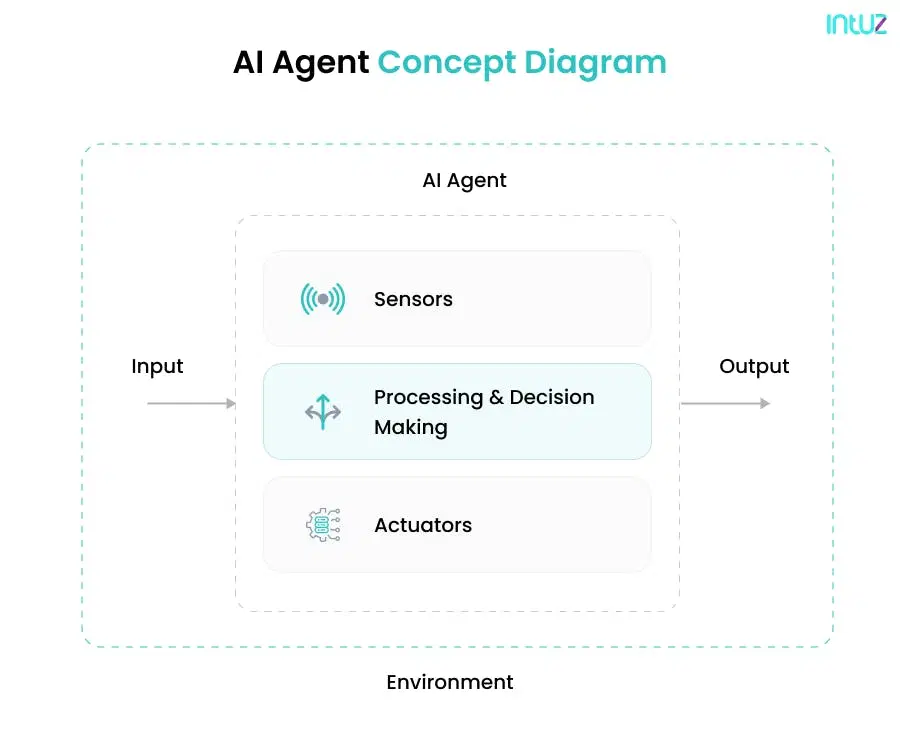
Terms to Understand Agentic AI Workflows
1. Subagents
Subagents are specialised AI units within an AI agentic workflow. They handle specific tasks autonomously and work together to achieve a larger goal. This allows systems to scale efficiently, improving response times and adaptability.
2. Multi-Agent Collaborations
AI systems use agentic ai for workflow automation to facilitate collaboration among multiple agents. Each AI agent has a distinct role. It includes coordinating in real time to complete complex tasks. This boosts efficiency, especially in large-scale automation.
3. Task Breakdown and Decomposition
Breaking down tasks into smaller, manageable parts makes AI more effective. Agentic workflows in AI automate this process and distribute work among agents. This speeds up execution, reduces errors, and allows continuous workflow adjustments.
4. Adaptive Learning Through Reflection
AI improves by analysing past actions and refining its approach. In an AI agentic workflow, reflection mechanisms enable continuous learning. This enhances decision-making, resulting in more efficient AI-driven processes over time.
5. Predictive Analytics in AI Workflows
Using data patterns, predictive analytics helps AI anticipate outcomes. Agentic AI workflows use this to optimise decisions, reduce risks, and enhance automation. Such an approach leads to proactive rather than reactive solutions.
6. Autonomous Decision-Making
AI agents can make decisions without human input. Automating workflow with AI agent systems uses predefined rules and real-time data to take immediate action, ensuring efficiency and reducing manual intervention.
7. Intelligent Automation Systems
AI-driven automation reduces workload by streamlining operations. Agentic workflows in AI integrate machine learning, analytics, and automation. This combination enhances accuracy, eliminates inefficiencies, and drives smarter business processes.
8. AI Memory: Short-Term & Long-Term
AI memory stores past interactions for better decision-making. Short-term memory helps with immediate tasks, while long-term memory refines models. This is crucial in an AI agentic workflow to enhance performance over time.
Types of AI agents
| Agent Type | How it works | Best for | Real-world example |
|---|---|---|---|
| Goal-based | Plans actions by considering future consequences to achieve a defined objective | Complex multi-step tasks with clear end goals | Robotic vacuum planning optimal cleaning route |
| Hierarchical | Multi-level decision system; higher agents guide lower-level agents | Manufacturing, regulated industries requiring oversight | Factory quality control with layered approval workflows |
| Simple reflex | Reacts to stimuli using predefined rules; no memory of past events | Fast, repetitive, rule-based responses | Smart thermostat adjusting temperature automatically |
| Utility-based | Maximizes a utility function in addition to achieving a goal | Optimization under competing constraints | Financial trading bot balancing ROI vs. risk |
| Model-based reflex | Maintains an internal model of environment; makes data-driven predictions | Dynamic, changing environments | Self-driving car using sensors + mapping data |
Explore Solutions
Agentic AI vs Traditional Automation vs RPA: Key Differences
| Features | Traditional Automation | RPA (Robotic Process Automation) | Agentic AI Workflows |
|---|---|---|---|
| Decision logic | Fixed, rule-based | Fixed scripts, structured data only | Dynamic, context-aware reasoning |
| Adaptability | None — breaks on exceptions | Minimal — requires rule updates | High — re-plans mid-execution |
| Learning | No | No | Yes — improves from past actions |
| Multi-step planning | No | Limited (linear workflows) | Yes — decomposes complex goals |
| Human oversight needed | High | Medium | Low — autonomous with checkpoints |
| Best for | Repetitive, predictable tasks | Structured data entry & processing | Complex, dynamic, multi-system workflows |
| Example tools | Zapier, IFTTT | UiPath, Automation Anywhere | LangChain, AutoGen, CrewAI |
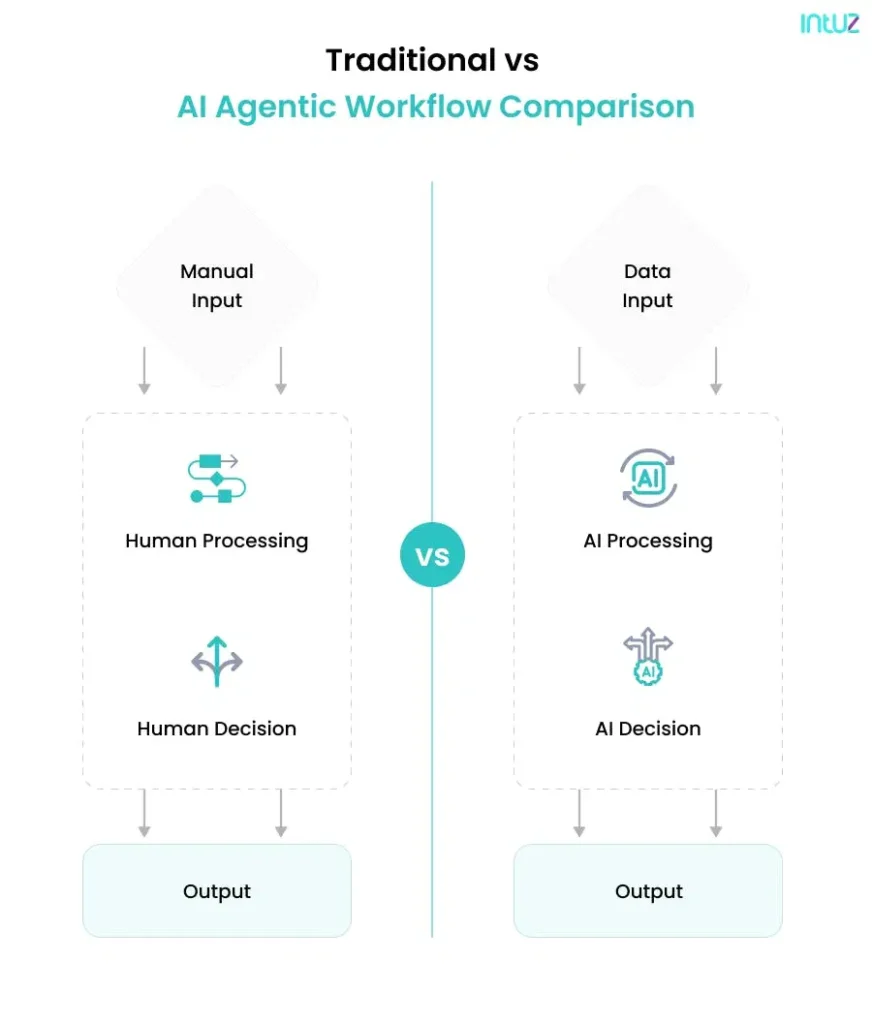
Technologies used in agentic workflow
There are six technologies in motion here:
- Sensors supply real-time data from the physical environment
- Computer vision enables AI agents to interpret and process visual information from the environment
- Cloud computing offers scalable computing power and storage for AI applications
- Machine Learning (ML) equips AI agents to learn from data and improve their performance with time
- Robotic Process Automation (RPA) automates repetitive tasks and processes
- Natural Language Processing (NLP) helps AI agents to understand and interact using human language.
Top 5 Core workflow elements
Autonomous AI agents
These agents are the heart of agentic workflows, operating independently to perform tasks, make decisions, and optimize processes without human intervention.
Large Language Models (LLMs)
LLMs power the processing of natural language, enabling AI agents to understand and generate instructions, handle complex queries, and drive decision-making within workflows.
Task automation
AI agents automate repetitive or complex tasks, freeing up time for humans to focus on higher-level decisions. This includes everything from data entry to advanced decision processes.
Context awareness
To make informed decisions, AI agents must be aware of their environment, adjust to new data or changes within the workflow to ensure efficiency and relevance.
Decision-making algorithms
These algorithms enable AI agents to analyze data and make intelligent, context-based decisions, ensuring that workflows are optimized and outcomes are met according to predefined goals.
The 4 Core AI Agentic Workflow Patterns
1. Planning patterns
This enables an AI agent to define a strategic path toward achieving a specific goal. This involves breaking down a high-level objective into a sequence of smaller, executable tasks and dynamically adapting that plan based on real-time feedback and circumstances.
For instance, if an AI agent is tasked with launching a marketing campaign, a planning pattern will help it:
- Set the overarching campaign goal (e.g., drive 15% more signups)
- Map out subtasks (target audience identification, copy generation, channel selection, budget allocation)
- Prioritize and schedule execution based on data, resource availability, and constraints
The agent re-evaluates steps based on live campaign performance, adjusting budget spends, creative variations, or even shifting channels on the go.
2. Tool use patterns
This type of pattern enables agents to interact with software systems, APIs, and third-party tools independently to complete tasks. Let’s say an AI agent is responsible for managing invoice reconciliation. Using the tool use pattern, it might:
- Access data from an ERP system
- Extract relevant invoice details via an OCR tool
- Cross-verify values using accounting software like QuickBooks or Xero
- Flag discrepancies and even trigger an automated follow-up email via Gmail or Slack
This pattern illustrates how AI agents interact with APIs, send commands, and integrate tool outputs.
3. Reflection patterns
Reflection is what separates intelligent agents from traditional bots. Such patterns enable AI agents to evaluate their performance, learn from past actions, and iteratively improve their decision-making strategies over time.
Thanks to reflection patterns, an AI agent pauses, assesses, and optimizes:
- What worked?
- What failed?
- Was the outcome aligned with the objective?
- Should the approach change next time?
Think of a customer support AI agent that reviews its resolution success rate, customer satisfaction scores, and average handling time.
4. Collaboration patterns
Not all workflows can be handled by a single agent. Complex processes require multiple AI agents to collaborate, each playing a distinct role. That’s where the multi-agent collaboration pattern comes into play.
Picture a supply chain scenario:
- One AI agent forecasts demand using real-time market trends
- Another manages inventory restocking with suppliers
- A third optimizes delivery routes based on traffic and cost variables
These AI agents don’t work in silos. They exchange information, coordinate decisions, and jointly adjust their actions in real-time to meet a shared goal, such as ensuring product delivery is both cost-effective and timely.
Also Read
Top 5 AI Agent Use Cases for Businesses in 2026
1. E-commerce
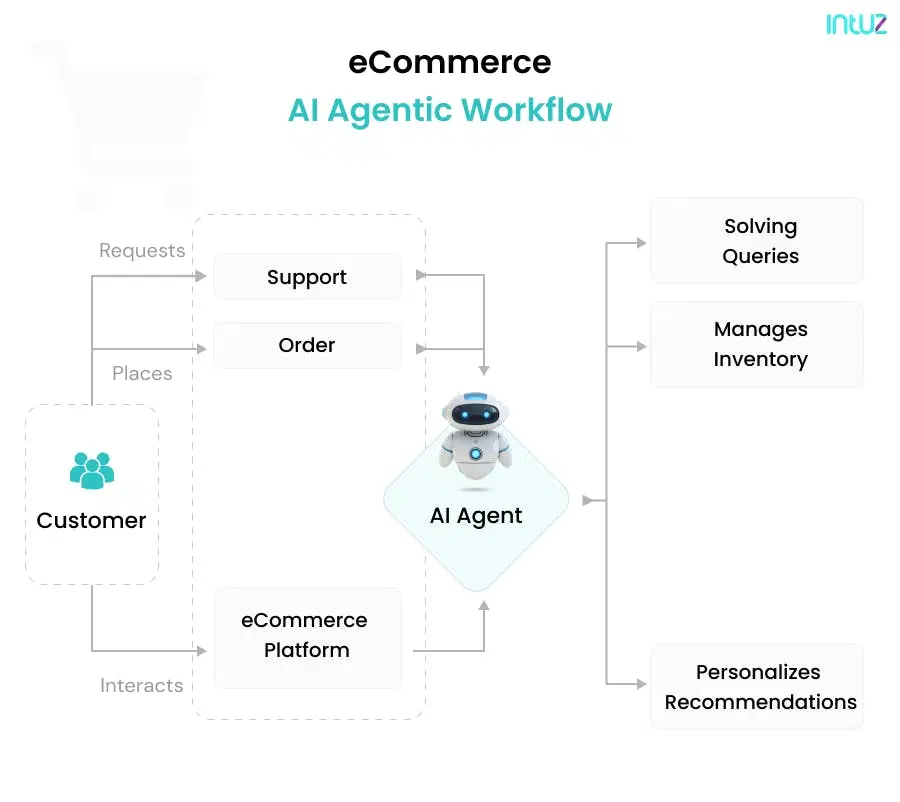
In an industry where personalization, speed, and operational agility are key differentiators, AI agentic workflows bring a competitive edge by:
- Personalizing product recommendations based on browsing behavior, purchase history, and contextual preferences
- Enabling dynamic pricing, where agents monitor demand, competitor prices, and inventory levels in real-time
- Orchestrating marketing campaigns across platforms (email, social, paid ads), with agents continuously tracking performance and reallocating budgets
Also Read
Impact
Retailers using AI-powered personalization report an average 10–15% increase in conversion rates and up to 30% reduction in cart abandonment (McKinsey & Company, 2023). AI-driven dynamic pricing tools have helped e-commerce brands improve gross margin by 2–5 percentage points in controlled deployments – Mckinsey
2. Healthcare
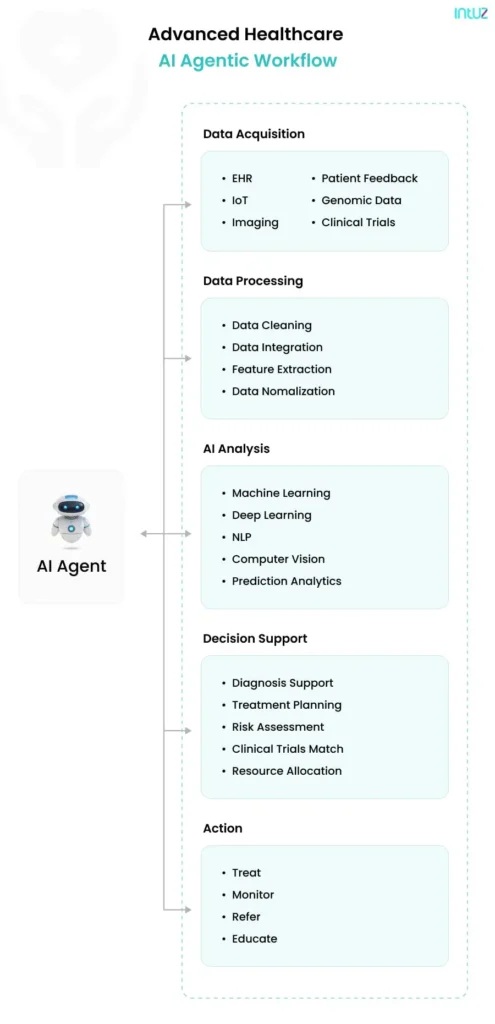
In this domain, AI agentic workflows can be life-saving. AI agents can:
- Maintain health records and send follow-up reminders for claims processes, freeing up human staff for critical care delivery.
- Analyze patient data through EHRs, wearables, and genetics to flag early warning signs of chronic conditions or acute episodes (e.g., cardiac issues)
- Recommend evidence-based personalized treatment paths customized for the patient based on medical history, or connect them to the right providers depending on availability, urgency, and specialization.
Impact
Healthcare providers using AI scheduling and triage agents report up to 30% reduction in administrative burden and 20–40% improvement in appointment adherence rates (WHO Digital Health Report, 2024). AI-powered prior authorization workflows reduce claim processing time from days to under 2 hours in documented hospital deployments.
3. HR management
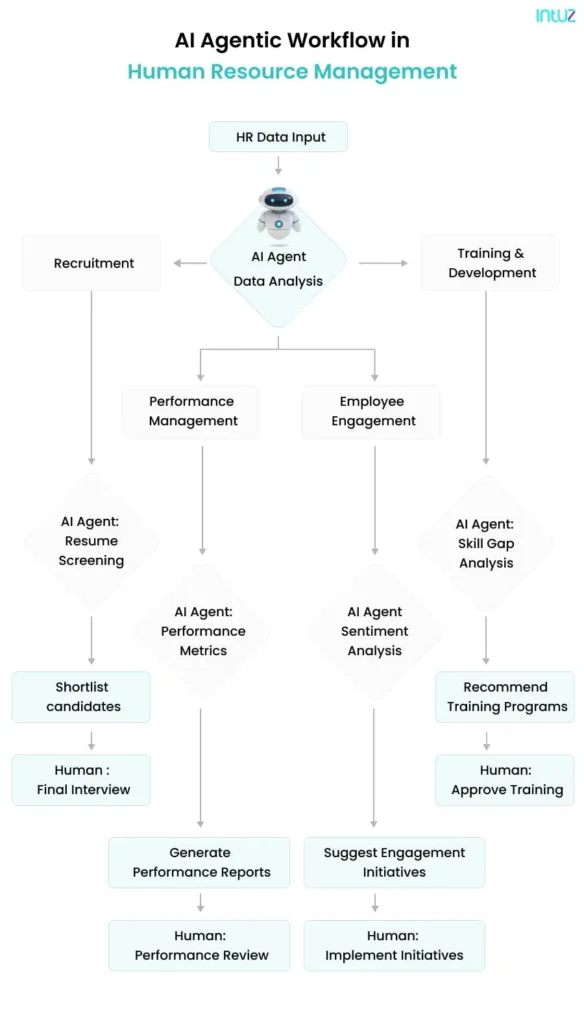
Attracting and retaining top talent while enhancing employee satisfaction is a balancing act—one that agentic workflows can help simplify. More specifically, agents can turn reactive HR into a proactive talent strategy by undertaking the following tasks:
- Sift through hundreds of applications, filtering candidates based on role-specific criteria and reducing hiring timelines significantly
- Conduct preliminary interviews, assess responses, and pass insights to HR teams for deeper evaluation
- Predict attrition, identify skills gaps, and recommend internal mobility paths
The diagram below maps how AI agents enhance recruitment, engagement, and performance management through intelligent data workflows.
Impact
Organizations using AI in recruitment report 50–70% reduction in time-to-screen and a 35% decrease in cost-per-hire (LinkedIn Talent Trends). AI attrition prediction models achieve 85–90% accuracy in identifying at-risk employees up to 6 months in advance.
4. Customer support/service
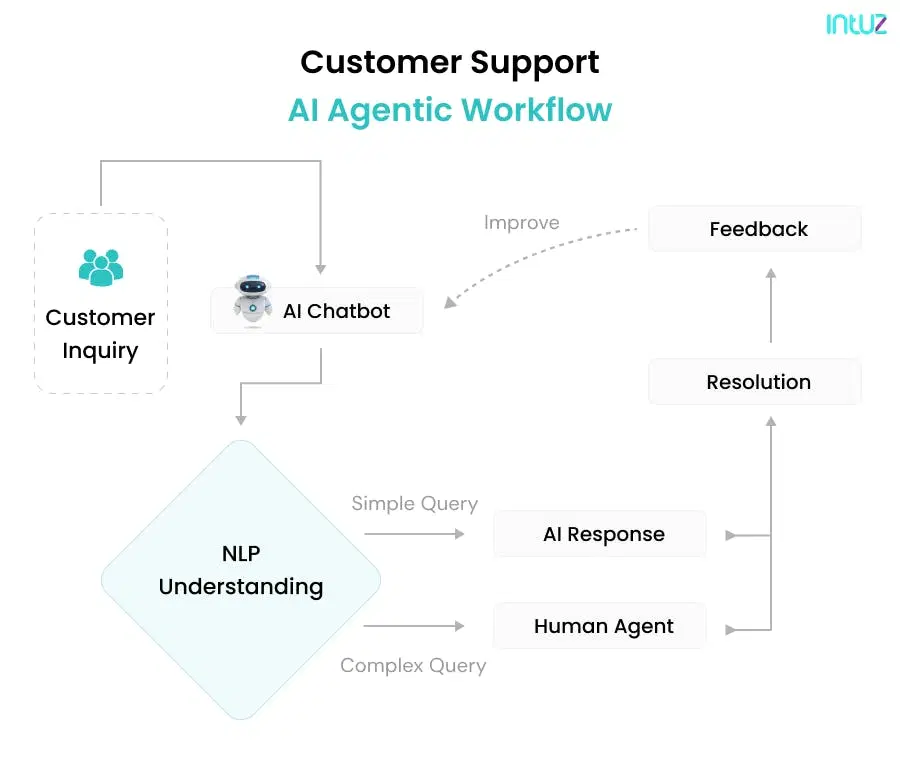
Today’s customers expect immediacy. They aren’t going to wait for you to get them answers. If the service is bad, they’ll switch regardless of how brilliant your service or product is. AI agents ensure you’re able to scale 24/7 without sacrificing personalization.
They can be trained on FAQs, support logs, and product documentation, which helps them:
- Analyze income requests, identify intent, and route tickets to the right team or handle generic queries autonomously
- Share conversation context and customer sentiment with human representatives for a faster resolution
- Send personalized messages, gather feedback, and adjust workflows to improve future interactions
- Additionally, AI can automate follow-up communications and facilitate customer feedback collection through surveys and sentiment analysis, refining their responses and support processes over time.
Impact
AI-powered chatbots and virtual agents handle up to 80% of routine customer inquiries automatically, enabling businesses to scale support capacity by up to 40% without proportional headcount increases Average handle time drops by 25–35% when AI agents pre-qualify and route tickets with full context
5. Manufacturing and supply chain
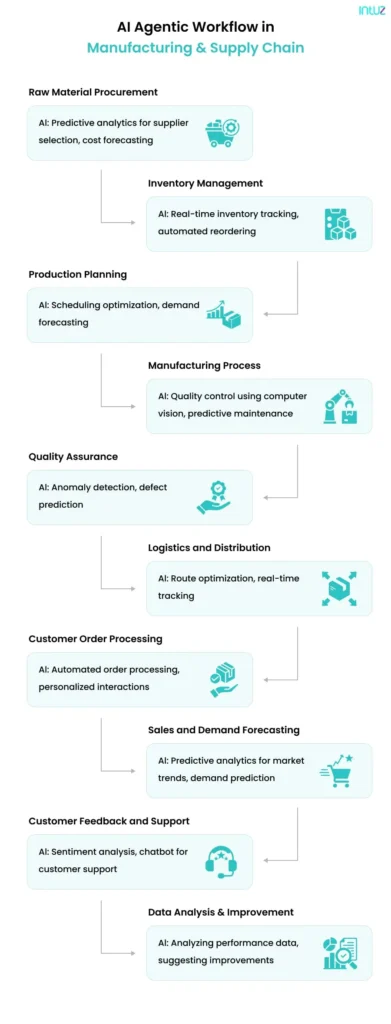
This is a tough industry where efficiency, timing, and precision are crucial, making it an ideal candidate for agent-based automation. AI agents can:
- Use historical sales, seasonality, and external variables (like weather or geopolitical events) to predict demand and adjust procurement accordingly
- Monitor equipment health and usage data to predict failures before they happen, scheduling maintenance at optimal times
- Use real-time machine and workforce data to adjust production timelines and minimize bottlenecks in the process dynamically
- Evaluate vendor performance, automate reordering, and ensure compliance with cost, quality, and delivery metrics
Impact
Manufacturers deploying AI predictive maintenance report 10–25% reduction in unplanned downtime and 15–20% decrease in maintenance costs (McKinsey). AI-driven demand forecasting reduces inventory carrying costs by an average of 20–30% in documented supply chain deployments.
Expert perspective
The shift from traditional automation to agentic AI is not incremental — it’s architectural. Organizations that redesign their workflows around autonomous agents will operate at a fundamentally different speed and cost structure than those that don’t.

Explore Solutions
Benefits of AI agentic workflows in business
1. Increased efficiency
By automating complex end-to-end workflows and connecting them to external systems and software, AI agents can automate repetitive tasks, significantly improving operational efficiency.
For example, chatbots can handle up to 80% of routine customer inquiries, allowing human agents to look after complex issues. This arrangement results in faster response times and enables you to scale your operations by up to 40% without proportional increases in staffing costs.
2. Data-driven insights
Because AI agentic workflows collect and analyze vast amounts of data, they can gain valuable insights into customer behavior and preferences. The result is more personalized and effective customer engagement.
McKinsey reports that businesses that invest in AI-based marketing strategies see a revenue uplift of 3%-15% and a sales ROI increase of 10%-20%.
3. Optimized operations
Agentic AI responds dynamically to shifting market conditions. This helps your business optimize operations across various departments in real-time, such as HR, finance, content marketing, IT, and so on.
When everything runs like a well-oiled machine, meaning routine tasks are automated, employees can dedicate more time to strategic initiatives. This helps foster a more innovative and self-driven workforce.
4. Autonomy
Autonomy is a key feature of an AI agentic workflow. AI agents operate independently, making decisions without constant human oversight. This self-sufficiency allows businesses to streamline operations, reduce delays, and improve efficiency.
With agentic AI workflows, AI adapts to real-time conditions, learns from past interactions, and optimises performance continuously. Automated decision-making enables faster responses, minimising human intervention while ensuring high accuracy.
9 Real-World AI Agent Workflow Examples
1. Automated FAQ responses by AI agent
Input: Customer sends a query via chatbot.
Process: The AI agent uses natural language processing (NLP) to understand the intent of the query. Searches a knowledge base for relevant answers.
Output: The chatbot provides the customer with a solution or redirects complex issues to a human agent.
2. Sales lead scoring
Input: AI agent receives lead information from a CRM system.
Process: Analyzes lead data (e.g., demographics, interaction history, website behavior).Applies a scoring algorithm to prioritize leads.
Output: Assigns high-priority leads to sales representatives for immediate follow-up.
3. Healthcare medical appointment scheduling
Input: Patient requests an appointment through an online portal.
Process: AI agent checks doctor availability and matches the request to suitable time slots. Reviews patient history for appointment prioritization (e.g., urgent care).
Output: Confirms the appointment and notifies the patient.
4. E-commerce personalized product recommendations
Input: Customer browses products on the website.
Process: AI agent analyzes browsing history, purchase patterns, and similar user data. Selects personalized product suggestions based on customer preferences.
Output: Displays tailored recommendations on the product page or sends them via email.
5. Predictive Maintenance for industrial equipment
Input: IoT sensors on equipment send real-time performance data to an AI system.
Process: AI agent detects anomalies or patterns that indicate potential equipment failure.Predicts maintenance needs using machine learning models.
Output: Schedules maintenance activities before a breakdown occurs.
6. Password reset automation
Input: An employee submits a password reset request through a self-service portal or chatbot.
Process: The AI agent verifies the user’s identity through multi-factor authentication (e.g., biometric match, email verification, or recent activity). It then interacts with your identity management system (e.g., Azure AD, Okta) to generate a secure, time-limited reset token.
Output: The agent sends a password reset link or temporary password directly to the verified user, resolving access issues in under a minute.
7. Time-off approvals
Input: An employee submits a time-off request through the HR system or Slack.
Process: The AI agent checks the employee’s leave balance, analyzes the team calendar for potential conflicts or workload gaps, and cross-references organizational leave policies.
Output: If conditions are met, the agent automatically approves the request and updates the shared calendar. If not, it flags the request for manager review with an explanation.
8. Cybersecurity threat detection
Input: Real-time logs and activity data are streamed from devices, servers, and applications.
Process: AI agents continuously monitor for anomalies, such as irregular login patterns, unauthorized file access, or data exfiltration attempts, using machine learning models trained on known threats and behavioral baselines.
Output: When a potential threat is detected, the agent isolates the affected system, sends a real-time alert to the security team, and initiates automatic incident response protocols.
9. Customer service operations
Input: A customer contacts support through a website chatbot with a service issue.
Process: The AI agent identifies the nature and urgency of the issue using Natural Language Understanding (NLU), then retrieves the relevant information (e.g., order history, past tickets, product manuals). It attempts resolution autonomously or escalates with full context if human intervention is needed.
Output: The customer receives a resolution in real time or is seamlessly handed off to a live agent.
How to Implement AI Agentic Workflows: 6-Step Process
AI agentic workflow deployment typically comprises a series of manageable steps, let’s deep dive into each step.
1. Evaluate current workflows
The first step is obvious: thoroughly assess your current workflows, no matter how traditional or modern. Note areas where AI automation services offers significant benefits, such as reducing costs, boosting efficiency, and improving accuracy.
On the other hand, look for repetitive, time-consuming tasks that can be automated. For example, your current workflow may involve manually sorting and responding to hundreds of emails or chat messages daily, which can drain your resources.
With an AI-powered chatbot, you can at least automate filtering emails based on relevance, urgency, and the initial response.
2. Data collection and processing
Data is the foundation of AI. Irrespective of your business nature and industry, you’d gather and analyze transactional data, CRM databases, operational metrics, customer interactions, and so on.
But to make the most of your data, you must ensure it’s clean, accurate (with no duplicates), and properly formatted. Here, using the ETL (Extract, Transform, Load) process to organize and structure it with tools like Talend or Apache Spark can help.
3. Select appropriate AI technologies
For the AI agentic workflow to perform the desired tasks accurately, you must take support of superior AI technologies that align with various needs, from language processing powerful tools to computer vision.
For example, you may need assistance with automating invoice processing.
For this, you’ll need a combination of Optical Character Recognition (OCR) to scan and extract text from invoices and convert it into digital data and RPA to automatically input the data into your accounting software, validate it, and handle any discrepancies.
Therefore, research about different AI models and tools is based on factors such as scalability, ease of integration, customer support, learning curve, and pricing. Contact AI experts or vendors to learn more about how a specific solution can help you.
4. Agent training and testing
Once the AI technologies are selected, the next step is to train your AI agents using the collected data from #2.
It’s important to run extensive testing to validate the performance of AI agents. You can do so by simulating real-world scenarios and measuring their accuracy, efficiency, and reliability in performing their tasks.
For example, if you want to implement an AI agentic workflow for marketing campaign management, you’d train the model using data from past campaigns, covering metrics like conversion rates, customer engagement statistics, and demographic information.
For batch simulation execution, you could set up a mock campaign targeting a specific customer segment and measure how effectively AI allocates budget, optimizes ad placements, and predicts overall campaign success. This helps address potential issues before full-scale implementation.
5. Integrate agents into the workflow
Next, integrate AI tools with your current systems and business processes. Ensure this step is seamless and that the AI agents interact with other software and databases without glitches or hassle. Cross-functional collaboration between your department and the IT team will help make this phase a success.
6. Monitor and evaluate
Your job doesn’t end with integration. You must question yourself: How positively is the AI agentic workflow impacting my business objectives and KPIs?
For maximum value delivery and to adapt to the ever-evolving business environment, it’s important to continuously monitor the performance of AI agents and make necessary adjustments and iterative improvements.
| Phase | Typical Duration | Key Milestone |
|---|---|---|
| Discovery & assessment | 1–2 weeks | Workflow map + AI opportunity list |
| Data preparation | 2–3 weeks | Clean, structured data pipeline ready |
| Agent development & training | 3–5 weeks | Tested agent with >90% task accuracy |
| Integration & pilot | 2–3 weeks | Live in one high-impact workflow |
| Scale & optimize | Ongoing | ROI benchmarks met; expand to next workflow |
Let’s Automate Your Business Processes with AI Agent!
Meet Intuz: Your partner for AI agent-driven automation solutions
As an AI agent development company that prides itself on being at the forefront of advanced AI and automation technologies, we know that AI agentic workflows represent a massive leap in this space.
No matter your role or industry, you can create an efficient environment using AI agents with our help. What you need is a bespoke AI and automation strategy that works. Fret not— we can develop custom advanced AI solutions that align perfectly with your specific requirements.
With decades-long experience, our AI team will take the time to understand your technical complex challenges, goals, and operational nuances.
We’ll also share a complimentary roadmap to show you the development steps clearly—we believe in delivering tangible results.
Book a free consultation with our AI experts today and get started.
Conclusion
The rise of AI agentic workflow solutions is transforming industries by making automation smarter and more adaptable. Businesses that adopt agentic AI workflows benefit from AI-driven decision-making, reduced manual intervention, and continuous optimisation.
Unlike traditional systems, agentic workflows in AI can analyse data, predict challenges, and self-correct in real time. This not only boosts efficiency but also enhances accuracy and scalability. Whether in finance, healthcare, or logistics, AI-powered workflows are reshaping how tasks are handled.
As technology advances, the ability to automate workflow with AI agents will become even more essential. Companies that embrace this evolution will gain a competitive edge, unlocking new levels of productivity and innovation.
FAQs
What’s the agentic model of AI?
It refers to systems designed to operate with autonomy, intelligence, and intent. These agents go beyond executing tasks. They plan, make context-aware decisions, learn from outcomes, and coordinate with other agents to achieve high-level goals. An agentic model represents a foundational shift from static automation to dynamic, self-directed systems.
How does an agent work in AI?
An AI agent functions by sensing its environment, reasoning through data or goals, and taking autonomous actions to fulfill specific objectives. It typically follows a “perception–planning–action loop” using tools such as Machine Learning (ML), Natural Language Processing (NLP), or decision algorithms to solve problems, adapt to change, and optimize outcomes in real-time.
What’s the best way to build agentic AI workflows?
To build an AI agentic workflow, start by defining the business goal and identifying tasks that require autonomy or adaptation. Next, select appropriate technologies, such as LLMs, APIs, or RPA bots. Then design the workflow around core agentic patterns (e.g., planning, reflection, tool use). Train the agents, integrate them into existing systems, and iterate continuously for performance and scalability.
What is the difference between zero shot and agentic workflow?
Zero-shot AI makes decisions based on pre-trained knowledge without prior examples. Agentic workflows in AI, however, continuously learn, adjust, and make decisions dynamically. While zero-shot AI is useful for static queries, agentic workflows excel in handling complex, evolving tasks that require adaptability and decision-making.
How long does it take to implement AI agent workflows?
Most production deployments take 8–16 weeks from discovery to the first live workflow, depending on complexity and integrations. Early phases include process discovery, data preparation, and agent testing. Organizations typically start with one high-impact workflow to validate ROI, then scale across departments.
Which industries benefit most from agentic AI workflows?
Industries with high volumes of repetitive, data-heavy, or multi-step decision processes benefit most. The top five are: healthcare (clinical admin, scheduling, prior auth), e-commerce (personalization, dynamic pricing, order management), financial services (fraud detection, loan processing, compliance), manufacturing (predictive maintenance, supply chain), and HR (recruitment automation, attrition prediction).
What is the difference between agentic AI and RPA?
RPA (Robotic Process Automation) follows fixed, rule-based scripts and works only with structured data. Agentic AI uses large language models and decision algorithms to reason across unstructured data, adapt to changing conditions, and re-plan mid-task. RPA breaks when workflows change; agentic AI adapts. For complex, dynamic workflows, agentic AI significantly outperforms RPA.
How much does it cost to implement AI agent workflows?
Costs vary widely based on workflow complexity and vendor choice. A single-agent deployment for a specific use case (e.g., customer support triage) typically ranges from $15,000–$50,000 for custom development. Enterprise-grade multi-agent systems can range from $100,000–$500,000+. Many organizations start with a focused pilot project to validate ROI before committing to full-scale deployment.