
 InsightsAI Workflow Automation: What It Is, How It Works, Use Cases & Implementation Guide (2026)
AI Workflow Automation: What It Is, How It Works, Use Cases & Implementation Guide (2026)
Updated 23 Apr 2026

AI is transforming the way businesses operate, making workflows faster, smarter, and more efficient. From automating customer support to streamlining data processing and predictive maintenance, AI is revolutionizing productivity. Discover how companies are using AI automation to cut costs, reduce errors, and unlock new growth opportunities!
Growing a business is hard work, as anyone will tell you.
And when you consider all the tasks in a founder’s day that don’t have anything to do with growing a business - like data entry or logging hours put in - it’s not surprising that 72% of small business owners report experiencing mental health setbacks.
This is where AI automation can change the game.
AI-powered workflows save time, reduce errors, optimize resource usage, and eliminate the hundreds of inefficiencies during the workday.
Result?
This results in a happier team, smarter leadership decisions, and the ability to scale operations at a much lower cost—a critical edge for success in today’s competitive landscape. This blog post explores how AI automation can transform your business.
- AI workflow automation reduces manual effort by handling data-heavy, repetitive tasks across departments.
- Businesses report average cost reductions of 32% after scaling intelligent automation (Deloitte)
- Common use cases: invoice processing, lead routing, employee onboarding, and customer support
- No-code tools like n8n, Zapier, and Make.com allow fast deployment without custom development
- Most AI workflow automation projects go live in 4–8 weeks with a phased rollout
What Is AI Workflow Automation?
AI workflow automation is the use of machine learning and intelligent decision-making to connect, coordinate, and execute business processes with minimal human involvement. Unlike traditional rule-based automation, AI-powered workflows can interpret unstructured inputs — such as emails, PDFs, and voice calls — adapt to changing conditions, and improve over time through pattern recognition.
AI Workflow Automation vs. RPA vs. Traditional Automation
Before diving into use cases, it helps to understand how AI workflow automation differs from RPA and traditional automation— three terms that are often used interchangeably but describe very different capabilities.
| Criteria | Traditional Automation | RPA (Robotic Process Automation) | AI Workflow Automation |
|---|---|---|---|
| Handles unstructured data (emails, PDFs, voice) | No | No | Yes |
| Learns & improves over time | No | No | Yes |
| Adapts to exceptions | No | Limited | Yes |
| Setup complexity | Low | Medium | Medium–High |
| Best for | Simple, fixed triggers | UI-based repetitive tasks | Complex, data-heavy workflows |
| Scales with volume | Limited | Moderate | High |
How AI Workflow Automation Works: 6 Core Use Cases
If you’re just starting to explore the AI world, it’s understandable that you might feel overwhelmed by all the options.
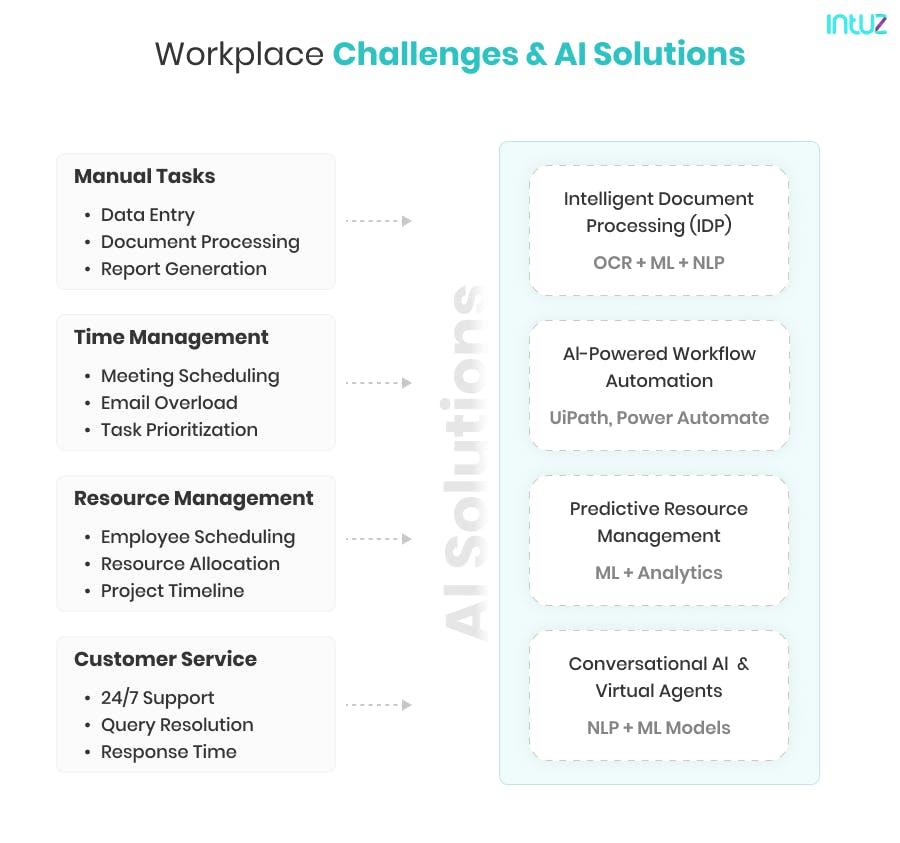
We recommend starting small and automating the tasks that take up the most time in your day, which leads to the most immediate benefits. Here are some examples of how custom artificial intelligence solutions can help streamline your processes and boost productivity:
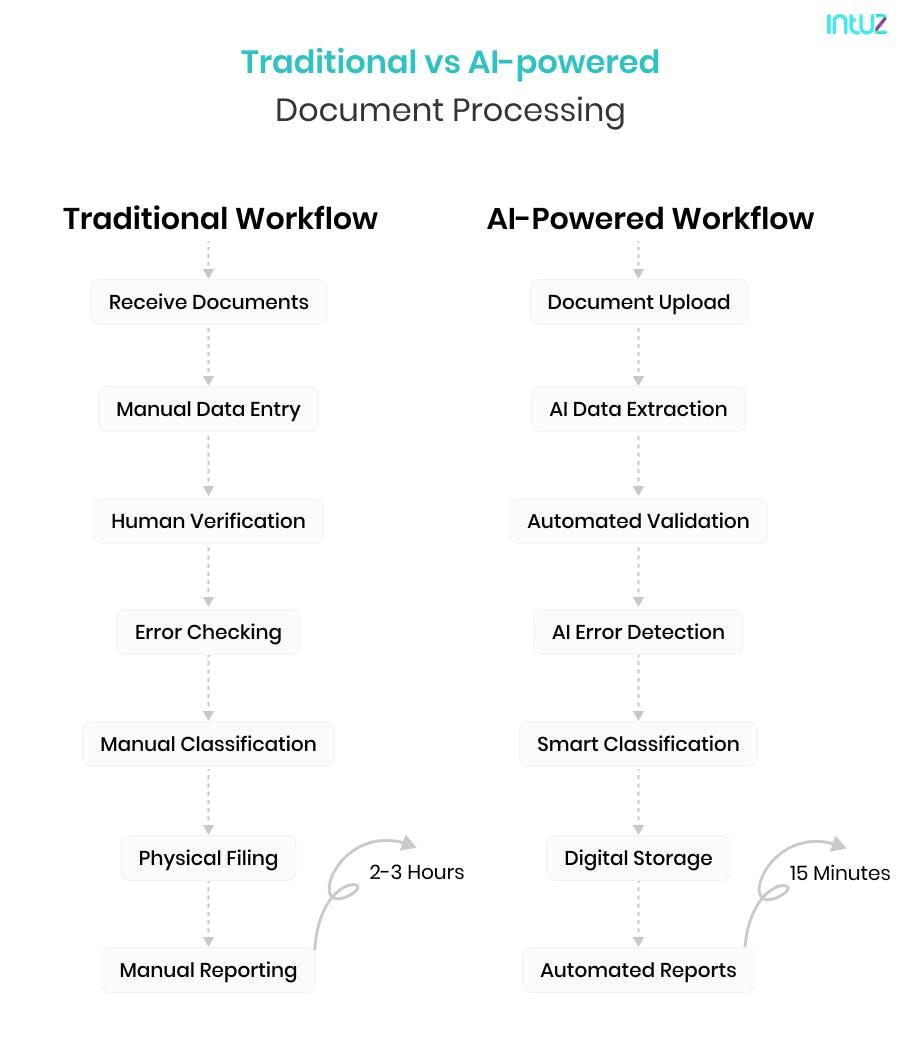
1. Document processing and data extraction
AI tools can scan, sort, and extract relevant information from your documents, saving your team the massive burden of handling paperwork manually. This is especially useful if you operate in industries like law or finance.
2. Bookkeeping and payroll
Two of AI’s most popular business applications relate to managing financial operations.
Several tools can automatically balance your books, run payroll, process expense claims, and clear invoices. This saves you weekly hours, helps you track your budget, and ensures that everyone is always paid promptly.
3. Email management
AI can sort your emails by priority and send responses on your behalf, saving you the trouble of drafting repetitive messages like meeting confirmations or follow-ups with meeting summaries.
4. Schedule optimization
Speaking of meetings, AI can manage your entire schedule for you, from figuring out the best time slots for a meeting to managing availability across time zones to automatically rescheduling as needed—no more double-booking or unexpected 2 AM calls.
Benefits of AI Automation
The benefits of AI in business operations have been documented extensively. Regardless of how big your enterprise is or what industry you’re in, AI can enhance your efficiency across multiple fronts. The benefits include:
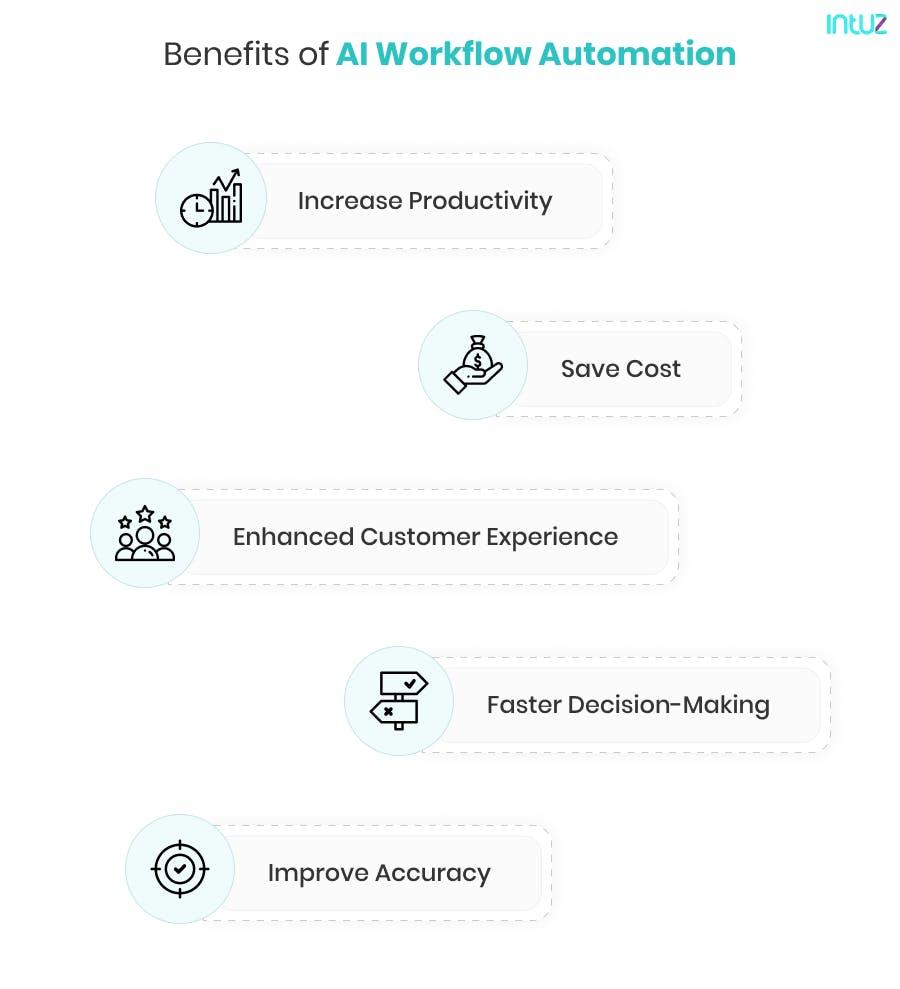
1. More productivity
AI tools can automate a variety of tasks, from scheduling events to drafting emails to payroll, saving your team several hours a week. A McKinsey report estimates that half of today’s work activities could be automated between 2030 and 2060.
2. More money saved
AI allows you to get more done with a smaller team and eliminate potentially costly errors in your operations. According to Deloitte, businesses that moved beyond piloting intelligent automation tell us they have achieved an average cost reduction of 32%!
3. More customers helped
AI chatbots allow you to be there for your customers 24/7, providing them with speedy, personalized answers to their queries.
By automating repetitive tasks like answering FAQs or tracking orders, they minimize the need for hiring human resources, minimizing overheads by 30%, says G2.
4. Smarter decision-making
AI can identify patterns in your business data and give you valuable insights on where you can optimize, such as by switching to a less expensive raw materials vendor or investing in more energy-efficient equipment.
In fact, research shows that AI-powered tools can reduce forecasting errors by up to 50% and minimize lost sales due to inventory shortages by up to 65%.
AI Workflow Automation Examples by Business Function
1. Human Resources
Recruitment is often a time-consuming process, with HR teams spending hours reviewing resumes and shortlisting candidates. AI is changing the way talent is attracted and acquired. Tools like HireVue or LinkedIn Talent Insights help to:
- Draft and distribute relevant job descriptions
- Analyse applicant resumes quickly
- Rank candidates based on job fit
- Automate candidate notifications and interview scheduling
- Reduce bias by shortlisting from diverse backgrounds
2. Finance
Managing expenses and invoices manually is prone to errors and inefficiencies. Solutions like QuickBooks or Expensify help streamline finances by:
- Categorizing expenses and invoices
- Approving expense claims promptly
- Flagging any claims that appear suspicious
- Issuing payslips according to the schedule
- Maintaining up-to-date books of accounts
3. Customer service
Providing 24/7 customer support can be challenging and costly. Zendesk AI, Drift, and Intercom are taking this game well beyond the traditional CRM. With tools like these, businesses can:
- Provide instant responses to common queries around the clock
- Personalise responses based on customer sentiment analysis
- Use customer profile history to offer the most relevant solutions
- Significantly cut down on ticket resolution time
4. Sales and marketing
Gone are the days when you did your market research, launched a campaign, and waited for it to end while hoping for the best. With AI tools like Marketo and Salesforce Einstein, businesses can optimize their sales and marketing efforts in real-time, such as by:
- Displaying custom ads based on each customer’s buying and browsing history
- Tweaking ad content based on real-time data about customer sentiment
- Automating all campaigns across email, search, and social media
- Automate the lead nurture process to drive quicker conversions
5. E-commerce
In a competitive space like eCommerce, tools like Amazon AI and Shopify AI have much to offer regarding inventory management and customer service. Applications include:
- Personalized product recommendations based on purchase and browsing history
- Offering real-time insights on demand trends to help brands plan their inventories efficiently
- Providing custom shopping support, such as finding complementary products or processing returns
6. Legal
Legal professionals spend significant time reviewing contracts and ensuring compliance. Tools like Evisort and LawGeex are helping legal professionals everywhere reclaim hours of their time each week. With generative AI in legal industry, they can:
- Rapidly scan and summarise legal documents
- Study contracts for important terms, potential risks, and compliance with relevant laws
- Compare contracts with previous ones to ensure consistency
How to Implement AI Workflow Automation: 5 Steps
Most businesses can go from zero to a live AI workflow in 4–8 weeks by following a structured rollout. Here's how to get started:
Identify your highest-friction process
Pick the one workflow where your team loses the most hours to manual steps. Tie it to a measurable metric (e.g., "reduce invoice processing time by 60%").
Map the current workflow end-to-end
Document every step, tool, and handoff point. Identify where data gets duplicated, where errors occur, and where approvals stall.
Select the right platform
For most SMBs, no-code tools like Make.com, Zapier, or n8n offer the fastest path to deployment. For more complex, multi-system processes, consider an iPaaS layer or a custom AI integration.
Build, test with real data, and iterate
Build in focused sprints. Test against real business scenarios — edge cases, failure conditions, and exception handling. A phased rollout reduces risk.
Transfer ownership and monitor performance
Ensure your team has full documentation and training. Track KPIs like time saved, error rate reduction, and throughput improvement to demonstrate ROI.
Popular AI Workflow Automation Tools
Choosing the right platform depends on your existing tech stack, process complexity, and how much control your team needs post-deployment:
| Tools | Type | Best For | Complexity |
|---|---|---|---|
| Zapier | No-code | Simple, linear automations between popular apps | Low |
| Make.com | Low-code | Multi-step workflows with branching logic | Medium |
| n8n | Open-source / low-code | Self-hosted, customizable workflows with API control | Medium |
| Microsoft Power Automate | Low-code | Microsoft 365 and enterprise environments | Medium |
| MuleSoft / Boomi | iPaaS | Complex enterprise integrations (ERP, CRM, custom APIs) | High |
11 Best Workflow Automation Tools & Software
Final Words
AI automation is one of the smartest investments you can make in your business, and with the plethora of tools out there, there’s something for every purpose and budget.
We recommend taking some time to assess your operations and identify the areas where AI can bring the most benefits.
Then, shop around for a tool that fits your needs and slowly ramp up as you (and your team) get used to working with AI.
Soon enough, you’ll see how much easier running a business this way is.
Intuz, a top-tier AI workflow automation development company, delivers intelligent, intuitive AI solutions designed to streamline your functions, reduce costs, and supercharge decision-making.
Your data is the key—we refine generative models to ensure unmatched accuracy, performance, and relevance for your specific domain.
And that’s just the beginning.
Prepping data for Generative AI can feel overwhelming but we take care of the heavy lifting, from cleaning and structuring to organizing your data for optimal training. With us, you’re hiring AI specialists who are genuinely invested in your success.
Still skeptical?
We practically wrote the playbook on building an LLM from scratch. We know this inside and out.
No more second-guessing.
Book a free consultation with our expert AI team today.
In just one hour—zero commitments, zero sales pitches—we’ll focus on your business needs, mapping out how AI can elevate your overall operations. Expect clear insights and a custom roadmap tailored just for your team.
Let’s help you work smarter, not harder.
Good luck!

Pratik Rupareliya
Co-Founder & Head of Strategy
I build production-grade AI systems that deliver real business outcomes. 700+ projects delivered globally across AI, cloud, and scalable application development — helping organizations reduce manual work, accelerate speed, and modernize their technology stack.

Got More Questions?
Let’s us know and our experts will get in touch with you soon
What is AI workflow automation and how does it differ from traditional automation methods?
What are the key use cases or examples of AI workflow automation in business processes?
What are the main benefits of implementing AI workflow automation for organizations?
What challenges or risks should businesses consider when adopting AI workflow automation?
How can companies measure the success and ROI of their AI workflow automation initiatives
How long does it take to implement AI workflow automation?
Which tools are best for AI workflow automation?
Can AI workflow automation integrate with my existing CRM or ERP?
Learn more about Artificial Intelligence
Read out our articles on Artificial Intelligence and gain deeper insight.

Trusted by


WORK WITH US
Tell us what
cant'fail
We respond within 24 hours with a clear point of view, not a sales pitch.
GET IN TOUCH
or email getstarted@intuz.comResponse within 24 hours — no junior reps
NDA on every engagement — standard, not optional
GDPR · HIPAA · DPA — compliance frameworks are standard, not custom-added
No retainers. No lock-in. Your IP, always.