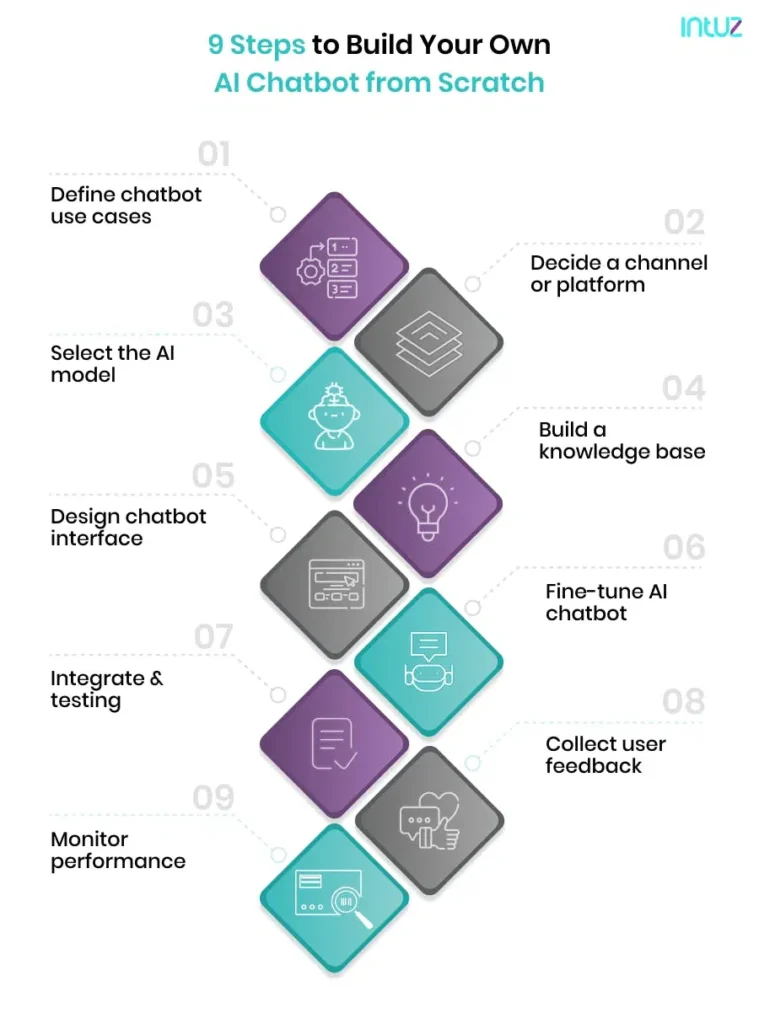
Building an AI chatbot involves 9 steps — defining purpose, selecting a channel, choosing an LLM or framework, building a knowledge base, designing conversation flows, training the model, integrating and testing, collecting feedback, and monitoring analytics. Costs range from $5,000 (basic) to $150,000+ (enterprise). Timeline: 2 days (no-code) to 4 months (enterprise RAG).
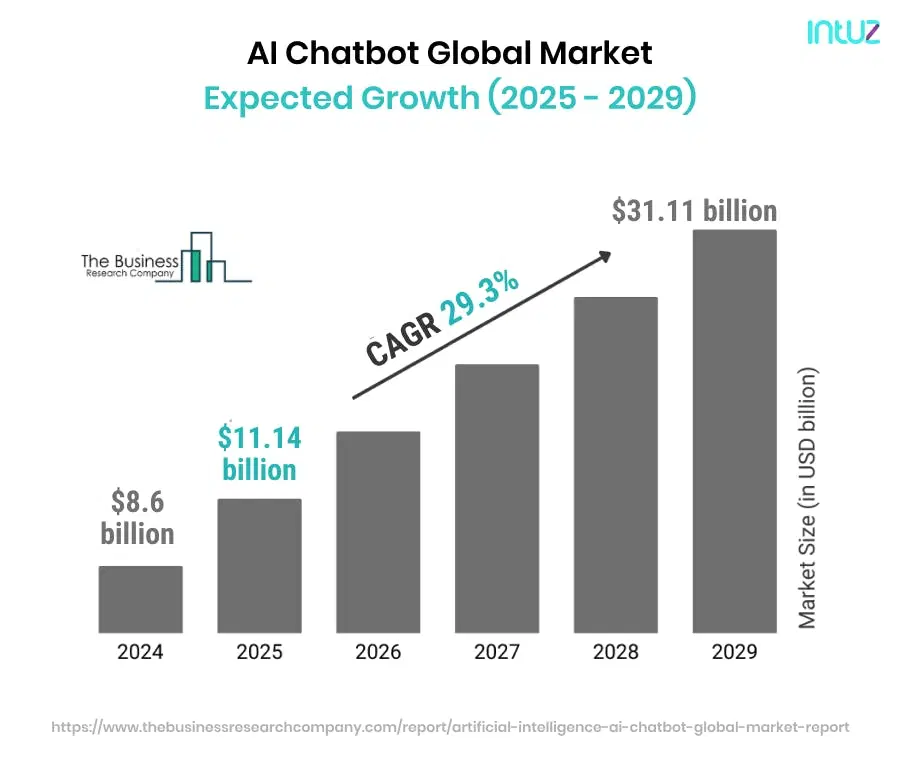
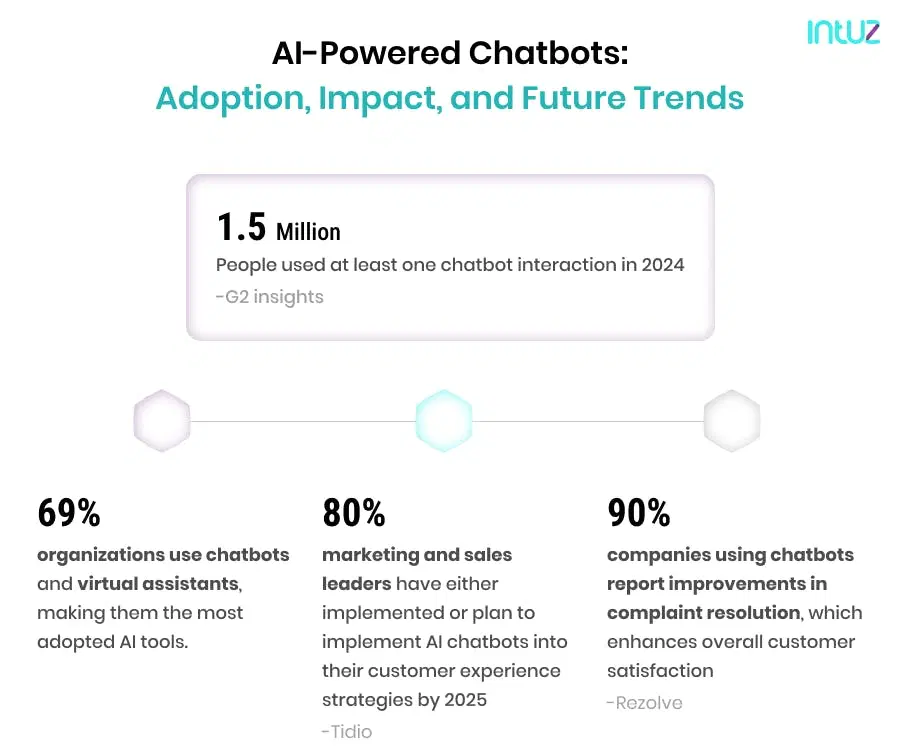
According to Gartner, chatbots will become the primary customer service channel for 25% of organizations by 2027. Businesses deploying AI chatbots already report 30–50% deflection of repetitive support tickets and a 50% reduction in first-response time. The window to gain a competitive edge through early adoption is now.
So, if you plan to harness the capabilities of an AI chatbot for your business, partnering with a reputable AI development company is essential—read this guide carefully.
Show
- Businesses deploying AI chatbots already report 30–50% deflection of repetitive support tickets and a 50% reduction in first-response time.
- AI chatbots have evolved from simple rule-based bots into agentic AI systems that can autonomously execute tasks — processing refunds, updating CRM records, and creating tickets — without human intervention.
- RAG (Retrieval-Augmented Generation) is the standard architecture in 2026 for enterprise chatbots that need factual accuracy — it grounds chatbot responses in real business documents rather than hallucinated content.
- Building an AI chatbot follows 9 structured phases, from defining purpose and selecting a channel, to training, integrating, collecting feedback, and monitoring analytics.
- Costs range from $5,000 for a basic chatbot to $150,000+ for an enterprise-grade system, with ongoing maintenance adding 15–20% of build cost annually.
What is an AI chatbot?
An AI chatbot is a software application that uses natural language processing (NLP) and machine learning to simulate human-like conversations across text and voice interfaces. Unlike rule-based bots that follow fixed decision trees, AI chatbots understand user intent, handle ambiguous queries, and continuously improve through interaction data.
Using these data sets and user interactions, the bots continuously improve. Some of the prominent use cases include customer support, sales, and automation. They can also answer queries, offer recommendations, and handle transactions. Businesses wondering how to create AI chatbot can choose pre-built solutions or custom development based on their needs.
Types of AI chatbots businesses use in 2026
- Rule-based chatbots: Follow predefined scripts; best for simple FAQs and menu-driven support.
- NLP chatbots: Understand natural language and intent; handle varied phrasing without fixed scripts.
- LLM-powered chatbots: Built on GPT-4, Claude, or Gemini; deliver contextual, human-like responses at scale.
- RAG chatbots: Retrieval-Augmented Generation systems that search your internal documents before answering — critical for accuracy in enterprise use cases.
- Agentic AI chatbots: Go beyond conversation to execute tasks — initiating refunds, updating CRM records, sending emails — without human intervention.
Businesses wondering how to create an AI chatbot can choose pre-built no-code solutions for quick deployment or invest in custom development for deep integration and long-term scalability. See our guide on AI for customer service to understand where chatbots fit in your support strategy.
Key Components for Successful AI Chatbot Development
As easy as it may seem to give the command to a chatbot and get the desired result, the actual work is much more complex in the backend. The working of an AI chatbot has numerous technologies and components backing it. Let’s take a look at those components!
The UI components
A clean, easy-to-use interface helps users navigate conversations effortlessly—whether through buttons, quick replies, or free-form text input. Everything related to what a user sees and experiences comes in UI components:
- The user interface has all the visual components like buttons, text boxes, fields, etc.
- The user experience component includes navigation, animations, and anything that improves the feel.
- Conversation design focuses on how the chatbot communicates — including flow, scripting, context, entities, and intent.
The functional components
- Natural language processing (NLP): Helps the chatbot understand user inputs, whether text or voice.
- Machine learning algorithms: Train the chatbot on data via supervised and unsupervised learning.
- Knowledge base: The information repository for product info, FAQs, policies, and domain data.
- Dialogue management: Controls conversation flow while managing context, intents, and responses.
Advanced components for 2026 chatbot deployments
- RAG (Retrieval-Augmented Generation): Allows the chatbot to search internal documents before answering, ensuring responses are grounded in your actual business data — not hallucinated content. Critical for enterprise accuracy.
- LLM integration layer: Connects to models like GPT-5, Claude 4.5, Gemini, or open-source alternatives like LLaMA 3 or Mistral depending on data privacy requirements.
- Agentic workflow engine: Enables the chatbot to take autonomous actions — initiating refunds, creating support tickets, updating CRM records — by integrating with backend APIs.
- Vector database: Stores embeddings for semantic search, powering the retrieval layer in RAG architectures (e.g., Pinecone, Weaviate, Chroma).
Ensuring Data Privacy, Security, and Compliance
Behind every successful chatbot is a secure infrastructure. Sensitive user data should be encrypted both in transit (via TLS/SSL) and at rest. Additionally, ensure authentication mechanisms (OAuth, JWT, etc.) are in place for session management. Adherence to compliance standards like GDPR, HIPAA, or CCPA is vital, especially when operating in regulated industries like healthcare or finance.
Building for Scalability and Performance
Leverage cloud-native services (like AWS Lambda, Azure Bot Service, or Kubernetes for container orchestration) so the chatbot can continue delivering fast, accurate responses. Caching frequent queries, load balancing across servers, and using scalable databases like MongoDB or PostgreSQL are important to keep response times low, even during peak usage.
Explore Solutions
No-Code Chatbot Builder vs. Custom AI Chatbot: How to Choose
Before diving into the build process, teams need to make a foundational decision: use a no-code chatbot platform or build a custom AI chatbot from scratch. Here’s a clear comparison:
| Factor | No-code Chatbot Builder | Custom AI Chatbot |
|---|---|---|
| Time to deploy | 2–5 days | 4 weeks – 4 months |
| Technical requirement | None | ML, NLP, backend expertise |
| Customization | Limited to platform features | Fully tailored to business logic |
| Cost | $50–$500/month (SaaS) | $20,000–$150,000+ (one-time build) |
| LLM integration | Platform-dependent | Any model (GPT, Claude, LLaMA) |
| Data privacy | Shared infrastructure | Private deployment possible |
| Best for | SMBs, MVP testing, FAQs | Enterprise, regulated industries, complex workflows |
Most businesses start with a no-code builder for proof-of-concept, then migrate to a custom-built solution once chatbot ROI is validated. Intuz helps at both stages.
How to Make an AI Chatbot from Scratch (9 Steps)
Building an AI chatbot involves nine structured phases. Simple bots can complete this process in under a week using no-code tools; enterprise-grade conversational AI with RAG and CRM integrations typically requires 8–16 weeks of custom development.
Step 1: Define chatbot purpose and use cases
AI chatbots can be used for different purposes and use cases. So the first step is to be very specific about your precise purpose and use cases for developing the bot. To understand your needs, you need to answer the questions listed below.
- What is your ultimate purpose for developing a chatbot? Do you want to improve customer experience, generate leads, automate customer support, or anything else? Your purpose could be one or a combination of multiple objectives.
- What are the most common chatbot use cases in your business and industry? Identify the use cases by checking for the queries you receive and evaluating potential examples in your domain.
- What are the essential features that you want to incorporate in the chatbot? You can decide on must-have features based on your business needs.
Common AI chatbot use cases by industry: customer support automation (all sectors), lead qualification (SaaS, B2B), appointment booking (healthcare, services), order tracking (ecommerce, logistics), internal HR helpdesk (enterprise), and compliance Q&A (finance, legal). See how AI chatbots work in fintech for an industry-specific example.
Step 2: Decide a channel where you want to launch it
The next important step is to decide the channel where you want to integrate and use the chatbot. Ensure integrating it across every platform, where your customers frequently interact with your brand. The most common platforms that you should consider are
- Website
- Mobile Application
- Social media platforms like WhatsApp, Facebook Messenger, etc.
If you are confused about picking the right channels, here are some tips to consider
- You must integrate the chatbot on your website and mobile app as customer interactions happen frequently on these channels. People prefer to connect with you directly to get help with their queries.
- Large-scale companies have a large customer base that interacts with their brand through different channels. In such cases, deploying the chatbot on multiple channels is the right approach.
If you are a multi-national brand, you need to set the tone, style, and content of the chatbot by considering target audiences from multiple regions.
Step 3: Select the AI model or framework for your chatbot
Now select the right technology stack. Ready-to-use AI builders are available in the market — a less time-consuming approach. You can consider platforms like Microsoft Bot Framework, Google Dialogflow, IBM Watson, or cloud platforms like Azure, AWS, and Google Cloud.
| LLM / Framework | Best for | Data privacy |
|---|---|---|
| GPT-5 / GPT-4o (OpenAI) | General-purpose, high quality responses | Cloud — data sent to OpenAI |
| Claude 4.5 (sonet) | Long-context, document-heavy use cases | Cloud — data sent to Anthropic |
| Gemini (Google) | Google Workspace integrations | Cloud — data sent to Google |
| LLaMA 3 / Mistral (open-source) | Regulated industries, private deployment | On-premise or private cloud |
| Dialogflow / IBM Watson | Structured NLP, enterprise-grade managed service | Cloud, enterprise SLA available |
For regulated industries (healthcare, finance, legal), open-source models deployed on private infrastructure are often required for compliance. See our guide on how to build a private LLM for this approach.
Step 4: Build a knowledge base
To make the AI chatbot smarter, you need to feed it with intelligent insights. It can learn and train itself using that data or knowledge base. If you are looking for where to get this information? You can consider three options that involve
- Internal Data
- Public Datasets
- Generated Data
For enterprise chatbots using RAG: The knowledge base becomes a vector database. Documents (PDFs, wikis, support articles) are chunked, converted to embeddings, and stored in systems like Pinecone or Weaviate.
When a user asks a question, the chatbot searches the vector store for relevant content before generating an answer — eliminating hallucination and grounding responses in your actual business data.
Step 5: Design a user-friendly chatbot interface
Using drag-and-drop building blocks, you can design the conversation flow for the chatbot. It allows you to create chat sequences that meet your specific business needs.
For example; if you are an eCommerce company, you can set the sequence of sending a welcome message, asking for which product they are looking for, sharing the particular product page, sending a message that helps the customers to make a decision, and sending a discount message if applicable.
This is the basic conversational sequence that you can consider. Ensure to mention that they are using the AI chatbot. Also, add the clause of your website’s privacy policy to avoid future conflicts.
Step 6: Train and fine-tune your AI chatbot
Companies opting for simple chatbots using decision tree flows do not need to train their product. When you need to understand customer intent, train the chatbot by adding an NLP trigger. Analyze the most common customer conversations, queries, and concerns.
Fine-tuning vs. prompt engineering: For most business chatbots, prompt engineering (crafting clear system instructions) delivers 80% of the value at a fraction of the cost of full fine-tuning. Fine-tune only when you need the chatbot to consistently adopt a very specific tone, domain vocabulary, or response format that prompt engineering cannot reliably achieve.
Step 7: Integrate the chatbot and conduct rigorous testing
Once you are done with fine-tuning the AI chatbot, you can integrate it into your defined channels. To check whether it works smoothly, you need to test the chatbot.
Testing checklist before launch:
- Test all defined intents with varied phrasing
- Test edge cases and out-of-scope queries
- Verify human handoff triggers work correctly
- Load test for peak concurrent users
- Security review — check for prompt injection vulnerabilities
- Compliance review — GDPR, HIPAA, CCPA as applicable
Step 8: Collect feedback from users
Feedback from customers is essential to understand the impact of chatbots. You need to conduct an automated survey using the chatbot. Understand the satisfaction level of the users with your bot conversation and explore what changes they want. It helps you make the conversation more effective and smooth. Implement the changes suggested by the users to increase user interactions with your chatbot.
Step 9: Monitor chatbot analytics and improve it
Lastly, keep monitoring your chatbot activity. It helps you understand where your bot is lacking in delivering the best customer experience. You can identify those spots and improve them. Moreover, you can recognize the best part that works excellently for you. You can check where else you can apply that tactic in the existing conversation flow.
Key metrics to track:
- Deflection rate: % of conversations resolved without human intervention (target: 30–50%)
- Containment rate: % of sessions where users didn’t request a human agent
- CSAT score: Customer satisfaction from post-chat surveys
- Fallback rate: % of queries the bot couldn’t answer (signals knowledge base gaps)
- Average response time: Should remain under 2 seconds for good UX
The Rise of Agentic AI Chatbots in 2026
Agentic AI chatbots represent the next evolution beyond conversational AI. Instead of just answering questions, agentic chatbots take autonomous action — processing refunds, updating CRM records, creating tickets, scheduling meetings — by connecting to backend APIs and executing multi-step workflows.
The shift from generative AI chatbots to agentic AI systems is already underway. Businesses in logistics, fintech, and ecommerce are deploying agentic chatbots that handle end-to-end customer requests without human intervention — delivering faster resolution and dramatically lower support costs.
How much does it cost to build an AI chatbot?
The cost of AI chatbot development depends on complexity, technology stack, integrations, and whether you use a no-code platform or custom development. Here is a comprehensive breakdown:
| Chatbot type | Purpose | Key features | Cost range |
|---|---|---|---|
| Basic AI chatbot | FAQs, customer support, lead generation | Rule-based responses, limited NLP, website/app integration | $5,000–$15,000 |
| Advanced AI chatbot | Personalized interactions, multi-step tasks | NLP, ML-based learning, CRM/database integration | $20,000–$50,000 |
| Enterprise AI chatbot | Large-scale orgs, complex workflows | Omnichannel, ERP integration, RAG, multilingual, analytics | $50,000–$150,000+ |
Additional cost factors: Ongoing maintenance adds 15–20% of build cost annually. API costs for LLMs (e.g., GPT-4o via OpenAI) add $0.01–$0.10 per 1,000 tokens depending on usage volume. Enterprise chatbots with high traffic should evaluate open-source models on private infrastructure to control per-query costs long-term.
Also Read
Conclusion
Chatbots have become a pivotal element of every business process today. The examples of ChatGPT and Google Gemini are clear proof that the chatbot industry has witnessed a paradigm shift. For businesses still following primitive practices to serve their customers, now is the time to invest in an AI chatbot.
Whether you need a simple FAQ bot to reduce support load or an enterprise RAG-powered chatbot that integrates with your CRM, ERP, and omnichannel infrastructure — the build process starts with clarity of purpose and the right technology partner.
Are you a business owner looking for an AI chatbot to streamline operations, boost sales, and enhance customer experience? Book your free 45-minute consultation with our AI experts today.
During this personalized consultation, our team will provide:
- High-impact chatbot use cases for your business
- Guidance on design, build, and deploy a chatbot solution
- Roadmap to integrate chatbots into your existing systems
FAQs
How long does it take to build an AI chatbot?
Timeline depends on complexity. A simple FAQ bot using a no-code platform like Dialogflow or Chatbase can go live in 2–5 days. A custom NLP chatbot with CRM integrations typically takes 4–8 weeks. Enterprise-grade RAG chatbots with omnichannel deployment, ERP integration, and compliance review generally require 2–4 months. The largest time investments are in knowledge base preparation, system integration, and pre-launch testing — not the model itself. Intuz typically delivers a production-ready MVP chatbot within 6–8 weeks for mid-market deployments.
What is the difference between a rule-based chatbot and an AI chatbot?
A rule-based chatbot follows a predefined decision tree — it can only respond to specific inputs it was programmed to handle. If a user phrases a question unexpectedly, the bot fails. An AI chatbot uses NLP and machine learning to understand intent, not just keywords — handling varied phrasing, maintaining conversation context, and improving over time through interaction data. For businesses with complex or unpredictable customer queries, AI chatbots dramatically outperform rule-based systems. The trade-off: AI chatbots require more setup effort and cost more to build, but deliver significantly better user satisfaction at scale.
What is a RAG chatbot and do I need one?
RAG stands for Retrieval-Augmented Generation. A RAG chatbot searches your internal documents — product manuals, support articles, policy documents — before generating a response, ensuring answers are grounded in your actual business data rather than the LLM general training. You need a RAG chatbot if your chatbot must answer questions specific to your company (not general knowledge), handle frequently updated information, or operate in regulated industries where factual accuracy is non-negotiable. For customer support, internal HR, and compliance use cases, RAG is the standard architecture in 2026. Intuz builds RAG systems using Pinecone, Weaviate, and LangChain.
How much does it cost to build an AI chatbot?
AI chatbot development costs range from $5,000–$15,000 for basic rule-based or simple NLP bots, $20,000–$50,000 for advanced systems with CRM integration and ML-based learning, and $50,000–$150,000+ for enterprise chatbots with omnichannel support, RAG architecture, ERP integrations, and multilingual capabilities. Ongoing maintenance adds 15–20% of build cost annually. No-code SaaS chatbot platforms offer a faster, cheaper alternative at $50–$500/month, but with limited customization. The right investment depends on query volume, integration complexity, and how central the chatbot is to your customer experience strategy.
Which AI model is best for building a chatbot — GPT-5, Claude, or an open-source LLM?
For general-purpose customer-facing chatbots, GPT-5 delivers the strongest conversational quality. Claude sonet 4.6 excels in long-context tasks and document-heavy use cases like policy Q&A. Gemini integrates well with Google Workspace. For regulated industries — healthcare, finance, legal — where data cannot leave your infrastructure, open-source models like LLaMA 3 or Mistral deployed on private cloud or on-premise are the appropriate choice. The decision should be driven by your data privacy requirements and per-query cost tolerance, not just benchmark rankings. Intuz architects chatbot stacks around the right model for your specific compliance and performance needs.
Can I build an AI chatbot without coding?
Yes. Platforms like Chatbase, Botpress, Intercom, and Tidio let you build and deploy functional AI chatbots without writing code. You connect your knowledge base (website URLs, PDFs, FAQ documents), define conversation flows using visual builders, and deploy via a code snippet on your site. Most no-code builders can go live in under a week. The limitation is customization – no-code platforms can not deeply integrate with your CRM, execute custom business logic, or use privately hosted LLMs. If your chatbot needs to do more than answer FAQs — like initiating refunds, updating records, or connecting to internal databases — custom development is required.
![AI Agent Workflows: Top 5 Use Cases, Examples & Implementation Guide [2026]](https://www.intuz.com/wp-content/uploads/2026/04/AI-Agent-Workflows-Top-5-Use-Cases-Examples-Implementation.webp)