MCP (Model Context Protocol) enables SaaS products to standardize how AI models access tools, data, and context. This guide walks you through a simple 4-step process to integrate MCP, helping you build secure, scalable, and agent-ready AI workflows faster.
If you work in the SaaS ecosystem, you’ll agree that AI functionality is now the baseline for any competitive product. Look around you:
- Automations trigger actions across internal services
- Assistants now query live data records and execute multi-step workflows
- Copilots answer critical customer questions by reading real-time and historical logs
We’re moving from single LLM prompts to tool-aware, context-driven AI systems. However, this shift exposes a structural gap.
Without a standard way to share context and invoke tools, every AI feature ends up defining its own contract with your backend. That fragments error handling, security logic, and behavioral consistency, making them quickly unmanageable.
That’s exactly the problem the Model Context Protocol (MCP), a protocol layer, solves. In this article, you’ll learn when it’s the right fit, how to integrate it into your existing SaaS product, and what changes in your architecture as AI becomes product infrastructure.
You’ll also see how Intuz can help you make this transition, from readiness audits to MCP server design and rollout.
Show
- MCP standardises how AI models access tools, data, and context in SaaS — collapsing what was an N×M integration problem into a single, reusable protocol layer.
- The 4-step integration process covers: architecture & readiness mapping → MCP server implementation → SaaS-grade security enforcement → product integration with MCP as first-class service.
- MCP is only needed when AI interacts with live product systems (multi-tenant access, real backend actions, regulated data); it is overhead for simple chatbots or early PoCs.
- Leading SaaS platforms — Figma, Asana, HubSpot, Atlassian — already expose their core systems through MCP servers, treating it as a public product interface rather than a plugin layer.
- Security must be enforced at the MCP layer itself (tenant isolation, field-level filtering, rate limits, audit logs), not inside prompts or feature code.
Also Read
MCP Server Development Company – IntuzMCP Market Momentum and Adoption Signals
Before we dive into the details, it helps to see just how quickly MCP has moved from a protocol proposal to production reality:
The MCP represents a fundamental shift from isolated AI interactions to interconnected, agent-based collaboration. (Scrum.org)
Since its announcement in November 2024, MCP has gained rapid industry adoption, including integration by OpenAI, Microsoft Azure, and other cloud providers. (Linux Foundation & CAMARA)
The MCP ecosystem grew 2,200% in just 13 months, from October 2024 to November 2025. (Clutch Security)
MCP has rapidly grown from a niche protocol into a foundation for AI-native application development. (X Hou, Y Zhao, S Wang, and H Wang)
Today, the open-source ecosystem already spans hundreds of MCP servers across tools, data stores, and browsers. (Cirra AI)
Almost 16% of enterprise employees already run at least one MCP server. (Clutch Security)
More than 30% of future API demand will come from AI and LLM-driven tools by 2026. (LTIMindtree BlueVerse)
The MCP ecosystem has exploded to over 10,000 active servers and 97 million monthly SDK downloads. (MintMCP)
Without MCP, AI-tool integration scales as an N×M problem. With MCP, it collapses to a single standard. (Cirra AI)
Sixty-six percent of MCP-related issues stem from code quality flaws, dramatically widening the attack surface. (California State University)
When Is MCP the Right Fit (and When It’s Not?)
MCP is overkill for simple experiments, such as a one-off chatbot or a prototype that only reads static content.
However, it becomes valuable when AI starts interacting with real product systems. If you’re unsure where you fall, use the table below to assess whether MCP is infrastructure for you or just overhead.
| Scenario | MCP Required? | Why |
|---|---|---|
| Context comes from multiple sources (DBs, APIs, third-party tools) | Yes | When data is assembled from several systems, consistency becomes a product concern. MCP enforces a single access path and keeps context formation predictable. |
| An AI copilot needs to update records or trigger actions | Yes | Backend actions must follow the same rules as application code. MCP centralizes validation, permissions, and failure handling for every model-driven action. |
| You handle regulated or security-sensitive data | Yes | Access control cannot live in prompts or feature code. MCP becomes the single enforcement point for data boundaries and auditability. |
| You operate a multi-tenant SaaS with role-based access | Yes | Each request must respect tenant and role boundaries. MCP enforces these rules once and applies them across all AI surfaces. |
| LLMs must execute real workflows | Yes | When AI triggers product behavior, every step must be traceable and reversible. MCP provides a controlled execution path with clear ownership. |
| Simple chatbot with static knowledge base | No | Context is fixed and controlled; no dynamic tool or resource switching needed. |
| Early MVP or PoC for AI features | No | MCP introduces overhead not needed at validation stage. |
What to do next?
If two or more “Yes” conditions apply to you, then you need to think about integrating MCP in your SaaS product. At this point, AI demands the same architectural discipline as any other system interface.
Step-by-Step: Integrating MCP into an Existing SaaS Platform
A production-grade rollout typically follows four phases:
1. Architecture and readiness
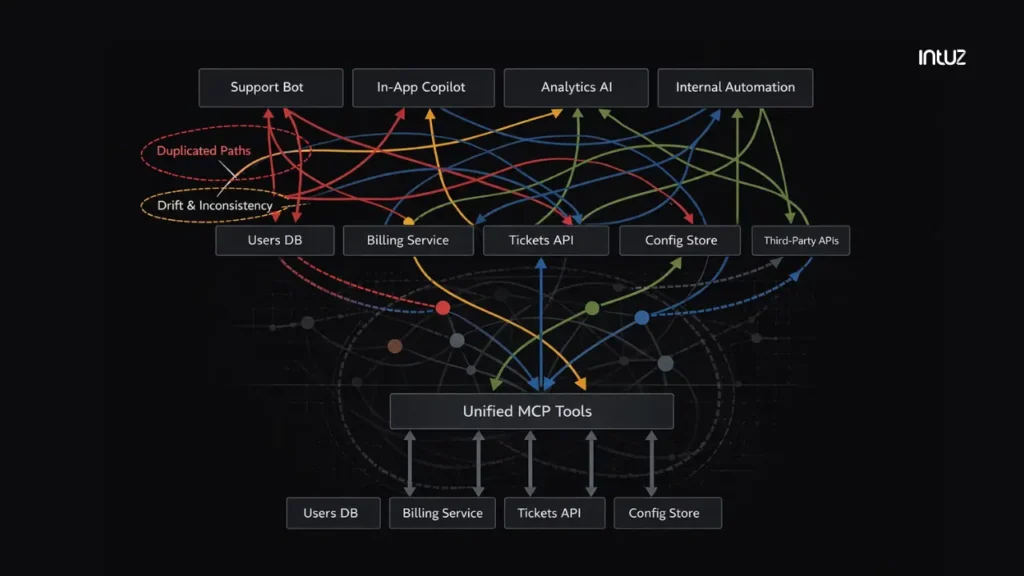
Begin by mapping how your SaaS product works today. Identify every system your AI features touch: users, billing, tickets, configuration, and any third-party APIs. Most teams discover that the same data is accessed in different ways across features.
MCP can fix that fragmentation. Next, identify where AI appears in your product: support agents, in-app copilots, analytics queries, and internal automations. Each of these is a product touchpoint with its own expectations and risk profile.
Now define a single, canonical way for AI to interact with your product. There should be one way to read a user. One way to fetch usage. One way to update the state.
Intuz Recommends
Define which models are allowed to read and which are allowed to change. Tie those rules to tenant, role, and scope. This becomes your single enforcement layer for AI behavior.
2. MCP server implementation
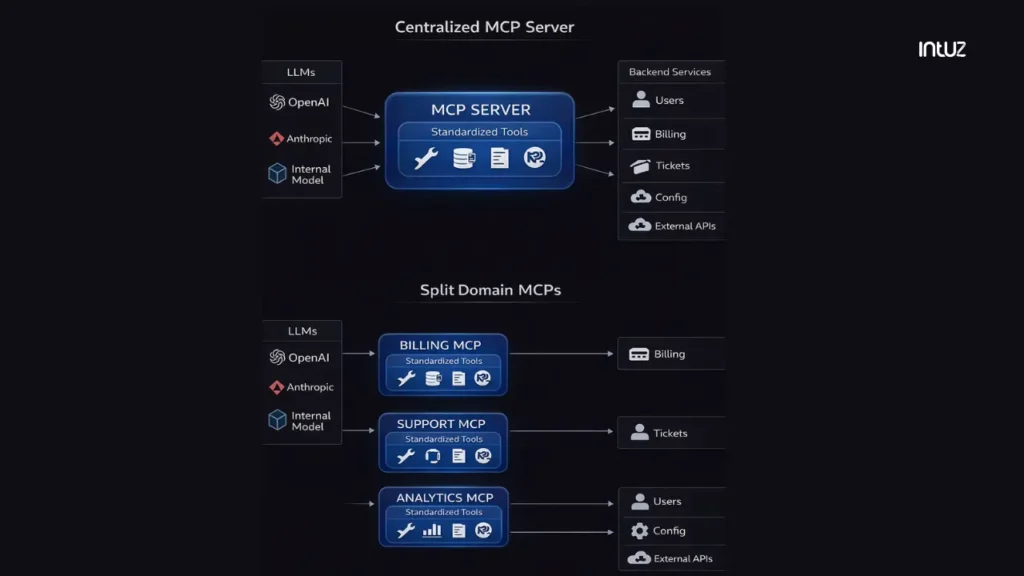
Build the MCP server as a gateway in front of your existing APIs.
Set up an MCP server alongside your product backend. Point it at the same internal services your app already uses. Then choose a topology:
- Use a single, centralized server if you want the fastest path to production
- Split by domain (billing, support, analytics) if teams need isolation and independent release cycles
Next, implement your tools:
- Wrap each internal capability as an MCP tool
- Define strict inputs and outputs
- Standardize error shapes so models can tell success from failure
- Remove any ad hoc, model-specific function calls
Intuz Recommends
Treat the MCP server like any other critical service. Log every call, track latency and failures, and make MCP traffic visible in your existing monitoring stack.
3. SaaS-grade security
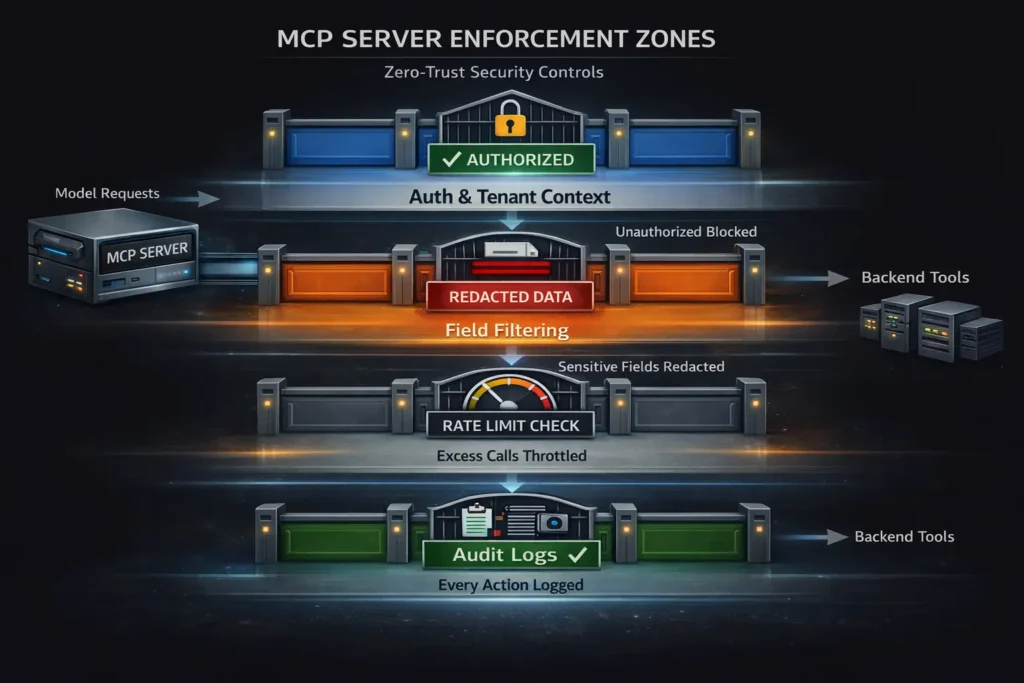
Now, make MCP enforce the same guarantees as your core app.
Wire your existing auth and tenancy model into the MCP layer. Every tool call must carry the tenant and role context. The MCP server becomes the place where access is decided, not the prompt or the feature code.
Next, define field-level boundaries. Decide which attributes can reach a model and which must never leave your system. Filter or redact sensitive fields at the MCP layer before they’re returned. Then add behavioral controls:
- Apply rate limits per model and per tenant
- Block unsafe sequences and repeated failures
- Prevent models from calling the same tool in uncontrolled loops
Intuz Recommends
Make AI actions auditable by recording every tool call, storing inputs, outputs, and outcomes, and attaching tenant, role, model, and request context.
4. Product integration
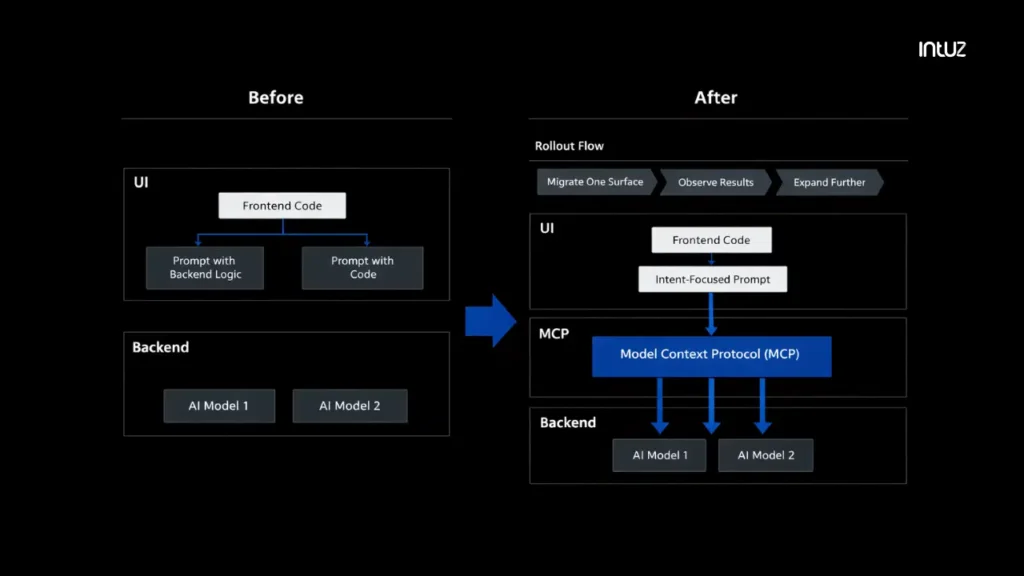
The last step is to integrate MCP into your product as a first-class service.
Choose one fundamental feature to migrate first, such as an in-app copilot, a support agent, or an internal tool. Remove any direct model calls from that feature and route every request through MCP instead. Replace embedded logic with tool calls:
- Remove prompts that contain instructions like “call the billing API” or “update the ticket status.” Prompts should only express intent
- Delete any code in the feature that directly calls internal services on behalf of the model
- Expose those capabilities as MCP tools and let the model invoke them through the MCP server instead
Intuz Recommends
Ensure every model request for that feature goes through MCP, even if it only reads data. This way, the behavior becomes consistent across every surface that uses AI: Prompts stop acting like pseudo-backend codeThe feature code stops acting as a proxy for the modelMCP becomes the only path from model to system You can now visualize exactly what has to change in the codebase.
Examples of Top SaaS Platforms Using MCP
Many SaaS companies are already deploying MCP as a product interface between models and core systems. Let’s look at the top examples:
1. Figma
Figma ships an MCP server that exposes design files, components, and structure to AI tools. Models can query real design artifacts, generate variations, and automate design-to-code workflows through a governed interface.
The MCP server wraps Figma’s API and presents it as a set of discoverable tools. Models don’t scrape files or rely on prompt injection. They call explicit capabilities with defined schemas.
2. Asana
Asana exposes its entire Work Graph through MCP. External AI clients can list tasks, create projects, update status, and generate reports using the same permission model that governs the Asana UI. Tool discovery is dynamic. Access is enforced through OAuth. Every action respects workspace roles.
3. HubSpot
HubSpot exposes CRM data to ChatGPT through MCP. Users can ask questions about pipelines, accounts, and risk, and receive live answers sourced directly from production data. The model doesn’t guess. It queries. For HubSpot, MCP functions as a public product interface rather than a plugin layer.
4. Atlassian
Atlassian’s MCP server becomes a bridge between external AI clients and internal systems. Users can search issues, create tickets, summarize pages, and automate routine work. Every request flows through existing access rules. Audit logs track model-driven actions.
Why Choose Intuz for Your MCP Integration?
So you see – integrating MCP changes how your product exposes data, tools, and actions to AI. It reshapes your architecture and introduces a new boundary in your system.
The good news is our AI development company works with you at that boundary. When you engage Intuz, you get a team that thinks of MCP as part of your product architecture.
We start by understanding how your SaaS product works today and map your internal systems, your existing AI features, and the places where context, access, and behavior drift.
We help you move from an isolated proof of concept to a production-grade layer. Your first MCP tools are shaped around real product workflows. We wrap your existing APIs.
Your MCP layer is designed to work across models from day one. We don’t let provider-specific behavior leak into your product. Switching between OpenAI, Anthropic, or future models remains a configuration choice, not a rewrite.
Security is enforced where it belongs. We implement row-level access, tenant isolation, sensitive data filtering, rate limits, and audit trails inside the MCP layer. Every model-driven action follows the same rules as your application code. Nothing is hidden in prompts.
After launch, our team stays with you. As new AI touchpoints appear, we refine tool contracts. As workflows grow, we help you decide when MCP is enough and when multi-agent patterns make sense.
Keen to learn more? Book a free 45-minute MCP consultation with Intuz to evaluate whether MCP fits your SaaS AI roadmap.
FAQs
Why should a SaaS product integrate MCP?
MCP becomes essential when AI in your product needs to read live records, trigger actions, or respect multi-tenant access rules. It centralises tool access, validation, and permission enforcement in one layer instead of spreading logic across prompts and feature code. Beyond architecture, adoption signals are strong: the MCP ecosystem grew 2,200% in 13 months, and over 30% of future API demand is projected to come from AI-driven tools by 2026.
How long does MCP integration take for an existing SaaS platform?
A focused team can prototype a single-domain MCP server in days using the official TypeScript or Python SDKs. A production-grade rollout — covering architecture review, security enforcement, tenant isolation, and one feature migrated end-to-end — typically takes 4–8 weeks depending on the complexity of your existing backend. Starting with one copilot or support agent feature is the fastest path to validating the layer before expanding.
What are the security requirements for MCP in a multi-tenant SaaS?
Every tool call must carry tenant and role context. Access decisions belong in the MCP layer, not in prompts or application code. Specifically: use OAuth or SSO for user-scoped tokens, apply field-level filtering to prevent sensitive data from reaching the model, rate-limit by tenant and by model, and log every call with its input, output, and context for auditability. OPA policies and secret managers like Vault work well here for enterprise deployments.
When should a SaaS company choose MCP over standard function calling?
Function calling is faster for single-model prototypes where context is static and scope is narrow. MCP is the right choice when you need tool reuse across multiple LLMs, multi-tenant access control, or when AI drives real backend actions. With MCP, switching between OpenAI, Anthropic, or future models stays a configuration change — not a rewrite. For production SaaS, MCP’s standardisation is what makes AI behaviour consistent and auditable at scale.
How much does it cost to integrate MCP into an existing SaaS product?
MCP integration for an existing SaaS product typically ranges from $5,000–$15,000 for a small app to $34,000–$75,000+ for an enterprise-grade rollout, depending on the number of internal systems exposed as tools, multi-tenant security requirements, and how many AI surfaces are being migrated. The build breaks into three cost layers: MCP server setup ($1k–$18k), integration development ($3k–$45k), and frontend/UI modifications ($1k–$15k). Recurring monthly costs for hosting, model spend, and observability are relatively low early on — typically $50–$300/month — but scale with AI surface adoption. Most mid-market SaaS teams reach break-even within 12–18 months once MCP becomes a shared layer across multiple AI features rather than a one-off integration.