





If you’re reading this, chances are you’ve heard the buzzword “Kubernetes” floating around in tech circles. Maybe your team is considering adopting it, or perhaps you’re just curious about what all the hype is about. Whatever the case, you’ve come to the right place. This guide will walk you through everything you need to know to get started with Kubernetes, from understanding its core concepts to deploying your first application. Let’s dive in!
Show
- Kubernetes (K8s) is an open-source container orchestration platform that automates the deployment, scaling, and management of containerized applications.
- Its core advantages are scalability (auto-scaling during traffic peaks), portability (move workloads across on-prem and cloud without rewriting code), and resilience (auto-restarting, rescheduling, and replacing failed containers).
- A cluster is built from a Master Node (scheduling and desired-state management) and Worker Nodes (where apps run via kubelet and a container runtime), supported by etcd, the API server, and controllers.
- Key building blocks include Pods (smallest deployment unit), Services (stable networking between pods), Deployments (managing rollouts and rollbacks), and ConfigMaps & Secrets (decoupling config and sensitive data from code).
- You can start a cluster three ways — locally with Minikube, via managed services (GKE, EKS, AKS), or self-hosted with Kubeadm/Rancher — then deploy a first app (e.g., Nginx) using YAML manifests for a Deployment and a Service.
Introduction to Kubernetes: Why It Matters
So, what exactly is Kubernetes? At its heart, Kubernetes (often abbreviated as K8s) is an open-source container orchestration platform designed to automate containerized applications’ deployment, scaling, and management. Think of it as the conductor of an orchestra—ensuring every piece of your application works harmoniously together.
But why should you care? Well, if you’re building modern cloud-native applications, Kubernetes offers some serious advantages:
Scalability: Need more resources during peak traffic? Kubernetes can automatically scale your app up or down.
Portability: Whether you’re running on-premises, in the cloud, or even across multiple clouds, Kubernetes makes it easy to move workloads without rewriting code.
Resilience: Kubernetes ensures your apps stay up and running by restarting failed containers, rescheduling them, or replacing them when needed.
Kubernetes simplifies operations and reduces downtime compared to traditional deployment methods—like manually managing servers or using virtual machines. It’s no wonder that companies big and small are adopting it at breakneck speed.
Get a Complimentary Cloud Deployment Consultation!
Core Concepts of Kubernetes
Before we jump into setting things up, let’s break down some of the key terms you’ll encounter when working with Kubernetes. Don’t worry; I promise not to drown you in jargon.
a. Cluster Architecture
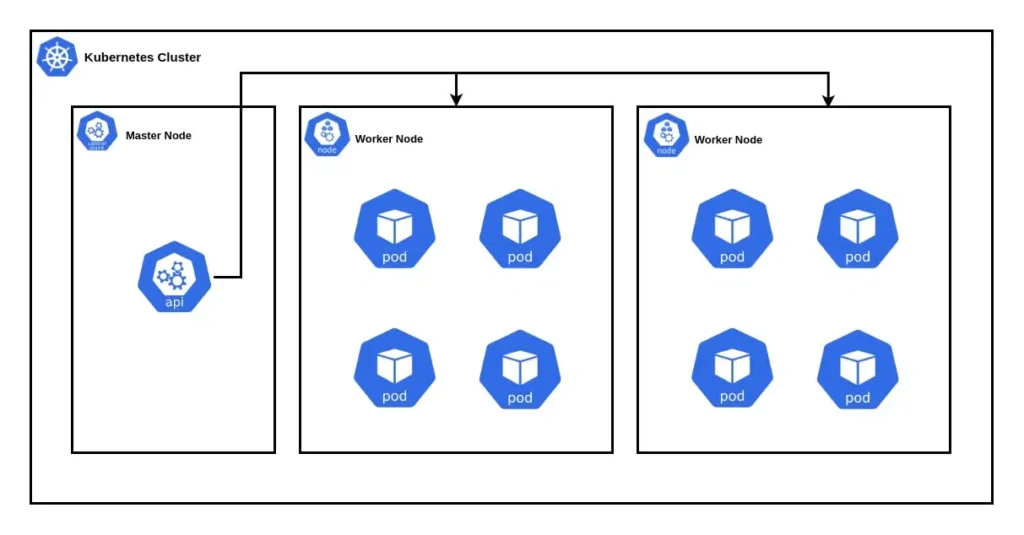
A Kubernetes cluster consists of two main components:
Master Node: The brain of the operation. It manages the overall state of the cluster and handles tasks like scheduling and maintaining desired states.
Worker Nodes: These are where your applications actually run. Each worker node runs a kubelet (which communicates with the master) and a container runtime (like Docker).
Under the hood, there are other pieces like etcd (a distributed key-value store for cluster data), the API server (how users interact with the cluster), and controllers (which ensure the system behaves as expected).
b. Pods
Think of pods as the smallest unit of deployment in Kubernetes. A pod can contain one or more containers that share storage and network resources. For example, you might have a web server and a logging sidecar container living together in a single pod.
c. Services
Services allow communication between different parts of your application. They provide stable IP addresses and DNS names so that pods can talk to each other reliably, even if they’re being replaced or scaled.
d. Deployments
Deployments are how you manage updates to your applications. Want to roll out version 2.0 of your app? Create a new deployment, and Kubernetes will handle the rest—rolling back changes if something goes wrong.
e. ConfigMaps & Secrets
These are used to decouple configuration details from your application code. ConfigMaps store non-sensitive information (like environment variables), while Secrets handle sensitive data (like passwords or API keys).
Setting Up Your First Kubernetes Cluster
Now comes the fun part—getting your hands dirty! There are several ways to set up a Kubernetes cluster depending on your needs and experience level. Let’s explore a few options.
Option 1: Local Development with Minikube
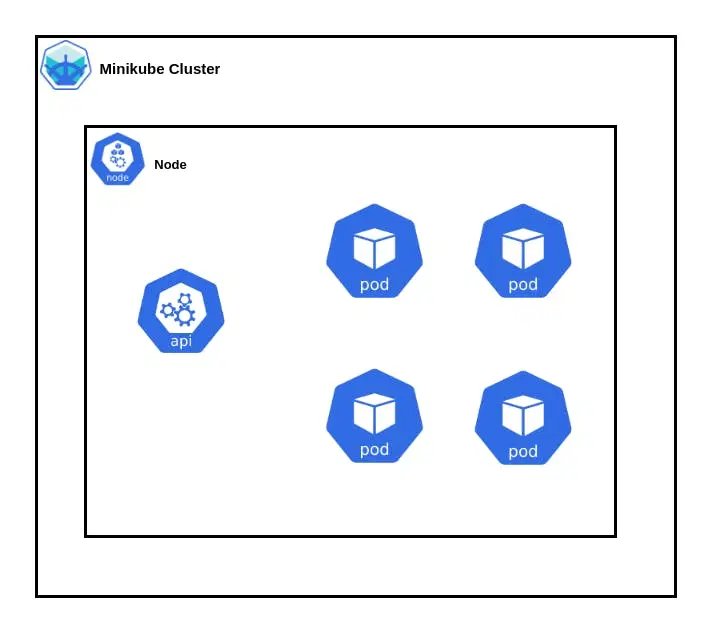
Minikube is perfect for beginners because it lets you run a single-node Kubernetes cluster locally on your machine. Here’s how to get started:
- Install Minikube: Head over to the Minikube installation page and follow the instructions for your operating system.
- Start the Cluster: Run minikube start. This command spins up a lightweight Kubernetes cluster on your local machine.
- Verify Installation: Use kubectl to get nodes to confirm that your cluster is up and running.
Option 2: Cloud Providers
If you want to skip the hassle of managing infrastructure, consider using a managed Kubernetes service from a cloud provider. Some popular options include:
Google Kubernetes Engine (GKE): Known for its ease of use and tight integration with Google Cloud.
Amazon Elastic Kubernetes Service (EKS): Great if you’re already invested in AWS.
Azure Kubernetes Service (AKS): Ideal for Microsoft Azure users.
For example, here’s how to create a GKE cluster:
- Go to the Google Cloud Console and navigate to the Kubernetes Engine section.
- Click “Create Cluster,” choose a name, and select the default settings.
- Once the cluster is ready, connect to it using gcloud container clusters get-credentials <cluster-name>.
Option 3: On-Premises
For those who prefer full control, tools like Kubeadm or Rancher can help you set up a self-hosted Kubernetes cluster. However, this approach requires more expertise and maintenance effort.
No matter which option you choose, always verify your setup with commands like kubectl cluster-info and kubectl get nodes. If something doesn’t look right, don’t panic—check the logs or consult the documentation.
Deploying Your First Application
Alright, now that you have a cluster up and running, it’s time to deploy your first application. We’ll keep it simple and use Nginx, a lightweight web server.
Step 1: Create a Deployment Manifest
In Kubernetes, deployments are defined using YAML files. Here’s an example:
apiVersion: apps/v1

kind: Deployment

metadata:

name: nginx-deployment

spec:

replicas: 2

selector:

matchLabels:

app: nginx

template:

metadata:

labels:

app: nginx

spec:

containers:

name: nginx
image: nginx:latest

ports:

containerPort: 80
Save this file as nginx-deployment.yaml.
Step 2: Apply the Manifest
Run the following command to create the deployment:
kubectl apply -f nginx-deployment.yaml
You should see an output confirming that the deployment was created successfully.
Step 3: Expose the Application
To make your app accessible, you’ll need to expose it via a Service. Let’s create a LoadBalancer service:
apiVersion: v1

kind: Service

metadata:

name: nginx-service

spec:

type: LoadBalancer

selector:

app: nginx

ports:

protocol: TCP
port: 80

targetPort: 80

Apply this manifest with:

kubectl apply -f nginx-service.yaml
Once the service is created, you can find the external IP address using:
kubectl get svc nginx-service
Open the IP in your browser, and voilà—you’ve deployed your first Kubernetes app!
Bonus: Scaling Your App
Need more capacity? Scale your deployment with:
kubectl scale deployment nginx-deployment –replicas=5
This command increases the number of replicas to five, allowing your app to handle more traffic.
Conclusion: Next Steps in Your Kubernetes Journey
Congratulations! You’ve taken your first steps into the world of Kubernetes. From understanding core concepts to deploying your first app, you’ve laid a strong foundation for future exploration.
But remember, Kubernetes is vast, and there’s always more to learn. As you grow comfortable with the basics, challenge yourself to tackle advanced topics like:
- Networking
- Storage
- Security
- Service Mesh
- Monitoring and Logging
And most importantly, don’t be afraid to experiment—Kubernetes rewards curiosity.
Let’s Book a Free 45-minute Consultation with Our Cloud Experts to discuss your custom Kubernetes app development requirements.
This guide is designed to help you get started with Kubernetes. For the latest updates and detailed documentation, always refer to the official Kubernetes documentation.
Work with Intuz
Need Help Deploying Kubernetes?
Talk to our cloud experts about your K8s setup.
Let's Get Started
Share this article