
This guide walks you through how AI invoice processing works, what different implementation approaches cost, and how to make the build vs buy invoice automation decision for your business.
Are you still correcting invoices by hand after your software pulled the numbers? We won’t be surprised if you do. After all, you could have bought an extraction tool only to find your AP team still resolving PO mismatches, chasing approvals, and correcting accounting entries!
But did you know according to Ardent Partners research, processing an invoice costs $9.84 on average, with 18.4% requiring exception handling? The end game here is undoubtedly automation.
As Nilay Dhamsania, product successor adviser at Intuz says, “Every invoice should reach one of two clear outcomes: an accurate, traceable ERP entry or a review request that tells your team exactly what needs attention and why. That’s how you reduce manual work while keeping control of the money moving through your business.”
Show
- AI invoice processing automation extracts invoice data, validates it against purchase orders and vendor records, routes exceptions, and posts approved invoices to accounting or ERP systems.
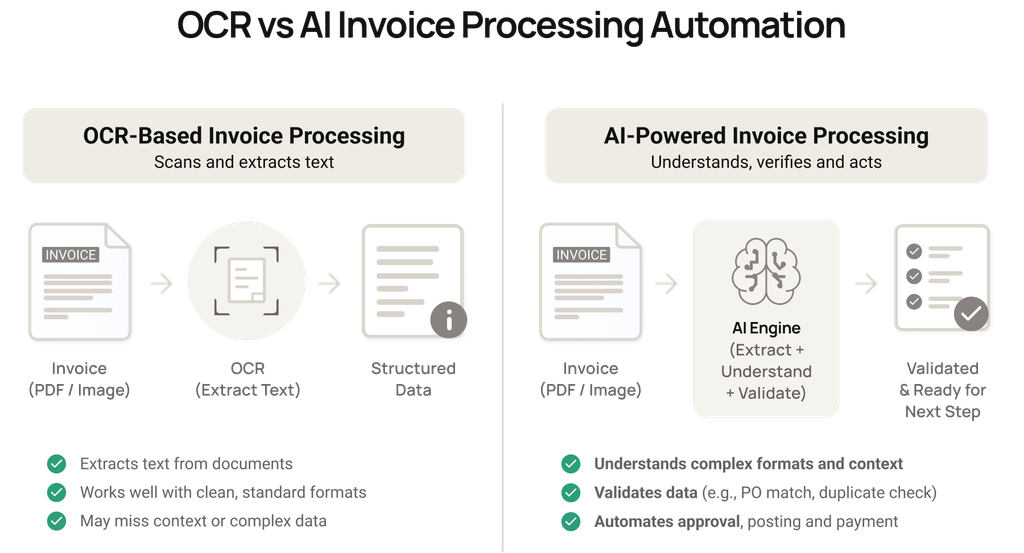
- OCR vs. AI: Traditional OCR converts invoice text into machine-readable data, while AI-powered processing can interpret layouts, validate information, and support exception handling.
- The five-step workflow includes invoice intake and deduplication, data extraction, validation, exception handling, and ERP posting with audit logs.
- AI agents handle exceptions such as purchase order mismatches, missing PO numbers, and duplicate invoices, while humans retain control over sensitive financial decisions.
- The right implementation approach depends on invoice volume, document variability, approval rules, and existing ERP AI integrations. Options include SaaS, low-code, hybrid, and custom development.
- Implementation costs vary by approach: The article gives an indicative budget of $20,000–$50,000+ for a focused custom solution, with timelines of 6–16+ weeks.
- ROI depends on measurable results: Track manual processing time saved, touchless processing rate, exception resolution time, integration reliability, and ongoing operating costs.
What Is AI Invoice Processing Automation?
It refers to the use of Optical Character Recognition (OCR), document intelligence, Machine Learning (ML), and workflow orchestration to receive invoices, extract header and line-item data, validate supplier and purchase-order information, identify exceptions, route approvals, and transfer approved records into an accounting or Enterprise Resource Planning (ERP) system.
Naturally, AI invoice processing and conventional OCR-based automation differ too.
Well, the latter converts printed or scanned content into machine-readable text. On the other hand, AI invoice processing adds layout interpretation, field classification, contextual checks, and workflows that act on that information.
At Intuz, we design custom document automation workflows that account for these downstream requirements, including validation rules, exception handling, ERP integration, and audit trails.
The engineering effort across these components depends on your project complexity, approval policies, and existing accounting systems.
How Does an AI Invoice Processing Automation Pipeline Work?
The process typically involves the following five stages:
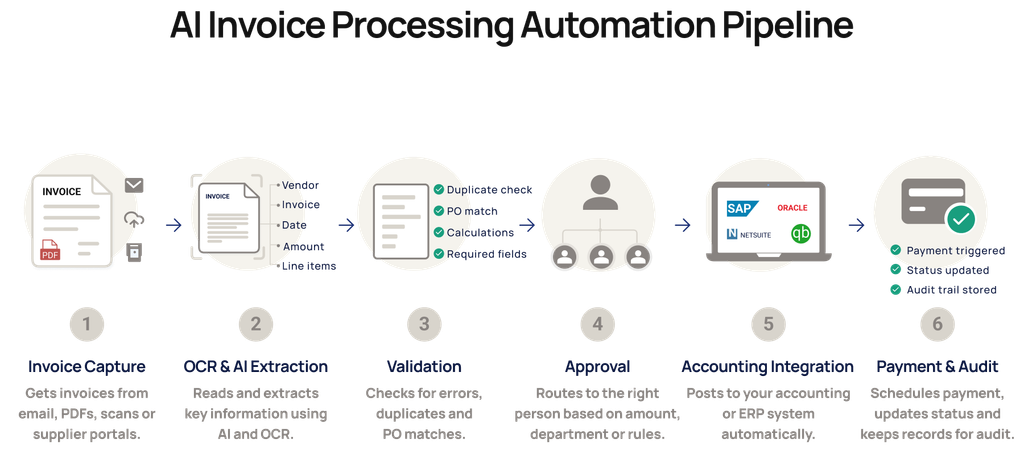
1. Intake and deduplication
Your invoices may come through email, supplier portals, or direct uploads, sometimes with multiple submissions of the same document.
The invoice intake layer captures each submission, standardizes its format, and assigns a unique document ID. It checks file fingerprints for repeated submissions, while select details such as supplier names, invoice numbers, and amounts help identify potential duplicates.
For our clients, we also account for simultaneous submissions and processing failures through queue management, unique document IDs, and retry safeguards.
2. Extraction
Next, OCR and document intelligence identify and structure invoice numbers, dates, supplier information, tax details, and individual line items.
At Intuz, our document-processing toolkit includes Amazon Textract, Google Document AI, Azure Form Recognizer, and custom OCR pipelines.
Depending on your invoice formats and security requirements, the solution may also incorporate hosted LLMs or privately deployed models to interpret complex layouts. Unclear scans or low-confidence fields can trigger a second processing pass or human review.
3. Validation
Once the invoice details are pulled together, the validation engine checks them against your vendor master, purchase orders, and goods-receipt records.
For our clients, the matching logic depends on their procurement policies, whether that requires two-way or three-way matching, tax verification, or acceptable price and quantity tolerances.
These checks help catch incorrect PO references, calculation errors, and discrepancies that accurate data extraction alone can’t detect.
4. Exception engine
If an invoice fails validation, the exception engine identifies the discrepancy and determines the next action based on your predefined business rules. An AI agent, for instance, can retrieve supporting records, suggest possible corrections, or prepare an approval request.
This is where our experience with n8n, LangGraph, and custom orchestration comes into play. Depending on your approval requirements, the workflow can coordinate automated follow-ups, route discrepancies to the right person, and maintain human review checkpoints for unresolved cases.
5. ERP posting and audit log
Lastly, the ERP integration layer maps invoice details, tax codes, and accounting fields to the corresponding records in your ERP or accounting platform.
For our clients working with QuickBooks or Zoho Books, this may involve platform-specific field mappings, API permissions, and posting-response checks.
Legacy systems may require custom connectors or alternative integration methods. Intuz also accounts for failed transactions and duplicate-posting risks through safe retries and timestamped audit logs, with deployment options across AWS, Azure, and Google Cloud.
How Do AI Agents Handle Invoice Exceptions?
Let’s say your supplier sends you a revised invoice after delivery. Before your AP team can approve it, they need to check whether the original invoice was posted, what changed, and whether the revised details match the purchase order.
An AI agent can help you investigate by retrieving the relevant invoice history, purchase orders, and approval records, identifying discrepancies, and directing the case to the appropriate reviewer. Depending on the issue, here’s how the process would work:
| Exception | How AI handles it | Where your team intervenes |
| PO price mismatch | Compares invoice lines with PO prices, receipts, and approved tolerances | Approves amounts outside tolerance or requests corrections |
| Missing or incorrect PO number | Searches for eligible POs using vendor, items, dates, and amounts; suggests possible matches | Confirms uncertain matches or approves non-PO coding |
| Duplicate or near-duplicate invoice | Compares invoice IDs, amounts, dates, document similarity, and posting history | Determines whether it’s a revised invoice, credit note, or duplicate |
For example, if you’re billed $11 per unit against an approved PO price of $10, the agent can check for an authorized price amendment and prepare the discrepancy for your purchasing team to review.
With custom AI invoice processing automation, you can tailor these checks, matching tolerances, and approval workflows to your organization’s policies.
Your team receives the supporting evidence needed to make a decision, while sensitive actions such as vendor bank-detail changes, high-value payments, and approvals outside delegated authority remain subject to human authorization.
Should You Buy Invoice Software, Use Low-Code, or Build Custom?
The right approach depends on your monthly invoice volume, the variety of supplier formats you handle, your ERP’s integration capabilities, and how often your AP team needs to intervene.
For example, you might process 400 invoices a month from familiar suppliers using accounting software that connects easily with an AP platform. In that case, SaaS could cover most of your requirements.
However, if those same 400 invoices involve hundreds of different layouts, a legacy ERP, and frequent PO mismatches, you may benefit from a custom exception-handling layer.
Here’s how the four options compare based on your requirements.
| Approach | Best fit | Where it breaks | Indicative go-live |
| SaaS AP platform | Standard workflows, supported accounting tools, predictable approvals. | Unusual business rules, complex exceptions, or unsupported ERP processes. | 2–6 weeks |
| Low-code + LLM (n8n, Make, Power Automate) | Modest volumes, straightforward routing, a few connected applications. | Fragile multi-step logic, difficult matching, and growing maintenance needs. | 1–4 weeks |
| Hybrid (SaaS extraction + custom exception layer) | Reliable capture is available, but validation, approvals, or ERP rules are unique. | Two systems must be maintained and monitored together. | 4–10 weeks |
| Full custom build | Many layouts, specialized controls, legacy/unique ERP, or multi-entity workflows. | Higher initial spend and longer design, testing, and support cycles. | 6–16+ weeks |
What Intuz Recommends About AI Invoice Processing Automation
- Choose SaaS if you process roughly fewer than 500 invoices monthly, with consistent formats and a supported ERP connector.
- Use low-code when your primary requirement is connecting invoice intake, notifications, and straightforward approvals across existing applications.
- Consider hybrid automation for approximately 500-3,000 invoices monthly when extraction works well but your exception-handling rules require customization.
- Explore full custom development if legacy ERP access, multiple entities, specialized financial controls, or complex posting logic determine how invoices must be processed.
- Pilot actual exceptions before committing. Compare touchless processing rates, review time, and integration reliability. These measures can reveal more about implementation fit than invoice volume alone.
How Much Does AI Invoice Processing Automation Cost?
Your invoice automation cost depends on the software you choose, implementation complexity, document or model usage, human review, and ongoing support. Here’s how the costs compare across different approaches:
| Approach | Reference price or planning budget | Additional costs to account for |
| SaaS AP platform | AP automation subscriptions from $99/month; specialized document automation from $18,000/year | Per-invoice fees, additional modules, onboarding, custom ERP integrations |
| Low-code + AI | Automation subscriptions from $15/user/month or €20/month, billed annually | Initial workflow setup, OCR/LLM usage, API integrations, maintenance |
| Hybrid automation | SaaS subscription plus separately estimated custom integration and exception-handling costs | Matching logic, ERP testing, platform fees, ongoing support |
| Custom development | $20,000-$50,000+ indicative implementation budget for a focused SME workflow | Hosting, model usage, security, maintenance, future enhancements |
Remember to also budget for onboarding new vendor layouts, ERP API or authentication changes, model updates, and the person or partner responsible for maintenance.
To estimate your potential savings:
Consider a business processing 1,000 invoices monthly, with automation saving six minutes of manual work per invoice.
Monthly time saved = 1,000 × 6 ÷ 60 = 100 staff hours
At an illustrative loaded labor cost of $25/hour:
Annual labor capacity value = 100 × $25 × 12 = $30,000
To assess first-year ROI, compare your measurable financial savings against implementation, software, support, and maintenance costs. Keep in mind that recovered staff hours represent additional capacity unless your operating expenses actually decrease.
How To Get Started With AI Invoice Processing Automation
After you’ve narrowed down your options, the next step is to test your preferred approach against the invoices and approval decisions your team handles every day. That’s where our expertise can be handy.
Share representative invoices, your vendor-master export, purchase-order and receipt data access, and your approval matrix. We’ll map your current process, identify automation opportunities, and recommend an implementation scope based on your accounting environment.
From there, we’ll run a pilot alongside your existing process. You’ll see how the proposed system handles regular invoices, missing POs, duplicate submissions, and failed posting attempts.
We’ll basically measure extraction accuracy, exception turnaround, and successful ERP entries before agreeing on production requirements for you.
If the pilot meets those criteria, we’ll move into production deployment and handover, configuring approval controls, monitoring, audit logs, and failure recovery. Your team will receive the documentation and training required to manage the workflow after launch.
If AI invoice processing is consuming hours your team could spend elsewhere, book a free invoice workflow audit with Intuz today.
FAQs
Can ChatGPT process invoices on its own?
For a handful, yes. At volume, no. A general chatbot can misread fields, return an impossible date like April 31, and it can’t check POs or post to your ERP. Production pipelines pair the LLM with rule-based validation and audit trails.
How accurate is AI invoice data extraction?
95–99%, usually on clean, well-formatted invoices, at field level. Before signing, ask for document-level accuracy and straight-through processing rate on your own invoices. The average AP team posts 32.6% of invoices with no human touch.
How much does AI invoice processing automation cost?
SaaS tools charge per user, per invoice or a flat monthly fee. Custom builds carry an upfront cost; published estimates run from $50K to $400K depending on scope. Benchmark against the average AP cost today: $9.40 per invoice.
Should I buy invoice automation software or build a custom solution?
Buy if volume is moderate, vendor formats are consistent and your ERP has a native connector. Build when volume is high, vendors send hundreds of layouts, your ERP is legacy or custom, or data must stay in your own environment.
Can AI invoice automation integrate with QuickBooks, Zoho Books or Tally?
Yes, if the system exposes an API or import interface. QuickBooks and Zoho Books offer REST APIs; Tally typically integrates through its XML/ODBC interface or a third-party connector. Confirm the integration posts approved bills directly, not through manual CSV exports.
How long does it take to implement AI invoice processing?
SaaS setups with standard ERPs can typically go live in a few weeks. Custom pipelines usually take a few months, including a parallel pilot on real invoices. ERP integration depth and exception rules, not extraction, drive most of the timeline.
Is it safe to send invoice data to AI models?
It can be, with the right setup. Use enterprise model terms that exclude training on your data, deploy in your region or private cloud, redact personal data before sending prompts, and always require human approval for any vendor bank-detail change.
Will AI invoice processing replace my accounts payable team?
No. It removes data entry and routine matching, so the team shifts to exceptions, vendor queries and approvals. Ardent Partners reports 14% of invoices hit exceptions on average, and many of those need human judgment, even with AI agents assisting.
Work with Intuz
Automate Your Invoice Processing Workflow
Book a free invoice workflow audit with Intuz today.
Let's Get Started
Share this article