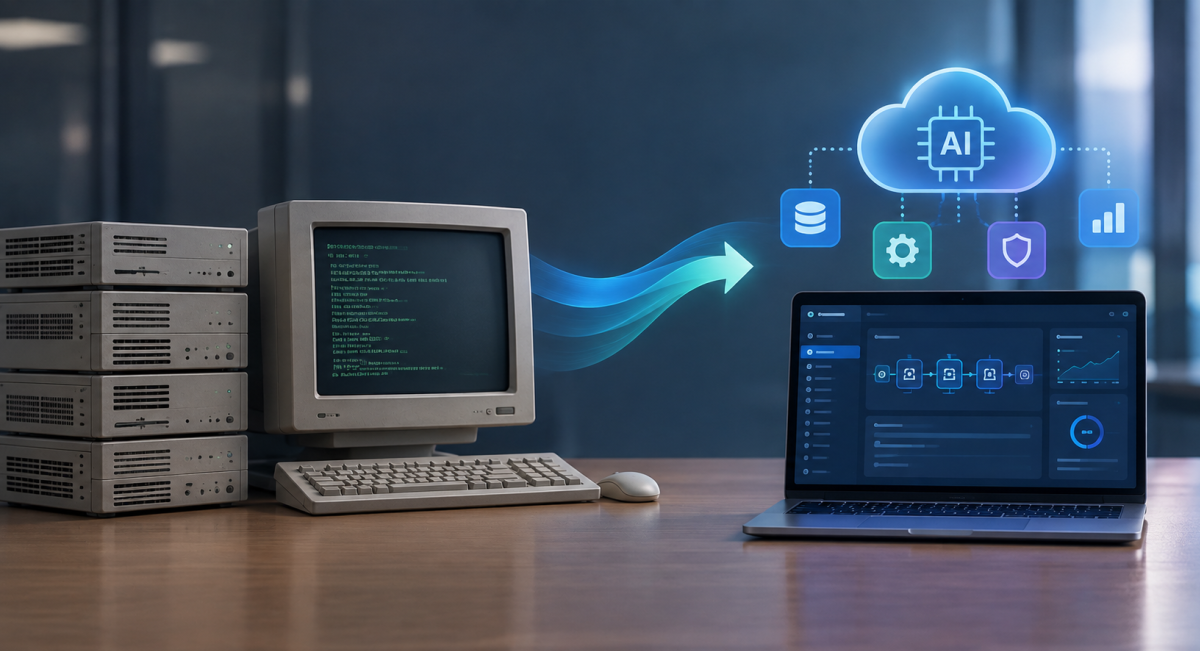
In this guide, we’ll walk you through those exact decisions, from assessing your current system and choosing a modernization approach to estimating cost and ROI, handling AI risk, and evaluating legacy system modernization services.
If you’re responsible for a 10- or 20-year-old ERP/CRM platform, healthcare application, or financial tool today, you know something has to change even though it’s not as easy as it seems.
Your application may still process transactions every day. But behind the scenes, releases take longer, integrations become harder to add, support costs keep rising, and every AI initiative functions on the same aging architecture.
This is a widespread problem: Gartner estimates that about 40% of infrastructure systems have technical-debt concerns. So, the hard part becomes deciding what deserves attention first, how far the change should go, and what your business gains from it.
Show
- AI’s role is to speed up analysis and grunt work (dependency mapping, code transformation, test generation), not replace engineering judgment — architecture and validation decisions still sit with engineers.
- System age isn’t the trigger for modernization; release velocity, dependency complexity, and integration friction are the real signals to watch.
- Four approaches (rehost, replatform, refactor, rebuild) scale from $50K to $5M+, and the right one depends on how much business logic is worth preserving, not just platform condition.
- The six-step roadmap — map, extract logic, set strategy per component, baseline tests, ship in small verifiable AI jobs, validate in production — ties every phase to a measurable gate before moving forward.
- ROI is tracked across four buckets (cost savings, speed to market, business value, risk reduction), with Intuz citing 30–40% maintenance-cost reductions from past client work.
- Four case studies anchor credibility: Capital One (70% faster disaster recovery), Jefferson County (88.9% lower operating costs, $500K+/year saved), Experian (40% less developer effort on 687K lines), Intesa Sanpaolo (800+ apps migrated).
- Intuz’s differentiator is positioning: senior engineers involved from day one, 54+ AI systems already in production, and a discovery phase that can end in “no-go” without forcing a full build.
What Is Legacy System Modernization with AI?
Legacy system modernization with AI simply refers to the use of AI tools that help you understand, update, migrate, or replace aging applications faster.
AI can analyze source code, map dependencies, document business rules, assist with code transformation, and generate tests, giving your engineering team more capacity for architecture, edge cases, and business-critical decisions.
Let’s see how traditional and AI-assisted modernization compare against each other:
| Area | Traditional modernization | AI-assisted modernization |
| System discovery | Teams review code, documentation, and dependencies manually | AI helps scan code, map dependencies, and reconstruct missing documentation |
| Planning | Scope relies heavily on existing documentation, interviews, and sampled analysis | Broader codebase evidence can inform component priorities earlier |
| Engineering focus | More effort goes into manual analysis and repetitive work | More engineering time can go toward architecture, exceptions, and validation |
How Do You Know If Your Legacy System Needs Modernization?
Here’s an unpopular truth: a system’s age alone doesn’t tell you whether it needs modernization. Instead, you need to look at what happens when your team tries to change something about it – for example:
- How long does a small feature take to release?
- How many dependencies does the system touch?
- Are upgrades being deferred because the team can’t predict what they might break?
- Can you connect a new API without weeks of workaround code?
- How much engineering time goes toward keeping existing functionality stable?
In our client engagements at Intuz, we often see several warning signs appear together:
- Systems become tightly coupled
- Libraries and frameworks reach end of support
- Years of piecemeal changes make code difficult to maintain
- Performance deteriorates as usage grows
To decide whether legacy application modernization deserves a formal assessment, use evidence your teams already have, i.e., compare release lead time with previous years, then review:
- Incident frequency
- Unsupported dependencies
- Security exceptions
- Performance trends
- Projects delayed by integration limits
What Triggered Legacy Application Modernization for an Intuz Client
We had been maintaining a customer application for seven years. It was originally written in PHP Yii 1, and over time the codebase accumulated several end-of-life and abandoned libraries. We also began seeing more unexpected errors in the logs.
We recommended modernization, but the customer was initially skeptical. At the same time, the technology landscape had moved forward.
Since 2019, Google has taken a Kotlin-first approach, with newer libraries, documentation, samples, and tools increasingly optimized for Kotlin, while Java continues to be supported.
As the legacy stack aged, the issues became harder to resolve and outages became more frequent, at times stopping ground staff operations entirely. That became the turning point. The customer saw the operational risk and agreed to modernize the codebase with Kotlin.
Legacy System Modernization Approaches: Rehost vs. Replatform vs. Refactor vs. Rebuild
Once you know an application deserves attention, the next decision is how much of it should change. Four legacy system modernization approaches cover most scenarios:
| Approach | Best fit | How AI can help | Relative cost | Relative risk |
| Rehost | The application functions adequately and infrastructure is the main constraint | Dependency discovery, environment analysis, migration support | Lower | Lower |
| Replatform | Useful business logic remains, but the application depends on an aging platform | Compatibility analysis, dependency mapping, migration support | Low to medium | Low to medium |
| Refactor | Technical debt or architecture limits a valuable application | Code analysis, transformation, documentation, test generation | Medium to high | Medium |
| Rebuild | The current system has severe technical limitations or little reusable value | Requirements analysis, coding assistance, documentation, testing | Higher | Higher |
But how do you choose the right legacy system modernization approach?
It’s simple – start with business logic.
How much of the application still reflects how your company works today? A mature pricing engine, underwriting workflow, or manufacturing process may contain years of domain knowledge worth preserving, which can make refactoring a better choice than rebuilding.
Then examine architecture, dependencies, business criticality, downtime, data migration, compliance, and budget – for example:
- If infrastructure is the main constraint, rehosting or replatforming may be enough
- If every new feature requires changes across tightly connected modules, the problem runs deeper
Intuz Recommends
In our experience, replatforming works well when an appropriate managed or cloud product can handle the functionality the application already provides. If the application is tightly coupled, the Strangler Fig pattern can help you modernize it gradually by replacing smaller parts over time and reducing cutover risk. A rebuild becomes more appropriate when the existing system has reached too many technical dead ends and carrying its architecture forward would preserve the same constraints.
How to Modernize a Legacy System with AI: A Step-by-Step Roadmap
After you’ve chosen an approach, convert it into a process your engineering team can execute and verify. Here’s how to do that:
1. Create a map of the system you have today
First of all, create a current-state map of the application. Pull together the source repositories, database schemas, APIs, scheduled jobs, external integrations, infrastructure configuration, and any existing architecture documentation.
Use AI-assisted code analysis to trace dependencies across the codebase, summarize modules, identify calls between components, locate outdated libraries, and surface connections that existing documentation may miss.
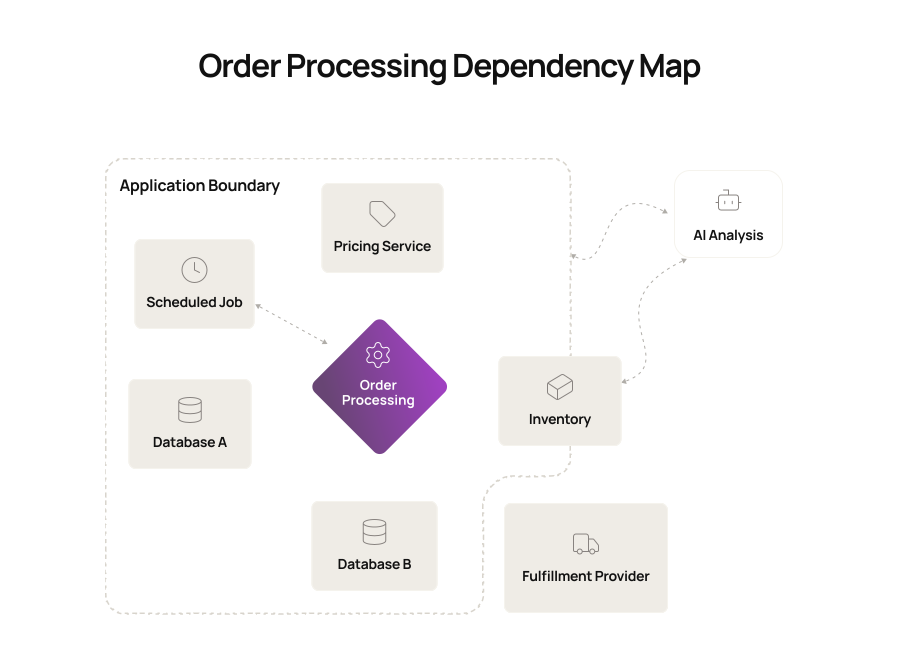
Let’s assume an order-processing module that calls a pricing service, writes to two databases, triggers inventory, and sends data to an external fulfillment provider.
A dependency map makes those relationships visible before you change the module and shows what else may be affected, as shown below:
2. Extract the business logic before you change the code
Next, choose your most important workflows and trace them from input to output. Document the rules, calculations, exceptions, dependencies, and system responses involved.
For instance, a financial application calculates customer eligibility using rules spread across Java classes, stored procedures, and configuration tables. AI can trace those references and produce a first-pass explanation of the logic.
Compare it with current behavior, then ask engineers and business stakeholders to validate each critical rule.
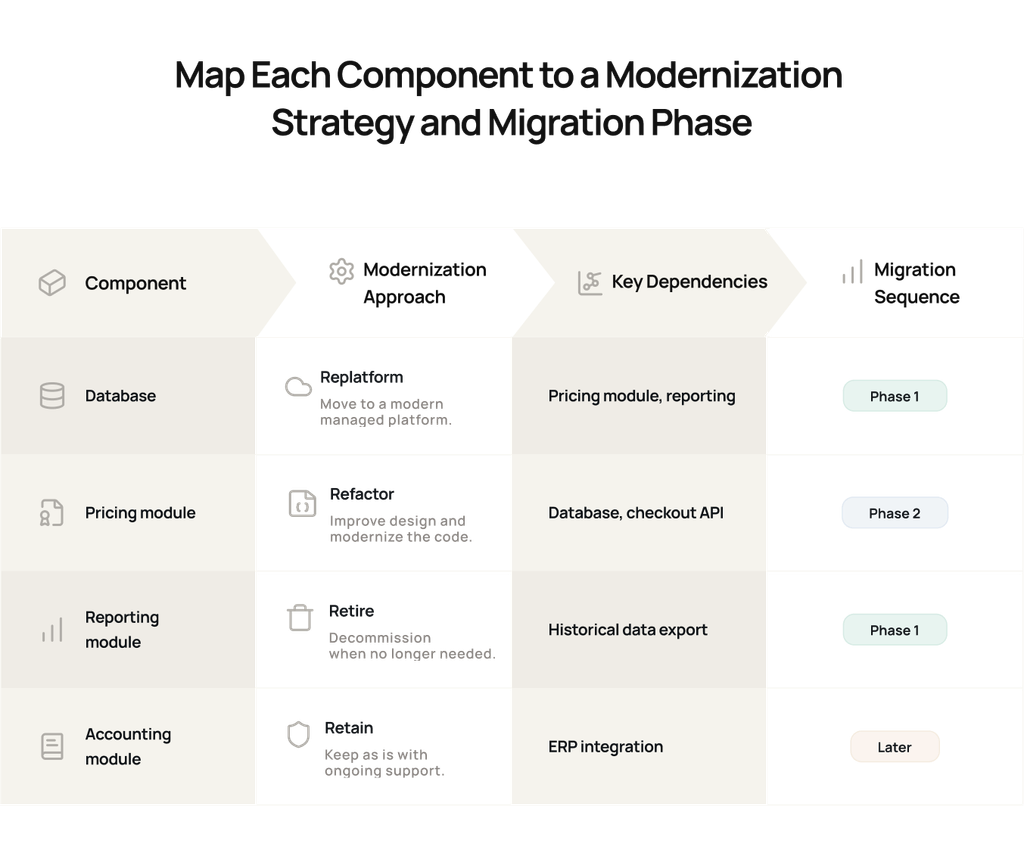
3. Decide what happens to each component
This is where you apply your legacy system modernization strategies at component level. Evaluate each major component against business value, technical condition, change frequency, dependency complexity, support status, and migration risk.
Put the decisions into a simple map to give your engineering, finance, and business stakeholders something concrete to plan around:
4. Establish the test baseline before migration begins
Here, your team needs a clear baseline for judging whether each modernized component still works as intended. Pick a small set that covers normal transactions, important business rules, integrations, and known failure scenarios.
For each AI workflow, capture five things:
- Representative input: What data enters the workflow?
- Current output: What result does the existing application produce?
- Connected systems: Which APIs, databases, queues, or third-party services does it touch?
- Current performance: How long does the transaction take, and what throughput does it handle?
- Known edge cases: What happens when data is missing, an API times out, a transaction fails, or a business rule hits an exception?
For example, take an invoice workflow.
Run several representative invoices through the existing application and record the calculated tax, discounts, final totals, database updates, downstream API calls, and processing time. Include unusual cases such as a missing tax code, a failed payment call, or a duplicate invoice.
Those results become the reference point for the modernized component. Then turn that evidence into test coverage:
| Test type | What to create | Example |
| Functional | Input-output cases for important business rules | The same invoice produces the expected tax and total |
| Integration | Tests for every external dependency and common failure | Payment API timeout or malformed response |
| Regression | Tests that capture existing critical behavior | Core invoice workflows pass after each migration batch |
| Performance | Measurable thresholds from current workloads | p95 latency remains within the agreed target |
| Security | Checks tied to the component’s actual exposure | Authentication, authorization, secrets, dependencies |
AI can help you expand this coverage. Give it the relevant code paths, validated business rules, existing tests, production defects, and known edge cases, then use it to draft additional scenarios your team may have missed.
Finish by setting acceptance criteria for the migration batch. For example:
- All critical business-rule tests pass
- Required integrations return the expected results
- No unresolved high-severity security findings remain
- Performance stays within the agreed threshold
A migration batch pushes forward only when it meets those criteria.
5. Give AI small, verifiable transformation jobs
Now, break the transformation into units your existing toolchain can verify. You might ask AI to update one package from an unsupported framework version, translate a set of data-access classes, create an API wrapper around a legacy function, or refactor a related group of files.
For each unit, provide the source files, dependencies, target framework or coding pattern, validated business rules, and the relevant tests and acceptance criteria from Step 4. Then put every transformed unit through a repeatable loop:
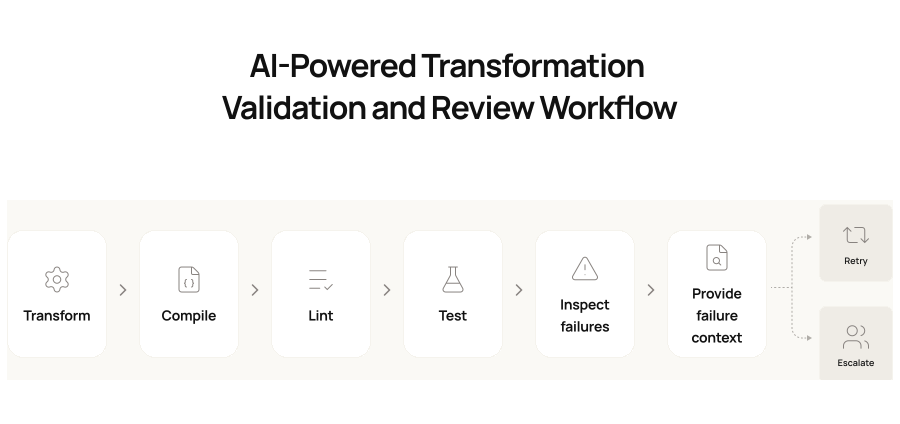
Before any AI-generated change is merged, have an engineer review the diff against the target architecture, validated business rules, security requirements, and test results.
Airbnb used a similar validation-driven approach when migrating nearly 3,500 React test files from Enzyme to React Testing Library.
Its LLM-assisted pipeline transferred files through automated checks and fed failures back into subsequent attempts, while engineers handled the remaining exceptions. The migration, originally estimated at about 1.5 years of manual work, was completed in six weeks.
6. Prove the modernized component under real conditions
At this stage, your question changes from “Does the transformed code pass its tests?” to “Does this component behave correctly as part of the full system?”
Connect the modernized component to a production-like environment and run the critical workflows and acceptance criteria from Step 4 end to end.
As you do that, watch for problems that only appear across system boundaries, such as authentication failures, retries, timing issues, inconsistent data, or unexpected downstream actions.
If your modernization includes a data migration, reconcile the source and target systems separately.
Compare record counts and totals, verify relationships between records, inspect representative samples, and reconcile business-critical values such as balances, invoice totals, inventory quantities, or transaction sums.
When those checks pass, expose the modernized component to a limited amount of real traffic or workload. Depending on your architecture, you might:
- Run the old and modernized versions in parallel
- Route a small percentage of traffic through the new component
- Start with one region, business unit, or workflow
- Use a blue-green deployment so you can switch traffic back quickly
Then track only the metrics that tell you whether the migration is working. For a transactional component, that may mean success rate, p95 latency, failed external calls, and data mismatches.
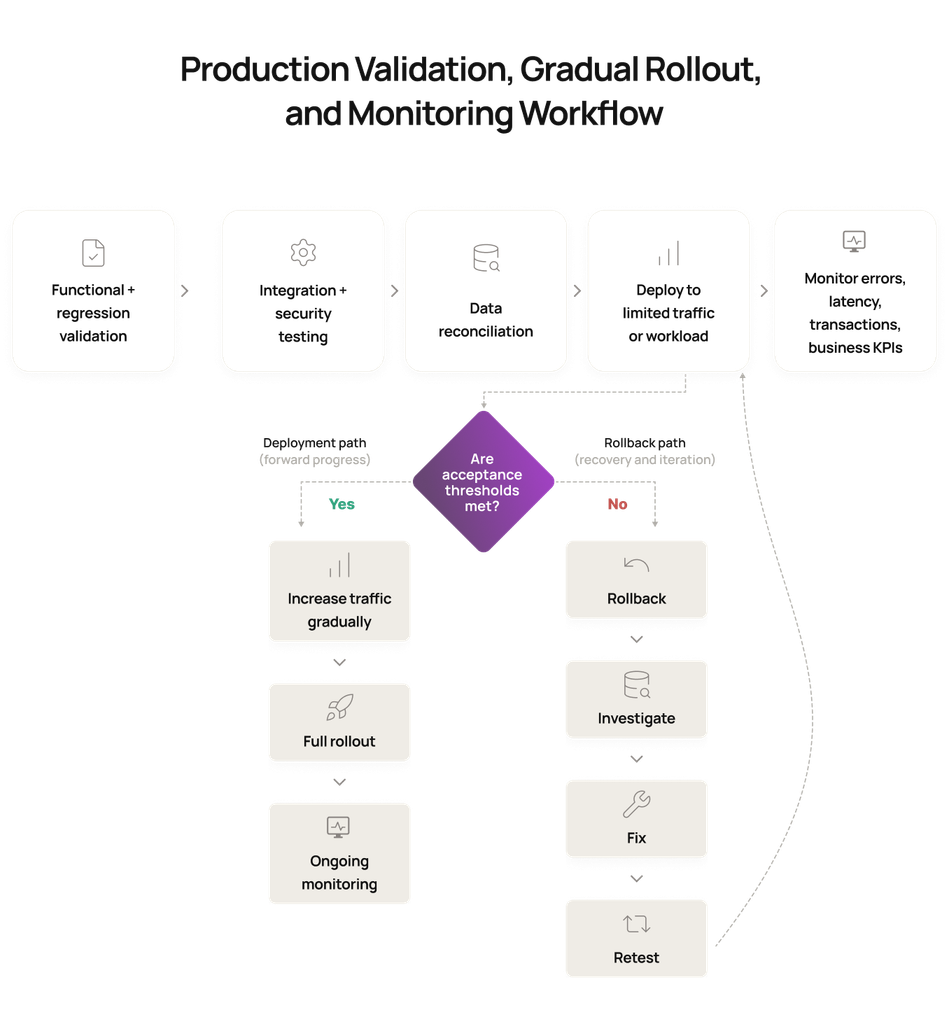
For a financial workflow, calculation differences and reconciliation failures may matter more. Set clear go-forward and rollback thresholds for those metrics.
If transaction errors cross the agreed limit, latency moves outside the accepted range, or reconciliation fails, send traffic back to the previous version and investigate. You should also be clear about who owns that decision and what happens after each trigger.
Legacy System Modernization Cost, Timeline, and ROI in 2027
If you’re preparing an initial budget for legacy system modernization services, market ranges can help you understand the order of magnitude but they can’t replace an assessment of your own application.
For planning purposes, recent published 2026 cost guides provide a useful starting point, although their ranges vary materially:
| Approach | Indicative planning range |
| Rehost | $50,000 to $150,000 |
| Replatform | $100,000 to $300,000 |
| Refactor | $250,000 to $1 million+ |
| Rebuild | $500,000 to $5 million+ |
The cost of legacy system modernization services depends on code complexity, integrations, data volume, undocumented business rules, test coverage, compliance requirements, downtime constraints, and the amount of functionality you plan to change.
Use the system inventory from Step 1 as the basis for vendor estimates, then add pricing constraints such as data migration, compliance, acceptable downtime, and testing requirements.
Here’s a simple way to think about that in practice.
For example, an illustrative $400,000 refactoring estimate could break down like this:
| Cost component | Illustrative amount |
| Engineering | $220,000 |
| Integrations | $50,000 |
| Data migration | $40,000 |
| Testing | $35,000 |
| Security/compliance | $25,000 |
| Contingency | $30,000 |
| Estimated total | $400,000 |
In this example, the estimated $400,000 total sits within the broader refactoring range. The breakdown simply shows you the direction the budget is taking.
How long does legacy system modernization take?
Speaking from experience, we’ve found that a small single application under roughly 50,000 lines of code may take one to two weeks to replatform in a suitable scenario, while refactoring can take one to three months.
For a medium system of around 500,000 lines of code with several databases, replatforming opportunities may be limited to hosted database migrations, which can take about a month, while refactoring may take two to three months.
Enterprise ERP environments and decades-old monoliths require individual assessment.
How to calculate the ROI of legacy system modernization?
The best way to move forward here would be to look at your current annual cost, including infrastructure, licenses, support contracts, specialist skills, incident resolution, maintenance engineering, manual workarounds, and repeated integration fixes.
Then estimate what modernization could change. Measure the engineering time you expect to recover, maintenance spend you can remove, features or integrations you can deliver faster, and outage or compliance costs you can reasonably reduce.
Build the business case across four categories:
| ROI area | What to measure |
| Cost savings | Infrastructure, licenses, support, maintenance engineering, incident resolution |
| Speed to market | Release lead time, engineering effort per release, delayed feature work |
| Business value | Revenue or efficiency enabled by new capabilities, integrations, uptime, or UX improvements |
| Risk reduction | Outage exposure, unsupported technology, security and compliance remediation |
A practical framework is:
ROI = (maintenance savings + productivity gains + business value enabled + expected risk reduction – modernization investment) / modernization investment x 100
Use conservative inputs. Count freed engineering time only when it can support planned work. For outage risk, use probability-weighted impact.
Intuz Recommends
We at Intuz have often seen approximately 30% to 40% reductions in application maintenance costs after modernization in some environments. There, the savings also freed the budget for new feature development and supported faster, safer, more predictable release cycles. But we treat that as experience from specific customers, not a universal benchmark.
Is AI Safe for Legacy System Modernization? Risks and Controls
AI can accelerate legacy system modernization. However, its output still needs explicit engineering controls:
| Risk | What to check |
| Business logic changes | Do you have validated rules and regression baselines for critical workflows? |
| Incorrect code transformation | Will AI-assisted changes pass code review, tests, and security analysis? |
| Sensitive code or data exposure | Which models and environments can access proprietary code, credentials, customer data, or regulated information? |
| Weak test coverage | Do current tests represent important production behavior? |
| Uncontrolled automation | Who owns architecture approval, exceptions, deployment, and rollback? |
Human review should match the risk. Security reviewers may verify authentication, authorization, secrets handling, and dependency risk. Domain specialists may validate pricing or regulatory logic. QA can compare old and new transaction outputs.
Legacy System Modernization Case Studies: Real-World Results
The following examples cover different modernization problems, so focus on the decision each one supports:
1. Capital One
If you’re dealing with a large on-premises estate, Capital One shows what modernization can look like at a serious scale. The company exited eight on-premises data centers over an eight-year migration to AWS.
AWS reports a 70% improvement in disaster-recovery time during tests, a 50% reduction in transaction errors, and development-environment provisioning dropping from three months to minutes.
2. Intesa Sanpaolo
If your challenge is a sprawling application portfolio, Intesa Sanpaolo gives you a very different modernization example.
By July 2026, the bank reported that more than 800 applications had moved to Google Cloud infrastructure, while roughly the same number had been decommissioned from its physical infrastructure.
3. Jefferson County, Alabama
If you’re working with a decades-old mainframe, Jefferson County is a useful example of how far the economics can shift.
The county modernized a 30-plus-year-old Unisys mainframe environment containing 28 applications across 11 databases by migrating it to Microsoft Azure.
The project was planned for 24 months but completed in 14 months. Jefferson County reported an 88.9% reduction in annual system operating costs and more than $500,000 in yearly licensing and maintenance savings.
4. Experian
If you want to see where AI-assisted modernization starts becoming tangible, Experian is the strongest example here. Experian used AWS Transform to modernize seven legacy .NET applications and move them to .NET 8.
Across the project, AWS reports that 687,600 lines of code were transformed, developer effort fell by about 40%, and the work saved approximately 300 engineering days.
How to Choose the Right Legacy System Modernization Company
By the time you start speaking to legacy system modernization companies, you should already have a basic system inventory, your critical workflows, major dependencies, business constraints, and the outcomes you expect from modernization.
Give the same information to every company you shortlist. Then compare how they respond to it, rather than comparing service-page claims.
Here’s a quick table to help you cruise through that conversation:
| Ask for | What you should receive |
| An initial technical assessment | What the provider understands about your architecture, dependencies, data, integrations, and areas of technical risk |
| A component-level recommendation | What they would rehost, replatform, refactor, rebuild, retain, or retire, with reasoning for each decision |
| The major unknowns | What still needs investigation and which assumptions could change the scope, cost, or timeline |
| The first migration slice | Which component or workflow they would tackle first and why it is a sensible place to prove the approach |
| An AI usage plan | Where AI will assist, what engineers will review, and which outputs must pass automated or manual validation |
| A production plan | How the provider will test the migrated component, introduce traffic or workload gradually, monitor it, and roll it back if required |
| An estimate with assumptions | The factors behind the cost and timeline instead of a single unexplained number |
Ask shortlisted companies to walk you through one engagement where the constraints resemble yours.
Hear about what made a project difficult, what the team discovered during implementation, what failed during testing, how they handled those failures, and what changed after deployment.
That also gives you a much faster way to spot weak proposals.
If a company can’t explain its assumptions, identify technical unknowns, show how transformed code will be validated, or tell you what would trigger a rollback, you still don’t have enough information to commit to a modernization program.
Thinking of Legacy System Modernization Services? Think Intuz
Intuz brings 16+ years of enterprise engineering experience, with 54+ AI systems currently in production across AI agents, automation workflows, predictive systems, and other AI applications. Simply put, we know what we’re doing, and we have the numbers to back it.
When you work with us, you get senior technical involvement from the beginning. Our AI engagements are senior-led from kickoff, so you’re not relying on several layers of account management to translate complex technical decisions between you and the engineering team.
We also don’t assume every assessment needs to become an implementation project. Our consulting process includes a discovery sprint, use-case prioritization, ROI targets, milestones, and contingency paths, and it can end with a clear go or no-go recommendation.
For one UK real-estate client, the Expert Agent CRM had no public API, even though every applicant and viewing still had to end up there.
We created four browser-automation scripts for applicant searches, record creation, duplicate checks, and viewing bookings, with persistent sessions, retry logic, and screenshot-based debugging.
Together, they effectively gave the legacy CRM a synthetic API that could run unattended in production. The best part is, you can see the same focus on measurable outcomes across other Intuz clients.
For QuickShift Logistics, we delivered 10 custom automations in four weeks for an operation handling more than 12,000 monthly shipments across eight cities, reducing manual operations by 77% and generating $12,000 in annual savings.
Therefore, to make an initial modernization discussion useful, bring us the same evidence you’ve gathered throughout this guide: your architecture and dependency information, integration list, incident and release data, compliance requirements, and downtime constraints.
Schedule a free 30-minute consultation with Intuz, and we’ll show you how to put all of that in a practical modernization plan. It will be worth your time.
Work with Intuz
Ready to Modernize Your Legacy System?
Get a practical modernization roadmap, estimated costs, and the right AI approach for your system.
Get Your Assessment
Share this article