In this guide, we’ll look at 11 AI optimization techniques across the model, inference, application, and infrastructure layers, plus how to choose the right approach for the constraint you’re trying to solve. But first – here are the basics.
AI infrastructure is becoming a bigger budget commitment for many organizations. In fact, 86% of business and technology decision-makers expect that spending to increase over the next three years, with average budgets projected to more than triple.
But as more AI workloads move into production, bigger budgets alone won’t keep costs in check. The real question becomes whether your system can scale without getting too slow or expensive to run, and that typically comes down to latency, memory use, or throughput spend.
No wonder many teams start by shrinking the AI model through quantization, pruning, or distillation. But compression is only one part of the equation.
What Is AI Model Optimization?
Simply put, it’s the process of improving the computational and operational efficiency of an AI model while preserving acceptable predictive quality.
AI model optimization encompasses techniques applied to model weights, numerical precision, architecture, execution graphs, inference workflows, and serving infrastructure to lower latency, memory usage, compute consumption, and deployment cost.
11 Best AI Model Optimization Techniques
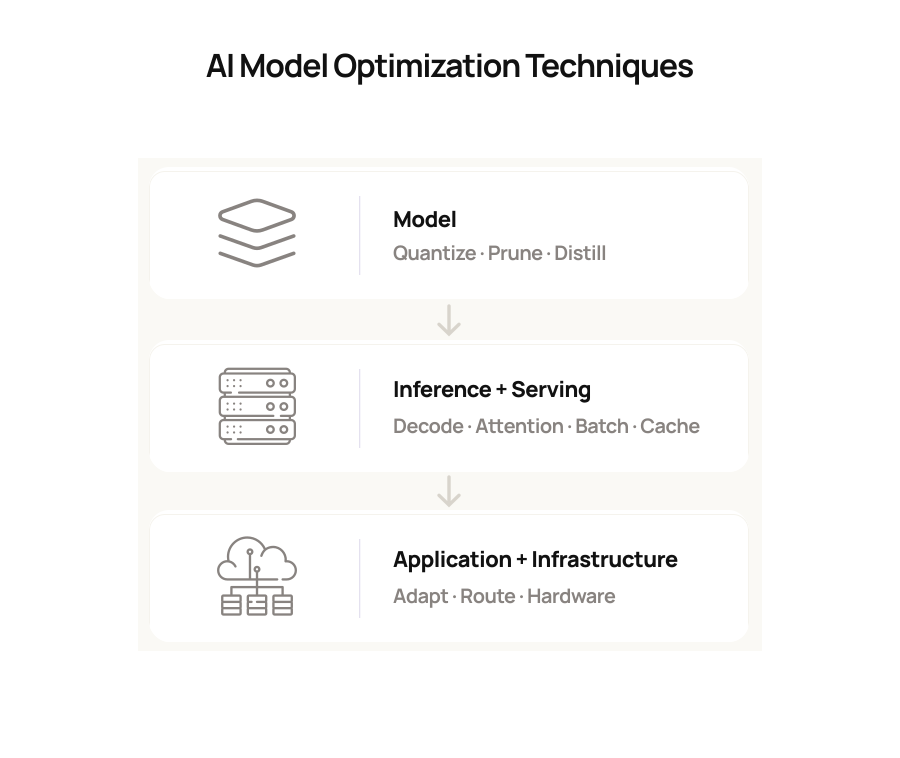
We’ve grouped the 11 techniques below by the part of the tech stack they affect, making it easier for you to compare their purpose, benefits, and implementation considerations:
Model-level optimization
1. Quantization
If GPU memory is becoming a constraint, quantization is often one of the first techniques worth testing. You store model weights, activations, or KV-cache values at lower precision, such as FP8, INT8, INT4, or FP4, instead of BF16 or FP16.
That can minimize memory pressure and improve throughput or latency when your hardware and kernels support the selected format efficiently.
But there’s a trade-off
Lower precision can affect output quality, so you still need to evaluate the quantized model against the workload you plan to serve.
2. Pruning
Pruning gives you another way to decrease model overhead. You remove weights, channels, attention heads, or other components that contribute relatively little to your target workload. The resulting model may require less memory and computation.
Here’s the catch
A smaller model on paper doesn’t automatically give you faster inference. Your serving runtime and accelerator still need to exploit the resulting sparsity pattern, and aggressive pruning can hamper performance on harder tasks.
3. Knowledge Distillation
Knowledge distillation lets you train a smaller student model to reproduce useful behavior from a larger teacher model. You can cut down on inference cost, memory requirements, and deployment complexity while accepting some loss in generality.
The only thing is, your evaluation set becomes particularly important here. It needs to represent the kinds of cases your smaller model will encounter once you put it into production.
Inference and serving optimization
4. Speculative decoding
If token generation is slowing your application down, speculative decoding can help reduce sequential decoding work.
A lightweight drafter proposes several tokens, and your target model verifies them together. When the acceptance rate is high, you can lessen the number of sequential target-model passes and improve token latency.
5. FlashAttention
Longer context windows can make attention increasingly expensive because of the amount of data moving between GPU high-bandwidth memory and faster on-chip SRAM.
FlashAttention shortens that data movement while preserving the exact attention calculation. You’re likely to see the most value when attention becomes memory-bound or your context lengths grow.
6. Continuous batching
Fixed batching can leave expensive accelerator capacity waiting for the slowest request in a batch to finish.
With continuous batching, you can admit new work as capacity becomes available rather than waiting for every request in the current batch to complete. That can keep your accelerators busier and improve throughput under concurrent traffic.
The balance matters
If you push utilization too far, your aggregate throughput may improve while individual requests spend longer waiting. Set your concurrency and token budgets against the latency targets your application needs to meet.
7. PagedAttention and KV-cache management
If you’re serving autoregressive models at scale, KV-cache memory can become a serious constraint. The model needs to retain key-value states for previously processed tokens, and that cache can consume a substantial amount of accelerator memory.
PagedAttention manages your KV cache in blocks so memory can be allocated and shared more efficiently across requests. That narrows fragmentation and can help you support greater concurrency, particularly with larger models and longer sequences.
8. Automatic prefix caching
If many of your requests start with the same system prompt, document prefix, or conversation history, you may be paying repeatedly for computation you have already performed.
Automatic prefix caching lets your serving layer reuse previously computed KV-cache blocks for that shared portion of the prompt. You still need fresh computation for newly generated output, but you can avoid repeating part of the prefill work across similar requests.
Tools such as vLLM, TensorRT-LLM, and SGLang
Bring several of these capabilities into production inference stacks, including quantization, continuous batching, KV-cache management, prefix reuse, optimized attention, and speculative decoding.
Adaptation, application, and infrastructure optimization
9. LoRA and PEFT
If you need to customize a base model for several tasks, full fine-tuning can become unnecessarily expensive.
Low-Rank Adaptation (LoRA) and other parameter-efficient fine-tuning (PEFT) techniques enables you to freeze the base model and train a much smaller set of adapter parameters.
That can sharply decrease the memory and compute you need for customization while allowing you to maintain several task-specific adapters around the same base model.
Keep the scope clear, though
LoRA mainly curb your adaptation cost. Your base-model inference cost remains broadly similar unless you combine it with other optimization techniques.
10. Application-Layer Cost Controls
Some of your easiest savings may come from asking the model to do less work in the first place. You can:
- Remove irrelevant context
- Cap unnecessary output length
- Cache reusable results where correctness allows
- Route straightforward requests to smaller models
- Reserve higher-cost models for tasks that genuinely require them
This technique is especially useful if your first production architecture sends every request to the same high-capability model simply because it was the quickest path to deployment.
11. Hardware-Software Co-Design
You can choose the right optimization technique and still see disappointing results if your hardware cannot use it efficiently.
Your model format, inference runtime, kernels, and accelerator generation all need to work together. A lower-precision format, for example, gives you limited benefit if the target hardware does not accelerate it effectively.
How to Choose the Right AI Model Optimization Technique
It’s simple – start with the constraint you need to improve. Then pick the smallest intervention that directly addresses it. The table below encapsulates it all:
| Your primary constraint | Techniques to consider | Why |
|---|---|---|
| GPU memory | Quantization, PagedAttention, KV-cache quantization | Scale down model and cache memory pressure |
| Token latency | Speculative decoding, FlashAttention | Limit sequential decoding work or attention overhead |
| Throughput | Continuous batching, PagedAttention | Improve accelerator utilization and request concurrency |
| Repeated long prompts | Automatic prefix caching | Reuse computed prompt states |
| Edge or constrained deployment | Quantization, pruning, distillation | Trim compute and memory requirements |
| Task-specific customization cost | LoRA / PEFT | Adapt your base model with fewer trainable parameters |
| End-to-end unit cost | Application controls, hardware-software co-design | Prune unnecessary model work and align execution with your target hardware |
Real-World Example: Optimizing an AI System for Production
We compared four image-generation models and three background-removal approaches at Intuz across quality, cost, latency, and production readiness. GPT Image 2 produced the strongest results for typography, logos, branding fidelity, and complex edits.
However, it couldn’t natively generate the transparent PNGs required downstream and averaged about 200 seconds per generation, compared with 15–40 seconds for Nano Banana.
Rather than move to a weaker generator, we changed the surrounding pipeline.
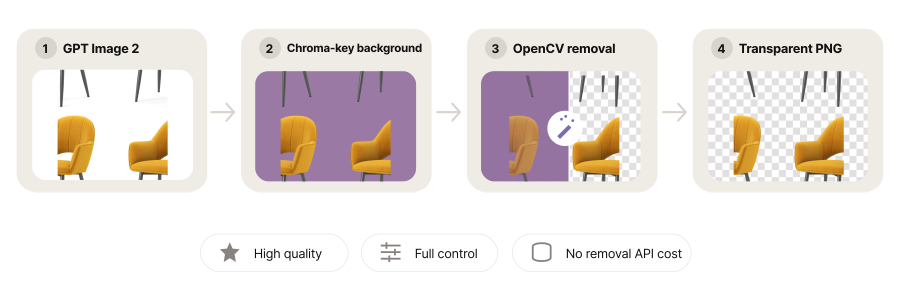
The workflow generated images against an AI-selected chroma-key background and used OpenCV for removal. In our testing, OpenCV delivered the cleanest extraction without an external API cost or dependency.
Cost also influenced how you might deploy the models. Nano Banana cost about $0.025 per image, versus roughly $0.230 for GPT Image 2, making the lower-cost option better suited to bulk or internal generation while premium output can be reserved for brand-sensitive assets.
How Intuz Approaches AI Model Optimization for Production: Best Practices
Once you know where your AI system is under pressure, the next step is deciding what to change and proving that the change will hold up under production conditions.
As an AI development company, we start with one rule before optimizing: establish a production baseline across the metrics that matter to your workload, including latency, throughput, memory use, cost per request, failure rate, and output quality.
Without that baseline, we feel it’s difficult to know whether a change solved the problem or simply moved it elsewhere.
We’ll then focus on the constraint creating the greatest impact instead of changing several parts of the stack at once. Whether that’s GPU memory, token latency, unit cost, or output quality, a clearly defined p0 gives us something specific to optimize and measure.
Testing also needs to reflect how your system will actually run.
Therefore, we’ll benchmark representative prompt lengths, output sizes, concurrency, retrieval steps, and target hardware, ensuring bottlenecks in caching, queueing, networking, or infrastructure aren’t hidden by an isolated model test.
We’ll then define acceptable thresholds for accuracy, task success, or output quality before deployment and evaluate each candidate against the same standard. A cheaper or faster system is only useful if it still produces the results your application requires.
And when an optimization is ready for production, we’ll introduce it gradually, monitor the same performance and quality metrics, and keep a rollback path available until the new configuration proves stable under real traffic.
So, if your AI architecture is becoming more expensive to run, schedule a free 30-minute consultation with Intuz. We’ll review your current setup, identify where efficiency is being lost, and help you determine which changes are worth testing before you commit a bigger budget.
FAQs
What is the difference between quantization, pruning, and distillation?
Quantization stores weights and activations at lower precision, such as INT8 or INT4. Pruning removes weights, channels, or attention heads that contribute little. Distillation trains a smaller student model to mimic a larger teacher. Quantization is usually fastest to test; distillation needs the most training effort and data.
Does quantization reduce AI model accuracy?
It can, but the loss depends on precision and task. 8-bit formats such as INT8 and FP8 typically stay close to full-precision quality, while 4-bit formats show larger, model-dependent drops, especially on reasoning, math, and coding. Always benchmark the quantized model on your own production prompts before deploying.
Is a larger quantized model better than a smaller full-precision model?
Often, yes. A 2024 study of open-source instruct models from 7B to 70B found larger models quantized to 4-bit generally outperformed smaller models at higher precision under similar memory budgets. The finding came from zero-shot tests, so validate it against your own tasks and latency targets.
How can I reduce LLM inference costs in production?
Start with application-layer controls: trim irrelevant context, cap output length, cache repeatable results, and route simple requests to smaller models. Then optimize serving with continuous batching, prefix caching, and quantization. Measure cost per request, latency, and quality before and after each change so savings don’t hide regressions.
What is speculative decoding and does it change model output?
A small draft model proposes several tokens, and the main model verifies them in one pass. The original Google research reported 2-3x faster inference on T5-XXL with an identical output distribution. Real gains depend on how often the target model accepts the draft’s tokens.
What is PagedAttention and why does vLLM use it?
PagedAttention stores the KV cache in fixed-size blocks, similar to virtual memory paging in an operating system. The original vLLM paper found existing systems wasted 60-80% of KV-cache memory; PagedAttention cut waste to under 4%, improving throughput 2-4x over prior serving systems at similar latency.
Should I use LoRA or full fine-tuning?
Use LoRA when you need to adapt one base model to several tasks on a limited GPU budget. The original LoRA paper cut trainable parameters by 10,000x and GPU memory by 3x on GPT-3 175B. Full fine-tuning can still win on large domain shifts, so test both.
Which inference engine should I use: vLLM, TensorRT-LLM, or SGLang?
vLLM suits teams that need broad model and hardware support and fast iteration. TensorRT-LLM fits a stable model on NVIDIA GPUs where peak throughput justifies longer compilation. SGLang performs best when many requests share prefixes, like system prompts, RAG documents, or multi-turn chats. Benchmark on your traffic.
Work with Intuz
Want to improve your AI model's performance?
Let's explore how AI model optimization can improve accuracy, reduce costs, and boost efficiency with Intuz
Let's Get Started
Share this article