Explore how Intuz solved the production-scale branded image generation problem — and what it means for your business.
Every brand that generates or edits images at scale — product catalogs, ad creative, logos, marketing assets — eventually hits the same wall: the AI model with the best output quality often isn’t the one that’s production-ready, and the cheapest model isn’t always the right one for brand-critical work.
Get this decision wrong and you either overpay for quality you don’t need, or ship inconsistent, off-brand assets at scale. Our engineering team ran a hands-on evaluation of four leading image generation models and three background removal approaches to answer a very practical question: which pipeline actually holds up in production, at what cost, and at what speed?
The findings below are unedited from our internal research — we’ve added business context throughout to show what each finding actually means if you’re running an image-heavy operation.
This study was conducted to identify the most suitable image generation and editing pipeline for production-scale asset generation, specifically focused on:
- Branding asset recreation
- Logo reconstruction
- SVG-like graphic generation
- Text-heavy image generation
- Transparent PNG asset creation
- Automated image editing workflows
The evaluation focused on four image generation models and three background removal approaches to determine the optimal balance between quality, cost, latency, and production readiness.
Show
- No single AI model wins across the board — GPT Image 2 delivers the highest quality, typography, and brand fidelity, but Nano Banana and Nano Banana Pro offer far better cost-to-quality ratios for bulk or draft work.
- Model choice has a real budget impact at scale — at 100,000 images, the cost gap between the cheapest and most expensive model is roughly $21,000, making pipeline architecture a financial decision, not just a technical one.
- The best-quality model has a critical limitation — GPT Image 2 doesn’t natively generate transparent PNGs, which is a common production blocker for brands needing clean, transparent assets.
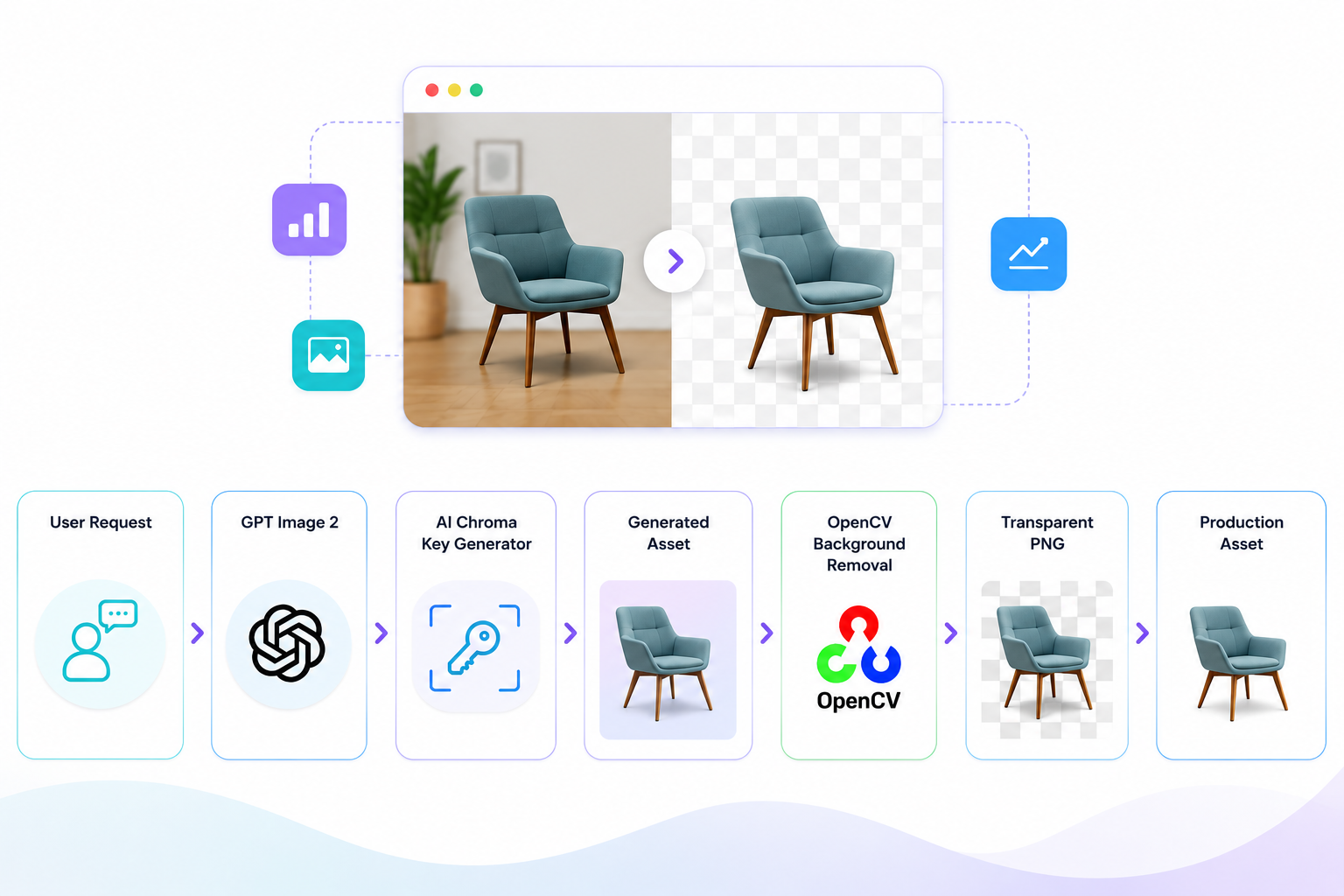
- A chroma-key + OpenCV workflow solves the transparency gap — combining GPT Image 2 generation with an AI-selected chroma key background and OpenCV-based removal delivers premium quality with true transparent PNG output.
- OpenCV outperforms paid background-removal tools — it beat BRIA AI and Remove.bg on cost (free), speed, and accuracy, especially for preserving fine edges, logos, and typography.
- The recommended production stack is GPT Image 2 + OpenCV — this combination gives the best balance of visual quality, branding consistency, transparent output, and low operational cost for production-scale image generation.
Is This Relevant to Your Business?
If any of the following describe how your business produces images, this research maps directly onto a cost or quality problem you likely already have:
- E-commerce & D2C brands generating thousands of product images monthly for Amazon, Shopify, or Flipkart listings, where marketplace rules require clean white or transparent backgrounds.
- Marketing and creative agencies producing branded creative, ad banners, and social assets at volume, where logo and typography fidelity directly affects client trust.
- Retail, fashion, and catalog brands that need brand-consistent product photography and seasonal creative variants without scaling their design team.
- SaaS and product companies looking to embed AI image generation directly into their own platform, where cost-per-image and latency determine unit economics.
- Print-on-demand, packaging, and merchandising businesses that depend on accurate logo reconstruction and transparent PNG assets for production.
The Common Thread
At volume, every fraction of a cent or second saved per image compounds into real budget and turnaround-time impact. The cost tables later in this piece make that concrete.
Explore Solutions
Generative AI Development Company For Enterprise & StartupsWhat We Tested
Image Generation AI Models (Tested)
- GPT Image 1.5
- GPT Image 2
- Nano Banana
- Nano Banana Pro
Background Removal Solutions (Tested)
- OpenCV
- BRIA AI
- Remove.bg
Which AI Models Performs Best?
| Capability | GPT Image 1.5 | GPT Image 2 | Nano Banana | Nano Banana Pro |
|---|---|---|---|---|
| Text-to-Image | ✅ | ✅ | ✅ | ✅ |
| Image Editing | ✅ | ✅ | ✅ | ✅ |
| Multi-step Editing | Limited | Strong | Very Good | Strong |
| Inpainting | ✅ | ✅ | ✅ | ✅ |
| Reference Image Support | Limited | Excellent | Excellent | Excellent |
| Text Rendering Accuracy | Medium | Excellent | Very Good | Excellent |
| Logo Recreation | Medium | Excellent | Very Good | Excellent |
| Complex Prompt Understanding | Medium | Excellent | Very Good | Excellent |
| Character Consistency | Medium | Excellent | Very Good | Excellent |
| Multi-image Composition | Medium | Excellent | Excellent | Excellent |
| Transparent PNG Support | ✅ | ❌ | ❌ | ❌ |
| PNG Output | ✅ | ✅ | ✅ | ✅ |
| JPEG Output | ✅ | ✅ | ✅ | ✅ |
| WebP Output | ✅ | ✅ | ✅ | ✅ |
| Production Readiness | Medium | High | High | Very High |
Intuz Recommends
No single model wins on every dimension. The right choice depends on your use case — bulk draft generation, brand-critical hero images, or fast transparent assets — which is exactly the kind of pipeline decision our engineering team makes for clients before a single image is generated.
Image Quality & Size Options
| Feature | GPT Image 1.5 | GPT Image 2 | Nano Banana | Nano Banana Pro |
|---|---|---|---|---|
| 1024 Resolution | Yes | Yes | Yes | Yes |
| 2048 Resolution | Partial | Yes | Yes | Yes |
| 4096 Resolution | No | No | No | Yes |
| Aspect Ratio Control | Good | Excellent | Excellent | Excellent |
| High Fidelity Generation | Medium | Excellent | Very Good | Excellent |
What We Found With Each Tool
GPT Image 1.5 — Good for Quick, Simple Assets
Strengths
- Native transparent PNG generation
- Lower generation cost
- Faster generation times
- Suitable for simple branding assets
- Good for workflows requiring immediate transparency
Limitations
- Text distortion
- Character spacing inconsistencies
- Curve deformation
- SVG recreation inaccuracies
- Logo fidelity degradation
- Shape inconsistencies in complex designs
Engineering Observation
The model performs adequately for simple graphical assets but struggles when precise geometry, typography, and branding consistency are required.
Image Examples
Purpose: Show text distortion and curve degradation. here you can see input image.
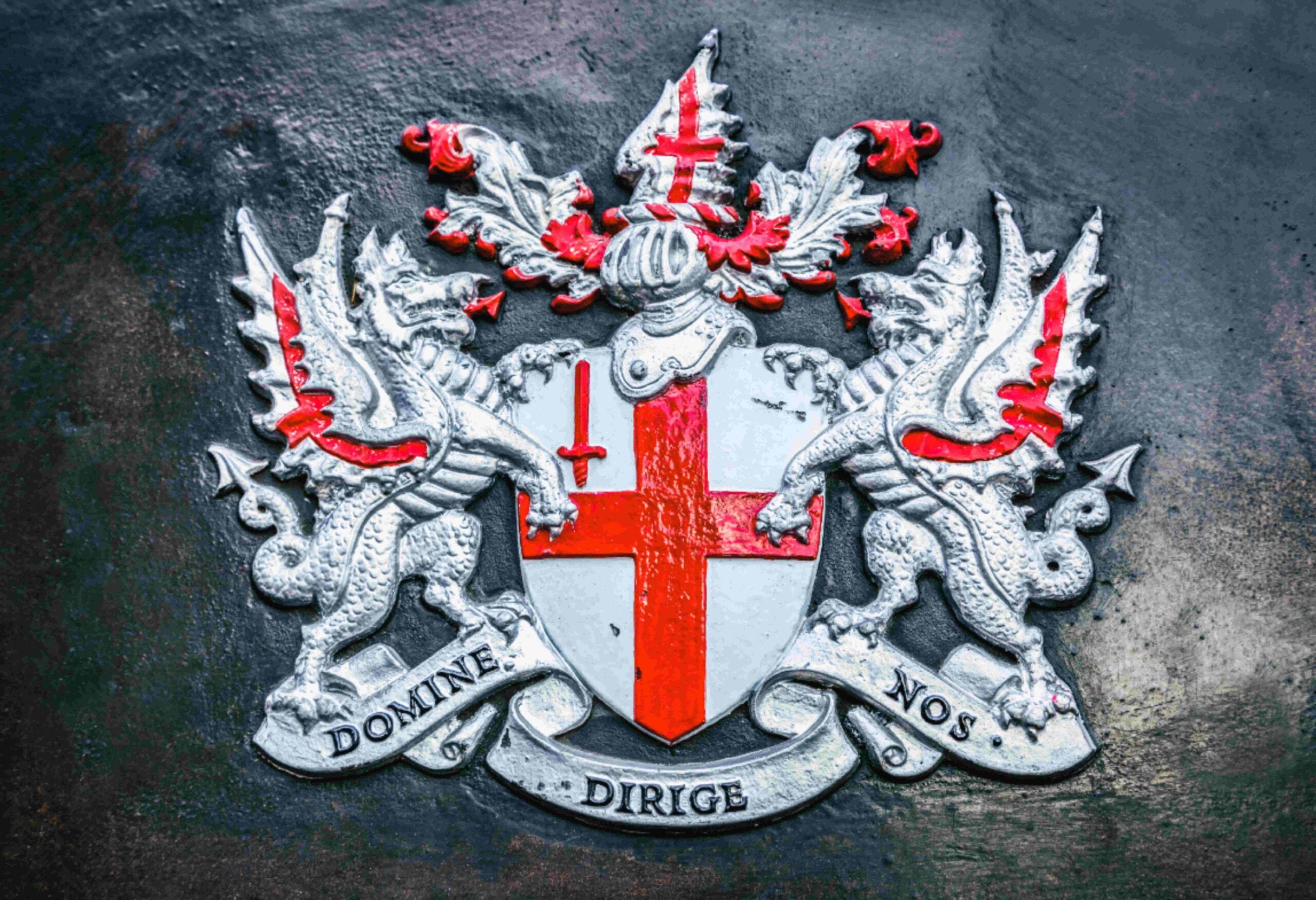
Zoomed In Low Quality: Visible Pixels
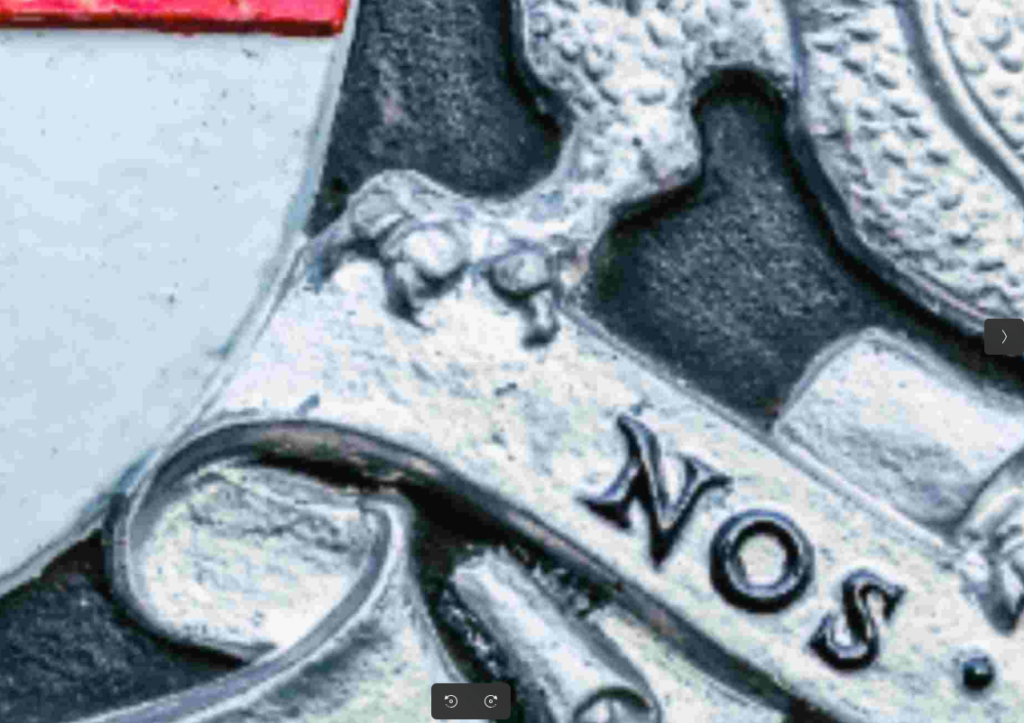
Output Image

Zoomed-In Output Image: Shows the loss of details in the texts
GPT Image 2 — Best for Premium, Brand-Critical Images
Strengths
- Highest generation quality among tested models
- Superior instruction following
- Best typography accuracy
- Better logo reconstruction
- Better shape consistency
- Better color preservation
- Better editing quality
- Stronger branding fidelity
Limitations
- No transparent PNG generation
- Higher generation latency
- Higher generation cost
Engineering Observation
GPT Image 2 consistently produced the most production-ready outputs for train liveries, branding assets, logo recreation, and complex editing workflows.
Image Example
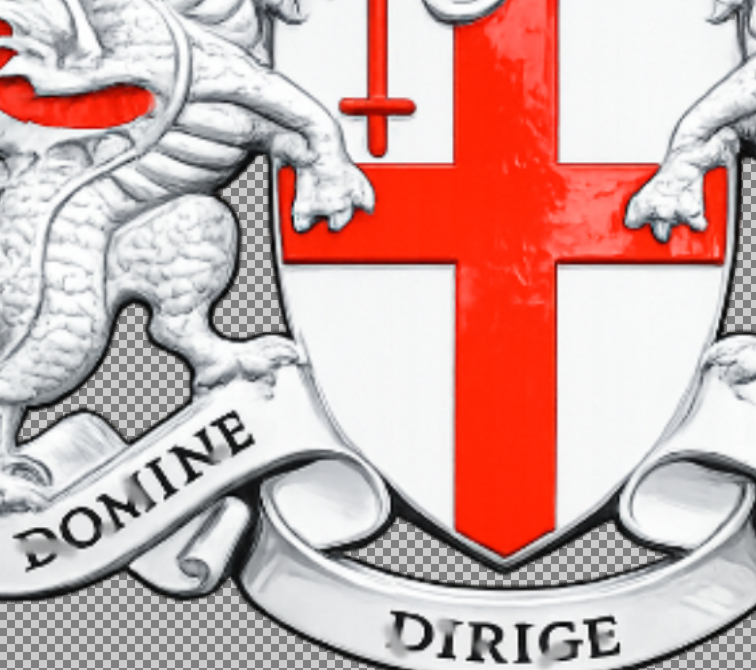
Original Low Quality Input Image: with background

Output Image: But with a white background

This is the model our tests point to for anything customer-facing — hero product shots, campaign creative, brand sensitive logo work. If your team is currently relying on manual design hours to hit this quality bar, this is where automation pays off fastest.
Nano Banana — Best for Fast, Low-Cost Bulk Images
Strengths
- Fast inference
- Low generation cost
- Strong editing workflow
- Good instruction adherence
- Suitable for bulk production workflows
Limitations
- Lower visual fidelity compared to premium models
- Some inconsistency in highly detailed branding assets
Top Use Cases
- Bulk image generation
- Draft concepts
- Internal workflows
- Cost-sensitive production systems
Nano Banana Pro — Best Balance of Quality and Cost
Strengths
- Excellent text rendering
- High-resolution generation
- Strong editing consistency
- Superior multi-image composition
- Better multilingual support
- Excellent branding fidelity
Limitations
- Higher cost than Nano Banana
- Slightly higher latency
Top Use Cases
- Marketing creatives
- Branding assets
- Infographics
- High-resolution design generation
How Fast Is Each Model? (Latency Benchmark)
| Model | Average Latency |
|---|---|
| GPT Image 1.5 | 40–80 seconds |
| GPT Image 2 | ~200 seconds (Observed) |
| Nano Banana | 15–40 seconds |
| Nano Banana Pro | 30–90 seconds |
What Will This Actually Cost You?
Standard Cost Benchmark (Generation Quality Comparison)
| Metric | Value |
|---|---|
| Input Tokens | 2,500 |
| Output Tokens | 7,000 |
| Model | Input Cost | Output Cost | Total Cost / Image |
|---|---|---|---|
| GPT Image 1.5 | ~$0.0125 | ~$0.2240 | ~$0.237 |
| GPT Image 2 | ~$0.0200 | ~$0.2100 | ~$0.230 |
| Nano Banana | ~$0.005 | ~$0.020 | ~$0.025 |
| Nano Banana Pro | ~$0.025 | ~$0.125 | ~$0.150 |
Which Tool Gives You the Most for Your Money
| Model | Relative Cost |
|---|---|
| Nano Banana | 1x (Cheapest) |
| Nano Banana Pro | 6x |
| GPT Image 2 | 9.2x |
| GPT Image 1.5 | 9.5x |
Your Costs at Scale (100 to 100,000 Images)
| Model | Cost / Image | 100 Images | 1,000 Images | 10,000 Images | 100,000 Images |
|---|---|---|---|---|---|
| Nano Banana | ~$0.025 | ~$2.50 | ~$25 | ~$250 | ~$2,500 |
| Nano Banana Pro | ~$0.150 | ~$15 | ~$150 | ~$1,500 | ~$15,000 |
| GPT Image 2 | ~$0.230 | ~$23 | ~$230 | ~$2,300 | ~$23,000 |
| GPT Image 1.5 | ~$0.237 | ~$23.70 | ~$237 | ~$2,370 | ~$23,700 |
Technical Finding
One interesting finding from the cost analysis is that GPT Image 2 is actually slightly cheaper than GPT Image 1.5 under a standardized generation workload, while delivering significantly better image quality, text rendering, logo fidelity, and editing performance.
From a pure cost perspective:
- Nano Banana is the most economical option.
- Nano Banana Pro provides the best quality-to-cost ratio.
- GPT Image 2 provides the highest generation quality.
- GPT Image 1.5 remains useful primarily when native transparency is required.
What This Means for Your Business
Look at the 100,000-image column above: the gap between the cheapest and most expensive model is roughly $21,200. At real production volume, model selection isn’t a technical footnote — it’s a budget line. Teams that default to whichever model is trending often overpay for quality their use case doesn’t need, while teams chasing the cheapest option sometimes ship inconsistent, off-brand assets that cost more in rework and lost conversions than
they saved in generation fees.
The right answer is almost always a blended pipeline — cheap, fast models for drafts and bulk internal work, premium models reserved for customer-facing, brand-critical assets.
Designing that split correctly is a large part of what we do when we build image pipelines for clients.
Production Challenge
Transparent Background Generation
The primary challenge encountered during evaluation was transparent background generation.
Although GPT Image 2 delivered the best generation quality, it does not natively support transparent PNG output.
This created a production blocker because generated assets were required in transparent PNG format for downstream processing and rendering workflows.
Solution
Chroma Key Based Background Removal
Instead of generating transparent images directly:
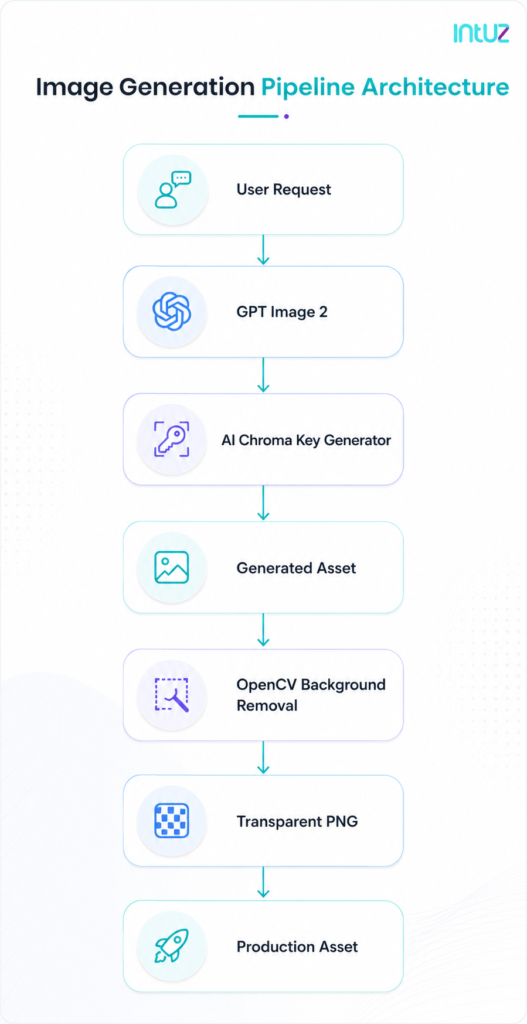
- Generate image using GPT Image 2.
- Generate a unique AI-selected chroma key background color.
- Render the image against that background.
- Remove the background using post-processing.
This approach allowed the use of the highest quality generation model while still achieving transparent assets.
Image Example
Purpose: Show generated image before background removal.
GPT 2.0 Chroma Key Background Colour Generated Image

Which Background Removal Tool Works Best? – Solution Comparison
| Solution | Cost | Quality | Processing Speed | Production Suitability |
|---|---|---|---|---|
| OpenCV | Free | ⭐⭐⭐⭐⭐ | Fast | Excellent |
| BRIA AI | Paid | ⭐⭐⭐⭐ | Medium | Good |
| Remove.bg | Paid | ⭐⭐⭐ | Fast | Medium |
| GPT Image 1.5 Native Transparency | Included | ⭐⭐⭐ | Fast | Medium |
BRIA AI — Decent, But Costs Extra
Strengths
- Good edge detection
- Reasonably accurate foreground extraction
- Easy API integration
Limitations
- Additional API cost
- Occasional detail loss
- Dependency on external service
Image Example
Purpose: Show extracted asset and edge quality. Where visible key colour was left out

Remove.bg — Fast, But Loses Detail
Strengths
- Fast processing
- Easy integration
Limitations
- Edge artifacts
- Detail loss around thin elements
- Reduced accuracy for complex assets
Image Example
Purpose: Inaccurate Removal of the Background

OpenCV — Free, Fast, and the Most Accurate
Strengths
- Zero API cost
- No external dependency
- Fast processing
- Fully controllable pipeline
- Excellent chroma-key extraction
- Consistent output quality
Engineering Observation
OpenCV produced the cleanest extractions across all tested samples when paired with carefully selected chroma-key background colors.
The results consistently preserved:
- Fine edges
- Logos
- Typography
- Curves
- Branding elements
Image Placeholder
Purpose: Demonstrate superior extraction quality.

Final Recommendation
Best Image Generation Model – GPT Image 2
Reasons:
- Highest visual quality
- Best instruction following
- Best logo recreation
- Best typography rendering
- Best SVG approximation
- Most consistent editing results
Best Background Removal Solution – OpenCV
Reasons:
- Free
- Fast
- Accurate
- Fully controllable
- No external API dependency
Final Production Architecture
Key Conclusion
Among all evaluated approaches, GPT Image 2 delivered the highest overall generation quality and production readiness. While transparent background generation was unavailable, the challenge was successfully addressed through an AI-assisted chroma-key workflow combined with OpenCV-based background removal.
The final pipeline achieved:
- Highest visual quality
- Strong branding fidelity
- Accurate typography
- Transparent PNG outputs
- Low operational cost
- Production scalability
Why This Matters Beyond Our Own Pipeline
This evaluation wasn’t an academic exercise — it was us solving a real production blocker the way we solve them for clients: benchmark rigorously, understand the cost and quality tradeoffs at real volume, and engineer around a model’s limitations instead of settling for them. The same decision-making shown above — model selection, cost modeling, and production-grade pipeline architecture — is exactly what determines whether an AI image workflow scales cleanly or breaks under real usage.
If your team is generating or editing images at volume — product catalogs, ad creative, branded assets, or anything in between — the questions this evaluation answers are the same ones standing between you and a lower-cost, higher-consistency image pipeline.
Get a Free AI Image Pipeline Assessment
Talk to our engineering team about your current image generation or editing workflow. We’ll review your volume, brand requirements, and cost constraints, and recommend a model and pipeline architecture — the same way we approached this evaluation — tailored to your business.
FAQs
Which AI image generation model is best for branding and logos?
GPT Image 2 delivers the highest quality for branding assets, logo recreation, and typography accuracy. It outperforms other models in instruction-following and editing consistency, making it the top choice for customer-facing, brand-critical visuals despite higher cost and slower generation speed.
Which AI model is most cost-effective for bulk image generation?
Nano Banana is the cheapest option, ideal for drafts, internal workflows, and bulk production. Nano Banana Pro costs more but offers the best quality-to-cost ratio, making it suitable when you need better fidelity without paying premium-model prices.
Can GPT Image 2 generate transparent PNG backgrounds?
No, GPT Image 2 doesn’t natively support transparent PNG output. This is a real production limitation. We solved it using a chroma-key workaround combined with OpenCV-based background removal, achieving transparency without sacrificing image quality.
What’s the best tool for removing image backgrounds?
OpenCV outperformed BRIA AI and Remove.bg on cost, speed, and accuracy. It’s free, fully controllable, and preserved fine edges, logos, and typography better than paid alternatives, making it the recommended production choice.
How much does AI image generation cost at scale?
Costs range from $0.025 (Nano Banana) to $0.237 (GPT Image 1.5) per image. At 100,000 images, that’s a difference of roughly $21,000, so model selection significantly impacts your production budget.
How fast are these AI image generation models?
Nano Banana is fastest (15–40 seconds), while GPT Image 2 takes the longest (~200 seconds) but delivers the highest quality. Speed and quality require a tradeoff depending on your use case and deadlines.
What’s the ideal AI image pipeline for production use?
The recommended architecture combines GPT Image 2 for generation, an AI-selected chroma-key background, and OpenCV for removal. This delivers premium quality, transparent PNG output, brand consistency, and low operational cost at scale.
Work with Intuz
Get a Free AI Image Pipeline Assessment
Book 45-minute free consultation call with Intuz experts.
Let's Get Started
Share this article