This guide explores practical applications of Artificial Intelligence across eight industries, including case studies, technical requirements, business outcomes, implementation timelines, and risks.
AI adoption is widespread, but its measurable value remains uneven. McKinsey reports that 88% of organizations use AI in at least one business function. But only 39% report any impact on earnings before interest and taxes.
Boston Consulting Group (BCG) reached a similar conclusion: 60% of companies gained little material value from their AI use cases despite substantial investment, highlighting the gap between access and execution.
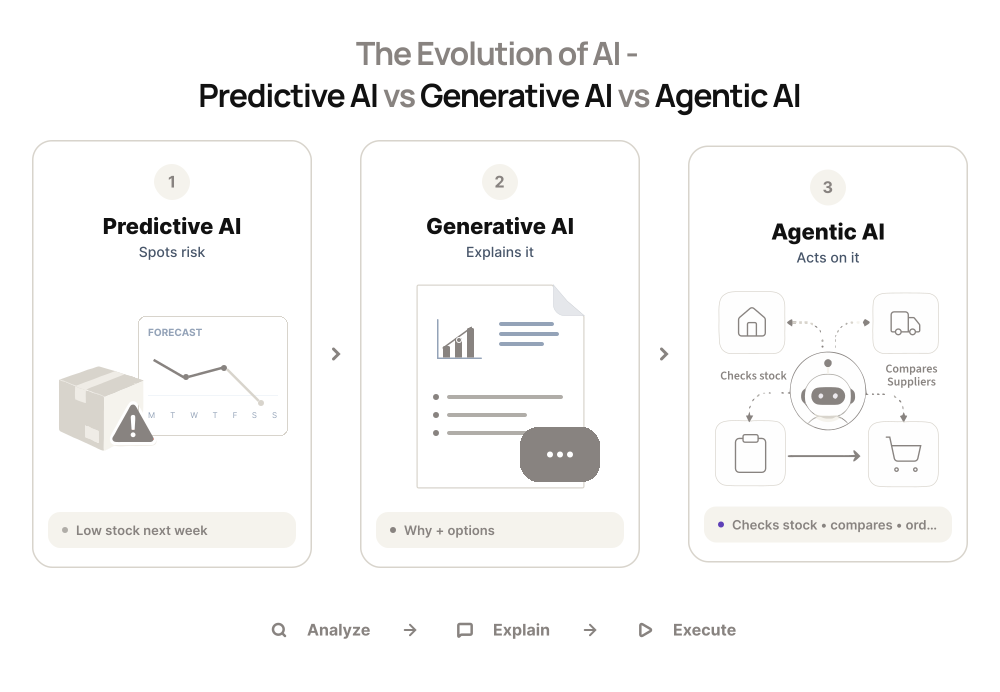
The types of AI applications available to companies have developed in three broad waves:
- Predictive AI (2015-2020) uses historical data to estimate outcomes, such as demand, fraud, equipment failure, and patient risk
- Generative AI applications (2022-2024) create or transform text, code, documents, images, and other content
- Agentic AI use cases (2025 onward) plan and complete multi-step tasks across software systems within defined permissions and review points
For example, a predictive model identifies an inventory risk, generative AI explains the risk and drafts a recommendation, and an AI agent checks the current stock, compares supplier terms and updates the relevant systems, and sends the proposed action for approval.
Show
- 88% of orgs use AI, but only 39% see EBIT impact; BCG found 60% get little value despite investment — the gap is execution, not access.
- Three waves of AI: predictive (2015-2020), generative (2022-2024), agentic (2025+) — scope has moved from analyzing data to completing full workflows.
- Before picking a use case: define the business problem in measurable terms, check data/system readiness, estimate ROI on 1-2 metrics, and decide build vs. buy vs. partner.
- Safer starting points are internal tools (knowledge assistants, document classifiers, forecasting) — avoid high-stakes first projects like loan approval or hiring decisions.
- 8 industries covered with real case studies: healthcare (Careonix — $250K/year saved, 5-min to 30-sec processing), eCommerce (French Florist), finance (real-time fraud scoring under 100ms), legal (GraphRAG for case law), real estate (85% of calls automated in 30 days), logistics (TransIQ — 21% efficiency gain), travel/hospitality (dynamic pricing), manufacturing (30-50% less downtime).
- Four-phase delivery framework: discovery (1-3 wks) → prototyping/PoC (4-8 wks, $5K-$15K) → production build (8-16 wks, $15K-$150K+) → ongoing monitoring for model drift.
- Intuz track record: 3-5 weeks avg for workflow automation to production, 2-3 months for agentic/RAG platforms, 70% of PoCs reach production, 54+ AI systems shipped since 2008.
- Compliance can’t be an afterthought: EU AI Act applies from Aug 2, 2026; sector rules (HIPAA, PCI DSS, SOX, GDPR) must be built into architecture from day one, especially for high-risk uses.
- Common failure points: legacy-system incompatibility, poor data quality, weak user adoption, and scope creep — not lack of AI capability itself.
The scope has expanded from analyzing information to completing more of the workflow.
A 2024 roadmap centered on standalone generative AI use cases may overlook system readiness, process ownership, or cross-functional coordination among the teams affected by those actions. At Intuz, we’re seeing clients recognize this change.
Instead of building a normal product first and adding an AI feature later, they want AI considered from the beginning. That influences how the whole product is planned, including its data, architecture, integrations, permissions, and workflows.
This guide explores practical applications of Artificial Intelligence across eight industries, including case studies, technical requirements, business outcomes, implementation timelines, and risks.
How to Identify the Right AI Use Cases for Your Business
Use these four checks to decide whether an AI idea deserves a place in your vision board:
1. Start with a business problem
Look for processes that consume significant time, involve large volumes of information, create repeated delays, or require your teams to make similar decisions frequently.
Next, define the problem in measurable terms. For instance, how many hours does the process demand each week? How often do errors occur? What does the process currently cost your company? A clear baseline gives you something concrete to improve.
2. Assess data and system readiness
Identify what data the application will require, where it’s stored, who controls it, and if you have permission to use it. In addition, check whether the information is complete, current, consistently formatted, and representative of the conditions the system will face.
Poor quality data can limit the accuracy of even a capable AI model and increase the time and cost required to take enterprise AI use cases into production.
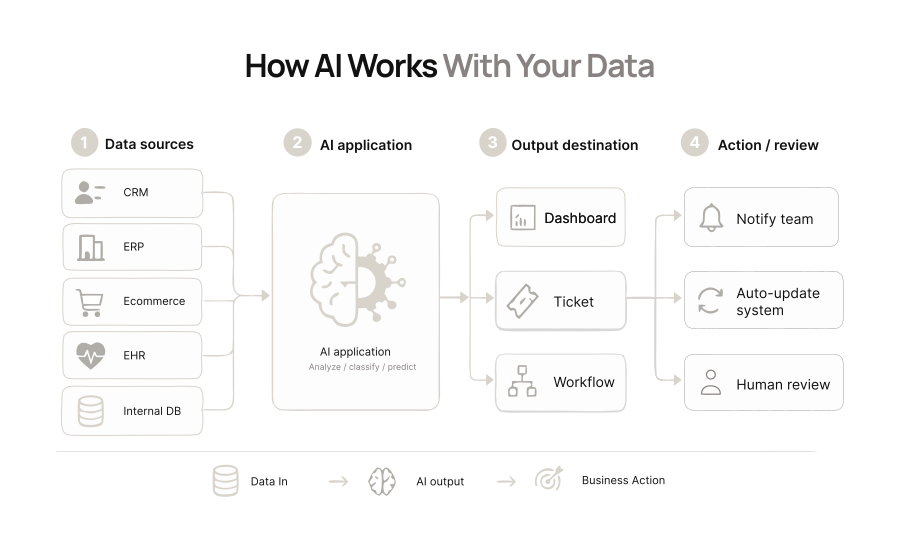
System readiness matters as much as data readiness. Confirm how the application will connect with your CRM, ERP, eCommerce platform, internal databases, or other relevant tools. Determine where the output will go and what action should follow.
At Intuz, we’ve found that our clients encounter legacy-system incompatibility and data cleansing or mapping most frequently during this assessment.
3. Estimate the ROI and prioritize the starting point
Define the result you expect the AI application to generate, which could be to improve processing speed, forecast accuracy, conversion rates, or operational efficiency while reducing errors, losses, and repetitive manual work.
Select one or two primary metrics and record the current performance with the expected result. The comparison should show whether the expected annual value justifies development, integration, infrastructure, training, and maintenance.
| Primary metric | Current baseline | Target after AI | Estimated annual value |
| Processing time per case | 20 minutes | 12 minutes | $120,000 in staff time saved |
| Error and rework rate | 6% | 3% | $60,000 in avoided costs |
Your first project should also be valuable without being unnecessarily difficult to control.
For example, an internal knowledge assistant, document classification system, or forecasting tool may be a safer starting point than an application that approves loans, recommends medical treatment, or makes employment decisions.
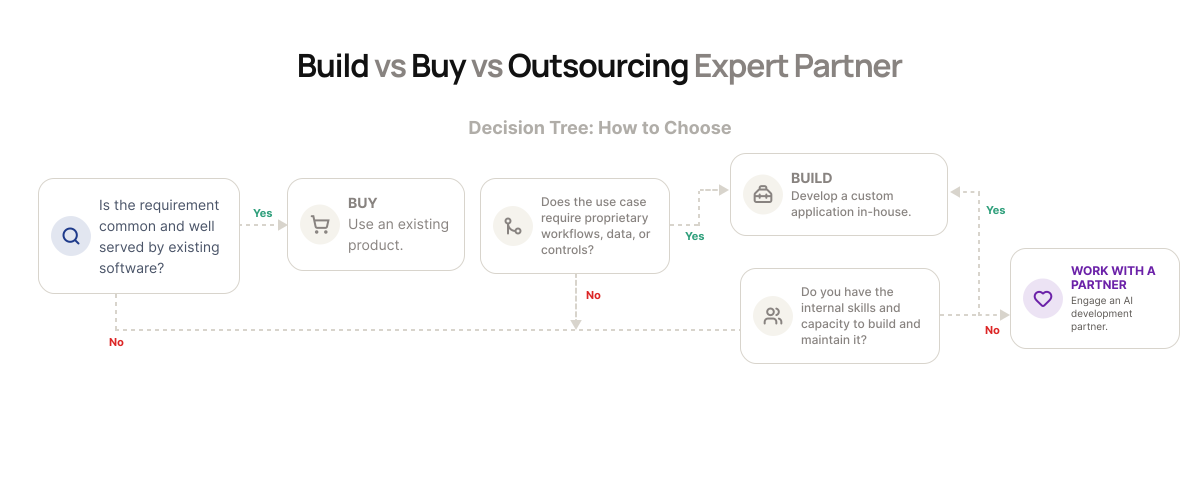
4. Decide whether to build, buy, or work with an outsourcing partner
Buy an existing product when mature software already addresses the requirement. Build internally when the use case depends closely on proprietary data, workflows, or intellectual property and your team has the required skills.
Work with an AI development partner when the application requires customization, several integrations, or specialist expertise. Compare each path according to time to launch, ongoing responsibility, customization, and control over data and security.
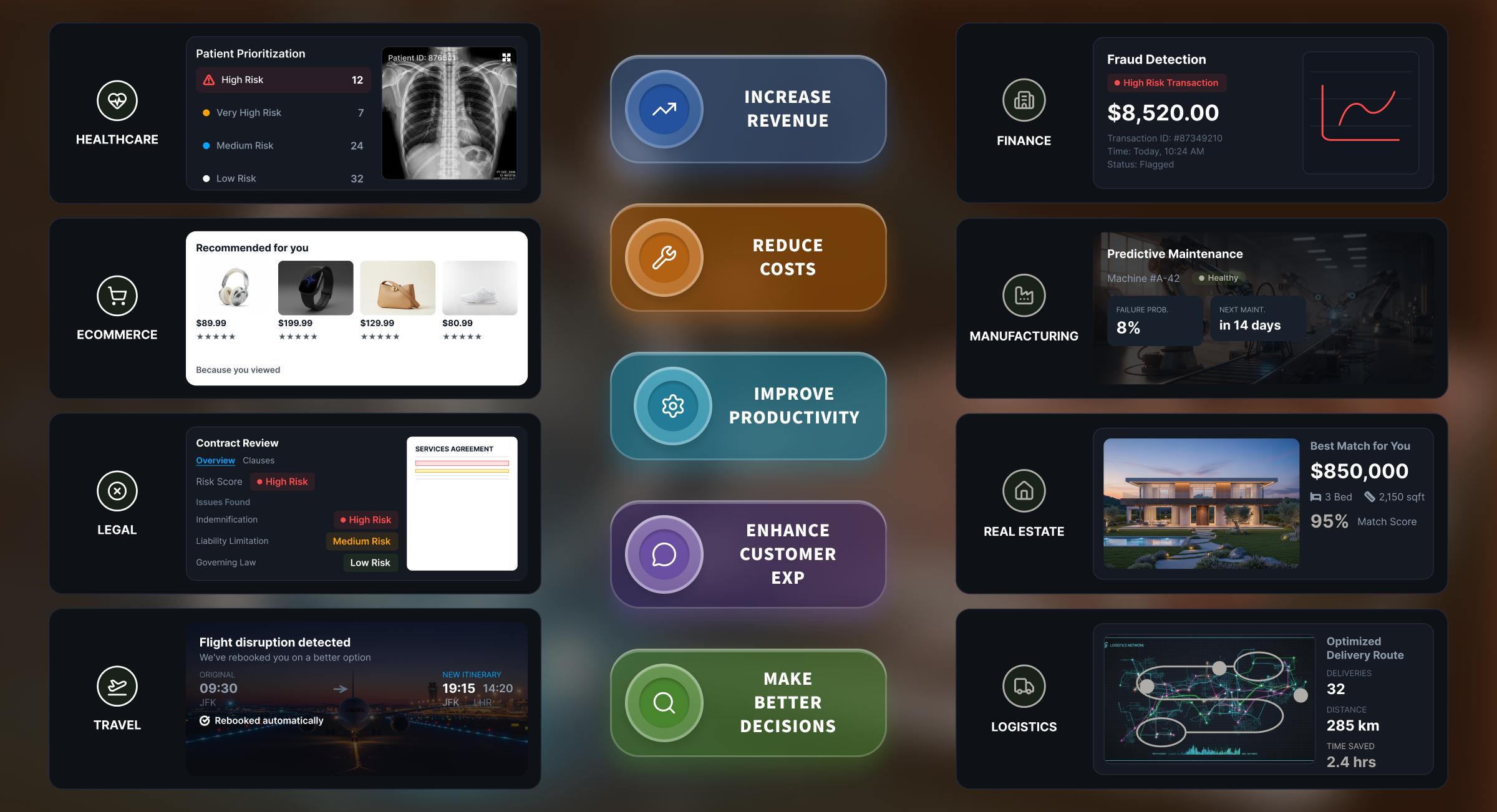
AI Use Cases by Industry: 8 Real-World Applications of Artificial Intelligence
To see where AI fits your own operations, here’s how it’s being put to work across domains:
1. AI applications in healthcare
Here, you can use AI wherever clinical or administrative work is delaying care or reimbursement.
- During patient onboarding, for instance, it can collect forms, verify details, and route records to the right team
- In revenue cycle management, it can support ICD-10 and CPT coding, process insurance claims, and flag missing information
- AI medical scribes can also turn consultations into draft clinical notes for review
Among the most useful AI use cases in healthcare, diagnostics and patient-risk prediction can give your teams more time to act.
For example, you can use AI-assisted radiology analysis to review scans, AI-powered pathology analysis to examine tissue images, and early disease detection and screening models to flag signs that need attention.
Predictive analytics, on the other hand, can support readmission prediction, disease progression prediction, and high-risk patient identification.
For care beyond the hospital, you can use AI-powered remote patient monitoring to:
- Interpret wearable-device data
- Generate AI-based health alerts
- Support chronic disease management
Your research teams can also use AI-assisted drug discovery to screen compounds and medical research and literature analysis to review evidence faster.
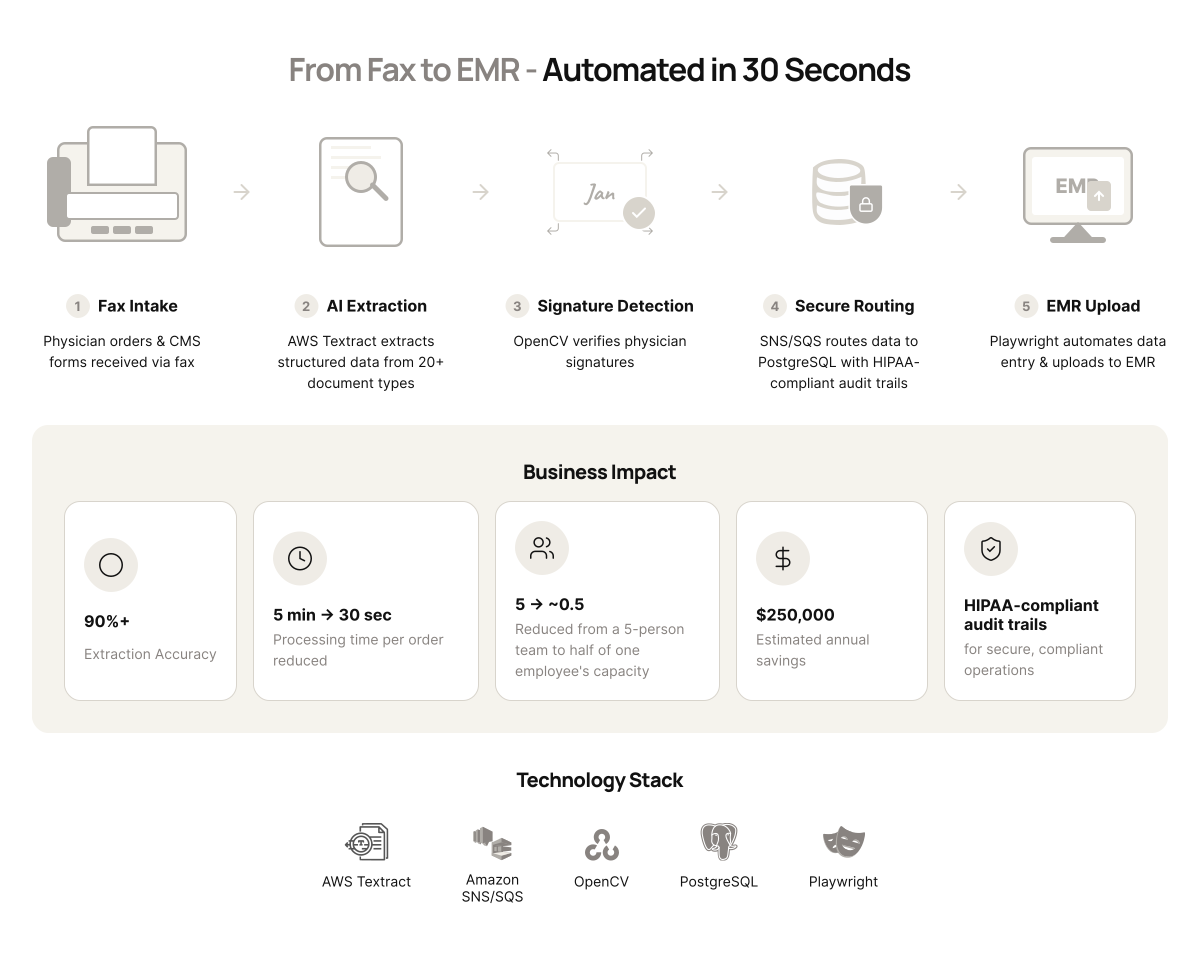
At Intuz, we worked with Careonix, a home-health provider whose team manually processed physician orders and CMS forms received by fax. We developed an agentic workflow using AWS Textract, SNS/SQS, OpenCV, PostgreSQL, and Playwright.
It extracted structured data from more than 20 document types, detected physician signatures, maintained HIPAA-compliant audit trails, and automated EMR uploads. The system achieved 90%+ extraction accuracy and cut processing from five minutes to 30 seconds per order.
Careonix reduced a five-person fax team to roughly half of one employee’s capacity and estimated annual savings of $250,000.
2. AI use cases in eCommerce
Your eCommerce data can reveal more than past purchases. For example:
- LLM-powered recommendations can interpret search language, browsing context, seasonal intent, and cross-category affinity to decide what each shopper should see next
- Dynamic pricing models can adjust offers using demand, competitor prices, inventory levels, and segment willingness to pay
- Forecasting models can help you plan replenishment, identify dead stock, and prepare for seasonal demand
These AI use cases in eCommerce can also change how customers discover and buy. For example, computer vision can support search by image and virtual try-on. AI agents can answer pre-purchase questions, track orders, manage returns, and suggest relevant add-ons.
Lastly, the Universal Commerce Protocol (UCP) can give agents a common way to interact with your catalog, checkout, and post-purchase systems.
At Intuz, we worked with French Florist, a 45-year brand held back by outdated technology. We rebuilt its commerce platform around personalized shopping, AI-driven inventory, and in-store operations tools.
We developed a connected e-commerce storefront, AI inventory system, custom iPad operations app, and reporting backend. The forecasting system analyzes historical sales, current demand trends, and SKU-level performance using Python, ARIMA, pandas, NumPy, and scikit-learn.
We also connected more than 13 delivery, payment, analytics, and marketing tools through a modular integration layer, allowing each service to operate independently without compromising the wider platform.
3. AI applications in finance
In this industry, you can use AI to make decisions faster without weakening the controls around them.
For real-time fraud detection, models such as isolation forests and autoencoders can identify unusual transaction patterns, while graph neural networks can expose suspicious relationships among accounts, devices, merchants, and transfers.
The system must evaluate every transaction before it clears without slowing the payment experience. At Intuz, we recommend an event-driven microservices architecture capable of calculating a risk score in under 100 milliseconds. Here’s how it aligns:
| Component | What it does |
| High-throughput streaming | Feeds the transaction into a dynamic feature store |
| Dual scoring engines | Combine established rules with machine-learning models |
| Asynchronous feedback loop | Uses confirmed fraud and false positives to improve future decisions |
Other AI use cases in finance can remove delays from compliance, lending, and customer service. Here are some of them:
- KYC and AML checks: You can use NLP to extract and compare names, addresses, and identifiers from submitted documents, while computer vision verifies identity documents and facial matches before screening customers against PEP and sanctions lists.
- Intelligent document processing: It can extract income, assets, and liabilities from bank statements, tax returns, and pay stubs before sending the information into underwriting
- Conversational agents: Among the most practical AI use cases in banking, these can handle balance inquiries, transaction disputes, loan applications, and investment questions across chat, voice, or email
- Alternative-data credit models: You can also use these to assess applicants who are poorly represented by traditional FICO scores
At Intuz, we support financial-services clients by incorporating operational security throughout the software development lifecycle. Depending on your regulatory environment, that may include SOC 2, PCI DSS, and SOX requirements.
We use controls such as tokenization, strict access permissions, protection for data at rest and in transit, and immutable audit logs for critical activities.
4. AI applications in legal services
Among the most practical AI use cases for your legal team is contract analysis. You can use NLP models to extract termination rights, liability caps, renewal terms, SLAs, and other key clauses, then flag language that differs from your playbook or creates additional risk.
For litigation, eDiscovery systems can:
- Classify large document sets
- Detect potentially privileged material
- Assign relevance scores
Legal research requires a more relationship-aware architecture. You can use RAG to search case law, statutes, and regulatory databases, retrieve supporting passages, and verify citations before the answer reaches a lawyer.
At Intuz, we recommend GraphRAG because legal reasoning depends on connections: a judgment may rely on a statute, while one contract clause may modify another. A graph database preserves those relationships better than vector search alone.
Agentic routing and multi-step reasoning can then follow authorities and dependencies across several sources.
You can also use AI applications to monitor regulatory changes across jurisdictions, compare them with your policies and contracts, and identify the teams, clauses, or controls that may require attention.
5. AI applications in real estate
Real estate teams lose time when property search, valuation, lead follow-up, and transaction paperwork happen across disconnected systems.
You can use AI to connect those stages, helping buyers find suitable properties faster, giving your agents better-qualified leads, improving valuation decisions, and reducing manual document work.
For property discovery, you can let buyers describe what they want in everyday language, such as:
“A family home near good schools under $500,000 with a yard.”
The system can translate that request into location, budget, property, school, and amenity criteria, then surface the most relevant listings.
- Automated valuation models can estimate property value using comparable sales, property features, neighborhood data, and market trends
- For lead generation, you can capture inquiries from your website, property portals, ads, and social channels, then score each prospect according to intent, budget, location, and readiness to buy
- Chatbots can answer initial questions, while automated email, SMS, or WhatsApp follow-ups keep the conversation moving and schedule appointments for your agents
- OCR and document intelligence can extract data from leases, contracts, disclosures, and application forms; the system can flag missing information, route documents for review, and update transaction or compliance workflows without repeated manual entry
At Intuz, we developed an end-to-end property-viewing operations layer for a UK lettings agency receiving enquiries through Rightmove, Zoopla, phone, email, and WhatsApp. Manual triage was causing slow responses, duplicated work, and CRM data-entry overhead.
Today, our workflow-first system uses AI voice agents and LLM-based intent extraction to qualify applicants and interpret natural-language availability across channels, and checks a shared calendar engine before proposing viewing slots.
We used Python and Playwright to automate duplicate checks, applicant creation, and bookings, supported by n8n, Retell AI, ElevenLabs, OpenAI GPT-4.1, Flask, Google Calendar, Gmail, WhatsApp Business API, and Google Sheets.
Within 30 days, AI handled approximately 85% of inbound enquiry calls, reduced staff time spent on enquiry administration by around 60%, brought average first-response time below one minute, captured 100% of enquiries across channels, and eliminated double-bookings.
6. AI applications in transportation and logistics
You can use AI to make routing decisions while conditions are still changing.
| Application | What it covers |
| Dynamic route optimization | Traffic, weather, delivery windows, vehicle capacity, and fuel costs |
| Demand forecasting | Positioning inventory closer to expected demand |
| IoT and machine-learning models | Warning your fleet team about component failures before a vehicle goes offline |
Other AI use cases can match freight with available carriers using capacity and pricing signals. In your warehouse, computer vision can inspect goods, while optimization models improve picking paths and labor schedules.
At Intuz, we worked with TransIQ, where more than 500 million operational records were difficult for non-technical teams to access.
We cleaned the data, added transport-specific business context, and developed an analytics agent using Google Gemini 2.0 Flash, LangChain, Flask, MySQL, and a three-stage SQL validation process.
The system produced a 21% efficiency improvement and saved more than 20 hours each week. We also built 10 self-hosted n8n workflows for QuickShift in four weeks, automating orders, invoices, shipment alerts, and returns across 12,000+ monthly shipments.
7. AI applications in travel and hospitality
For hotels, airlines, and tour operators, dynamic pricing and revenue-management models can adjust rates using booking pace, local events, competitor prices, remaining capacity, and the time left before departure or check-in.
AI use cases in hospitality you protect revenue without relying on fixed seasonal rules:
- Recommendation engines can combine a traveler’s preferences, budget, dates, loyalty history, and real-time availability to assemble suitable hotels, flights, activities, or complete itineraries.
- Conversational booking agents can then answer questions, confirm reservations, handle modifications or cancellations, and support rebooking across chat, voice, or email.
Within a property, you can use guest preferences and occupancy patterns to improve both service and staffing:
- Smart-room systems can remember temperature or lighting choices
- Service teams can receive relevant preference alerts
- Predictive models can align housekeeping, front-desk, and food-service capacity with expected demand
This gives you a more consistent guest experience while reducing avoidable pressure on your teams.
8. AI use cases in manufacturing
You can use AI to reduce the cost of equipment failure, quality issues, and production delays. Predictive-maintenance models combine IoT sensor data with maintenance history to detect patterns that may signal a breakdown 48 to 72 hours in advance.
That gives your team time to inspect the equipment, arrange parts, and schedule repairs before an unexpected stoppage disrupts output. Depending on the operation and data quality, this can reduce unplanned downtime by 30–50%.
For quality control, AI applications using computer vision can inspect components or finished products directly on the production line.
They can identify surface defects, dimensional inconsistencies, assembly errors, or packaging problems at production speed, then route uncertain cases for human review.
Among the most practical AI use cases in manufacturing are:
- Supply-chain control towers, which can combine supplier, inventory, logistics, and factory data into one operating view, flag emerging risks, and trigger exception workflows
- Demand-driven production planning, which can then adjust production schedules using current demand, raw-material availability, plant capacity, and logistics constraints rather than relying only on periodic forecasts
You can also use digital twins to create virtual representations of equipment, factories, or supply networks. Before changing a line configuration, maintenance schedule, or material flow, you can simulate the effect on throughput, downtime, cost, and bottlenecks.
How to Implement AI from Concept to Production
Once you’ve shortlisted a promising use case and delivery approach, the next step is turning that decision into a working application. Intuz uses a four-phase framework for this:
1. Discovery and project definition (Weeks 1-3)
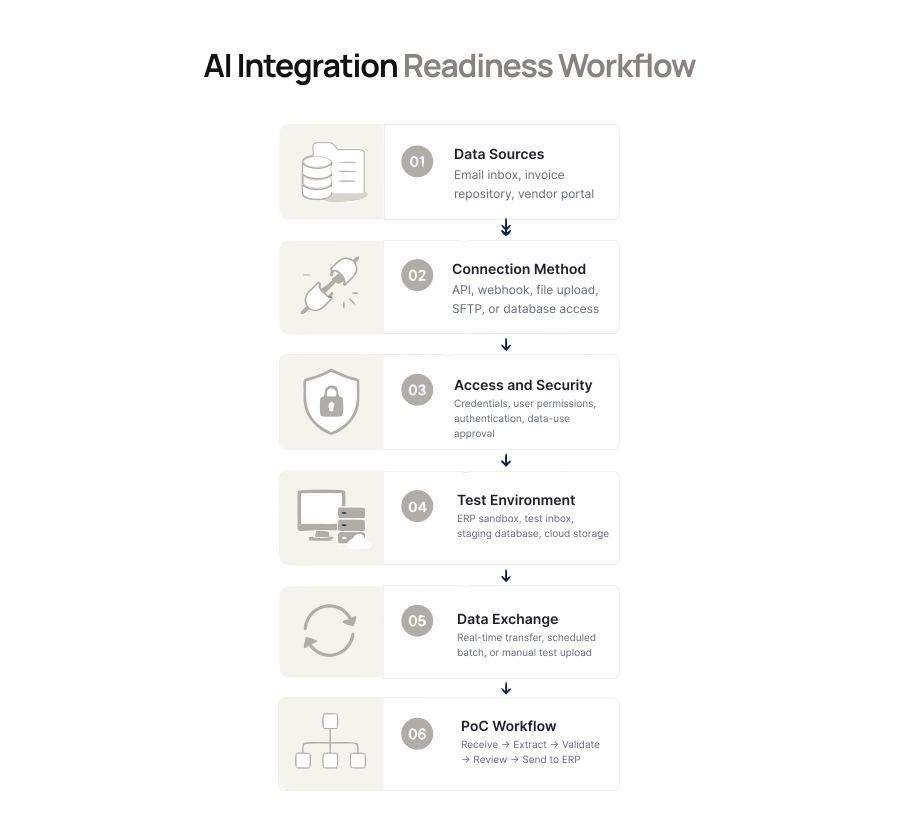
Start by setting the boundaries of the Proof of Concept (PoC). Decide which users, workflow steps, data sources, systems, and decisions it will cover, along with anything you’ll deliberately exclude from the initial scope.
Let’s say you want to automate invoice processing.
You may begin with invoices received by email from a selected group of vendors. The PoC could extract the supplier name, invoice number, purchase order number, invoice date, and total amount before sending the results to a test version of your ERP.
You should then define the operating rules. You may require at least 95% field-level accuracy, direct low-confidence or duplicate invoices to your accounts payable team, and exclude international invoices and tax validation from the first version.
Next, audit the available invoice data. Confirm that you have enough representative files and that your team can access and use them. Use actual invoice volumes, processing times, and error costs to refine the ROI model.
For example, if your team processes 10,000 invoices each month and spends five minutes handling each one, reducing manual processing by 70% would save almost 600 hours a month.
You can compare the value of those hours, along with fewer payment errors and late fees, against the expected development and operating costs. End the phase with a go or no-go decision, a provisional architecture, and an estimated team, timeline, and budget.
2. Rapid prototyping and PoC (Weeks 4-8)
In this step, you test the central claim behind the project: can the AI complete the required task using real organizational data?
Through its AI PoC & MVP Development service, Intuz converts the approved roadmap into a functional prototype that produces actual results.
For the same invoice-processing example, the PoC would receive sample invoices, classify them, extract the selected fields, route low-confidence cases for review, and transfer approved information to a test environment.
Test the PoC with different vendor layouts, scanned documents, missing fields, duplicate invoices, poor image quality, and other variations it’s likely to encounter.
Compare the extracted information with verified invoice records so you can measure model accuracy objectively.
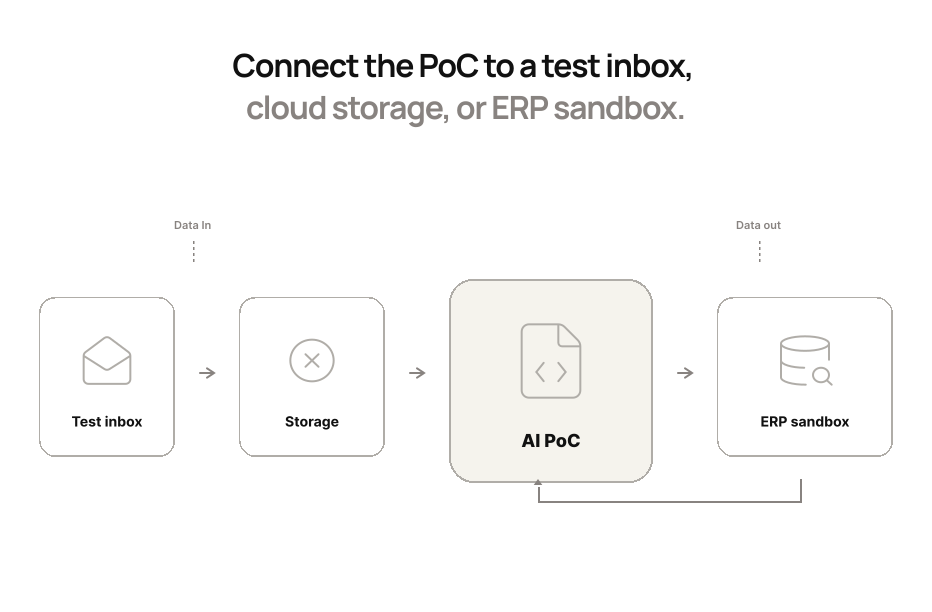
Next, connect the PoC with a test inbox, storage environment, or ERP sandbox to confirm that data can enter and leave the application, pass through the required steps, and reach the destination correctly.
Ask your accounts payable team, for instance, to review extracted fields, correct mistakes, and flag anything that creates confusion or additional work.
A limited integration, such as AI-powered search, may require one to two weeks of development, while a document-processing pipeline may require two to five weeks. A focused project at this level may fall within an initial range of $5,000 to $15,000.
3. Production development and integration (Weeks 8-16)
If the PoC meets the accuracy, integration, and user-acceptance criteria, use its results to develop the complete production workflow.
Connect the application to the approved inbox or vendor portal. Configure it to collect each invoice, assign it to the correct document category, and extract the required fields.
Next, create validation rules that compare the extracted information with your vendor master data and purchase orders. Send uncertain results, missing fields, and possible duplicates to an employee review queue.
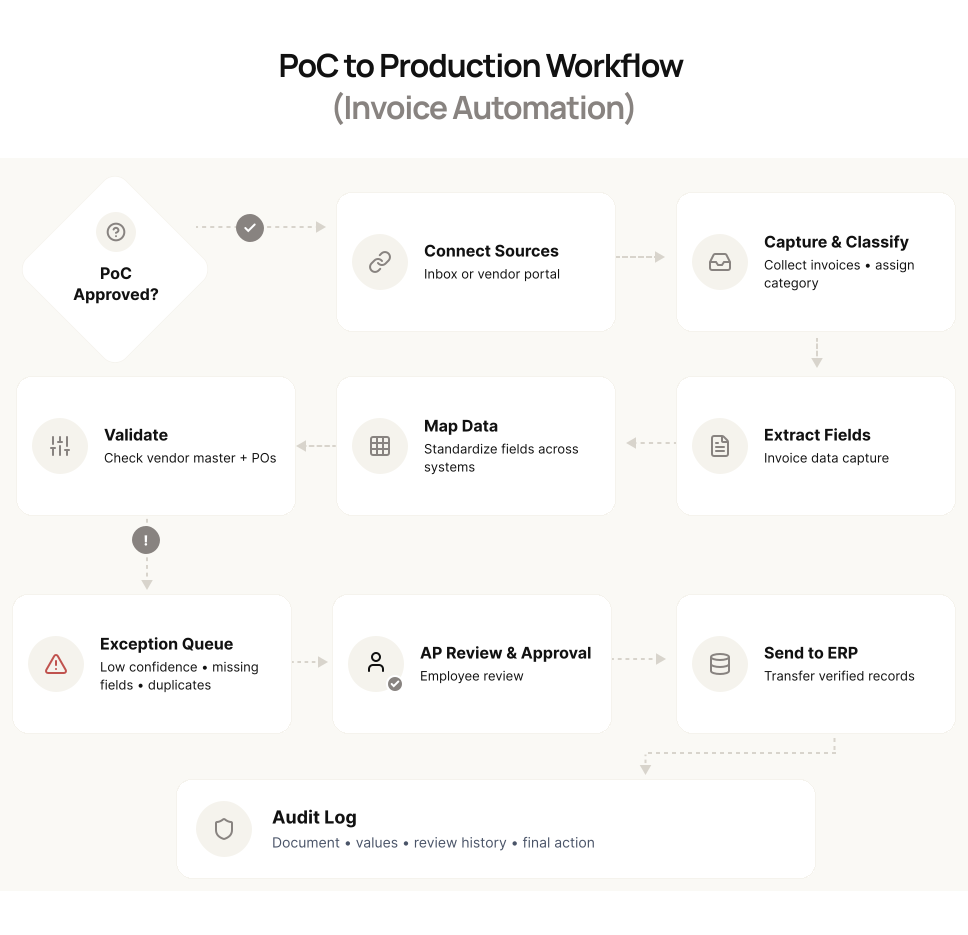
You must map information across systems. Decide how the supplier name and purchase order number on the invoice correspond with the fields in your vendor database and ERP. Standardize those definitions before automating the transfer.
You should also decide how each part of the workflow will run. You may process invoices as they arrive, send approved records to the ERP in scheduled batches, or use both methods.
Add role-based access, authentication, encryption, retry rules, backups, and alerts for failed actions. Test the application with higher invoice volumes, simultaneous users, delayed systems, broken connections, and unfamiliar document formats.
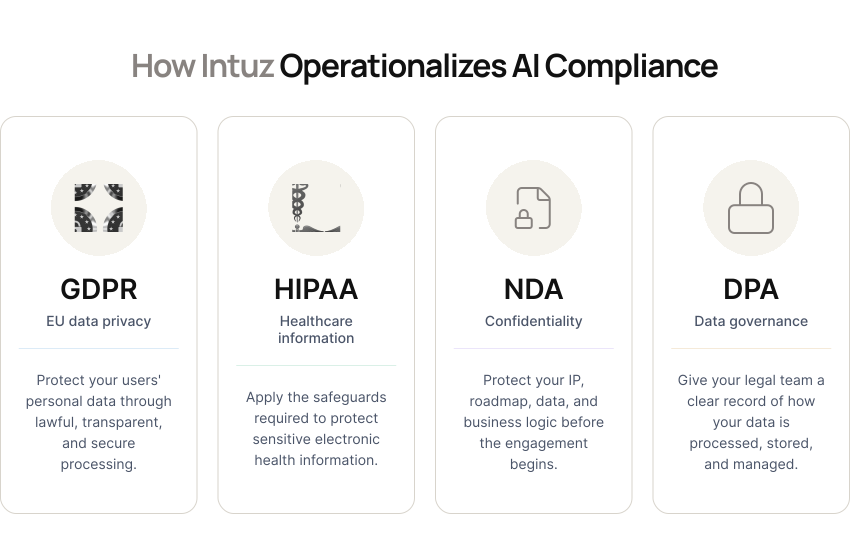
When the application handles regulated or sensitive information, include controls required under frameworks such as HIPAA, SOC 2, and GDPR.
A typical Intuz team includes one AI engineer, one full-stack engineer, one DevOps engineer, and one project manager.
For a multi-agent system connected with an ERP, the initial foundation may take two to three weeks, followed by another one to two weeks for each major module or integration.
Custom workflows may fall within a range of $15,000 to $40,000. Complex platforms involving several systems, agentic workflows, regulated data, or higher volumes may range from $40,000 to $150,000 or more.
Across our projects, user adoption and change management, inadequate testing and validation, data synchronization, process misalignment, and budget or scope creep occur frequently. Semantic interoperability and security or regulatory complexity arise less often, but they can add significant effort.
4. Deployment, monitoring, and optimization (Ongoing)
Before the pilot starts, record the current processing time, error rate, invoice volume, payment delays, and cost per invoice. You will use these figures to measure whether the application improves the process.
Train your employees to review uncertain results, correct extracted fields, approve invoices, and escalate errors.
During the pilot, you should also track extraction accuracy, response time, failed requests, duplicate detection, low-confidence invoices, and ERP errors. Compare those measures with the business results you recorded before deployment.
Review errors regularly and improve the application according to what you find. New vendor layouts may require additional examples, a crowded review queue may require different confidence thresholds, and repeated ERP failures may require stronger retry and alerting logic.
Continue monitoring for model drift, which occurs when changes in the data or operating environment reduce the application’s accuracy over time.
“AI isn’t a trend to chase. It’s a lever. When applied right, it cuts costs, removes friction, and gives your team back the hours that matter.”
– Nilay Dhamsania, Product Success Advisor at Intuz
AI Governance and Compliance: What You Can’t Ignore
As you start building AI applications in business, classify the risk before finalizing the architecture. Under Article 113, the EU AI Act applies from August 2, 2026, although some provisions took effect earlier and certain high-risk requirements follow later timelines.
Medical diagnostics, credit scoring, and employment screening may require stronger controls than internal search, forecasting, or product recommendations.
Depending on the application, these controls can include risk management, data governance, activity logs, technical documentation, human oversight, cybersecurity, and accuracy testing.
You can use the NIST AI Risk Management Framework to organize this work through four functions: Govern, Map, Measure, and Manage.
Your sector may add further obligations. For example:
- Healthcare systems may require HIPAA safeguards, while payment-card workflows may come under PCI DSS
- Public-company financial reporting processes may need to preserve SOX controls, and systems processing EU personal data must account for GDPR
- Data-residency requirements may also depend on applicable laws, contracts, and client requirements
Build AI Applications That Deliver Real Results With Intuz
The range of AI use cases covered in this guide may give you several possible places to begin. Therefore, start with a workflow where the cost of manual effort, delayed decisions, repeated errors, or disconnected information is already visible.
Choose one process, identify the people, data, and systems involved, and define the improvement you expect before development begins. You should then validate the use case through a focused proof of concept using your own data.
Decide in advance how you’ll measure value, whether through processing time, error reduction, forecast accuracy, customer response, cost per task, or employee capacity.
Across Intuz’s last 10 AI projects, workflow automation moved from the first client call to production in an average of three to five weeks.
Agentic AI platforms using RAG and multi-step reasoning required an average of two to three months, while 70% of Intuz PoCs progressed to production.
Since 2008, we’ve delivered more than 54 AI systems in production and over 700 products, with clients including Mercedes-Benz, Bosch, JLL, and Holiday Inn.
Want to identify which AI Applications offer the clearest route to measurable value? Book a free AI use-case assessment with Intuz and receive an initial roadmap for taking the selected workflow into production.
FAQs
How much does it cost to build a custom AI application?
Cost scales with scope. A focused integration like AI-powered search runs $5,000–$15,000 over 1–2 weeks. Custom workflows with ERP integration cost $15,000–$40,000. Complex, multi-system platforms with agentic workflows or regulated data range $40,000–$150,000+. Starting with one well-scoped process keeps early investment predictable while you validate ROI.
How long does it take to go from AI idea to production?
Using a four-phase framework: discovery takes 1–3 weeks, prototyping 4–8 weeks, and production build-out 8–16 weeks. Across Intuz’s last 10 projects, workflow automation reached production in 3–5 weeks on average, while agentic platforms using RAG took 2–3 months. Roughly 70% of PoCs advanced to production.
Which AI use case should a company start with?
Start with something valuable but easy to control, like an internal knowledge assistant, document classifier, or forecasting tool, rather than loan approvals or hiring decisions. Set a measurable baseline first: current processing time, error rate, and cost. Compare that against expected annual value before committing to development, integration, and maintenance budget.
What tools or tech stack power these AI systems?
Stack choice depends on the use case: AWS Textract, OpenCV, PostgreSQL, and Playwright for document automation; Python, ARIMA, pandas, and scikit-learn for forecasting; Google Gemini 2.0 Flash, LangChain, and MySQL for analytics agents; n8n, Retell AI, ElevenLabs, and GPT-4.1 for voice and booking agents. Tools follow the integration need.
What ROI can I realistically expect from an AI project?
Results vary but are measurable: a home-health client saved $250,000 annually by cutting document processing from 5 minutes to 30 seconds per order. A logistics client gained 21% efficiency and saved 20+ hours weekly. A lettings agency cut enquiry admin time 60% and automated 85% of inbound calls within 30 days.
Should we build in-house, buy software, or hire AI development partner?
Buy when mature software already solves the problem. Build internally when the use case depends on proprietary data or workflows and your team has the skills. Partner with a firm when it needs multiple integrations, custom logic, or specialist expertise, comparing time to launch, ongoing ownership, and data control across options.
What compliance rules apply to AI systems we build?
Requirements depend on sector and risk level. The EU AI Act applies from August 2, 2026, with stricter controls for high-risk uses like credit scoring or employment screening. Healthcare needs HIPAA, payment workflows need PCI DSS, public financial reporting needs SOX, and EU personal data requires GDPR safeguards from day one.
Why do most AI projects fail to deliver measurable value?
McKinsey found 88% of organizations use AI, yet only 39% see earnings impact; BCG found 60% gained little value despite investment. Common causes include legacy-system incompatibility, poor data quality, weak user adoption, and scope creep. A phased PoC-first approach with clear ROI metrics and system-readiness checks avoids most of these failures.
Work with Intuz
Not Sure Which AI Use Case Fits Your Business?
Get a free AI assessment and discover the highest-ROI use cases
Let's Get Started
Share this article