

Real-estate teams often struggle with scattered documents, manual approvals, and constant follow-ups that slow down property deals and increase compliance risks. With n8n workflow automation, contracts, verifications, approvals, and document storage can move automatically without manual intervention. Intuz helps you build customized, secure automation workflows that simplify document handling and accelerate deal closures.
How many deals are sitting in your pipeline right now just because a document is missing, misfiled, or waiting for review?
In the US, real estate transactions generate hundreds of pages of paperwork per deal, including contracts, disclosures, verification materials, amendments, and compliance records. That means even small delays in handling these documents can slow down the entire process.
The result? Chaos fueled by extended closing timelines, exhaustive admin workload, and of course, increased legal risk exposure!
Now, you may rely on a mix of email threads, shared drives, spreadsheets, and manual follow-ups for coordinating with brokers, agents, legal teams, and clients. But doing that without a centralized workflow is a recipe for disaster!
What you need is a flexible automation backbone that holds up your document-heavy operations. That’s where n8n enters the picture. In this blog post, we’ll explore how it can be used for automating critical real estate workflows.
Show
- Real estate transactions in the US generate hundreds of pages of paperwork per deal — contracts, disclosures, amendments, KYC documents, and compliance records — making manual document handling a serious bottleneck.
- n8n enables a fully automated document intake-to-approval pipeline: from centralized intake with transaction-linked document IDs, to AI-based classification, data extraction, validation rules, and role-based review routing.
- Validation logic runs automatically per document type — checking for required clauses, signature presence, KYC/AML compliance, and title ownership — preventing incomplete or non-compliant documents from progressing downstream.
- Once a document is approved, n8n automatically syncs extracted data (buyer name, closing date, transaction value) with connected CRM/ERP systems, eliminating manual data entry entirely.
- Intuz builds these workflows within your own infrastructure — with full audit logging, role-based access controls, configurable validation rules, and the flexibility to expand automation scope as deal volume grows.
Traditional Real-Estate Document Handling vs Workflow Automation with n8n
| Parameter | Traditional Document Handling | n8n Workflow Automation |
|---|---|---|
| Document Intake | Email attachments, manual uploads, disconnected portals | Centralized intake via portal, email trigger, or API |
| Processing Speed | Manual sorting and review queues | Automated routing based on document type |
| Data Extraction | Manual data entry into CRM or spreadsheets | AI-based extraction of buyer, property, price, and dates |
| Error Rate | High rework due to missed fields or misfiled documents | Rule-based validation before routing |
| Signature Tracking | Manual follow-ups and email reminders | Workflow-based status tracking and notifications |
| CRM Updates | Delayed or inconsistent manual updates | Automatic synchronization with CRM and ERP |
| Audit Trail | Fragmented across inboxes and drives | Centralized workflow logging and traceability |
| Scalability | Requires more staff as deal volume grows | Event-driven workflows scale with volume |
| Compliance | Manual checklist verification | Embedded validation and compliance rules |
| Cost Efficiency | High administrative overhead | Reduced manual handling and rework |
How Real-Estate Document Workflow Automation Works with n8n
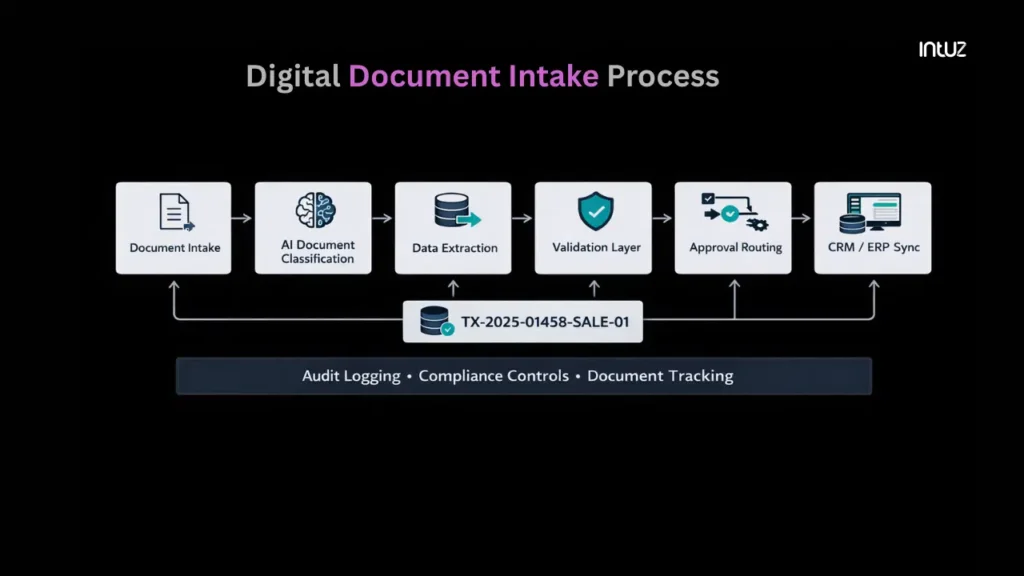
1. Digital document intake
When a document enters the system through defined channels such as a client portal, broker upload interface, shared inbox trigger, or API connection, n8n automatically registers it, assigns a reference ID, and stores it in a structured location.
Metadata such as upload source, timestamp, transaction ID, and related deal information is captured immediately. Instead of forwarding attachments to teams, every document enters the same controlled intake layer.
At intake, generate a structured transaction-linked document ID. For example: TX-2025-01458-SALE-01
Where:
- TX-2025-01458 represents the deal or transaction ID
- SALE represents the document category
- 01 represents the version number
If a revised agreement is uploaded, the workflow increments it to: TX-2025-01458-SALE-02
This ID travels with the document through classification, validation, review routing, and CRM synchronization. When legal reviews version 02, there’s no ambiguity about which file is active.
Also Read
2. AI-based document classification
Real estate transactions include multiple document types – sale agreements, lease agreements, buyer identification, disclosure forms, mortgage-related paperwork, and supporting attachments. And all follow different review paths.
This means that if classification depends on manual labeling, routing errors will occur. Therefore, with n8n, each uploaded file is sent to an AI-based classification service immediately after registration.
The workflow analyzes document structure, headings, keywords, and formatting patterns to determine its category. For example, a document containing structured purchase terms, property details, and buyer/seller signatures can be identified as a sale agreement.
Similarly, an uploaded government ID with identity markers, serial numbers, and personal details is classified as a verification document.
Intuz Recommends
Configure a confidence threshold in your workflow. For example, if the classification confidence falls below 85%, route the file to manual review instead of processing it automatically. Log the outcome along with the score and timestamp. This allows you to audit how documents were categorized and refine the model over time.
3. Data extraction
Once the document type is identified, the workflow extracts the specific data required for the transaction.
For a sale agreement, this may include buyer name, seller name, property address, purchase price, earnest money amount, and proposed closing date. For mortgage-related paperwork, it may include loan amount and financing terms.
n8n sends the classified file to an AI extraction service, which converts unstructured content into predefined fields. The output is returned in a standardized format and stored with the transaction record. This removes the need to manually enter info into a CRM or spreadsheet.
Intuz Recommends
Configure field-level validation rules after extraction. For example, verify that transaction_value is numeric, closing_date is a valid date, and required fields like buyer_name and property_address are present. If validation fails, route the transaction to an exception queue instead of updating the CRM. This prevents incomplete or incorrect records from entering downstream systems.
4. Validation rules
After that, the workflow evaluates whether the document meets defined transaction and compliance requirements. Validation logic runs automatically based on document type and extracted fields.
For example, the workflow can check:
- Whether required clauses are present in a sale agreement
- Whether buyer and seller signatures are present in designated signature fields
- Whether identification documents meet KYC and AML verification requirements, including validity and completeness
- Whether ownership information in the document matches the recorded seller or transaction record
- Whether a closing date exists and follows expected formatting
- Whether transaction value fields are populated
- Whether mandatory disclosure fields are included
Signature presence checks ensure that unsigned or partially executed agreements don’t proceed to approval stages. KYC and AML validation checks confirm that buyer and seller identification documents meet regulatory and transaction requirements.
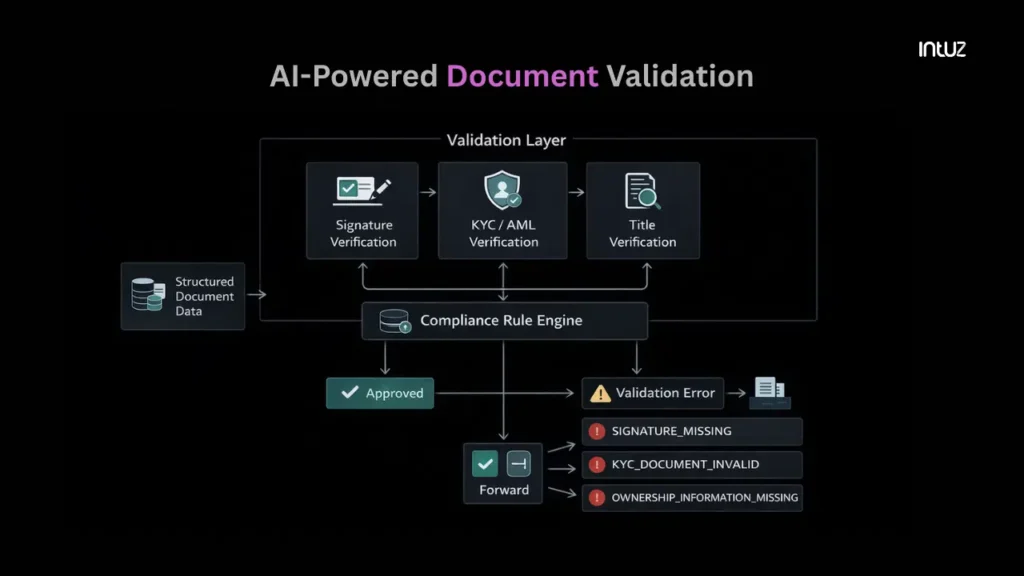
Title verification and ownership validation ensure that the party listed as seller matches the ownership information provided for the transaction. If ownership data is missing or inconsistent, the workflow flags the document for review before it progresses further.
Intuz Recommends
Define validation rules as configurable parameters rather than hard-coded conditions. For example, maintain a rule set such as: sale_agreement_requires_closing_date = trueid_document_must_be_valid = truetransaction_value_must_be_present = true Store these rules in a centralized configuration file or database. This allows operations or compliance teams to update requirements without redeploying the workflow.
5. Review and approval routing
Next, the workflow determines who needs to review the document. Routing logic is based on document type, transaction stage, and validation status.
For instance, a sale agreement may move from broker review to legal review and then to client confirmation. But an identification document may require compliance verification before the transaction proceeds.
n8n assigns the document to the appropriate reviewer automatically, who get notified with the document reference ID, extracted data summary, and any validation flags.
Each review stage updates the workflow state. If a reviewer requests changes, the document is sent back to intake with the same transaction-linked ID, and the version number increments. If approved, it progresses to the next defined stage.
Intuz Recommends
Define routing logic using role-based conditions rather than named individuals. For example: SALE_AGREEMENT → BROKER_REVIEW → LEGAL_REVIEW → CLIENT_REVIEWBUYER_ID → COMPLIANCE_REVIEW This will keep things crystal clear even when team members change. Role-based routing also simplifies permission management and prevents approval bottlenecks.
6. Automated updates to CRM/ERP
Once a document reaches an approved state, the workflow updates connected systems automatically. Extracted and validated data, which could be property information, closing dates, or transaction value, is pushed to the CRM or ERP linked to the transaction.
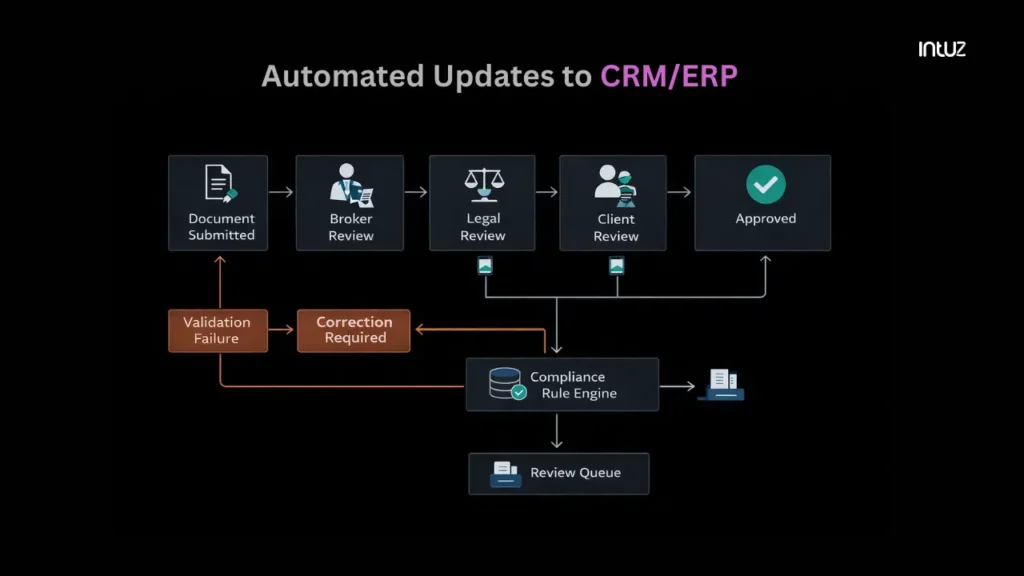
The document status is synchronized as well. For instance, if a sale agreement moves to approved, the corresponding deal record reflects that state. If validation failed earlier in the process, the CRM shows the flagged condition rather than an outdated status.
Intuz Recommends
Map extracted document fields to CRM fields explicitly before enabling sync. For example: buyer_name → CRM.Contact.Nameproperty_address → CRM.Deal.Property_Addressclosing_date → CRM.Deal.Closing_Date This removes the need for manual data entry after document review. It also prevents inconsistencies between stored documents and transaction records.
How to Implement Real-Estate Document Automation Workflow in n8n
Designing a document workflow is straightforward on paper. Implementing one that handles live real estate transactions without breaking is not. You know real estate deals move fast, documents change versions, reviewers miss deadlines, and transaction timelines shift.
Automation must reflect that operational reality.
Thankfully, Intuz works with real estate companies like yours to design controlled workflow systems rather than isolated automations.
We approach every engagement with an outcome-first mindset. We define clear operational goals at the start, whether that involves reducing document handling delays, improving transaction visibility, or eliminating manual data entry.
This ensures that implementation remains aligned with measurable business outcomes rather than open-ended development cycles.
All workflow logic, integrations, and deployment environments are configured directly within your infrastructure. Your documents, transaction data, and access controls remain under your control. That’s how our engineers work!
Plus, you’ll always have full visibility into routing rules and system integrations. Every automation decision, rule definition, and system change is documented, allowing your operations and compliance teams to understand and maintain the workflow independently.
We configure access controls, audit logging, and role-based permissions to ensure that sensitive transaction documents remain protected and traceable. This approach supports regulatory compliance and provides a clear operational record of every document action.
Flexibility is built into every engagement. You can begin with a focused automation scope and expand coverage as your transaction volume or operational needs grow. There’s no dependency on proprietary tooling, and your internal team retains full control over the workflow.
If you’re evaluating document workflow automation for your real estate operations, Intuz can help you implement a system that improves reliability, visibility, and operational efficiency while ensuring your data, infrastructure, and processes remain fully under your control.
Book a free 45-minute consultation with us today!
FAQs
What problems does document workflow automation solve in real estate?
Real-estate teams deal with agreements, KYC documents, approvals, and compliance paperwork every day. Manual handling causes delays, missing files, and follow-up chaos. Automation organizes document collection, validation, approvals, and notifications automatically. It reduces human errors, speeds up deal closures, and ensures every document moves through a defined process without constant manual tracking.
Why should real-estate businesses use automation instead of manual document handling?
Manual processes depend heavily on people remembering tasks — sending reminders, verifying files, or updating CRM records. Automation removes dependency on manual follow-ups. Once configured, workflows automatically trigger actions like document requests, approvals, or uploads. Teams spend less time coordinating paperwork and more time focusing on clients and property transactions.
How does n8n help automate real-estate document workflows?
n8n connects tools like CRM systems, cloud storage, email, and e-signature platforms into one automated workflow. For example, when a deal is created in CRM, it can automatically request documents, store files in folders, notify agents, and trigger approvals. Its visual workflow builder makes complex automation easier without heavy coding.
Can automation help with compliance and audit readiness in property transactions?
Yes. Automation keeps proper records of who uploaded documents, approval timestamps, and verification history. This audit trail becomes extremely useful during compliance checks or disputes. Instead of searching emails or folders manually, teams can instantly access organized document histories, ensuring regulatory requirements are consistently followed.
Is document workflow automation suitable for small or midsize real-estate agencies?
Absolutely. Smaller agencies benefit the most because automation reduces dependency on large operations teams. Even with limited staff, workflows can automatically handle document requests, reminders, and storage organization. It helps growing agencies scale transactions without hiring additional administrative resources.
What real-estate processes can be automated using workflow automation?
Common examples include buyer onboarding, seller agreement processing, rental documentation, property verification, loan paperwork coordination, and broker approvals. Automation can also send reminders for missing documents and notify stakeholders when files are approved. Essentially, any repetitive document movement between systems or people can be automated.
How long does it take to implement document workflow automation in real estate?
Simple workflows can be implemented within days if processes are clearly defined. More advanced setups involving CRM integration, compliance validation, or multiple approval layers may take a few weeks. The key is mapping your document journey first — automation works best when business workflows are properly structured.