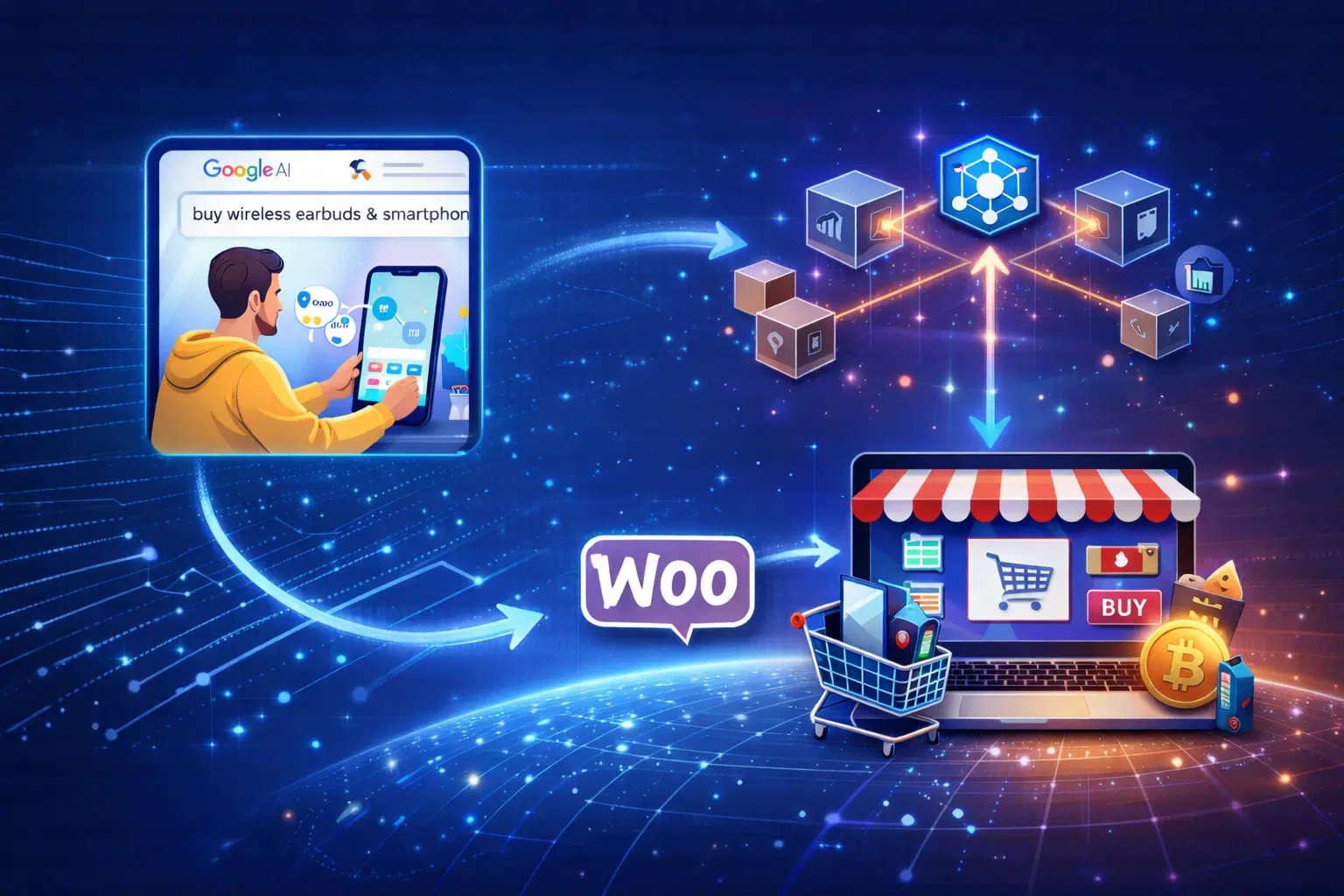

Shopify businesses struggle with messy integrations and disconnected sales channels. UCP fixes this by creating a single, real-time commerce layer. Intuz helps you implement UCP on Shopify so everything works smoothly and scales without complexity.
If you run a Shopify store, you must prepare yourself for the shift from human-led browsing to AI-driven purchasing. Some time ago, we discussed how online shopping will change thanks to Google’s Universal Commerce Protocol (UCP).
AI assistants like ChatGPT, AI Mode, Gemini app, voice bots, and autonomous shopping agents will soon be acting on behalf of buyers. They’ll search for products, compare prices, and in some cases, even make payments to close the purchase.
Now, the problem is that Shopify stores are still built entirely to satiate human behavior. Product discovery assumes scrolling and visual scanning. Check flows comprise manual form fills and browser-based confirmation.
While APIs exist, they don’t provide a complete, machine-executable purchasing surface. That’s where UCP enters the picture. In this blog, we’ll understand how it works for Shopify and what you need to prepare to get started with UCP.
Show
- Shopify stores are currently designed for human-led browsing and checkout, making them difficult for AI agents to interact with programmatically.
- Universal Commerce Protocol (UCP) creates a structured execution layer between AI shopping agents and Shopify stores for AI-driven purchasing.
- Clean product data, accurate inventory, deterministic pricing, and standardized fulfillment states are essential for UCP readiness.
- UCP validates product availability, pricing, inventory, taxes, and shipping rules in real time before programmatically creating orders.
- Intuz helps Shopify merchants prepare their stores for AI-agent commerce by handling UCP integration, validation, and operational guardrails.
Why Shopify Stores Can’t Support AI-Led Purchasing Today
1. Product data isn’t consumable by AI agents
While Shopify exposes APIs, product information is fragmented across objects and requires store-specific interpretation. Variants, bundles, conditional pricing, inventory rules, and eligibility logic aren’t expressed as a single, machine-consumable contract.
This creates ambiguity for the AI agent, which can’t reliably determine which SKU to select, validate constraints such as quantity limits or delivery regions, or confirm whether a product is purchasable in the current context.
This isn’t a data availability issue: the information exists, just not in a form an AI can reliably execute against.
2. There’s no standard way to express purchase intent
AI agents operate on structured intent. They need to pass a request that clearly states:
- Quantity
- Product SKU
- Price expectations
- Delivery location and timing
Since Shopify doesn’t expose an interface for external agents to submit this intent, custom logic is required to translate it into a valid cart or order.
3. Checkout can’t be completed programmatically
Currently, Shopify checkout assumes four parameters:
- A user session
- Manual data entry
- Step-by-step confirmation
- A browser-based payment flow
AI agents can’t reliably authenticate user intent, authorize payment, and complete the payment process using this model. There’s no native mechanism for agent-authorized or tokenized checkout that works consistently across stores.
How Universal Commerce Protocol (UCP) Works With Shopify
In this model, the buying journey doesn’t start on your Shopify storefront. Instead, a buyer interacts with an AI system that collects requirements and converts them into a structured purchase intent.
This intent specifies the requested product or variant, quantity, acceptable pricing constraints, delivery location or timing, and a payment authorization reference.
So by the time your store gets involved, the buyer has already approved the purchase, and the AI is acting on their behalf. It sends the purchase request to UCP, which, in turn, acts as an established execution layer between the AI shopping assistant and your Shopify store.
Using APIs, UCP retrieves the real-time store data required to evaluate the request, including product and variant availability, pricing, discounts, taxes, inventory status, and shipping rules. This is a read-only validation step, and no cart is created, nor does an order exist at this stage.
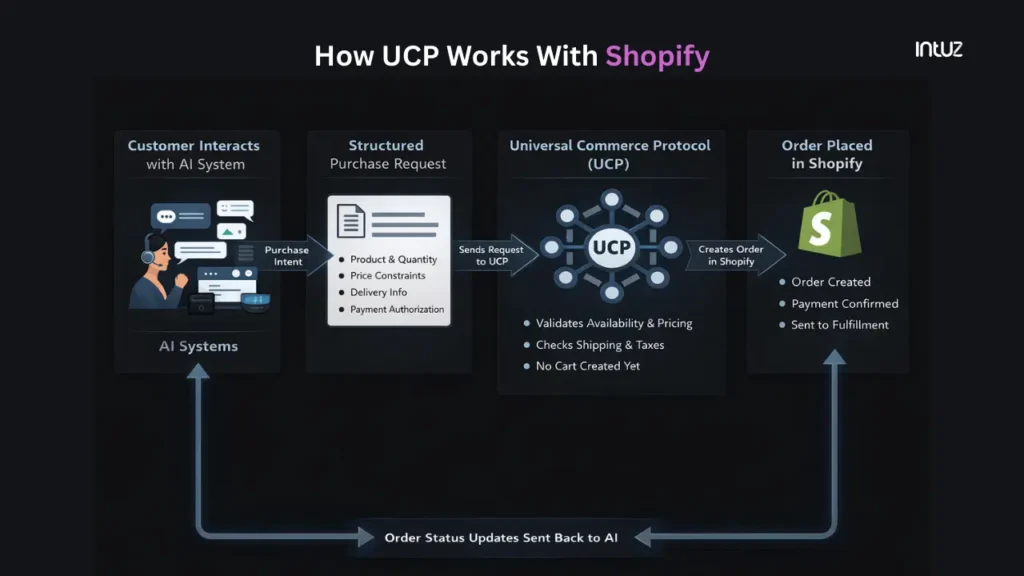
Your Shopify store returns live data reflecting its current state. UCP evaluates whether the request can be fulfilled under those conditions. If the request is deemed invalid, the flow stops without creating any objects in Shopify.
If the request is valid, UCP creates the order programmatically in your Shopify store using supported APIs. This doesn’t rely on the browser-based checkout flow. There’s no user session, cart, or manual confirmation step.
Shopify receives the order with a confirmed payment reference, just as it would from an external payment or order-creation integration. From this point onward, your existing workflows remain unchanged.
Getting Started with UCP on Shopify: What Merchants Need to Prepare
1. Clean up your product data in Shopify
This matters because UCP and AI systems don’t infer meaning from images, layouts, or marketing copy; instead, they rely on structured data to decide whether a product can be recommended, selected, and purchased.
You see, bad product data usually looks “fine” to a human. However, it breaks down for automation. For example, a product called a “Classic Shirt” with variants only listed as “S/M/L” forces guesswork. Is it men’s or women’s? Slim or regular fit? Cotton or linen?”
A human buyer can fill in the gaps. An AI can’t—unless the information is specified. Here’s what good product data looks like:
| Field | Concrete example value |
|---|---|
| Product title | Men’s Cotton Oxford Shirt |
| Product ID | prod_874512 |
| Category path | Apparel → Men → Shirts |
| Variant dimension | Size |
| Variant dimension | Color |
| Variant ID | var_874512_S_Blue |
| Size | S |
| Color | Blue |
| Material | Cotton |
| Fit | Regular |
| Sleeve length | Long |
| Gender | Men |
| Price | USD 24.99 |
| Inventory quantity | 18 |
| Inventory status | In stock |
| Minimum order quantity | 1 |
| Maximum order quantity | 3 |
| Shipping regions allowed | US and Canada |
| Delivery methods | Standard, Express |
| Estimated delivery window | 3–5 business days |
| Tax class | Apparel |
| Payment eligibility | Prepaid |
| Purchasable | true |
Intuz Recommends
Assign a single team to own end-to-end product data accuracy. This team should define which attributes are mandatory, what “complete” means for every product, and when a product is considered invalid for purchase. New products, variant additions, and catalog changes should flow through this ownership model.
2. Stock levels should be up to date
AI-driven purchasing assumes inventory is accurate at the exact moment a request is made. Here’s what bad inventory management looks like:
- Products stay “in stock” even when you routinely oversell
- Bundles don’t correctly decrement underlying SKUs
- Inventory is adjusted manually in batches
These setups work when a human double-checks. Not when AI is responsible for making purchase decisions. Good inventory data is strict, boring, but very clear:
| Inventory signal | Example state |
|---|---|
| Stock tracking | Enabled at the variant level |
| Available quantity | 18 units |
| Real-time updates | Quantity updated immediately on every order |
| Oversell protection | Prevents orders when quantity reaches 0 |
| Bundle handling | Bundle purchase decrements each underlying SKU |
| Reservation behavior | Stock reserved at order creation |
| Manual adjustments | Logged, infrequent, and reflected instantly |
| Inventory source | Single source of truth |
| Backorders | Explicitly disabled or explicitly allowed |
| Purchasable state | true only when all inventory rules pass |
Intuz Recommends
Maintain inventory using event-by-event updates. For example, when an order is created, the available quantity should decrease instantly. If the order is cancelled, the stock should be restored immediately, not at the end of the day. This ensures that availability checks made by AI systems always reflect the true state of your inventory.
3. Finalize pricing, discounts, and taxes
UCP validates a purchase request against your final payable price. Bad pricing setups rely on human intervention. Examples include draft-order discounts, ad hoc coupon logic, and tax behaviors that change unpredictably by location.
In such scenarios, an AI can’t reliably determine the final amount to charge. That’s why you must ensure your pricing setups are deterministic. For example, if a product is $100, a 10% automatic discount applies, and state tax is 6%, the final amount should always resolve as:
| Price component | Amount |
|---|---|
| Base price | $100.00 |
| Discount | –$10.00 |
| Subtotal | $90.00 |
| Tax (6%) | $5.40 |
| Final price | $95.40 |
Intuz Recommends
Make your pricing verifiable before an order is created. Given a product, quantity, and delivery location, your system should return a single final amount without requiring checkout. If pricing logic only resolves during checkout, it can’t be validated or trusted by an AI system.
4. Standardize fulfillment states and automatic updates
AI-led purchasing requires unambiguous post-order signals. For instance, if fulfillment data is delayed, manually updated, or inconsistent, the AI can’t reliably inform the buyer about what happened after the transaction was processed.
Therefore, to prepare your Shopify store, apply these rules:
- Use Shopify-native fulfillment statuses only (“unfulfilled,” “fulfilled,” “partially fulfilled,” “cancelled”)
- Ensure tracking numbers are attached automatically at fulfillment time, not added later
- Avoid custom fulfillment states that exist only in internal tools or spreadsheets
- Ensure cancellations and refunds update the order status immediately, not at another point in time
- If you ship in parts, make partial fulfillment explicit rather than implied
Intuz Recommends
Eliminate any fulfillment or order state changes that don’t update Shopify immediately. Manual updates, spreadsheet tracking, or delayed status changes create blind spots for automated systems. If a state change can’t be observed programmatically in real time, it shouldn’t exist in your fulfillment process.
How Intuz Can Help Shopify Merchants Adopt UCP
Looking, deploying UCP in your Shopify business isn’t a plug-and-play exercise. In fact, what you must understand is that it has the potential to completely transform how you run the store.
So if you plan to partner with an AI development services like ours, the first step is to assess whether your store is ready to accept programmatic orders.
We’ll look at how your products are structured, how variants are defined, how inventory is tracked, and whether pricing and tax rules resolve deterministically for US customers.
- Once readiness gaps are clear, we’ll restructure variants to make buying decisions explicit, resolve inventory sync issues, or stabilize discount and tax logic so final prices resolve cleanly. This work is done within your current Shopify configuration.
- We’ll handle the UCP integration directly—basically enabling and configuring the required Shopify API access, validating read and write scopes, and setting up secure order-creation flows.
- Intuz also defines guardrails for how UCP is supposed to operate. That includes constraints on what products can be purchased through AI-driven channels, how inventory thresholds are handled, and how payment authorization is executed.
- Once integration is complete, Intuz validates the full flow end-to-end. Structured purchase requests are tested against real store data. Order creation, payment execution, fulfillment, and status updates are verified in conditions that match live usage.
In the end, your Shopify store continues to run as it does today, but it can now accept and fulfill programmatic orders without manual intervention.
Interested in stepping into the new world of eCommerce?
Book a 45-minute free consultation and get a UCP readiness assessment for your Shopify store.
FAQs
What is Universal Commerce Protocol (UCP)?
UCP is an open-source standard co-developed by Shopify and Google that lets AI agents like those in Google AI Mode or ChatGPT discover your products, check stock, build carts, and complete checkouts seamlessly—all without custom integrations for every platform. It standardizes commerce for the AI era, keeping you as the merchant of record with full control over pricing and customer data. This means selling directly in AI apps boosts visibility and cuts friction.
How do I set up UCP on Shopify?
Log into your Shopify Admin, go to Settings > Checkout, then enable ‘Agentic Checkout’ in the Google & YouTube app—it’s a native toggle that maps your data to UCP automatically. Prep your Google Merchant Center feed with native_commerce attributes, configure payments/shipping, customize branding, save, and test with a bogus gateway order. Takes 30-60 minutes if your feeds are clean; no custom code needed for basics.
What are the benefits for Shopify merchants?
You’ll slash cart abandonment by enabling AI agents for real-time inventory checks and seamless checkouts in places like Gemini or Copilot, driving more conversions from high-intent buyers. Merchants stay in control while gaining exposure on AI surfaces via Shopify’s Agentic Storefronts, plus features like auto loyalty rewards and negotiated payments boost relevance and sales without extra work.
Does UCP work with third-party Shopify apps?
Yes, UCP plays nice with apps if they follow the schema—test via Shopify’s API playground. Core ones like fulfillment or discounts map to extensions (e.g., dev.ucp.shopping.fulfillment), and Shopify’s MCP servers expose them to agents. Custom apps just declare supported capabilities in the profile endpoint for compatibility across Google, ChatGPT, etc.
What are common UCP setup challenges?
Watch for messy product feeds causing Merchant Center errors, inconsistent inventory leading to agent blacklists, or mismatched shipping that blocks transactions—fix by validating GTINs, weights, and attributes first. API rate limits (2/sec, 40k/day) can hit high traffic; monitor via Shopify Analytics. Basic plans work but need Google linkage; upgrade for more quota
Work with Intuz
Prepare Your Shopify Store for UCP
Get a free UCP readiness assessment from Intuz experts.
Let's Get Started
Share this article