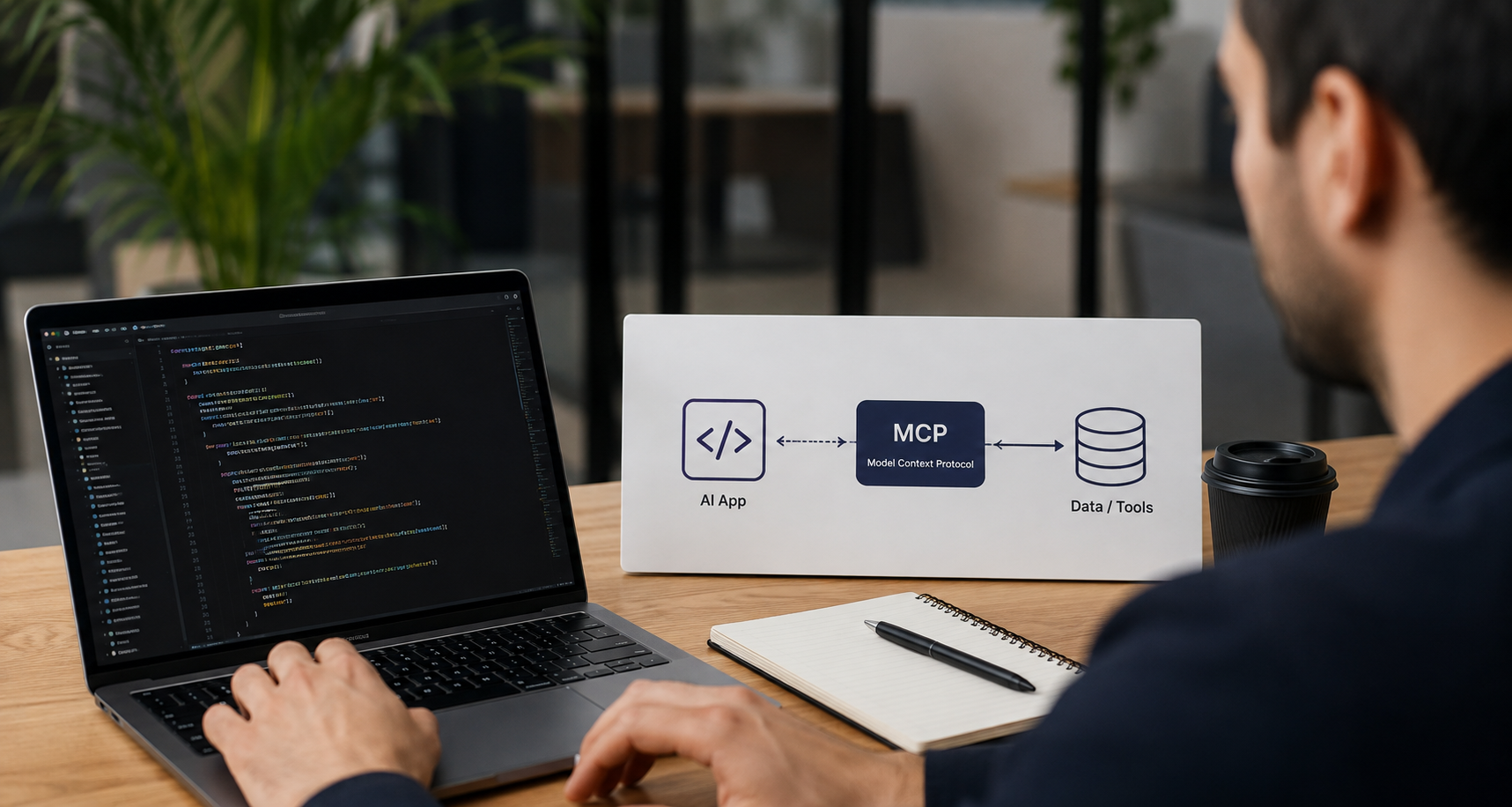
Building AI apps with Model Context Protocol (MCP) can simplify integration, improve scalability, and boost performance. In this guide, we’ll walk you through the process step by step—and show how Intuz, an AI development partner, can help you leverage MCP for your next AI-driven application.
Let’s say you run a small or mid-sized business. You’re spinning many hats, from sales and finance to operations and customer support, and every decision matters. You feel the pressure to consistently deliver value, stay competitive, and grow without incurring significant costs.
Sure, an AI app can take that workload off you by a large margin. But if it doesn’t follow a standardized protocol like the Model Context Protocol (MCP), several things can go wrong:
- Higher costs: AI may not always remember to apply user details, leading to frustrating experiences
- Context gaps: Without efficient context management, models may need longer prompts and repeated calls, driving up token usage and infrastructure spend
- Security exposure: Passing data around without a structured protocol increases the risk of leaks or unauthorized access
You don’t want to deal with any of these challenges, especially when resources are already stretched. At Intuz, we believe every SMB can harness the MCP to build AI apps with real impact. In this guide, we’ll help you create one, from planning to production.
Show
- Without a standardized protocol like MCP, AI apps face higher costs from repeated context calls, context gaps due to missing session memory, and security risks from unstructured data passing.
- MCP architecture has two primary styles — centralized (simpler, one MCP server, easier access control) and modular (multiple MCP servers, better fault isolation and independent scaling) — and the right choice depends on your growth projections.
- Building an MCP server involves six sequential steps: defining I/O schemas, connecting data sources, managing context, implementing tool orchestration, securing and validating inputs, and optimizing for scale.
- Integrating MCP with the Client/Host layer unlocks use cases like GPT-based assistants, natural-language analytics systems, and RAG pipelines over private knowledge bases.
- Deploying an MCP-driven AI app should follow a gradual rollout strategy — starting with a small user group, tracking key metrics (latency, load tolerance, security), and expanding only after validation.
How to Develop an AI Application Using the MCP (+ Best Practices By Intuz)
1. Set up your development environment
The first step here is to ensure your foundation is solid. Therefore, start with a version control system like Git (hosted on GitHub, GitLab, or Bitbucket). Pair it with a CI/CD pipeline (such as GitHub Actions, GitLab CI, or Jenkins) to automate testing and deployments.
This ensures every update is trackable and repeatable. Next, choose your programming language wisely. For example:
- Python is popular for AI because of its broad SDK support
- JavaScript or TypeScript fits better for front-end or client-side work
Plan for scalability. Containerization with tools like Docker and Kubernetes can simplify the process of rolling out updates, managing dependencies, and scaling as usage increases.
Intuz Recommends
We’ve seen SMBs overspend by starting on enterprise-grade cloud tiers “just in case.” Most early workloads run well on lower-tier instances, such as AWS t3.medium or Azure B-series, when paired with auto-scaling. Start here, track CPU and memory usage for the first three months, and only scale up if you consistently cross 70% utilization. This approach keeps bills predictable while giving you room to grow safely.
2. Define your MCP architecture
The architecture is your AI app’s blueprint. It will determine how well your system will function, how secure it will be, and how much it will potentially cost you to run daily. But before you draw it out, it helps to understand the building blocks of the MCP architecture:
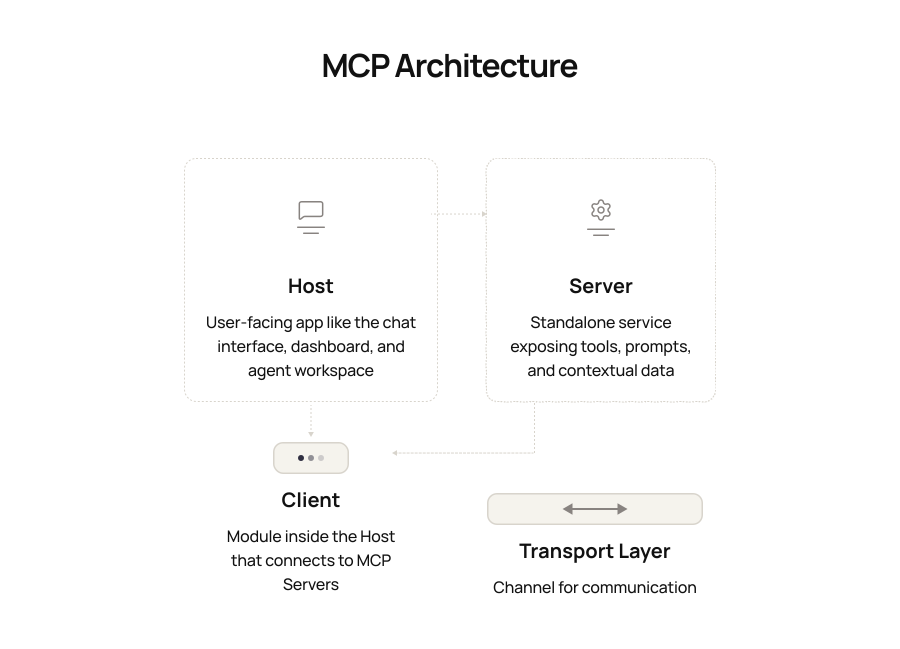
Once you understand these pieces, the next step is to decide on your architecture style, which commonly comprises the following:
| Type of architecture | What Is It? | Pros | Cons |
|---|---|---|---|
| Centralized architecture | Keeps most of the logic in one MCP Server | Simpler to manage, easier for access control, and ensures consistency | It can become a bottleneck as your app grows, and scaling specific parts is harder |
| Modular architecture | Spreads the work across multiple MCP Servers | Gives you flexibility, better fault isolation, and independent scaling | It adds more complexity in managing discovery, versioning, and authentication |
There are also additional factors to plan for early:
- Versioning so updates don’t break Clients or Hosts
- Storage and caching, since context data tends to grow quickly
- Load balancing if multiple Hosts or Clients connect to your Servers
Intuz Recommends
When we design MCP setups for clients, we always draft both a centralized and a modular version. Then, we simulate scenarios: What happens if traffic doubles? What if you add 3–5 new tools in a year? By comparing latency, storage growth, and security exposure in both versions, you’ll see which path buys you 18 months of stability. This exercise costs you a day, but it can save weeks of painful re-architecture later.
3. Build the MCP server
Server is the part of your AI app that does the real work. It handles user requests, manages context, and ensures seamless data flow. Let’s try to understand this with an example:
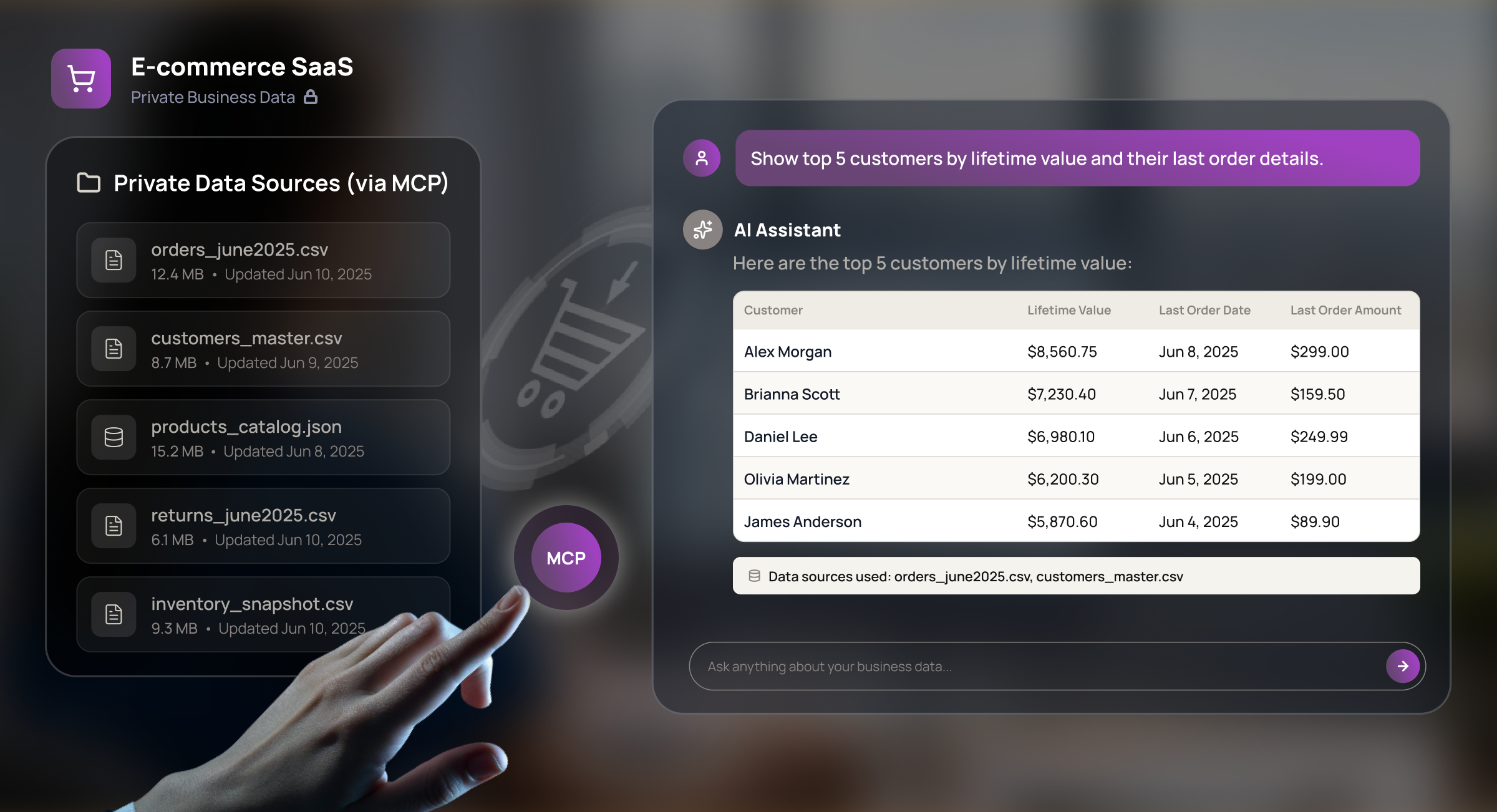
Imagine you run a small eCommerce store and you add an AI assistant for support. A customer says, “I want to return what I bought last week,” and later asks, “Also, change the delivery address.”
Your MCP Server will then:
- Read order history from your database
- Check shipping status via the carrier API
- Decide whether to call the returns tool or the address-update tool
- Maintain session context for the follow-up request to apply to the right order
- Send back a structured response that the client UI can render
That’s a lot of work, right?
The good news is that you can build an MCP Server step by step:
| Steps | What to do |
|---|---|
| Define I/O schemas | Decide request/response formats (usually JSON). Specify context structure, available tools/actions, and error formats. |
| Connect to data sources | Wire up databases (SQL/NoSQL), APIs (REST, GraphQL), CRMs, and ERPs. Control read/write permissions and plan for latency |
| Manage context | Maintain session memory across requests. Detect the topic shifts. Provide fallback behavior if context is lost. |
| Implement tool orchestration | Model tools as modules (e.g., FAQ, returns, order lookup). Add middleware to pick the right tool, chain multiple calls, and retry if needed. |
| Secure and validate | Authenticate clients, sanitize input, validate payloads, encrypt sensitive data, and apply rate limits/quotas. |
| Optimize for scale | Use caching, batch requests when useful, optimize queries, add load balancing, and set up monitoring. |
Intuz Recommends
One of our UK clients needed to align with GDPR while building an MCP-driven AI support app. Beyond RBAC, we implemented data retention rules (auto-deletion after 30 days), anonymized logs, and region-specific storage, ensuring data doesn’t leave the EU. If you’re in healthcare, HIPAA requires similar safeguards, such as encryption in transit and at rest. Map the regulations that apply to your industry before you connect MCP to sensitive apps. Trust us—it’s more cost-effective to design them now than to retrofit later.
4. Integrate MCP with clients, hosts, and AI apps
Once your MCP Server is ready, connect it with your AI model and AI apps using the Client/Host layer, which:
- Takes user input (e.g., a Slack message or CRM query)
- Translates it into structured MCP messages
- Routes it to the correct Server and returns formatted responses
- Preserves context, ensuring conversations stay seamless across turns
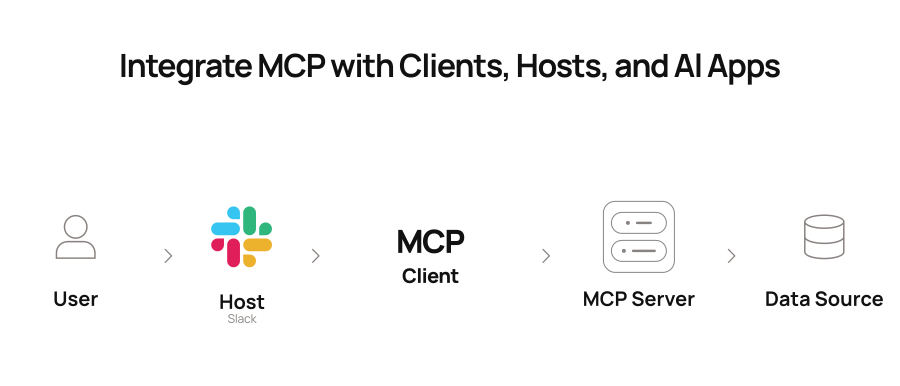
With this bridge in place, you can unlock powerful AI use cases, such as:
- GPT-based assistants: Customer support bots, internal team helpers for drafting, summarizing, or researching
- Analytics systems: Ask natural-language questions (“Show me Q2 revenue vs Q1”) and get instant charts or insights
- RAG pipelines: Combine AI with your knowledge base (e.g., legal firms retrieving clauses with AI explanations)
In addition, when you connect MCP to your business tools, you also open new doors to sensitive information. That’s why it helps to set clear rules from the start.
Give each person access only to the data they need, keep information protected as it moves between systems, and keep records so you can track what happened if something goes wrong. With these basics in place, your integrations stay secure without slowing down your team.
Intuz Recommends
We’ve worked with SMBs where the tech team wanted a modular setup, but the business goal was simply faster customer reporting. In that case, a lean centralized server was the better fit. Before you lock in your design, write down your top three business outcomes (e.g., cut reporting time in half, reduce support workload by 30%, automate invoicing). Use these outcomes as the lens to shape your MCP architecture.
5. Test, debug, and deploy the workflow
Building your MCP-driven AI app is one part of the job. Making sure it works the way you expect is the other. Testing gives you the confidence that your system will hold up when your team and customers rely on it. Even small failures can frustrate users, erode trust, and inflate costs.
Start small with unit tests to verify that each MCP component behaves as expected.
Then move on to integration tests to confirm everything flows smoothly between the Client, Server, and AI model. Finally, run security checks to catch leaks or unauthorized access before they become real risks.
| Category | Metric | Why It Matters |
|---|---|---|
| Reliability | Test pass rate | Higher rates mean fewer surprises in production |
| Performance | Response time (latency) | Slow responses hurt user trust |
| Security | Unauthorized access attempts | Early warning for potential breaches |
| Scalability | Load tolerance | Shows how the system handles sudden spikes |
| User Experience | Consistency of responses | Ensures stable outputs for the same queries |
Once your AI app passes these checks, move it into production gradually. Start with a small group of users, watch the performance closely, and expand step by step. This reduces downtime, keeps costs in check, and helps your team build trust with customers as you grow.
Intuz Recommends
Imagine if you deployed updates manually and lost two days of customer queries due to a misconfigured schema? Well, that happens but it’s completely avoidable. Set up GitHub Actions pipelines that run unit tests, integration checks, and schema validation on every pull request. If something breaks, it never reaches production.
Join Hands With a Partner Like Intuz for MCP-Driven AI Application Development
Building an MCP-driven AI app takes planning, testing, and smart execution. But with the proper roadmap, the payoff is real! Forrester projects up to 353% ROI from AI adoption in just three years! And with Intuz, as you’ve seen, you can move from idea to impact faster, with less risk.
Get in touch with us. In half an hour, you’ll walk away with a clear roadmap for how MCP can fit into your business, including where to begin and the following steps to take. Book your free consultation with Intuz now.
FAQs
What is MCP and why does it matter for building AI apps?
Model Context Protocol (MCP) is an open standard that defines how AI models communicate with external tools, APIs, and data sources. For app developers, it matters because it removes the need to build custom connectors for each integration. Instead of one-off API logic, you get a standardized interface your AI can use across tools — databases, CRMs, carrier APIs — without rewriting integration code every time. Practically, this means faster builds, fewer context gaps, and lower token costs. Most teams working on AI apps with more than two or three integrations find MCP pays back the setup time within the first release cycle.
How long does it take to build an MCP-powered AI application?
A simple MCP setup — one server, two or three tool integrations, basic context management — can go from design to deployment in four to eight weeks for a team with AI development experience. More complex setups with modular servers, multiple data sources, RBAC, and regulatory compliance (GDPR, HIPAA) typically take three to five months. The biggest time variable is architecture decisions made early: centralized vs modular, caching strategy, versioning plan. Teams that skip the architecture phase and start building often spend more time re-architecting later than the planning would have taken.
Do I need a separate MCP server for each AI use case, or can one server handle multiple tools?
One server can handle multiple tools, and for most SMBs starting out, a centralized server is the right call — simpler to manage, easier to lock down access, and consistent in behavior. The tradeoff is that it can become a bottleneck if traffic spikes or if you add many tools over time. A modular approach — separate servers per domain (e.g., one for order management, one for customer support) — gives you independent scaling and fault isolation, but adds management complexity around discovery, versioning, and auth. The right answer depends on your 18-month roadmap. If you expect to add more than five tools in that window, model both architectures before committing.
What security controls are essential when connecting MCP to sensitive business data?
At a minimum, you need role-based access control (RBAC) so each user or service only sees the data they’re authorized for, input validation and payload sanitization to block injection attacks, encrypted data in transit (TLS) and at rest, rate limits to prevent abuse, and audit logging so you can trace what happened if something goes wrong. If you’re subject to GDPR, add data retention rules and ensure data doesn’t leave the required region. HIPAA requires encryption plus access audit trails. These controls are far cheaper to design in from the start than to retrofit after your system is live and handling real customer data.
Can MCP be used to build RAG pipelines or agentic AI systems?
Yes — MCP is well-suited for both. In a RAG (Retrieval-Augmented Generation) setup, the MCP server acts as the bridge between your AI model and your knowledge base, retrieving the right documents and passing structured context back to the model for synthesis. For agentic systems, MCP handles tool orchestration — deciding which tool to call (returns lookup, address update, FAQ search), chaining multiple calls in sequence, and maintaining session context across turns. Legal firms use MCP-backed RAG to retrieve contract clauses with AI explanations; eCommerce teams use it to power support agents that handle returns, shipping, and order edits in a single conversation.
What programming languages and tools are needed to build an MCP server?
Python is the most common choice because of its broad SDK support and the AI ecosystem built around it (LangChain, LlamaIndex, OpenAI SDK). JavaScript and TypeScript are better fits if your team is building client-side or full-stack, or if the MCP server needs to integrate tightly with a Node.js backend. For infrastructure, Docker is the standard for containerizing the server, and Kubernetes handles scaling. Source control via Git (GitHub, GitLab, or Bitbucket) paired with a CI/CD pipeline like GitHub Actions lets you automate testing and deployment so every schema change or tool update is validated before it reaches production.
What’s the difference between a centralized and modular MCP architecture?
Centralized means one MCP server handles all tool logic and context — it’s simpler to build, easier to secure, and consistent in how it manages state. Modular means you distribute the work across multiple servers, each owning a specific domain (billing, support, analytics). Modular gives you better fault isolation — a bug in the billing server doesn’t take down support — and lets you scale components independently. The cost is added complexity in how servers discover each other, version their APIs, and authenticate requests. For teams launching their first MCP app, start centralized. Plan for modularity only when you have a clear reason (traffic patterns, team ownership, compliance isolation) that justifies the overhead.
Work with Intuz
Build Your AI App with MCP Today
Get expert help from Intuz in 30 minutes consultation call.
Let's Get Started
Share this article
![Top MCP Server Development Companies in USA [2026]](https://www.intuz.com/wp-content/uploads/2026/05/Top-MCP-Server-Development-Companies-in-USA-2026.svg)