This guide is written for teams choosing an OCR layer to build on: health-tech product companies, payer and provider IT, and RCM vendors. It comes from Intuz’s own production work.
For most US health companies building document automation, the best OCR choice is Amazon Textract (with Comprehend Medical) on AWS, Azure Document Intelligence on Microsoft stacks, or Google Document AI where FHIR data already lives in Google Cloud. ABBYY Vantage fits large payers that need on-premise processing.
LlamaParse and open-weight vision-language models suit product teams building AI-native extraction. No tool on this list turns a fax into a correct chart entry by itself. Most of the engineering effort sits in the pipeline you build around the OCR.
That last point is where most comparisons go wrong. They rank engines on clean PDFs. Real healthcare intake is messier. A 2025 Documo survey of 100+ healthcare operations staff found that 35% of inbound documents are still faxes, rising above 45% at high-volume organizations, and 52% of those faxes need manual handling.
Our Careonix build processes physician orders from fax to EMR and cut handling time from 5 minutes to 30 seconds per order. Every tool below is judged on what breaks in production, not on what demos well.
Show
- Choose OCR based on your cloud, document mix, and compliance needs—not generic accuracy.Amazon Textract, Azure Document Intelligence, and Google Document AI are strong choices for cloud-native healthcare document automation.
- ABBYY Vantage is better suited to large payers requiring enterprise-grade, on-premise intelligent document processing. LlamaParse and open-weight vision-language models are options for AI-native products and teams that need greater control over PHI and extraction workflows.
- OCR alone does not automate healthcare documents. Production systems also need document splitting, patient/MRN matching, validation, confidence scoring, human review, and EHR write-back.
- HIPAA eligibility or a BAA does not automatically make the entire solution compliant. Teams must verify the exact service, data retention, processing region, and audit controls.
- Real-world healthcare documents are significantly messier than clean benchmark PDFs, especially faxed documents, mixed packets, handwritten content, and low-quality scans.
- Intuz’s Careonix implementation demonstrates the value of the full pipeline: combining Textract, validation, signature detection, and EMR automation reduced order handling from 5 minutes to 30 seconds and achieved 90%+ extraction accuracy across 20+ document types.
The 8 best OCR software for healthcare automation
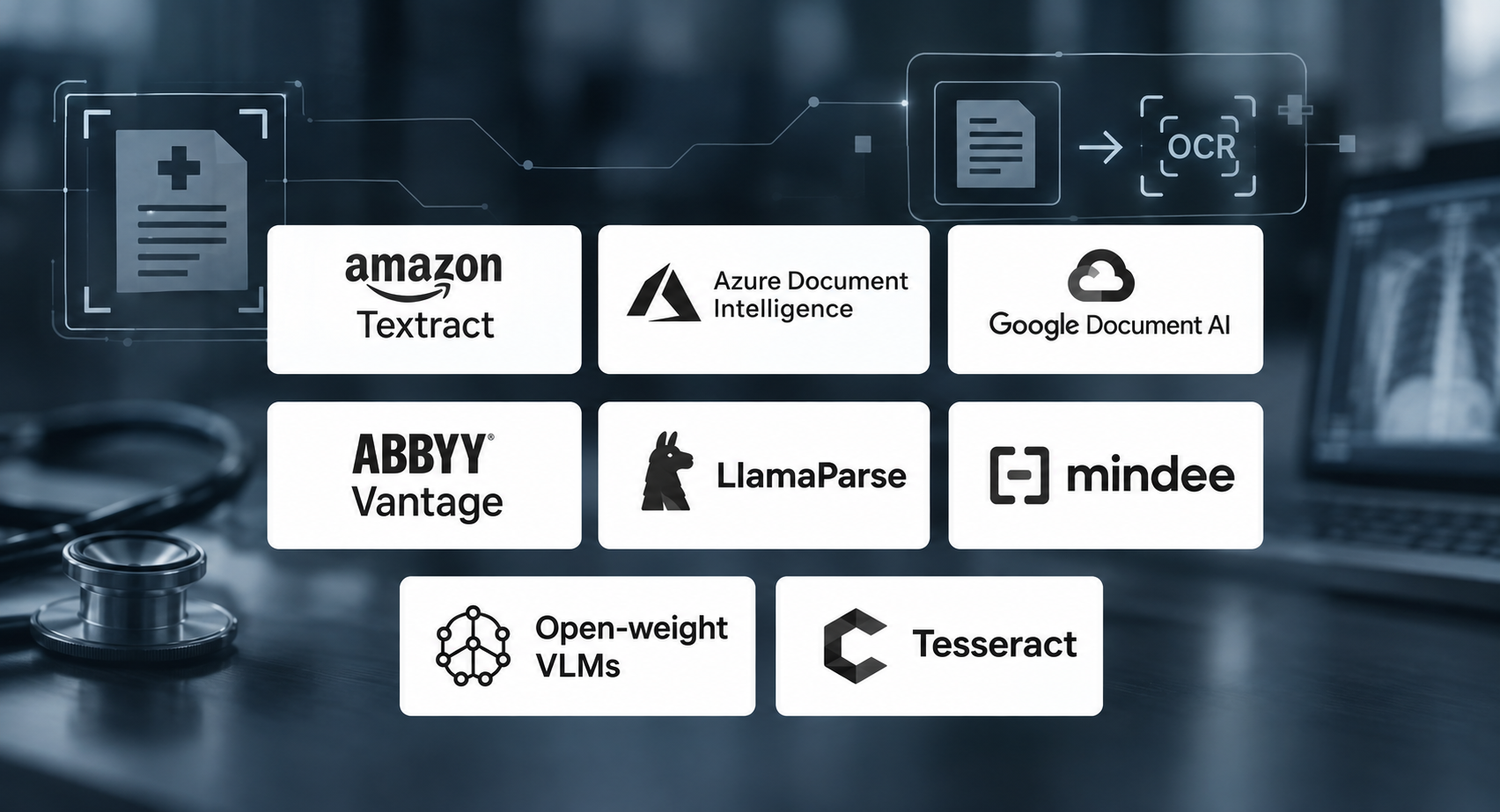
Best OCR software for healthcare automation are amazon textract, azure document intelligence, google document AI, ABBYY Vantage, LlamaParse, mindee, open-weight VLMs and tesseract. Pricing is from vendor pages as of September 2026, first volume tier.
| Tool | Best for | HIPAA / BAA | Starting price |
|---|---|---|---|
| Amazon Textract | AWS fax and forms pipelines | Yes, AWS BAA | $0.0015/page |
| Azure Document Intelligence | Microsoft stacks, insurance cards | Yes, Microsoft BAA | Per page |
| Google Document AI | FHIR data on Google Cloud | Yes, covered product | $1.50 / 1,000 pages |
| ABBYY Vantage | Large payers, on-premise | Confirm in contract | Enterprise quote |
| LlamaParse | AI-native product teams | Enterprise plans only | Free tier |
| Mindee | Startups, custom APIs | Confirm BAA | $44/month |
| Open-weight VLMs | PHI kept in your own cloud | Your cloud’s BAA | Compute only |
| Tesseract | Printed-text fallback | Your cloud’s BAA | Free |
1. Amazon Textract + Comprehend Medical
Best for AWS-native fax and forms pipelines
Textract extracts text, forms, tables and signatures. Comprehend Medical then reads clinical text and links entities to ICD-10-CM, RxNorm and SNOMED CT. Both are HIPAA-eligible under the AWS BAA.
Key features
- Text, form, table and signature extraction
- Queries for pulling specific fields by question
- Analyze ID for identity documents
- Comprehend Medical entity extraction, PHI detection and ontology linking
Watch out: Forms analysis costs $0.05/page versus $0.0015/page for plain text, roughly 33 times more. Classify first and send only form pages to Forms.
Skip it if: you have no AWS engineering capacity. There is no UI, and HIPAA controls (encryption, logging, bucket policies) are yours to configure.
Intuz Recommends
Textract is the extraction core of our Careonix build. It classifies incoming faxes and pulls MRN, DOB, insurance and start-of-care dates with confidence scores, reaching 90%+ accuracy across 20+ document types, including CMS-485 plans of care.
2. Azure Document Intelligence
Best for Microsoft-centric providers and payers
Azure offers a prebuilt health insurance card model plus layout, read and custom extraction, with Azure RBAC and audit logging.
Key features
- Read and Layout models for text and tables
- Prebuilt health insurance card and ID document models
- Custom extraction models
- .NET, Python and REST SDKs
- Disconnected containers for offline processing
Watch out: Disconnected containers need Microsoft approval and a commitment plan, and the health insurance card model is not on the container list. Air-gapped teams lose the one healthcare prebuilt.
Skip it if: your core documents are lab reports or EOBs. Those need custom model training.
3. Google Document AI
Best when FHIR data already lives in Google Cloud
Document AI and the Cloud Healthcare API are both on Google’s HIPAA covered products list, so extraction can flow into a FHIR store under one BAA.
Key features
- Enterprise Document OCR
- Form Parser and Layout Parser
- Custom Extractor for your own fields
- Custom Splitter and Classifier for mixed packets
- Summarizer
- Native handoff to the Cloud Healthcare API FHIR store
Watch out: Enterprise OCR costs $1.50 per 1,000 pages; Form Parser and Custom Extractor cost $30 per 1,000, a 20x jump. Gemini features are covered only under specific product names, so check each one you call.
Intuz Recommends
The Custom Splitter ($5 per 1,000 pages) is the cheapest way to break multi-patient referral packets before extraction.
4. ABBYY Vantage
Best for large payers needing on-premise IDP
Vantage 3.0 (January 2026) adds LLM connectivity through Azure OpenAI, and lets you choose whether the model sees the document image or only ABBYY’s extracted text. It includes redaction, prebuilt insurance claim skills and a dashboard for touchless processing rates.
Key features
- Pre-trained skills for insurance claims and healthcare documents
- Low-code skill builder for custom forms
- LLM connectivity through Azure OpenAI
- Automatic redaction
- Role-based access and audit trails
- Analytics on touchless rates and human corrections
Watch out: Enterprise pricing only, and a longer implementation cycle than API-first tools.
Skip it if: you are a startup that needs to ship in weeks on modest volume.
5. LlamaParse
Best for product teams building AI-native extraction
LlamaParse parses complex layouts, and its schema-based extraction returns each field with page-level citations. It is SOC 2 Type II and offers self-hosting and BYOC.
Key features
- Parsing of complex layouts, tables and charts
- Schema-based extraction (LlamaExtract) with page-level citations
- Field-level confidence scores
- Python and TypeScript SDKs
- RAG pipeline integration
- SaaS, self-hosted, BYOC and EU region deployment
Watch out: The BAA is available only on Enterprise plans. Prototype on the free tier with synthetic data only.
Skip it if: your team needs a no-code interface.
6. Mindee
Best for startups that need custom document APIs fast
Mindee’s API builder, split and classify tools and SDKs (Python, Node.js, Java) get a custom extractor running quickly. Plans start at $44/month for 6,000 pages, billed annually.
Key features
- Custom API builder for your own document types
- Split and Classify tools for multi-page packets
- Per-field confidence scores
- Bounding-box coordinates for audit
- Webhooks for async processing
- Continuous learning from corrections
- Regional data processing
Watch out: Confidence scores cost 1.5 credits per page instead of 1, so the feature healthcare needs most raises cost by 50%. Data localization is on Pro and Enterprise only.
Intuz Recommends
Mindee states HIPAA support, but BAA terms are not on its pricing page. Get the signed BAA before sending PHI.
7. Open-weight vision-language models
Best for keeping PHI inside your own cloud
PaddleOCR-VL (0.9B parameters), GLM-OCR and IBM’s Docling run on your own GPUs. PHI never leaves your HIPAA environment, so no OCR vendor BAA is needed.
Key features
- End-to-end parsing of text, tables and layout into Markdown or JSON
- Multilingual recognition
- PaddleOCR-VL serving on vLLM for throughput
- Full control over fine-tuning on your own clinical documents
- No per-page fees
Watch out: Vision-language models can hallucinate. They may output a plausible dosage or code that is not on the page. Require coordinates for every field and validate codes against official code sets.
Skip it if: you lack MLOps staff to run, monitor and fine-tune models.
8. Tesseract
Best as a free printed-text fallback
Tesseract is free, self-hosted and supports 100+ languages. It handles clean printed text well and handwriting poorly.
Key features
- LSTM-based recognition engine
- 100+ languages
- Output as plain text, hOCR, searchable PDF or TSV with word positions
- Trainable on custom fonts
- Runs fully offline
Intuz field note: Careonix runs Pytesseract alongside Textract and OpenCV. A hybrid stack lets a free engine cover clean printed pages while paid APIs take the rest.
Skip it if: you need structured fields. Tesseract returns flat text only.
OCR is one layer: the pipeline you still have to build
Every tool above covers extraction. A few, like Google’s Custom Splitter and Mindee, also split documents. None of them matches pages to the right patient, checks that a code exists, and writes the result into the chart.
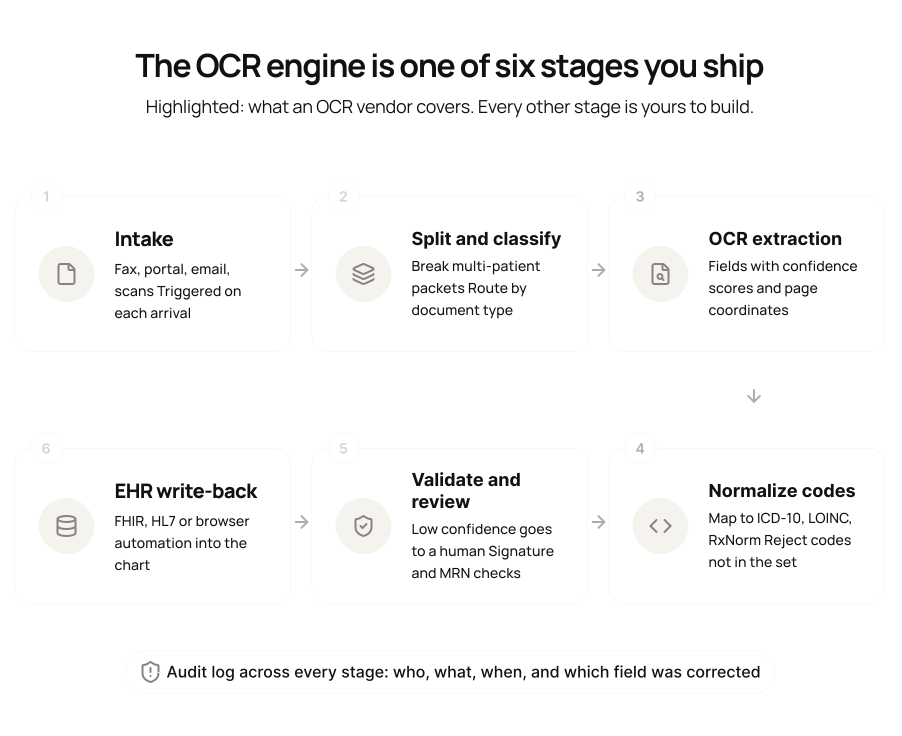
Stages 2, 4 and 5 are where production accuracy is won or lost. A page filed to the wrong patient is a privacy incident, not an extraction error. That is why splitting and MRN matching come before extraction, and why every low-confidence field needs a human path.
HIPAA compliance: what “BAA available” doesn’t tell you
A BAA covers named services, not a vendor’s whole catalog. Before any PHI moves, get written answers to four questions:
- Is the exact API or feature on the covered list? Google lists Document AI but covers Gemini only under specific product names. New generative add-ons often lag.
- Does the vendor retain documents or train on them? Get the retention period and the opt-out in the contract.
- Can you pin processing to a region? Careonix runs in US AWS regions only, with no cross-border PHI movement.
- Is every step logged? You need a trail from fax receipt to EHR write, including who corrected which field.
Case study: how Intuz turned faxed physician orders into EMR entries
Careonix, a home health provider, had a five-person team reading and filing faxes. Each physician order took up to 20 minutes to print, file and key into the EMR. Unsigned orders were caught late, and start-of-care dates slipped.
Intuz built the full pipeline, not just the OCR:
- Intake: RingCentral webhooks trigger processing the moment a fax lands, with an async queue for concurrent faxes.
- Extraction: AWS Textract classifies 20+ document types, including CMS-485 and CMS-495, and extracts MRN, DOB, insurance and start-of-care dates with confidence scores.
- Validation: Textract, OpenCV and PyPDF2 detect physician signatures and flag unsigned orders automatically.
- EMR write-back: Playwright logs into the EMR, finds the patient by name, MRN or order number and uploads to the correct task, with no EMR API required.
- Audit: PostgreSQL logs every action with timestamp and actor. Slack alerts on failures.
| Metric | Before | After |
|---|---|---|
| Handling time per order | 5 minutes | 30 seconds |
| Staff on fax handling | 5 people | Half a person |
| OCR accuracy | Manual keying | 90%+ across 20+ document types |
| Signature detection | Manual check | 95% accuracy |
| Annual savings | Baseline | $250,000 (client-reported) |
The whole stack runs under a BAA in US AWS regions. Intuz signs a BAA on every healthcare engagement and has built integrations with WellSky, Forcura and AmazingCharts (Intuz Health).
Bottom line: choose by cloud, BAA scope and document mix
Pick the engine that matches your cloud and your BAA. Then budget most of the effort for splitting, validation, human review and EHR write-back. That is where healthcare OCR projects succeed or stall.
- On AWS with faxes and forms: Textract plus Comprehend Medical.
- On Microsoft with insurance card intake: Azure Document Intelligence.
- Feeding a FHIR store on Google Cloud: Document AI plus Cloud Healthcare API.
- Enterprise payer needing on-premise: ABBYY Vantage.
- Building an AI-native product: LlamaParse, or open-weight VLMs if PHI must stay in your VPC.
Intuz builds HIPAA-aligned document pipelines from fax intake to EHR write-back, under a signed BAA. Start with a 6-week pilot on one workflow, or see how Careonix saved $250,000 a year.
FAQs
What is the best OCR tool for healthcare automation?
Amazon Textract with Comprehend Medical suits AWS teams. Azure Document Intelligence suits Microsoft stacks and insurance card intake. Google Document AI suits FHIR workloads on Google Cloud. Self-hosted open-weight models suit teams that must keep PHI in-house.
How much does healthcare OCR cost per page?
API prices run from $0.0015/page for plain text on Textract to $0.05/page for forms. Google charges $1.50 to $30 per 1,000 pages. The larger cost is usually human review of low-confidence fields, so model cost at your expected straight-through rate.
Can AI OCR read handwritten prescriptions reliably?
It reads them better than legacy OCR, but not reliably enough to act alone. Route every low-confidence drug name, dosage and code to a pharmacist or reviewer. No OCR output should be the only check before a prescription is filled.
Can OCR write data directly into Epic or other EHRs?
Rarely out of the box. Most pipelines push data through FHIR or HL7 interfaces. Where an EMR has no usable API, browser automation works: Intuz’s Careonix pipeline uploads orders into the EMR through Playwright.
How long does it take to build a healthcare OCR pipeline?
A single workflow can go live in about six weeks. Intuz’s healthcare pilot runs six weeks and needs one internal owner, one workflow, 10 to 20 sample records and your security constraints.
Do open-source OCR models remove the need for a BAA?
They remove the OCR vendor from the BAA chain, not the cloud provider. If you run PaddleOCR-VL or Docling on AWS, Azure or Google Cloud, you still need that provider’s BAA and HIPAA-eligible services.
Work with Intuz
Ready to automate document intake?
Pilot one workflow in 6 weeks. We respond within 24 hours.
Tell Us What You're Building
Share this article