This guide walks you through how AI can help you plan and replan production, where you can apply it, what data you need, how to evaluate tools, and how to pilot the technology without disrupting processes.
Ever had your production schedule fall out of date before a shift even began? A late material delivery, rush order, absent technician, or machine stop can send your planners back to the schedule before the day has properly started.
And the pressure behind those disruptions is widespread. In NAM’s Q2 2026 survey, 83.1% of US manufacturers named increased raw material costs among their biggest business concerns, while 50.2% cited supply chain challenges. That raises the stakes of every schedule change.
What Is AI in Production Planning and Scheduling?
AI in production planning and scheduling is the use of machine learning (ML), predictive analytics, and mathematical optimization to analyze production data and recommend what to make, how much to make, when to make it, in what order, and which resources should perform the work.
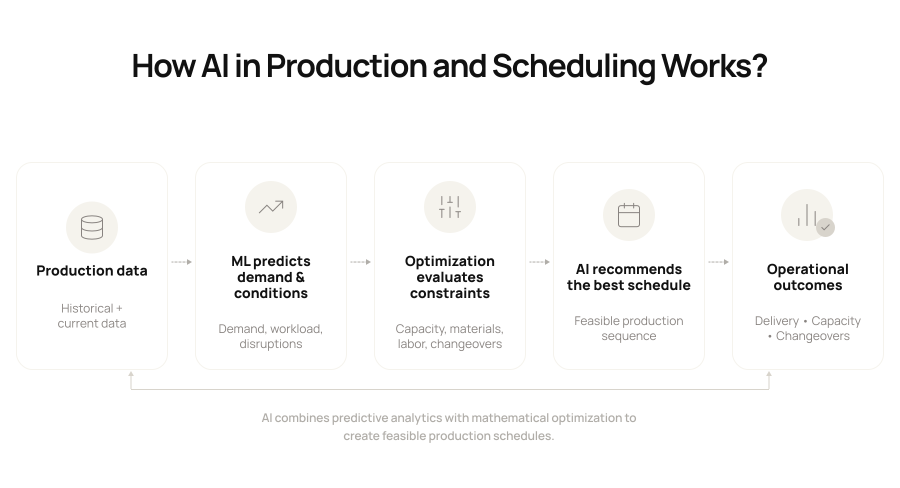
It combines demand, materials, machine and labor capacity, routings, changeovers, due dates, and other production constraints to generate a feasible schedule and recalculate it when conditions change.
Here’s how those pieces work together:
Why Traditional Production Planning and Scheduling Breaks Down
Traditional planning struggles because it often works from a snapshot of conditions rather than what’s happening across production now.
See, a schedule may be perfectly viable when your planner releases it. Then a rush order changes demand, a component arrives late, a bottleneck machine goes down, or an unexpected changeover makes the existing sequence impractical.
Once those assumptions change, someone has to recalculate the schedule. Finite capacity makes that harder.
A traditional material requirements planning (MRP) run can tell you what materials are required and when, but that doesn’t automatically prove that every job will fit the machines, tooling, labor, setup windows, and production time you have available.
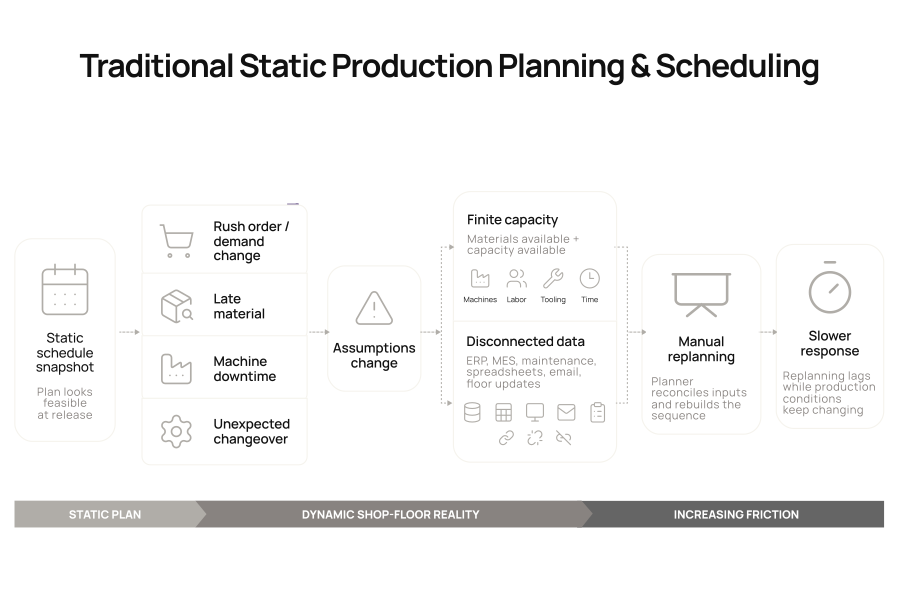
On paper, the materials may be there. On your floor, the job may still have nowhere to go. The problem gets harder when those inputs are spread across ERP, MES, maintenance systems, spreadsheets, email, and conversations with the floor.
Your planner has to reconcile the information, determine which jobs are affected, and rebuild the sequence manually. That makes replanning slower precisely when your production environment requires a faster response.
How AI Solves Production Planning and Scheduling Challenges: 5 Use Cases
So, what changes when AI enters the planning process?
It can keep feeding current production data back into the schedule instead of waiting for the next manual planning cycle. It can assess changing conditions, compare alternatives, and show you how each option affects delivery, utilization, inventory, changeovers, or cost.
Let’s understand the different ways in which AI helps with production planning and scheduling:
1. Improves demand forecasting
You can feed your order history, sales forecasts, seasonality, promotions, customer commitments, and relevant external signals into an AI forecasting model.
ML can identify patterns that static forecasts may miss and update expected demand as new information arrives. Your planners can use that forecast in production and material planning, ensuring your scheduling decisions reflect the latest demand.
2. Strengthens material requirements planning
Predictive AI models can flag material risks earlier by analyzing your Bills of Materials (BOMs), inventory, lead times, safety stock, open purchase orders, supplier performance, and consumption patterns.
That helps you pinpoint likely shortages and confirm whether the required materials will be available before they release work.
3. Plans against finite capacity
Want to model available capacity across your machines, lines, tooling, labor skills, and shifts instead of assuming every planned job will fit? AI can help you.
Optimization engines can analyze different combinations against your due dates and priorities, helping you spot bottlenecks and decide whether to add a shift, use an alternate resource, or renegotiate a delivery date.
4. Optimizes scheduling and sequencing
You can factor setup families, allergen or color changeovers, curing time, tooling, cleaning, batch size, and sequence dependencies into the scheduling logic. AI-assisted scheduling can appraise those constraints together and recommend a robust sequence that reduces avoidable setup time while protecting your priority orders.
5. Connects predictive maintenance to scheduling
If your maintenance model highlights a rising failure risk on a critical asset, you can use that metric to adjust the production schedule before downtime occurs. You might move priority jobs to another machine, create a maintenance window, or resequence work to reduce the impact on customer orders.
Agentic AI coordinates decisions across these use cases
A scheduling agent could detect a machine outage, ask a capacity agent to test alternate lines, have a material agent verify component availability, and subsequently send the best option to your planner for approval.
The AI agents coordinate the analysis within defined permissions, while your planners retain approval and escalation control.
What Data Do You Need to Implement AI?
Let’s look at the five types of data you need to make AI-driven production planning work:
| Data type | Why it matters | Common sources | Typical owner |
|---|---|---|---|
| Demand and orders | Establishes quantities, priorities, and due dates | ERP, CRM, S&OP tools | Sales, planning |
| Product and material data | Defines BOMs, routings, inventory, lead times, and substitutes | ERP, MRP, PLM | Supply chain, engineering |
| Capacity and production data | Shows cycle times, line rates, WIP, machine availability, and output | MES, SCADA, IIoT, ERP | Operations |
| Labor and shift data | Adds staffing levels, calendars, skills, and certifications | WFM, HRIS, MES | Operations, HR |
| Maintenance and asset data | Adds downtime history, planned maintenance, condition, and failure signals | CMMS, EAM, sensors | Maintenance |
Best AI Tools for Production Planning and Scheduling
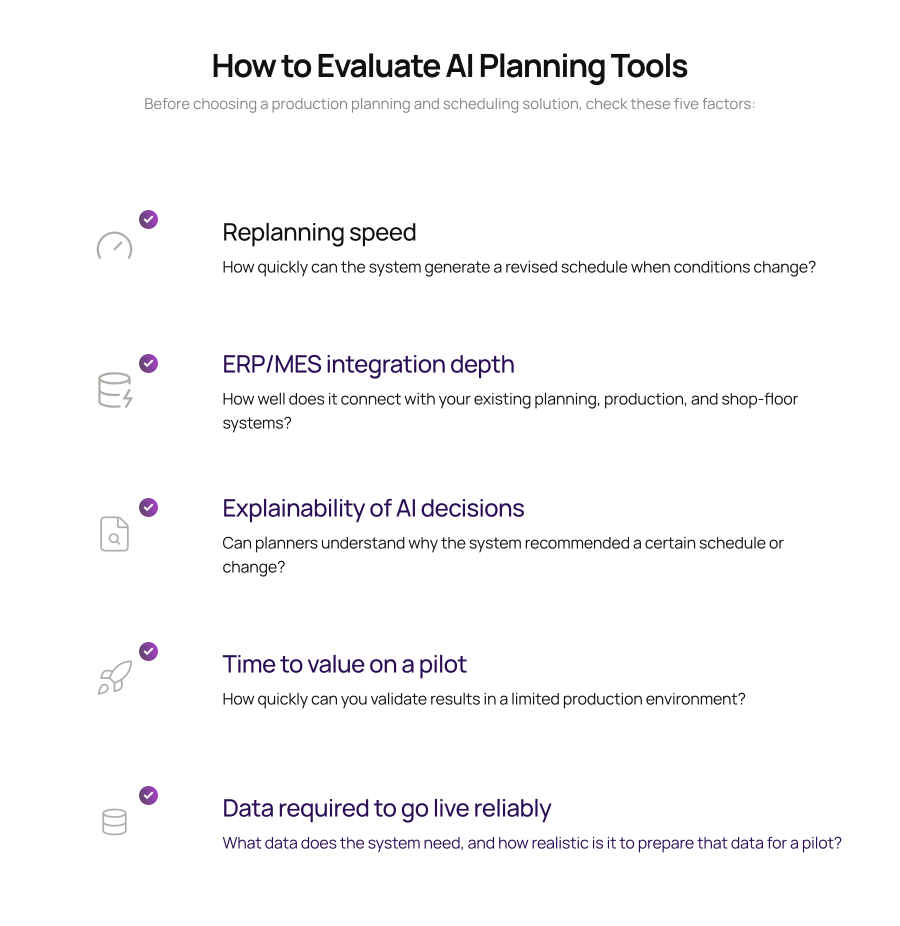
What should you look for when you start evaluating AI planning tools? The right option depends as much on your existing systems and planning complexity as it does on AI features:
| Category | Examples | Best fit | Strength | Watch for |
|---|---|---|---|---|
| ERP-embedded or suite-integrated AI | SAP Integrated Business Planning, Oracle Fusion Cloud Supply Chain Planning | Manufacturers already standardized on a major enterprise suite | Connects planning closely with demand, supply, inventory, and enterprise data | Confirm whether shop-floor scheduling depth and replanning speed match your environment |
| Standalone APS | Siemens Opcenter APS, DELMIA Ortems | Plants with complex finite-capacity scheduling, sequencing, and changeovers | Deep constraint modeling, what-if scenarios, and detailed production scheduling | Integration and master-data work can influence how quickly you reach value |
| AI-native or agentic planning | C3 AI Production Schedule Optimization, RELEX, Plataine | Manufacturers seeking faster optimization, continuous replanning, or AI-agent workflows | Rapid scenario analysis, optimization, and more autonomous exception handling | Check explainability, approval boundaries, integration depth, and how the platform behaves with edge cases |
Benefits of AI in Production Planning and Scheduling
The advantages become much easier to judge when you measure them against operating metrics your plant already tracks:
- More usable capacity: Better sequencing and constraint visibility can help you recover capacity hidden by avoidable idle time, bottlenecks, and changeovers.
- Faster response to disruption: Your planners can compare recalculated scenarios in minutes instead of rebuilding the schedule manually.
- Higher schedule adherence and delivery performance: You can create feasible plans that account for capacity and materials before work is committed.
- Lower WIP and inventory pressure: Better demand, material, and sequencing decisions can reduce the buffers you use to compensate for uncertainty.
- More planner capacity: Automation handles repetitive recalculation, giving your planners more time for exceptions and process improvement.
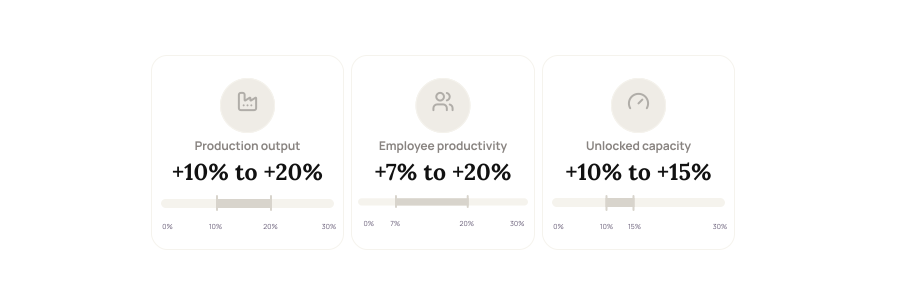
Deloitte’s 2025 Smart Manufacturing and Operations Survey of 600 executives at large manufacturers with US headquarters or operations found average net gains of 10% to 20% in production output, 7% to 20% in employee productivity, and 10% to 15% in unlocked capacity from smart manufacturing initiatives.
How to Implement AI in Production Planning and Scheduling
If you’re wondering where to begin, start with these three steps:
1. Model the real scheduling problem
Start with one line, cell, or product family where scheduling pain is frequent enough to measure, such as repeated changeovers, bottlenecks, expedites, or constant resequencing.
Capture the constraints your planners already use, including machine eligibility, tooling, labor skills, batch sizes, changeover rules, maintenance windows, material release dates, alternate routings, and priority rules.
Some may exist in your systems; others may still be in spreadsheets or your planners’ heads. Ask: ‘What would make you reject this schedule even if the system says it works?
2. Give the AI a clear objective hierarchy
Define which goals take precedence before the pilot starts. A schedule that improves utilization by delaying a priority order has optimized the wrong objective.
Protect committed dates and hard material/capacity constraints first, then optimize changeovers, overtime, or utilization. Attach two or three KPIs, such as schedule adherence, on-time delivery, changeover hours, WIP, or planner replanning time.
3. Run the AI in shadow mode and test it with real disruptions
Deploy the AI schedule alongside your existing process, then test the disruptions that normally break your plan. Check what happens when:
- A bottleneck machine loses four hours of capacity?
- A critical component arrives one shift late?
- A rush order enters the schedule?
- Labor availability drops unexpectedly?
- One job fails quality inspection and must be rerun?
Calculate replanning speed, schedule stability, affected orders, and planner acceptance.
Use this period to decide where human approval is still required. For example, the system may be allowed to resequence jobs within the same shift, while scheduling overtime, substituting materials, or changing a committed delivery date still requires planner approval.
In addition, track repeated overrides. If planners consistently reject the same type of recommendation, you may have a missing constraint, incorrect source data, or a planning rule the system hasn’t captured.
Bring AI Into Your Production Planning and Scheduling With Intuz
We’re an AI development and automation partner that helps businesses move from identifying an AI use case to deploying a working system.
Our capabilities span AI strategy and advisory, custom AI development, predictive analytics, workflow and process automation, agentic AI, ERP integration, and MLOps.
For manufacturing and supply-chain environments specifically, we work with capabilities such as demand forecasting, predictive maintenance, anomaly detection, and predictive modeling at plant scale. We first assess your goals, data readiness, and highest-value AI opportunities.
From there, we prepare the relevant data, develop a proof of concept, integrate the solution with systems such as ERPs and data warehouses, test it in your environment, and continue monitoring and improving the model after deployment.
If you’re exploring where AI could improve your production-planning process, schedule a free 30-minute consultation with us. We can help you identify the right pilot, map the required data and integrations, and define success metrics before you commit to a larger AI program.
FAQs
How much does it cost to develop a custom AI production scheduling system?
A custom AI scheduling system of moderate complexity typically costs $100,000–$200,000. The final cost depends on how many plants are covered, which constraints are modeled (machines, labor, materials), how many ERP/MES integrations you need, and whether scheduling runs in real time.
What does off-the-shelf AI production scheduling software cost?
Subscription pricing varies widely. Entry-level tools run $50–$150 per user per month, mid-tier finite schedulers $500–$2,000 per month, and enterprise platforms $5,000+ per month. Setup, configuration and integration fees often add $5,000–$10,000 or more.
How long does it take to implement AI production scheduling?
A focused pilot on one line typically takes 3–6 months, a full single-plant deployment 6–12 months, and a multi-site rollout 18–24 months. Data readiness is the biggest variable, since messy data can add 6–12 weeks.
Can AI scheduling integrate with our existing ERP and MES?
Yes. Most solutions connect to SAP, Epicor and legacy ERPs through APIs, read-only database views or CSV exports. The harder work is mapping work orders, BOMs, routings and machine states correctly, not building the connection itself.
What data do we need before implementing AI production planning?
At minimum you need work orders, bills of materials, routings, inventory levels, machine capacity and status, shift calendars, and changeover times. Historical production data lets the model learn your actual cycle times instead of relying on outdated engineering standards.
What ROI can manufacturers expect from AI production scheduling?
Vendor benchmarks cite 15–25% better equipment utilization, 10–20% higher on-time delivery, and 20–30% lower inventory carrying costs. Actual results depend on your starting point, and plants still scheduling in spreadsheets usually see the fastest gains.
Should we build a custom AI scheduler or buy existing software?
Buy if your processes fit standard discrete or batch workflows. Build custom if you have unusual constraints like multi-stage routing, regulated batch records or proprietary equipment, or if licensing fees across several sites would exceed a one-time development cost.
Will AI replace production planners?
No. AI can generate and re-optimize schedules in minutes, but planners still handle customer priorities, supplier problems and judgment calls the model can’t see. Most deployments keep a planner in the loop who reviews and approves schedules before release.
Work with Intuz
Ready to make production planning smarter?
We help businesses use AI to optimize production planning, scheduling, and operational efficiency.
Let's Get Started
Share this article