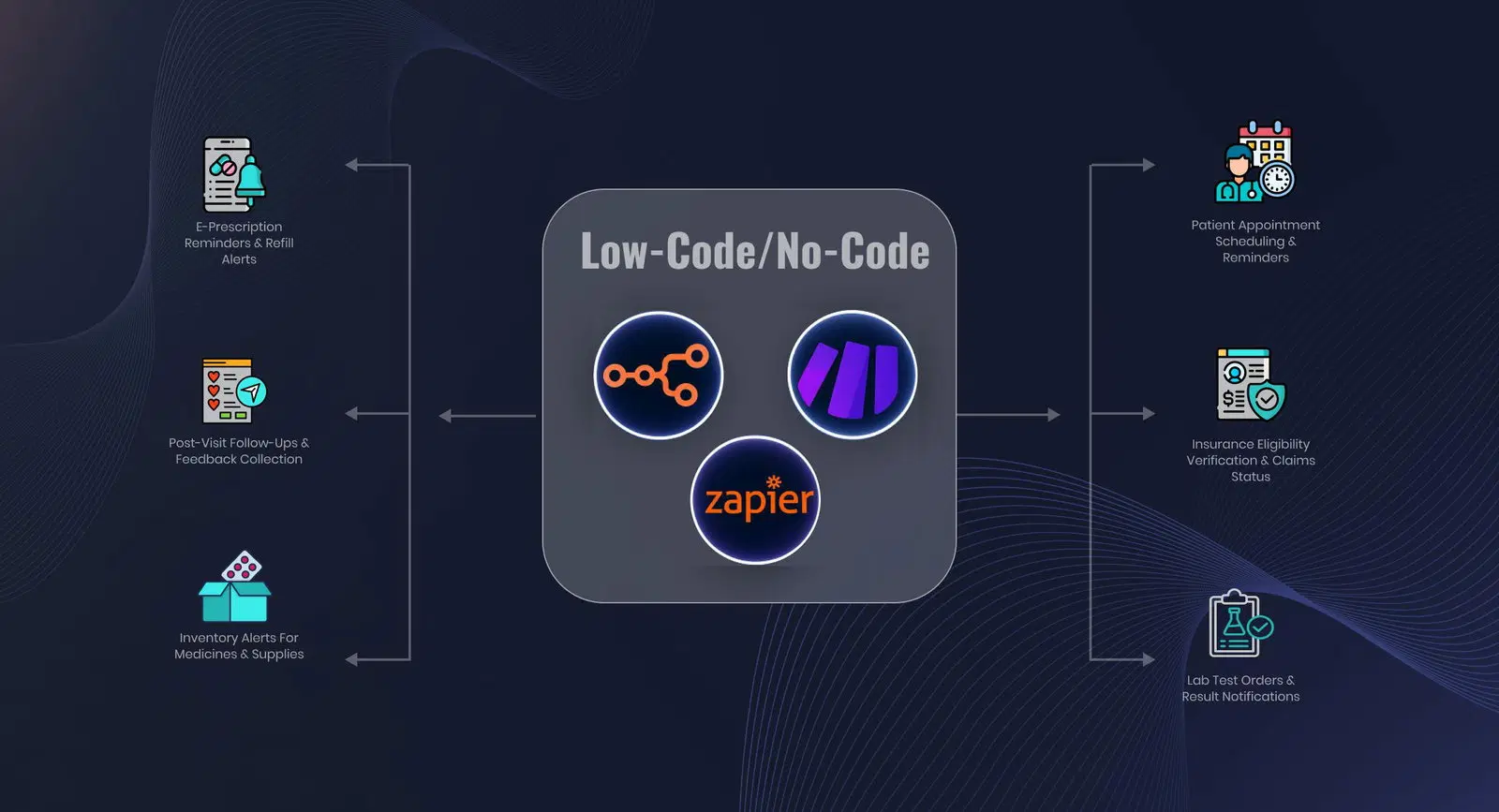
AI-Powered Home Health Care Workflow Automation Software Platform
Every patient comes with a referral to process, physician orders to manage, visits to verify, and a claim to file.
Our software platform automates the operational work across all of it — so your staff focuses on care, not paperwork.
Trusted by


















What Gets Automated Across
the Home Health Workflow
From the moment a referral arrives through patient admission, active episode management, and claim reimbursement — the platform handles the high-volume administrative work at every stage.
Referral Processing
Referrals arriving by fax or portal are retrieved automatically. AI-powered OCR reads the facesheet and attached documents, extracts patient demographics, insurance details, diagnosis codes, episode dates, and referring physician information — and flags missing fields before they cause problems downstream.
Patient Record Creation
Patient demographics, primary and secondary insurance, MBI, Medicaid ID, referring physician NPI, admission type, episode start date, and emergency contacts are entered directly into your EHR — pulled from referral documents, validated, and checked for duplicate records before creation.
Order & Task Setup at Admission
CMS 485, Start of Care order, initial Physician Order, Consent task, and Medication Profile task are generated automatically at admission — with correct episode dates and assignments. Nothing is created manually, nothing is missed.
Physician Order Classification
Incoming physician order faxes — which often contain multiple order types in one document — are split and each order identified individually. CMS 485, Frequency, Recertification, Supply, PRN, and Evaluation orders are each routed to the correct patient episode automatically.
Plus 10 home health automation we offer
Every incoming order is checked for a valid physician signature — both digital and handwritten. Orders without a confirmed signature are flagged and held from the EHR until resolved. Nothing unsigned enters the system undetected.
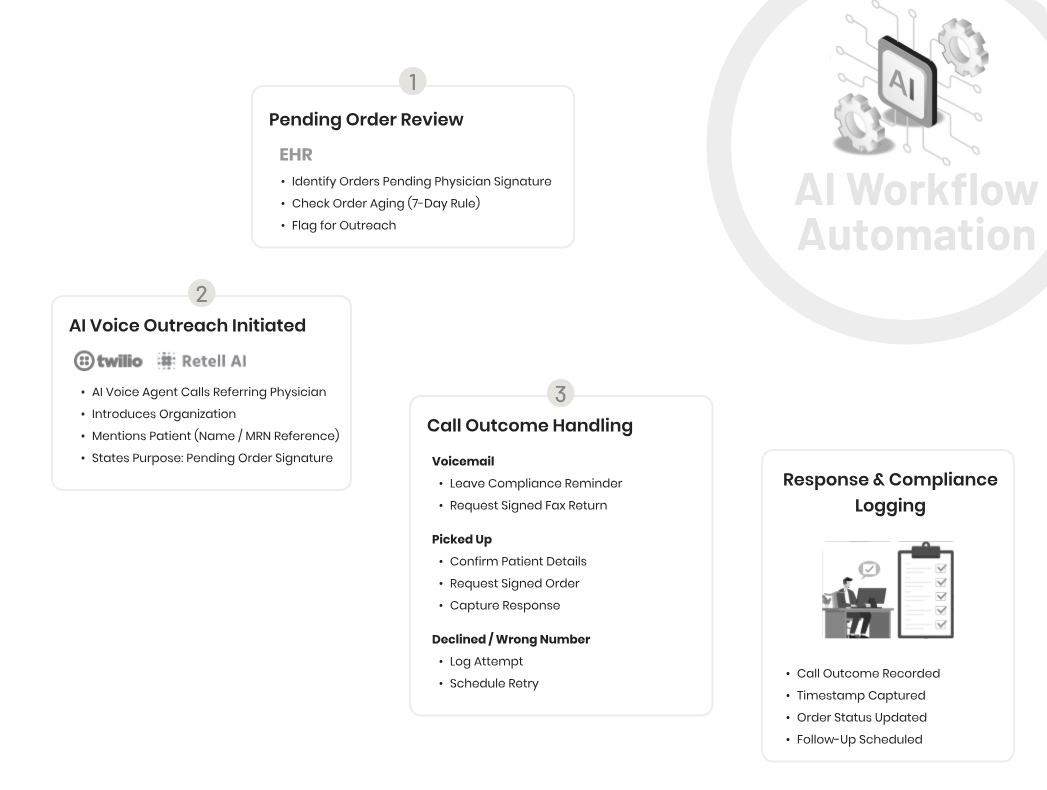
Orders pending physician signature are automatically faxed to the physician’s office with a generated cover sheet. Order status updates when the signed version is received. The follow-up loop runs without manual management.
EVV exceptions are processed automatically — the correct reason code is selected, the standardized explanation is entered, and the transaction is resubmitted. Staff only reviews exceptions that fall outside standard patterns.
Wound images, consent forms, and clinical photographs sent through Slack are uploaded directly to the correct task in the correct patient episode in your EHR — no manual download, no navigation, no risk of wrong-patient upload.
Open prior authorizations are monitored against payer portals continuously. Status updates are captured automatically, staff are notified when a response requires action, and upcoming expirations are flagged before a coverage gap occurs.
Claim status is checked in bulk across Medicare, Medicaid, and commercial payer portals. Payment status, denial reasons, and check numbers are retrieved automatically and updated in your tracking system — no manual portal logins.
Every claim denial reason is logged against the associated patient record and order history — giving your billing team the visibility to identify which upstream documentation or authorization issue is generating repeated denials.
Patient and caregiver calls outside business hours — visit scheduling, rescheduling, messages to care coordinators — are handled by conversational AI. Every call is captured with structured detail and routed to the right person. No calls are lost to voicemail.
When the platform encounters a document it cannot process with confidence — degraded fax quality, unrecognized order type, patient record conflict — it flags the item and notifies the right staff member with the context already captured. Humans handle the exceptions; the platform handles the volume.
Every action the platform takes is logged with a timestamp and full detail — document processed, data extracted, fields entered, order uploaded. Audit-ready records are maintained automatically for every automated action.
Proof in the field
Proof It Works for Home Health
Real agencies, real hours saved — see how the platform performs in production.


Ready-to-Deploy Workflows
For Home Health Automation
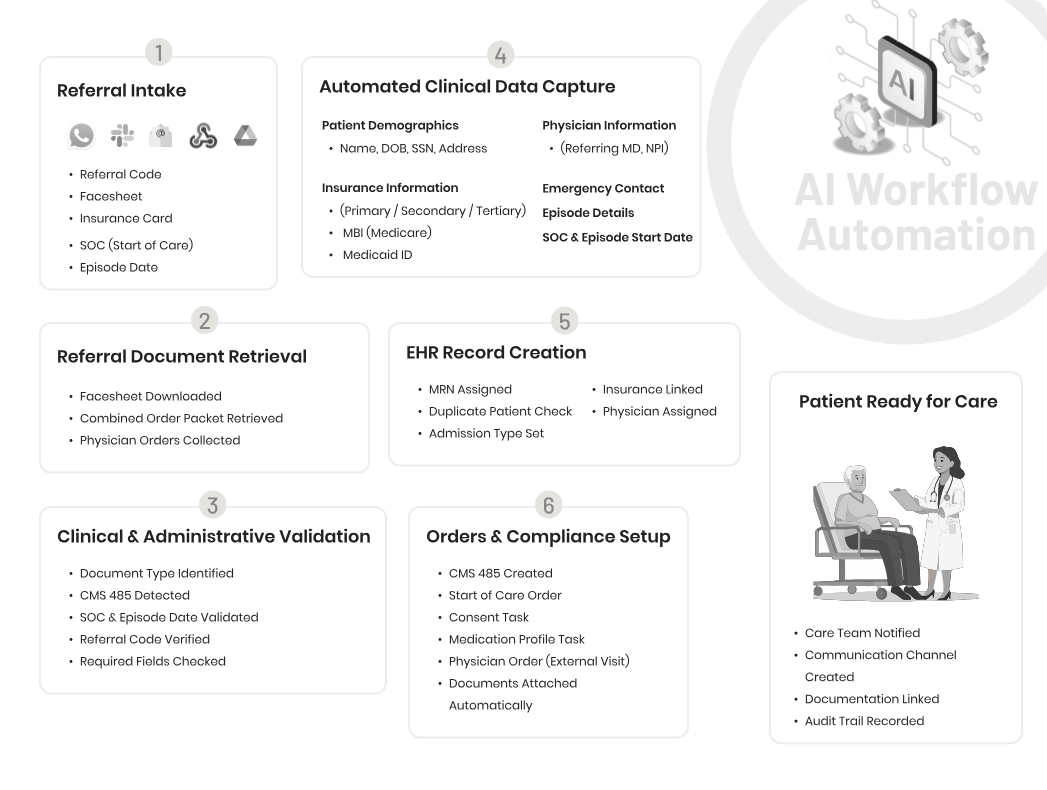
Patient Onboarding Workflow Automation
Referral documents are retrieved, read, and validated automatically. Patient demographics, insurance details, MBI, episode dates, and physician information are entered into your EHR — and all required orders and tasks are created — without anyone touching the record manually.
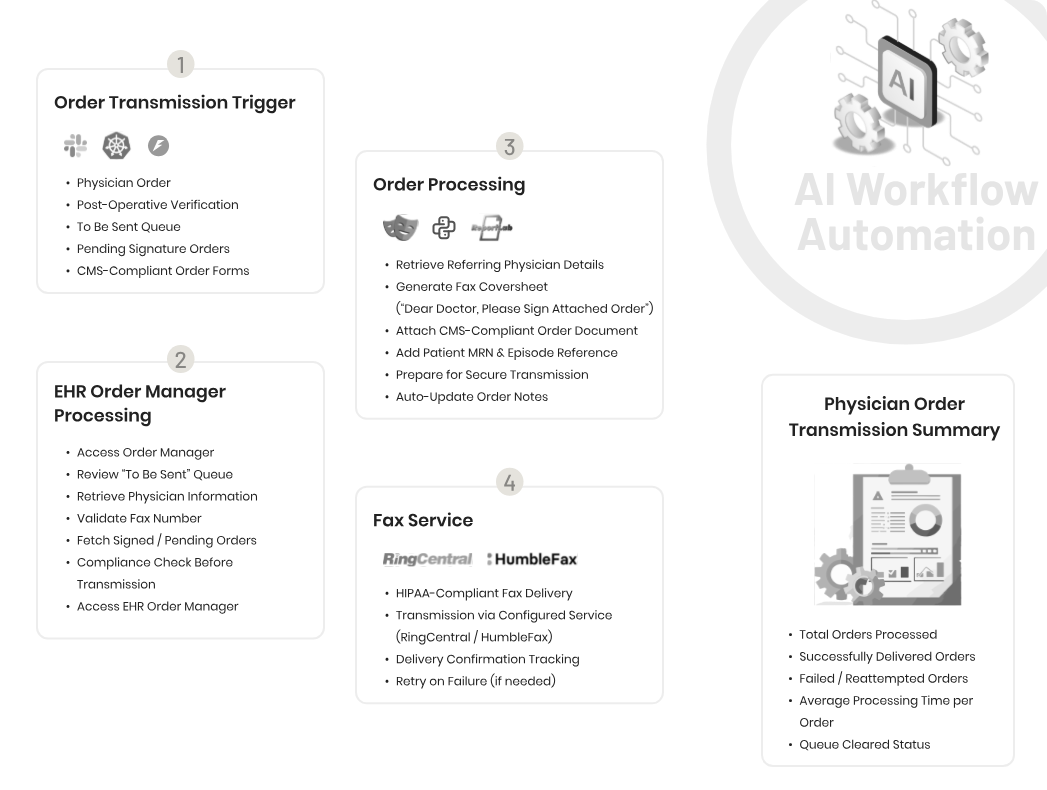
Physician Order Transmission Workflow Automation
Orders pending physician signature are pulled from your EHR queue, packaged with a CMS-compliant cover sheet, and faxed through RingCentral or HumbleFax automatically. Delivery is confirmed, order notes are updated, and failed transmissions are flagged for retry — no manual fax queue management.
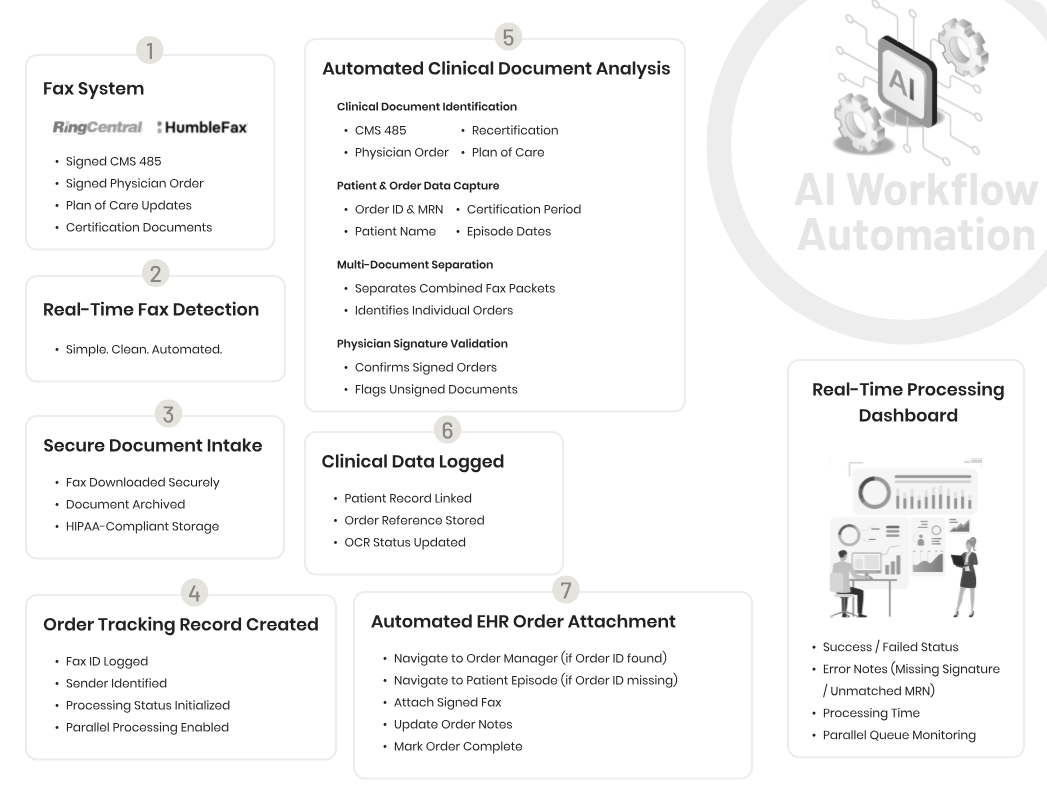
Signed Physician Order Processing Workflow Automation
Signed orders arriving by fax are detected in real time, downloaded securely, and analyzed by AI — identifying document type, extracting patient and order data, verifying the physician signature, and uploading to the correct patient episode in your EHR. Multi-document fax packets are split and each order processed individually.
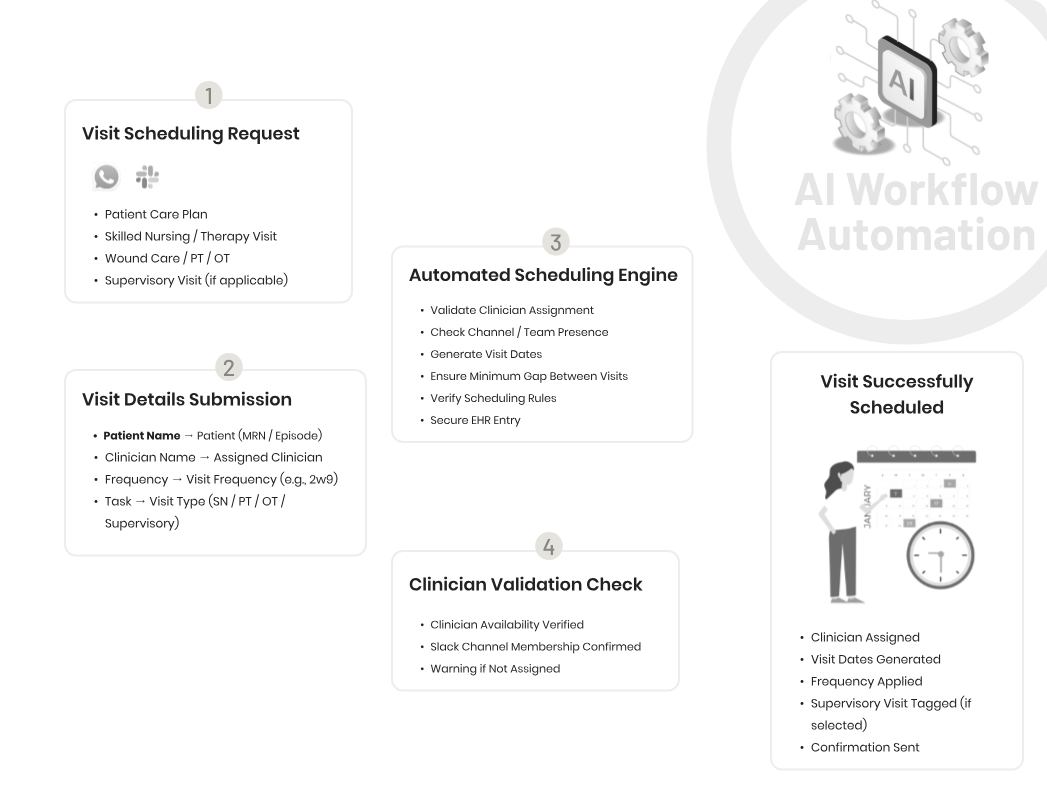
Clinical Visit Scheduling Workflow Automation
Visit scheduling requests — skilled nursing, therapy, wound care, or supervisory visits — are processed automatically. Clinician assignment is validated, visit dates are generated at the correct frequency, scheduling rules are applied, and the confirmed schedule is entered into your EHR.
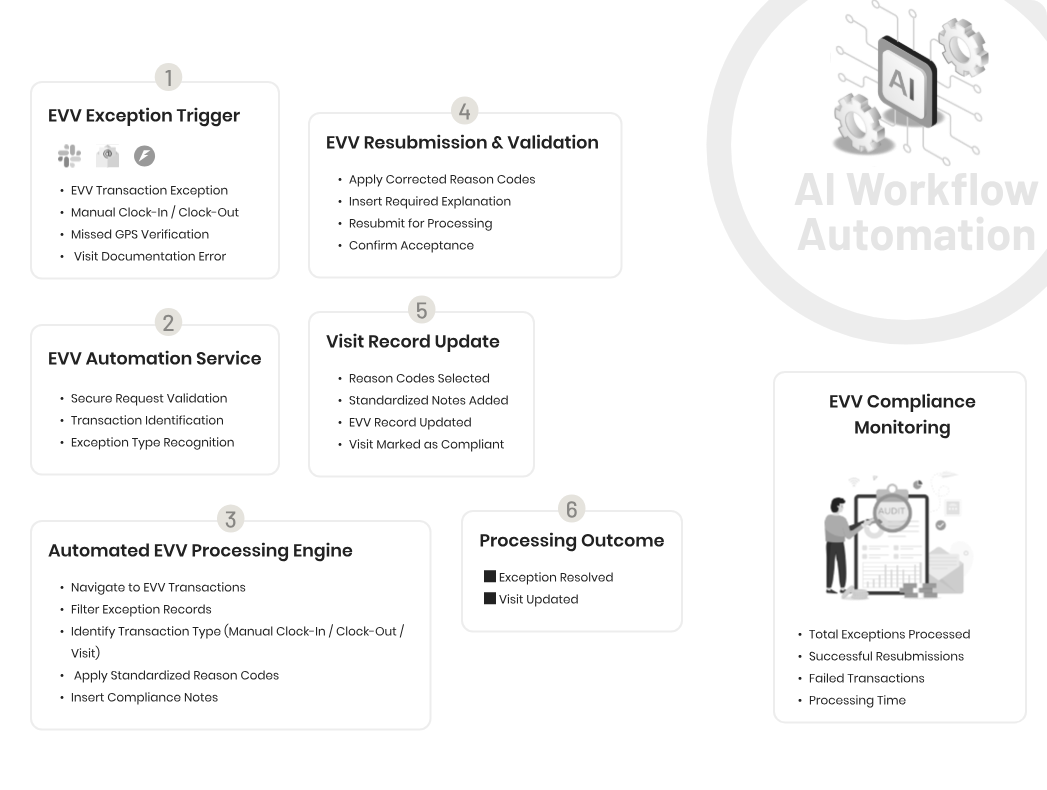
EVV Compliance & Resubmission Workflow Automation
EVV exceptions — missed clock-ins, manual overrides, GPS verification failures — are identified, classified by transaction type, and processed automatically. Correct reason codes are applied, compliance notes are entered, and the transaction is resubmitted and confirmed. Your EVV compliance queue clears without manual processing.
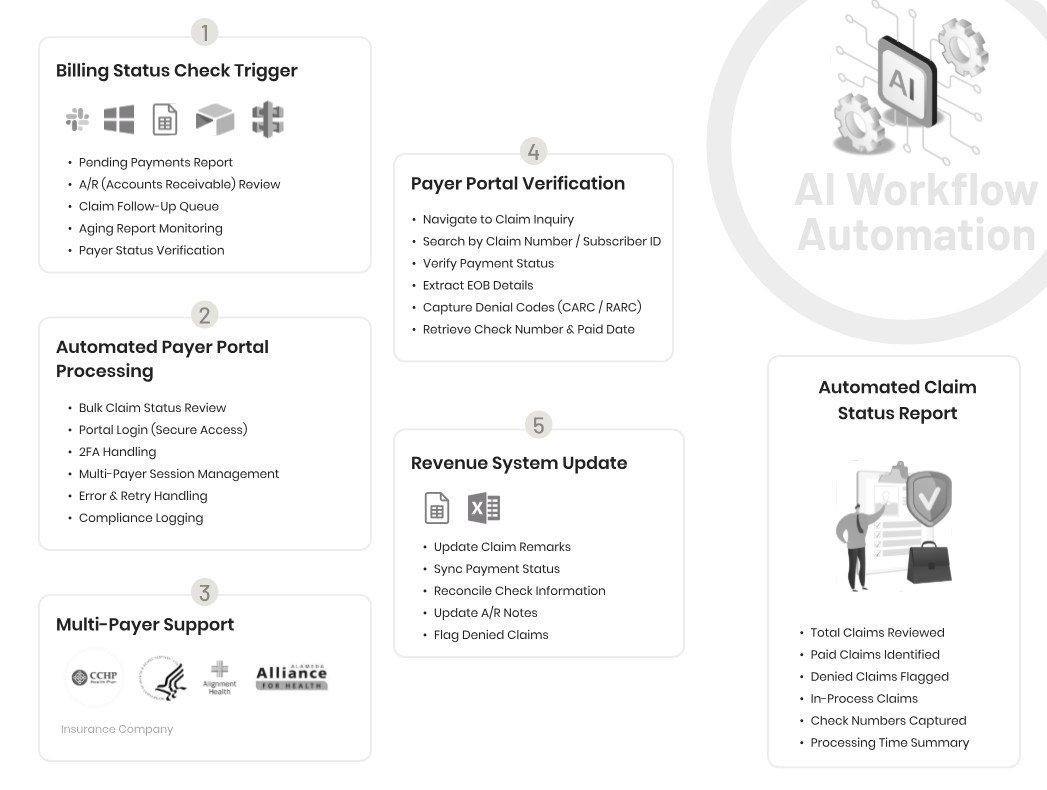
Automated Claim Status
Claim status is checked in bulk across multiple payer portals — Medicare, Medicaid, and commercial insurers. Payment status, EOB details, denial codes (CARC/RARC), and check numbers are extracted and synced to your revenue tracking system automatically. Your billing team sees a current view of every claim without a single manual portal login.
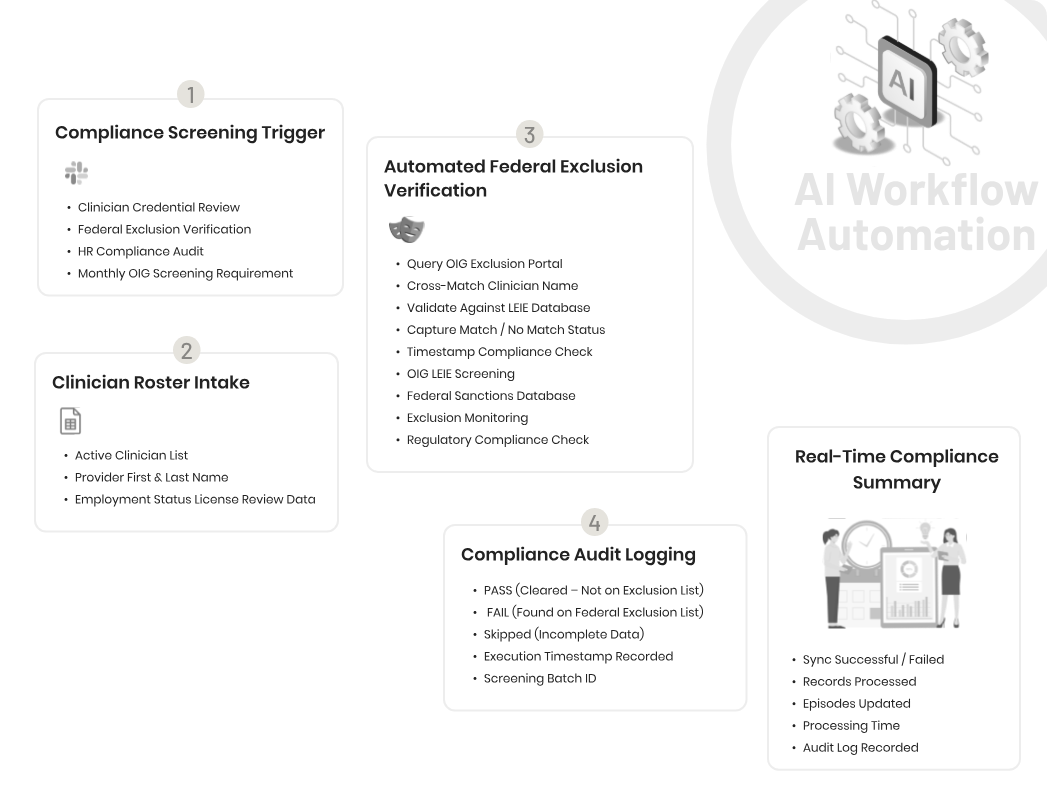
OIG Exclusion Screening Workflow Automation
Wound images, consent forms, and clinical documentation sent through Slack are routed directly to the correct task in the correct patient episode in your EHR. Consent compliance is validated, signatures are verified, and task status is updated automatically — no manual download, no navigation, no wrong-patient uploads.
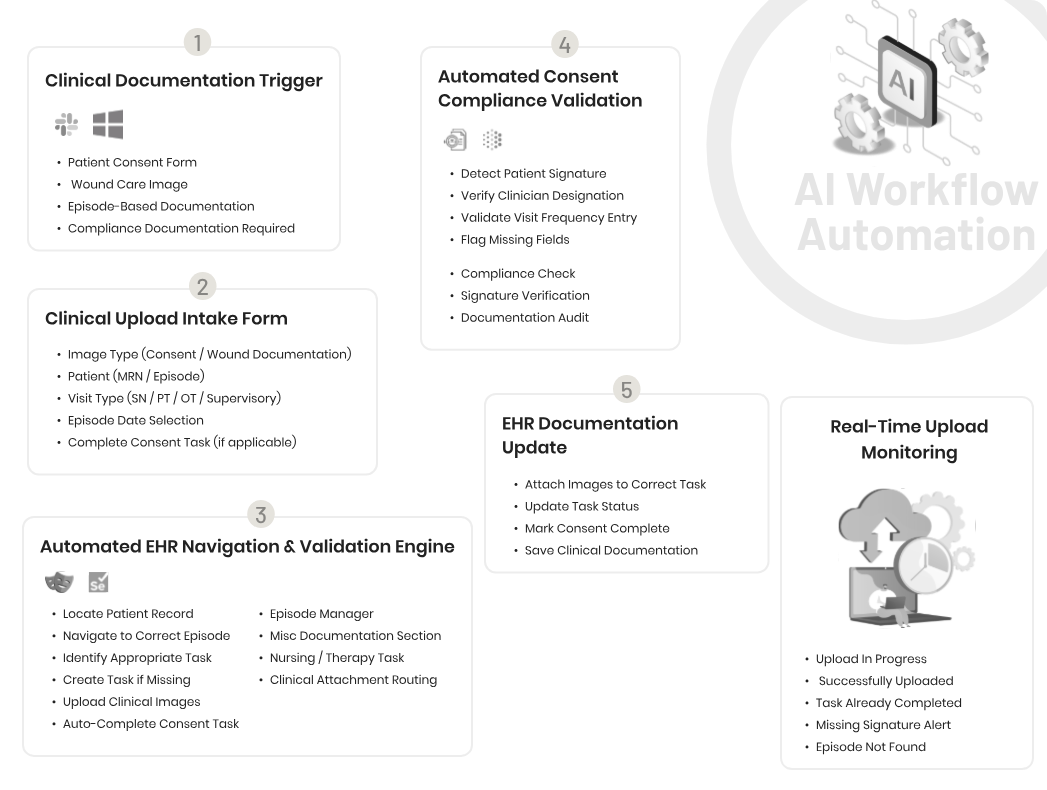
Real-Time Compliance Summary
Your active clinician roster is screened against the OIG LEIE database and federal sanctions lists automatically on a monthly basis. Each clinician is cross-matched by name and credentials, pass/fail status is logged with a timestamp, and your compliance audit trail is updated — meeting the monthly OIG screening requirement without manual lookups.
Inbound Clinical Call Handling AI Agent
Every inbound call — patient, caregiver, case manager, referral source, or discharge coordinator — is answered, classified by caller type, and handled by the AI agent 24/7. Structured call summaries with the right information for each caller type are generated and routed to the right staff member with a follow-up action flag. No calls go to voicemail. No intake is missed.
See the Full Home Health Workflow in Action
From referral received to patient admitted, episode managed, and claim filed — walk through how the platform runs the full administrative cycle.
Solving the Major Challenges of
Home Health Operations
Home health runs on referrals, physician orders, field visits, and compliance — and every step involves manual work. Our platform addresses each one directly.
Referral Documents Arriving After Hours with No One to Process Them
High-Volume Physician Order Fax Processing and Classification
Multi-Document Faxes Requiring Manual Splitting and Individual Entry
Physician Signature Verification Across Every Incoming Order
Patient Registration Across many EHR Fields Per New Admission
Order and Task Creation Missed or Delayed at Onboarding
Recertification Orders Not Chased Before Episode Authorization Expires
EVV Exception Backlogs Putting Medicaid Visit Reimbursement at Risk
Clinical Documentation from the Field Uploaded to the Wrong Patient or Episode
Prior Authorization Status Unknown Until a Claim Is Already Denied
Insurance Claim Status Spread Across Multiple Payer Portals
After-Hours Patient and Caregiver Calls Lost to Voicemail
Compliance Audit Trails Requiring Manual Documentation of Administrative Actions
Staff Time Consumed by Repetitive Data Entry Instead of Care Coordination
FAQs
Does the platform work with our EHR, or will we need to switch systems?
The platform works alongside your existing EHR — Kinnser, WellSky, Homecare Homebase, and similar systems. Nothing is replaced. We connect to what you already use and automate the manual steps your staff is doing between systems. Compatibility is confirmed during discovery before any commitment is made.
Our payer mix is complex and our EHR setup is customized. Can the platform actually handle that?
Configuration is specific to your operation — your document types, your EHR field structure, your payer-specific rules, your exception handling preferences. We spend time during discovery understanding exactly how your operation works before building anything. Generic configurations are not deployed.
How do you automate physician order processing in home health?
Physician order automation in home health works by connecting to your incoming fax line, reading each document with AI-powered OCR, classifying the order type — CMS 485, Start of Care, Frequency, Recertification, Supply, or Evaluation — verifying the physician signature, and uploading the order to the correct patient episode in your EHR. Multi-document faxes are split and each order processed individually. Orders missing signatures are flagged before they enter the system.
What is EVV exception processing and how can it be automated?
Electronic Visit Verification exceptions occur when a home health visit cannot be automatically verified — a clinician who missed a clock-in, a visit outside the scheduled window, or a location that could not be confirmed. Each exception requires a reason code, a written explanation, and a resubmission to the state EVV system. Automation handles this by identifying the exception type, selecting the appropriate reason code, entering the standardized explanation, and resubmitting — removing the manual processing burden from your billing or operations staff.
What EHR systems does the platform integrate with?
The platform is configured to work with the EHR your agency already uses — including Kinnser (WellSky), Homecare Homebase (HCHB), and similar home health EHR systems. Compatibility is confirmed during discovery before any commitment is made. We do not replace your EHR — we automate the manual work that happens around it.
How does the platform handle EVV compliance for Medicaid visits?
EVV exceptions — missed clock-ins, location verification failures, visits outside the scheduled window — are processed automatically. The correct reason code is selected based on transaction type, the standardized explanation is entered, and the transaction is resubmitted to the state EVV system. Staff handle only exceptions that fall outside standard patterns.
Does the platform support OASIS documentation workflows?
OASIS documentation triggers are supported within the workflow. The platform handles the administrative side — flagging episodes that require OASIS completion, routing tasks to the clinical team, and logging completion status. Clinical content within OASIS is always completed by a qualified clinician.
How long does the first automation lane take to go live?
Most agencies go live on their first workflow within 4–6 weeks of starting the pilot. Discovery, configuration, and testing are structured into a defined timeline so there’s no open-ended build. The pilot covers one workflow; expansion lanes typically ship 30–60% faster because the platform foundation is already in place.
Explore More
Go deeper
on the platform.
One platform. Multiple automation lanes.
See every module the platform covers — from patient intake and physician orders to billing, compliance, and voice.
Explore the Platform
What the platform delivers in practice.
See what your team feels in week one — and what the numbers look like after six months in production.
See Outcomes
Start with one workflow. Go live in six weeks.
Lane by lane — no big-bang risk, no restarting from scratch. A structured pilot that proves value before full deployment.
See Pilot Plan