This benchmark reflects real engineering work: our team at Intuz builds document intelligence pipelines for enterprise clients dealing with exactly this kind of high-volume, high-variance PDF ingestion. The patterns below aren’t theoretical — they’re what consistently breaks, and what consistently works, across every large-scale extraction project we run.
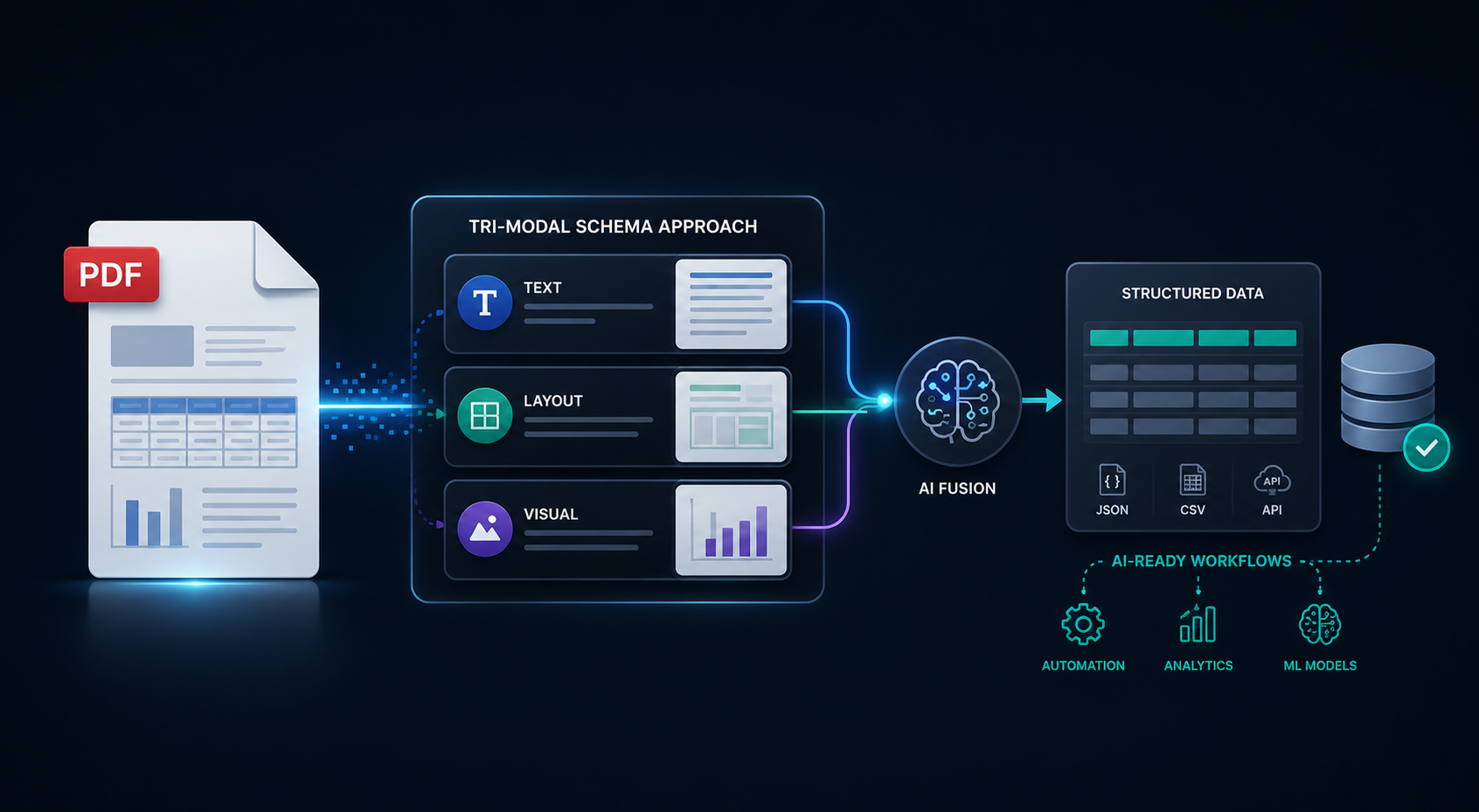
A recent enterprise data engineering initiative aimed to ingest over 10,000 highly heterogeneous PDFs—ranging from standardized financial reports to complex sustainability documents with borderless tables and multi-column layouts. The objective was not merely text extraction, but the extraction of semantic sWant the Highest Accuracy? Be Ready for This Trade-offtructure (Headings, Subheadings, Paragraphs, Tables) to feed a downstream categorization engine.
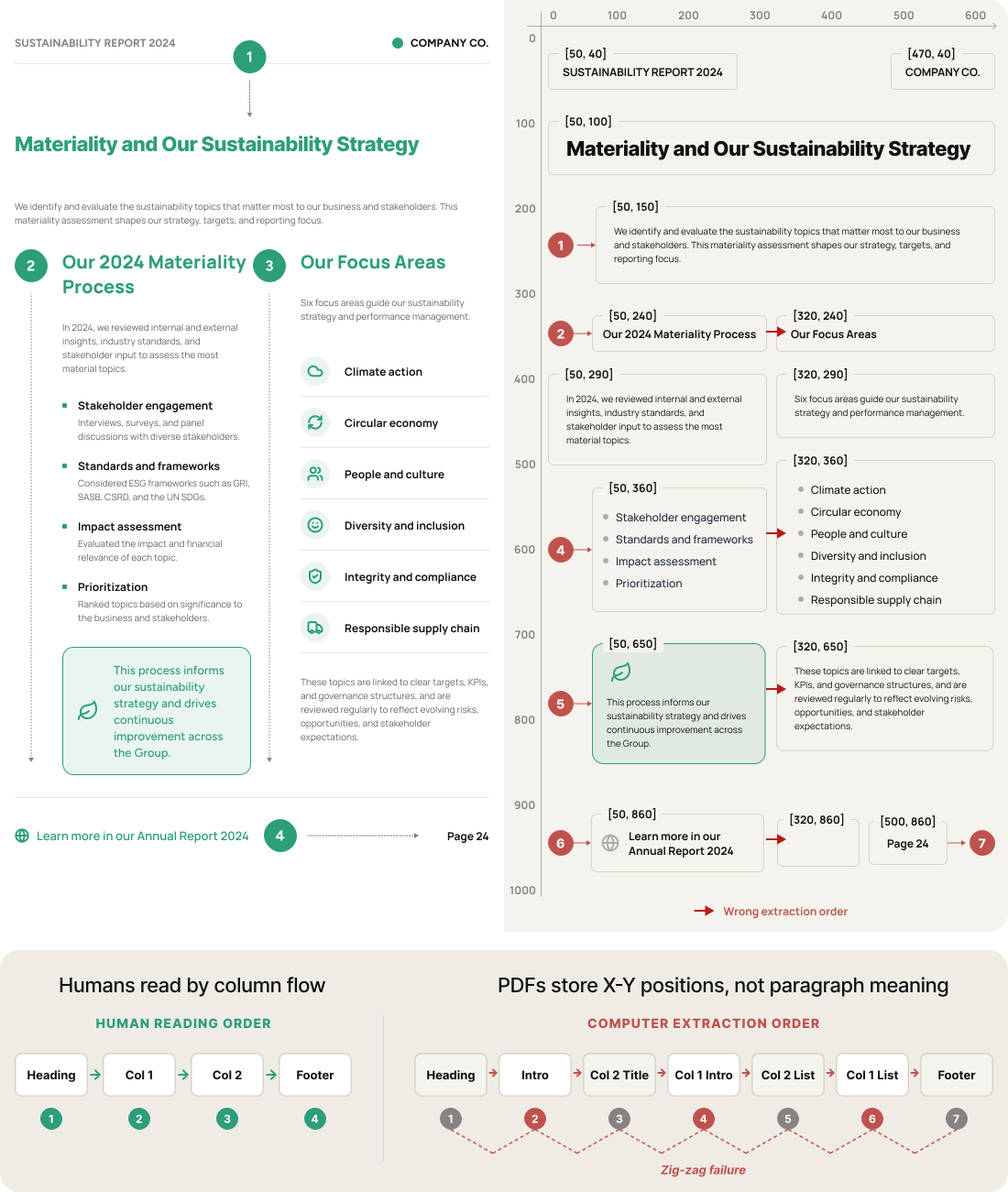
Direct-to-string extraction methods failed immediately due to the “Zig-Zag” reading order problem inherent to PDF coordinates. This case study details the quantitative and qualitative evaluation of 9 industry-standard extraction tools, highlighting why a single-tool approach fails, and how a Routed Pipeline Architecture ultimately achieved a 94% structural accuracy rate.
Why Your PDFs Don’t Extract Cleanly (And Why That’s Costing You)
A PDF does not natively understand paragraphs, columns, or table boundaries; it only understands X/Y coordinates. When extracting text from a standard two-column layout (e.g., a sustainability report), standard parsers read left-to-right, top-to-bottom across the entire page width.
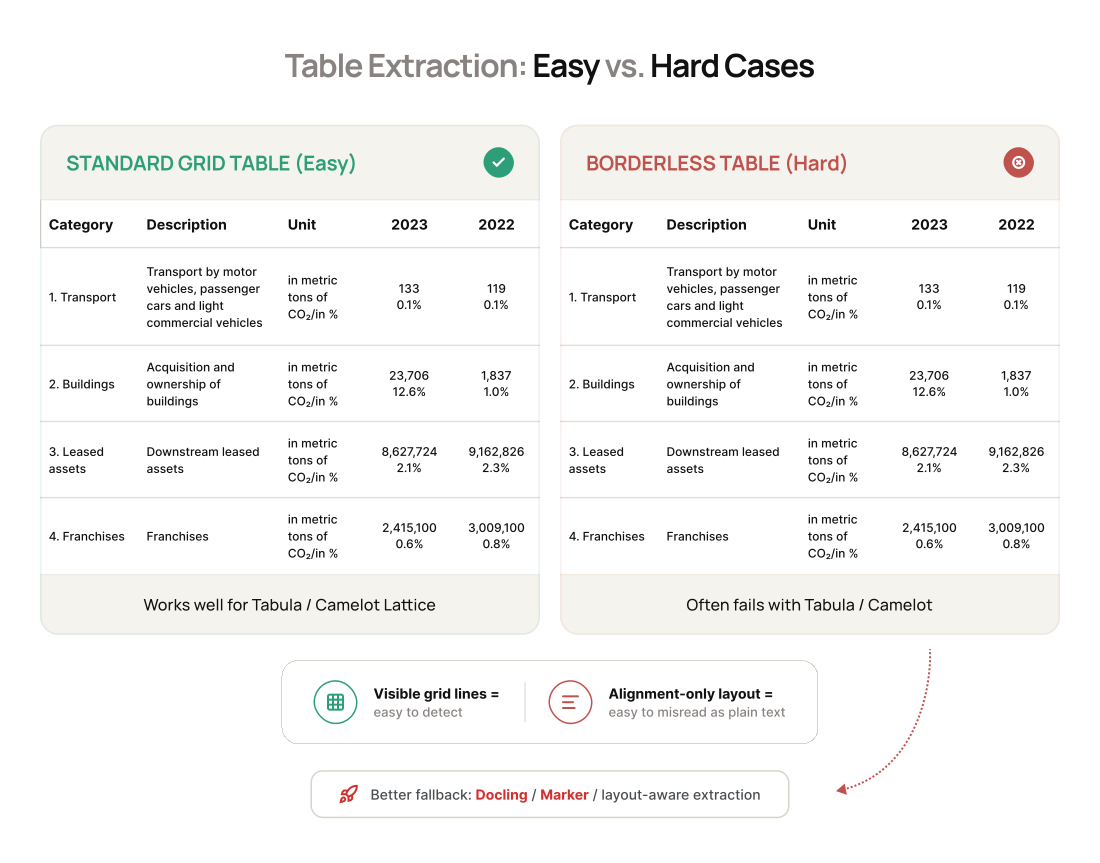
Furthermore, table extraction varied wildly based on visual structure:
- Standard Grid Tables (High Success Rate): Tables with visible borders (e.g., standard financial matrices) are easily detected by basic heuristics.
- Borderless Tables (High Failure Rate): Tables relying on spatial alignment and whitespace (common in legal and ESG documents) are routinely flattened into broken narrative text by 80% of tested tools.
What We Tested Across Top 9 PDF Extraction Tools — So You Don’t Have To
Nine tools were benchmarked across a dataset of 500 representative documents. Tools were scored on Structural Accuracy (Hierarchy & Reading Order), Table Extraction F1-Score, Processing Speed (Pages/Second), and Memory Efficiency (Peak RAM usage).
Note: API-based tools were also evaluated for concurrency limits, frequently hitting 429 Too Many Requests errors when scaling beyond 50 concurrent threads due to standard tier rate-limiting.
| Tool / Approach | Processing Speed | Peak Memory | Hierarchy & Reading Order Accuracy | Table Extraction Reliability | Primary Use Case & Verdict |
|---|---|---|---|---|---|
| PyMuPDF + Custom Logic | 85 p/s (Very Fast) | < 0.5 GB | 92% (Strong for text) | 0% (Fails entirely) | Fast, simple text extraction. Verdict: Failed on columns/tables. |
| Marker-pdf | 3–5 p/s (Slow) | 8.5 GB (Very High) | 96% (Excellent) | 90% (Strong) | High-fidelity Markdown. Verdict: Too slow/memory-heavy for batch. |
| Docling | 2–4 p/s (Slow) | 6 GB (High) | 82% (18% H-level errors) | 94% (Excellent) | Table-heavy docs. Verdict: Heading misclassification broke routing. |
| Markdrop | 4 p/s (Slow) | 7 GB (High) | 95% (Strong) | 95% (Excellent) | Visual HTML/Markdown. Verdict: Same resource constraints as Marker. |
| MarkItDown | 120+ p/s (Fastest) | < 0.2 GB (Lowest) | < 40% (Very Weak) | Weak | LLM ingestion w/o structure. Verdict: No paragraph/heading control. |
| Tabula | Moderate | Low | N/A (Text ignored) | 98% (Grid) / <15% (Borderless) | Simple grid tables only. Verdict: NoneType errors on merged cells. |
| Camelot | Moderate | Low | N/A (Text ignored) | Moderate (Stream) | Programmatic table extraction. Verdict: False positives on narrative text. |
| Amazon Textract | Network Dep. | Cloud | 70% (Fails on columns) | Moderate (Fails borderless) | Scanned OCR workflows. Verdict: Confused prose with tables. |
| Unstructured.io | Moderate-Slow | Moderate | 70% (Fails on columns) | Moderate (Fails borderless) | Generic RAG chunking. Verdict: Jack-of-all-trades, master of none. |
Not sure which row in this matrix matches your document mix? Most teams don’t realize their PDFs are a blend of several of these categories until after they’ve already committed to the wrong single tool. If you want a second opinion on which path fits your dataset, our Document AI team can map it for you in a free 30-minute call — no obligation.
Top 9 PDF Extraction Tools – Full Detailed Comparison
Nine tools were benchmarked across a dataset of 500 representative documents. Tools were scored on Structural Accuracy (Hierarchy & Reading Order), Table Extraction F1-Score, Processing Speed (Pages/Second), and Memory, Efficiency (Peak RAM usage).
Note: API-based tools (Marker, Textract, Unstructured) were also evaluated for concurrency limits, frequently hitting 429 too many requests errors when scaling beyond 50 concurrent threads.
1. Need Raw Speed With Full Control? Here’s the Catch
Tool: PyMuPDF + Custom Heuristics
- Performance: 85 p/s | <0.5 GB RAM
- Findings: By leveraging low-level font sizes and X/Y coordinate delta rules, this approach achieved a 92% accuracy rate in classifying Headings, Subheadings, Paragraphs, and Bullet points (specifically handling “continuation lines” accurately).
- Critical Failure: 0% accuracy on tables. Completely failed on columnar PDFs, breaking reading order flow.
2. Want the Highest Accuracy?
| Tool | Strengths | Issues |
|---|---|---|
| Marker-pdf | Achieved the highest overall Markdown fidelity (~96% accuracy) for complex layouts. | Severe resource constraints. Processing dropped to 3–5 p/s with peak memory spikes exceeding 8.5 GB per document. Cloud API usage resulted in frequent rate-limiting (max 10 req/sec on standard tiers). |
| Docling | Highly accurate text and table extraction (Table F1-Score: 0.94). | Speed dropped to 2–4 p/s. Crucially, it exhibited an 18% misclassification rate between heading levels (e.g., failing to differentiate H2 from H3), which broke downstream routing logic. |
| Markdrop | Excellent at handling complex tables and offered unique LLM-powered image description integration. | Mirrored Marker’s bottlenecks (4 p/s, 7+ GB RAM), making it impractical for high-volume batch processing. |
3. Only Need Tables Extracted?
| Tool | Strengths | Issues |
|---|---|---|
| Tabula | Achieved 98% accuracy on standard grid tables. | Threw NoneType errors on 25% of borderless tables. Completely failed on merged cells, dropping extraction accuracy to below 15% for complex layouts. |
| Camelot (Stream Mode) | Fast and effective for extracting well-structured, text-based tables without requiring OCR. | High false-positive rate. Frequently misidentified narrative text columns as tables due to spatial alignment heuristics. No native OCR support. |
4. Fast and Cheap — But Is It Actually Usable?
Tool: MarkItDown (Microsoft)
- Performance: 120+ p/s | <0.2 GB RAM
- Findings: Extremely fast CLI utility.
- Issues: Yielded a <40% structural accuracy rate. Provided almost zero differentiation between paragraphs and headings, rendering it useless for strict semantic categorization.
5. Relying on Cloud OCR? Know These Blind Spots First
Tools: Amazon Textract, Unstructured.io
- Findings: Both tools performed exceptionally well on scanned documents via OCR (98% character accuracy). However, for selectable text, both suffered identical failures: they could not reliably distinguish between columnar narrative text and borderless tables. Unstructured.io served well as a generic RAG partitioner but lacked the granular heading-level control required for this pipeline.
6. Can a Table of Contents Do the Work for You?(No.)
Tested as a structural anchor prior to text extraction.
- Findings: In 40% of the test set, native TOCs were unlinked, scattered across pages, or pointed to incorrect page numbers. While useful as a secondary validation layer, TOC metadata was deemed too unreliable to drive primary extraction logic.
The Fix: Let Every Document Route Itself to the Right Tool
The evaluation proved that relying on a single extraction model is an architectural anti-pattern. The successful solution required a Dynamic Router Pipeline that classifies the document page-by-page and routes it to the most efficient tool, optimizing for both accuracy and compute cost.
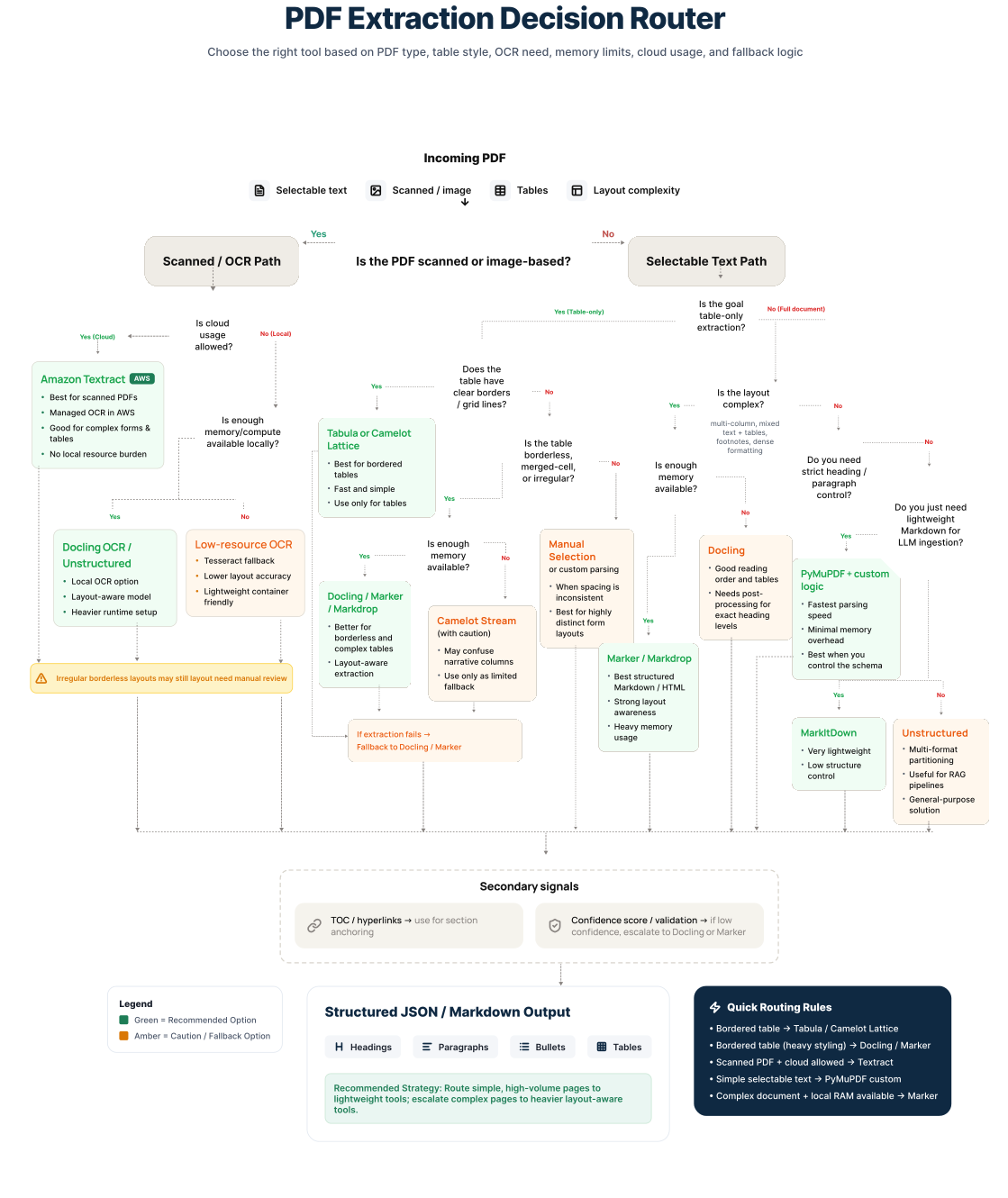
Step 1: Sort Every Document Before You Touch It
- Is this a scanned image? → Yes: Route to OCR Path (Amazon Textract).
- Are there visible table gridlines? → Yes: Route to Table Purist Path (Tabula/Camelot).
- Is it a complex, borderless, multi-column layout? → Yes: Route to Heavyweight Path (Docling/Marker).
- Is it simple, single-column text? → Yes: Route to Fast Path (PyMuPDF Custom Logic).
Step 2: Turn Every Output Into One Clean, Usable Format
Regardless of the routing path, all outputs are normalized into a strict JSON hierarchy schema. Heading level errors introduced by tools like Docling are corrected using font-size heuristics in the post-processing layer.
Should You Build This In-House? Weigh the Real Cost First
The Routed Pipeline Architecture above is the right approach — the benchmark data proves that. But building it inhouse is a different project than running a one-time tool comparison. Teams that attempt this internally typically spend 8-12 weeks tuning the classification router alone, then face ongoing maintenance every time a new document type enters the pipeline, a vendor API changes its rate limits, or a tool version update shifts heading-detection behavior.
This is the point where most internal data engineering teams stall — not because the architecture is wrong, but because running nine specialized tools as one coordinated pipeline requires dedicated document-AI expertise most teams don’t have on staff full-time. This is exactly the kind of pipeline our engineering team at Intuz builds and maintains for enterprise clients, so their internal teams stay focused on the product instead of the parsing layer.
The Bottom Line: What This Means for Cost, Speed & Accuracy
By implementing the Routed Pipeline, the enterprise achieved the following:
- Cost Reduction: Reduced heavy AI-model API calls by 72% by routing simple text pages to PyMuPDF instead of Marker/Docling.
- Performance: Increased overall processing speed from an estimated 4 p/s (using a heavyweight tool uniformly) to an aggregated 35 p/s across the dataset.
- Accuracy: Maintained a structural hierarchy accuracy of 94%, compared to the 40-60% accuracy seen in single-tool deployments.
- Engineering Time Saved: Equivalent to an estimated 8-12 weeks of in-house tuning avoided by starting from a production-tested routing layer instead of building one from scratch.
These results are consistent with what we’ve seen across enterprise document AI engagements at Intuz — the routing approach generalizes well beyond this specific 500-document benchmark.
Ready to Stop Guessing Which Tool Fits Your PDFs?
If your team is building a similar pipeline in-house, talk to Intuz’s AI team. We’ll review your document mix in a free 30-minute architecture consultation and tell you which routing approach fits — no obligation.
FAQs
What’s the best PDF extraction tool for enterprise document processing?
There isn’t one universal winner — the benchmark data shows accuracy trade-offs between speed, memory, and table handling across all 9 tools tested. PyMuPDF wins on speed (85 p/s) but fails completely on tables (0%). Marker-pdf and Docling hit 94-96% structural accuracy but run at 2-5 p/s and need 6-8.5 GB RAM per document. For enterprises processing mixed document types at scale, the highest-accuracy result (94% aggregate) came from routing each page to the tool best suited for it, not picking a single winner.
Why does PDF text extraction break on multi-column or two-column layouts?
PDFs store text as X/Y coordinates, not paragraphs or columns — parsers that read left-to-right across the full page width produce the zig-zag error, stitching together unrelated lines from adjacent columns. This affected every general-purpose tool tested, including Amazon Textract and Unstructured.io, both of which scored just 70% hierarchy accuracy on columnar layouts. Fixing this requires layout-aware models (like Docling or Marker) or a custom coordinate-delta heuristic layer.
Can Tabula or Camelot handle borderless tables?
Not reliably. Tabula scored 98% on standard grid tables but dropped below 15% accuracy on borderless tables and threw NoneType errors on 25% of merged-cell layouts. Camelot’s Stream mode frequently misidentified narrative text as tables due to whitespace alignment, producing false positives. Borderless tables — common in legal, ESG, and sustainability reports — need a layout-aware model like Docling or Markdrop, which scored 94–95% on the same dataset.
Is Docling or Marker-pdf better for structured Markdown output?
Marker-pdf produced the highest Markdown fidelity in testing at 96% structural accuracy, ahead of Docling’s 82%. But Docling led on table extraction (94% F1 vs. Marker’s 90%) and Marker’s memory footprint (8.5 GB peak) makes it impractical at batch scale. Docling’s main weakness was an 18% heading-level misclassification rate, confusing H2 and H3 headers, which is fixable with a font-size correction pass in post-processing rather than a reason to discard the tool.
Why do single-tool PDF extraction pipelines fail at enterprise scale?
Because no single tool performs well across all document variations. In this benchmark, uniform use of one heavyweight tool across a mixed dataset produced only 40–60% structural accuracy and processed at roughly 4 pages/second. A routed architecture that classifies each page first and sends it to the right specialized tool lifted accuracy to 94% and throughput to an aggregated 35 p/s, while cutting heavy API calls by 72%. Treating extraction tools as specialized micro-services, not one monolithic solution, is what closes this gap.
How much does it cost to build a custom PDF extraction pipeline in-house?
Beyond tool licensing or API costs, the bigger investment is engineering time: teams building a routing layer like the one in this benchmark typically spend 8–12 weeks tuning classification logic, table-detection thresholds, and heading-correction heuristics, plus ongoing maintenance whenever a new document type or vendor API update shifts behavior. That’s before accounting for infrastructure costs from running memory-heavy tools like Marker or Docling (6–8.5 GB peak RAM per document) at scale. Many teams find it faster to start from a production-tested routing architecture instead of building one from zero.
How do I know which PDF extraction approach fits my documents?
Start by profiling your document mix: what percentage are scanned images, standard grid tables, borderless tables, or clean single-column text? Each category maps to a different tool in the benchmark matrix above. Most enterprise datasets are a blend of several categories, which is exactly why single-tool deployments underperform. If you’re unsure how your documents break down or want a second opinion before committing engineering time, Intuz’s Document AI team offers a free 30-minute consultation to map your dataset against the right routing approach.
Work with Intuz
Stop Guessing Which Tool Fits Your PDFs.
Talk to Intuz's AI team. Get a free 30-minute document architecture consultation.
Let's Get Started
Share this article