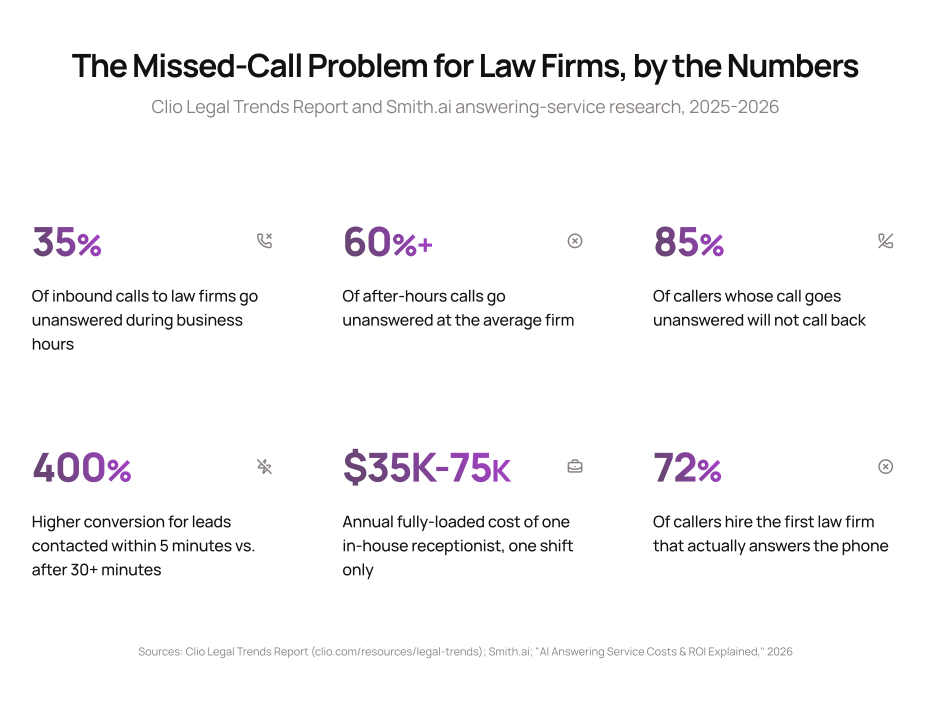
A prospective client calls your firm at 6:40 PM about a matter that needs to move fast. No one picks up. They hang up, and forty seconds later they’re calling the next firm on their search results page. That single call, gone, is not a minor inconvenience. Clio’s Legal Trends Report puts the share of inbound calls that go unanswered at law firms at 35% during business hours, and the number climbs well past that once the office closes for the day.
Most firms know they’re losing calls. Few have worked out what that actually costs them, or what a realistic fix looks like that doesn’t mean hiring a second front-desk shift. This guide covers what an AI receptionist for a law firm actually does, what it costs against the alternatives, and where it fits (and doesn’t) inside a mid-size firm’s operations.
Show
- Law firms miss roughly 35% of inbound calls during business hours, and that rate rises sharply after hours, according to Clio’s Legal Trends Report.
- Response speed drives conversion more than almost any other intake variable: leads contacted within 5 minutes convert at dramatically higher rates than those reached after 30 minutes or more, per Smith.ai’s answering-service research.
- An AI receptionist typically costs a fraction of a full-time hire, since one in-house receptionist runs $35,000 to $75,000+ a year fully loaded and only covers a single shift.
- The technology works best as the front door to a connected intake workflow, not as a standalone fix. Bolting a voice agent onto a phone line without a plan for what happens to the data afterward just moves the bottleneck one step downstream.
- This is one of the lowest-friction automation projects a firm can run. It sits in front of the phone line and doesn’t require touching your existing practice management system to get started.
The Missed-Call Problem Is a Revenue Problem, Not a Front-Desk Problem
- Missed call rate, business hours: 35% (Clio Legal Trends Report)
- Missed call rate, after hours: 60% or higher at the average firm
- Callback behavior: 85% of callers whose call goes unanswered do not call back
- Conversion window: Leads contacted within 5 minutes convert at up to 400% higher rates than leads contacted after 30+ minutes (Smith.ai)
The instinct at most firms is to treat a missed call as a staffing inconvenience: someone was in a meeting, someone was at lunch, the line got busy. The data says something sharper. A missed call is a lead that is very likely to become someone else’s client within the hour. Prospective legal clients rarely wait around. They’re usually calling two or three firms off the same search results page, and the one that actually answers has a real structural advantage before the conversation even starts.
This is why response speed, not just call volume, is the number that should drive the decision to automate. A firm that answers slowly but eventually answers is still losing deals to firms that answer immediately, even if every call technically gets picked up by end of day.
What an AI Receptionist Actually Does
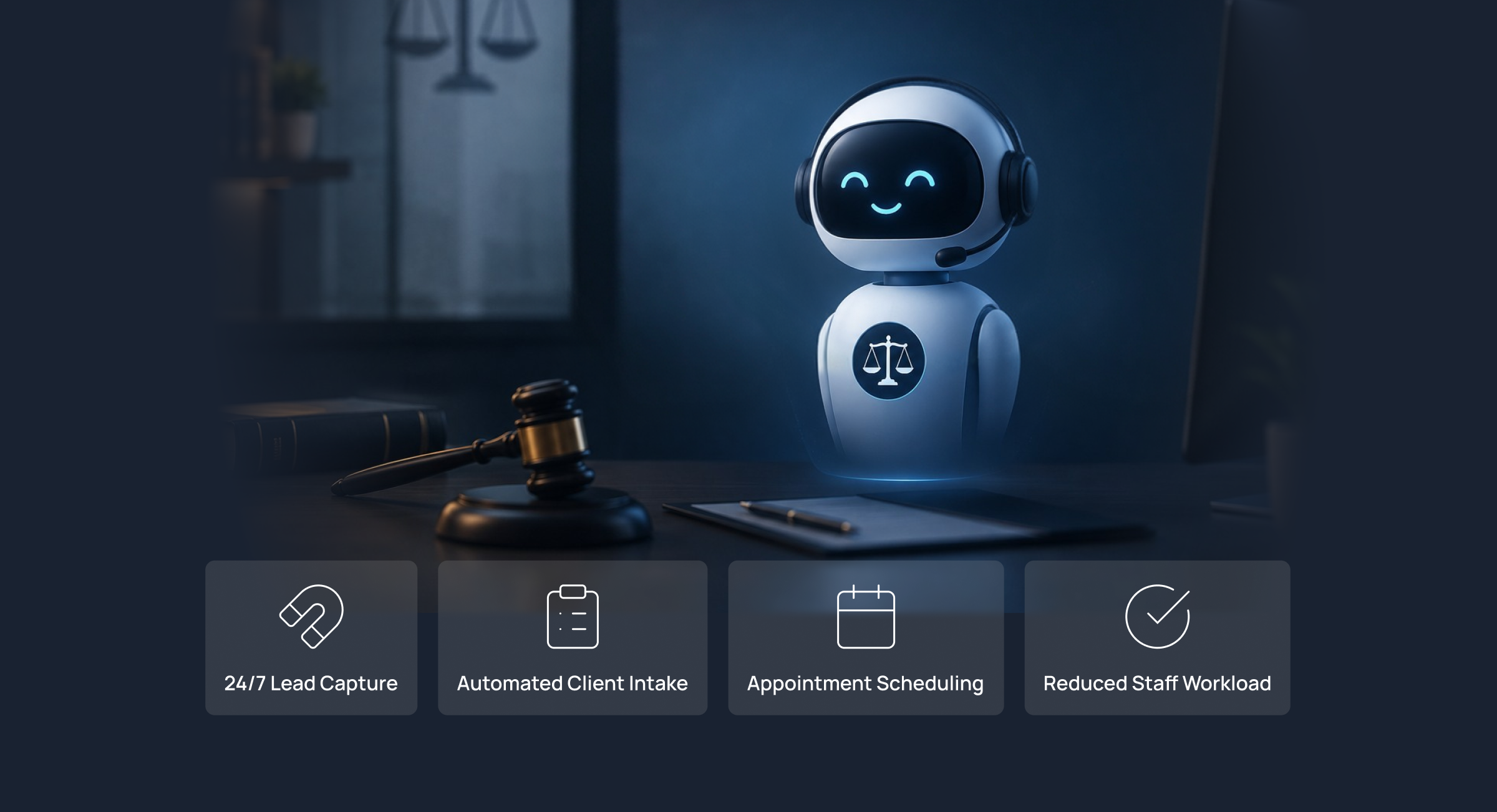
An AI receptionist is a voice system that answers inbound calls in real time, runs a structured intake conversation, and routes the result to the right person or system. It is not a phone tree, and it is not a chatbot bolted onto a call. The better legal-specific platforms on the market today (Smith.ai, Dialzara, Lexidesk, and similar) are built specifically to:
Answer every call 24/7, including nights, weekends, and overlapping calls that would otherwise go to voicemail. Run a structured intake script that captures the caller’s name, the nature of the matter, and basic qualifying details, so the attorney who picks it up isn’t starting cold. Screen for case viability against the firm’s own criteria, filtering out calls that clearly don’t fit the practice before they ever reach a paralegal’s desk. Log the transcript and captured details directly into the CRM or practice management system, instead of leaving that data trapped in a voicemail no one transcribes. Route qualified callers to a live attorney, a scheduling link, or a callback queue based on urgency and matter type.
None of this requires the firm to give up a human touch entirely. Most firms that adopt this technology keep a live attorney or paralegal in the loop for anything beyond routine intake. What changes is that the phone no longer goes unanswered at 6:40 PM, and the person who eventually calls the prospect back already has the context instead of starting from “So, tell me what happened.”
What It Costs Compared to the Alternatives
A full-time, in-house receptionist is the default most firms reach for, and it’s also the most expensive option per hour of actual coverage. Salary, payroll tax, benefits, and PTO push the fully loaded cost of one receptionist to $35,000-$75,000+ a year, and that figure buys exactly one shift. Nights, weekends, lunch breaks, and sick days are all still unanswered.
| Option | Typical annual cost | Coverage | What you’re actually buying |
|---|---|---|---|
| In-house receptionist | $35,000-$75,000+ | One shift, business hours only | A dedicated employee, full context on your firm, but no after-hours or overflow coverage |
| Traditional human answering service | $1,200-$6,000+ | 24/7, but generic scripts unless heavily customized | Coverage without hiring, but often less firm-specific nuance than an in-house hire |
| AI receptionist / voice agent | $600-$6,000 (roughly $50-$500/month platform cost) | 24/7, simultaneous calls, consistent script every time | Coverage plus consistency, at a cost structure closer to software than headcount |
Smith.ai’s own published analysis modeled a five-person firm handling 200 inbound calls a month achieving a 1,775% ROI switching from a full-time receptionist to an AI-driven answering setup, based on labor savings alone, before factoring in the additional converted leads from faster response time. That number will vary by firm size and call volume, but the direction is consistent across every case we’ve reviewed: the math favors automation once a firm is past roughly 100-150 inbound calls a month.
Where This Fits Inside a Broader Legal Workflow
An AI receptionist solves exactly one problem: the phone gets answered. What happens after that call is still governed by everything else in the firm’s operations, and this is where a lot of deployments underdeliver. If the receptionist captures a lead beautifully but that lead still lands in an inbox no one checks until Monday, the firm has automated the wrong end of the funnel.
The stronger pattern is treating the AI receptionist as the entry point into a connected intake workflow rather than a standalone fix, feeding directly into client intake automation, conflict checks, and scheduling rather than sitting as an isolated tool. We cover the fuller set of legal workflows worth automating, including intake, billing, and calendaring, in our guide to legal workflow automation.
What to Check Before You Buy
| Firm profile | Recommended starting point | Why |
|---|---|---|
| Solo or under 5 attorneys, under 100 calls/month | Human answering service or basic voicemail-to-text | Call volume may not yet justify a dedicated AI platform cost; test economics first |
| 10-50 attorneys, 150+ calls/month, high after-hours volume | AI receptionist as a standalone deployment | Fastest ROI case; low integration burden since it doesn’t require touching the PM system |
| 50-100 attorneys, multiple practice areas | AI receptionist integrated with intake and CRM | Volume and complexity justify connecting the voice layer directly into matter creation, not just call logging |
| 100+ attorneys with existing legal-ops function | Evaluate as part of a broader intake automation project | Likely already has enterprise vendor relationships; standalone voice tools may duplicate existing intake infrastructure |
Before signing with any vendor, confirm three things: whether the transcript and captured data actually sync to your practice management system or just sit in the vendor’s own dashboard, whether the intake script can be customized per practice area (a personal injury intake and an estate planning intake should not ask the same questions), and what happens when the AI can’t handle a call. A tool that silently fails on complex calls is worse than no automation at all.
How Intuz Approach This
We don’t start with a voice platform recommendation. We start by mapping where your firm’s calls are actually going wrong: is it after-hours coverage, overflow during business hours, or slow follow-up once a lead is captured. From there we build the connection between the voice layer and whatever practice management or CRM system your firm already runs (Clio, MyCase, PracticePanther, or otherwise), so the call doesn’t just get answered, it turns into a properly logged, followed-up lead. If your firm is also looking at wider workflow automation across intake, billing, and case management, the front-desk piece is usually the fastest place to start and the easiest to show results from within the first month.
If you’re evaluating this as part of a broader move toward AI agents handling operational work across your firm, front-desk automation is a reasonable first deployment precisely because it’s contained: it touches the phone line and the intake record, not your entire case management stack.
When this fits your firm
You’re missing calls during business hours, after hours, or both, you have at least 100-150 inbound calls a month, and you have somewhere for the captured lead data to go (a CRM or PM system, even a basic one).
When it doesn’t
Your call volume is low enough that a missed call is a rare event rather than a pattern, your intake process is genuinely too complex or sensitive to hand any part of to a voice agent (some criminal defense and family law intakes fall here), or you don’t yet have a workflow for what happens after a lead is captured. Fix that gap first. An AI receptionist that feeds a broken follow-up process just automates the point where leads go to die.
Our experience
The firms that get the most out of this aren’t the ones chasing the newest voice technology. They’re the ones who already knew, roughly, how many calls they were missing and what a converted lead was worth to them. That number is what makes the ROI conversation concrete instead of theoretical.
Legal workflow automation doesn’t start and end with the phone line. See our complete guide to legal workflow automation for the other manual processes worth fixing first, from client intake to billing and deadline tracking.
FAQs about AI Receptionist for Law Firms
What CTOs, founders, and enterprise innovation teams ask before engaging an AI development company.
What is an AI receptionist for a law firm?
An AI receptionist is a voice-based software system that answers inbound calls to a law firm automatically, conducts a structured intake conversation, screens the caller against basic qualifying criteria, and routes the result to an attorney, a scheduling system, or a callback queue. It operates 24/7 and can handle multiple calls simultaneously, which a single human receptionist cannot.
How is an AI receptionist different from a traditional answering service?
A traditional answering service uses live human operators, usually working from a general script, to answer calls on a firm’s behalf. An AI receptionist uses voice AI to run the same function without a human on the line, which typically means lower per-call cost, more consistent script adherence, and the ability to handle overlapping calls, though some firms prefer keeping a human option available for complex or sensitive intakes.
Will an AI receptionist replace my firm’s front-desk staff?
For most mid-size firms, no. The more common pattern is using an AI receptionist to catch overflow and after-hours calls that would otherwise go to voicemail, while existing staff continue handling calls during business hours. Some solo practitioners and very small firms do replace a dedicated receptionist role entirely, since the call volume doesn’t justify a full-time hire either way.
How much does an AI receptionist cost for a law firm?
Platform costs for legal-specific AI receptionist tools generally run in the range of $50 to $500 a month depending on call volume and features, compared to $35,000 to $75,000+ a year for a fully loaded in-house receptionist covering a single shift. The exact cost depends on call volume, the number of practice areas the script needs to cover, and whether the vendor charges per call, per minute, or a flat platform fee.
Does an AI receptionist integrate with practice management software like Clio or MyCase?
Many legal-specific AI receptionist platforms offer native or Zapier-based integrations with common practice management systems, but the depth of that integration varies significantly by vendor. Before purchasing, confirm specifically whether captured intake data and call transcripts sync automatically into your practice management system’s matter records, or whether they only appear in the vendor’s own dashboard, which would require manual re-entry.
What happens if the AI receptionist can’t handle a caller’s question?
Most legal AI receptionist platforms are designed to escalate calls that fall outside their scripted intake flow, either by transferring to a live team member, taking a detailed message for callback, or flagging the call for priority follow-up. Ask any vendor directly what their escalation path looks like before signing, since a silent failure on a complex call is a worse outcome than no automation at all.
Is client information shared with an AI receptionist secure and confidential?
Reputable legal AI receptionist vendors build in encryption, access controls, and audit trails specifically because they’re operating in a profession bound by attorney-client privilege. That said, security posture varies by vendor, so confirm data handling practices, where call recordings and transcripts are stored, and whether the vendor will sign a confidentiality or data processing agreement before sending any client-identifying information through the platform.
How quickly can a law firm deploy an AI receptionist?
Deployment timelines for a standalone AI receptionist are typically measured in days to a few weeks, since it usually doesn’t require touching a firm’s core practice management system to get started, only the phone line and an intake script. Deployments that also connect the tool into intake and CRM workflows for full data sync take longer, generally a few weeks, since that requires mapping how call data should flow into existing matter records.