Did you know that across Medicaid, 77.17% of FY 2025’s $37.39 billion in improper payments were traced to insufficient documentation rather than fraud? If you’re an operations director, billing manager, or a home health
care agency owner, the statistic might not completely surprise you.
You see, in home care, that shortfall often starts with a single Electronic Visit Verification (EVV) exception: a missed clock-out, a location variance, or a transmission the aggregator never accepted. After all, how many should your team still be clearing by hand?
In a similar boat? Fret not – this blog post explains how AI-powered compliance automation can help: what to catch, what to automate, and what still needs human sign-off in your Electronic Visit Verification software.
What Is AI-Powered EVV Compliance Automation?
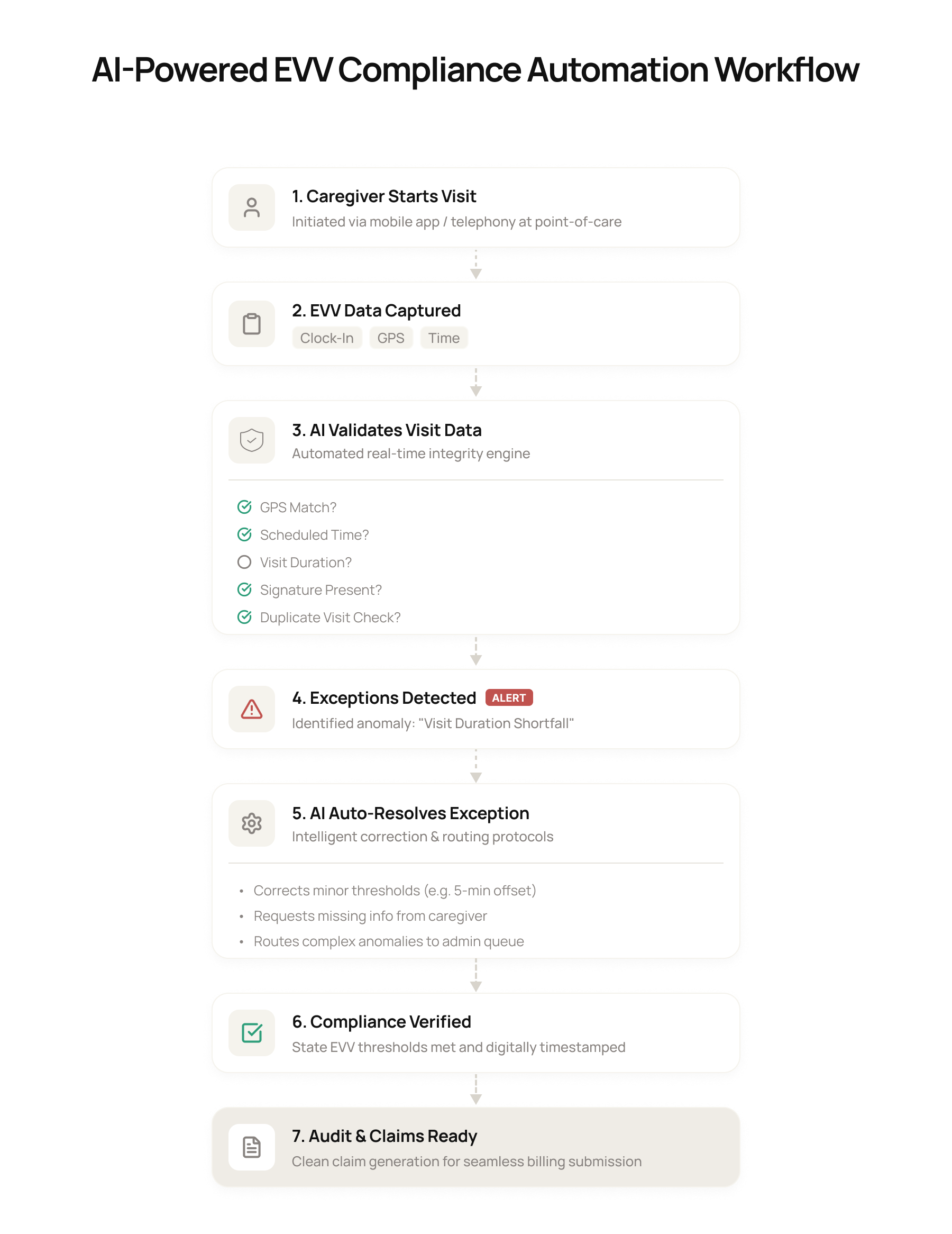
Simply put, it’s a workflow layer that works alongside your existing EVV software. It continuously checks visit, scheduling, caregiver, and billing data to catch missing, inconsistent, or conflicting information early.
After that, it either resolves the issue based on your rules or routes it to the right person before the claim is submitted.
Traditional EVV vs. AI-powered EVV compliance automation
| Traditional EVV | AI-Powered EVV Compliance Automation |
| Captures and stores visit data | Monitors visit data across EVV, scheduling, caregiver, and billing systems |
| Confirms required visit details were recorded | Confirms whether the record is complete, compliant, and claim-ready |
| Leaves staff to find and fix exceptions manually | Flags exceptions early and triggers the next action automatically |
| Focuses on visit documentation | Focuses on exception handling, compliance, and billing readiness |
How AI Improves EVV Accuracy for Home Healthcare Providers
Behind the workflow, a rules engine compares your structured data against payer, state, and agency requirements. AI models analyze unstructured information, such as caregiver notes, and identify recurring exception patterns.
An orchestration layer then coordinates the next step, such as retrying a transmission, updating an approved field, or creating a case in a reviewer’s queue. Throughout this process, your EVV system remains the system of record and each action is logged for auditing.
Also Explore
How the Intuz Healthcare AI Platform WorksWhy Are EVV Exceptions Costing Home Healthcare Agencies Thousands?
That’s literally a million-dollar question! Public case studies rarely quantify EVV exceptions as a standalone cost, which is why we need to look at broader workflow results.
One useful benchmark comes from Ability360, a nonprofit organization, which reduced billing and claim-review time by 50%, eliminated rejected claims, and reported $500,000 in first-year savings after integrating its EVV, billing, payroll, and case-management workflows.
This also allowed the Ability360 team to access critical reports whenever they wanted to and conduct the monthly eligibility checks required to stay in compliance.
Now, let’s consider an illustrative scenario:
If your team handles 150 exceptions each week, spends 12 minutes on each, and has a loaded labor cost of $30 per hour, then EVV exception processing alone adds up to:
(12 ÷ 60) × $30 × 150 = $900 per week, or $46,800 per year
But the calculation excludes delayed revenue.
If 25 claims averaging $180, for instance, miss a weekly billing cutoff, $4,500 in revenue is delayed by at least seven days until the next eligible submission cycle.
State Rule in Practice
In Texas, EVV-required claims must match an accepted EVV visit transaction. A missing or mismatched record can therefore result in claim denial.
To protect that revenue, you first need to know which data gaps are most likely to stop a visit from becoming claim-ready, which brings us to the next section.
Seven Common EVV Exceptions That Create Compliance Problems
Let’s look at seven common EVV exceptions your team may encounter. Each begins with a missing, mismatched, or unaccepted data point.
| EVV exception | What indicates the exception |
| Missed clock-in | A scheduled visit has no corresponding start event. |
| Missed clock-out | The visit has a start event but no valid end event. |
| GPS or location mismatch | The recorded location falls outside the approved address or permitted geofence. |
| Schedule variance | The visit time or duration falls outside the agency’s permitted tolerance. |
| Service code mismatch | The recorded service differs from the scheduled, authorized, documented, or billed service. |
| Authorization mismatch | The visit falls outside approved dates, units, frequency, or service limits. |
| Missing visit transmission | The visit exists in the source system but has no accepted record in the receiving system. |
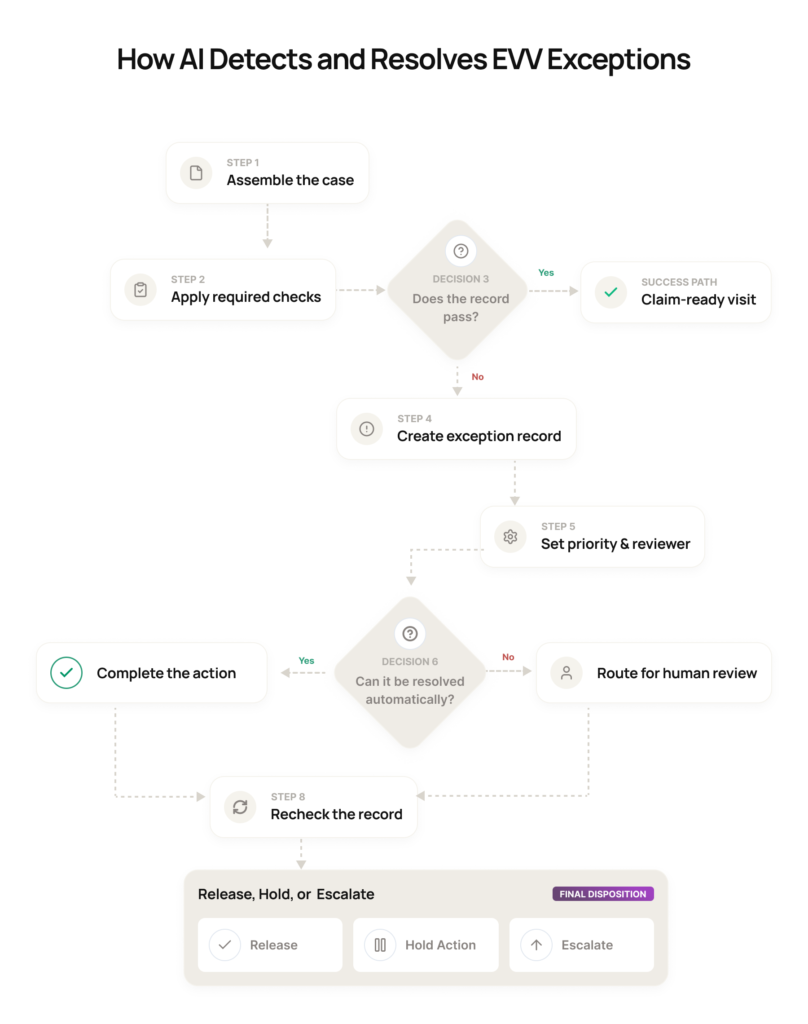
How AI Detects and Resolves EVV Exceptions Before Claims Are Affected
Knowing which exceptions to watch is only part of the picture. You also need to understand how to move each affected visit from initial review to a claim-ready or escalated outcome. Here’s what happens when a visit enters your exception-handling process:
1. Assemble the case
Your workflow brings together the visit record and the relevant scheduling, caregiver, authorization, transmission, and billing information.
2. Apply the required checks
The record is evaluated against the requirements that apply to that visit, including required fields, permitted time and location ranges, authorization limits, and transmission status.
3. Create the exception record
When a check fails, you can see what went wrong, which information is missing or conflicting, and how much time remains before the billing cutoff.
4. Take the approved next step
Your workflow completes a predefined action or sends the case to the person authorized to review it.
5. Recheck the record
After the issue is addressed, the relevant checks run again to confirm that the correction is complete.
6. Release or hold the visit
If the record passes, you can mark it as claim-ready. If it doesn’t, the visit remains out of the billing queue and moves to the appropriate escalation path.
How to prioritize and route exceptions
The thing is, you shouldn’t treat every exception as equally urgent or send every case to the same queue. Once an exception enters your workflow, you need to make two separate decisions: how quickly it should be handled and who should handle it.
| Decision | What you can use |
| Set the priority | Time remaining before the billing cutoff, claim value, compliance risk, time since detection, and whether the issue is recurring |
| Choose the reviewer | Transmission failures can go to IT or integration supportClock-event and attestation issues to caregivers, supervisors, or operationsAuthorization and billing mismatches to billing or complianceClinical documentation issues to a qualified clinical reviewerFraud, safety, or unexplained location concerns to compliance or clinical leadership |
Which EVV Tasks Should Be Automated and Which Still Need Human Review?
Your AI workflow may identify the appropriate next action, but that doesn’t mean it should carry out every action automatically. You need to determine whether the task follows an objective, preapproved rule or depends on human judgment, evidence, or authorization.
Tasks you can automate
- Compare structured fields against defined payer, state, and agency requirements
- Request missing information and send reminders when responses are overdue
- Retry rejected transmissions or perform other preapproved technical actions
- Record each action while preserving the original data and audit history
- Assign a priority, status, deadline, and owner using predefined rules
Each automated action should preserve the original value, reason code, supporting evidence, timestamp, and system response. That record gives your compliance and billing teams a traceable history they can follow during an audit.
Tasks that still need human review
- Approving exceptions that require supporting evidence or formal payer or state authorization
- Investigating suspected fraud, safety concerns, or unexplained location discrepancies
- Approving corrections that require caregiver, patient, or supervisor attestation
- Reconciling conflicting visit, schedule, authorization, or clinical information
- Making clinical documentation, service-code, or coding decisions
Explore Solutions
AI-Powered Home Health Care Workflow Automation Software PlatformHow Intuz Helps You Create an AI-Powered EVV Compliance Workflow
By this point, you should have a clear sense of which EVV compliance problems you need to solve, which exceptions deserve priority, and where human oversight is still required. The next step is to create a workflow that fits around your existing systems.
At Intuz, we structure that work around five implementation steps:
- Identify high-volume exceptions. We analyze frequency, handling time, manual touches, recurring causes, and claim impact to give you a prioritized set of use cases with measurable goals.
- Connect your systems. We map the required data sources, the authoritative system for each field, and the available connection method. Depending on your environment, that may involve APIs, webhooks, secure file exchange, middleware, or an Electronic Visit Verification software aggregator.
- Define the automation rules. We create a decision matrix for each selected use case. It records the trigger, validation inputs, permitted action, reviewer, deadline, and escalation path.
- Keep people in control. We configure role-based queues, access controls, escalation paths, and approval records. We then test normal cases, edge conditions, duplicate transmissions, rejected corrections, missing data, and integration failures before launch.
- Track operational KPIs. We measure exception volume, resolution time, manual touches, first-pass resolution, delayed claims, recurring causes, and the share of cases completed automatically to check the workflow automation’s performance.
Do you want to see how Intuz can make a difference in your organization?
Book a free 45-minute EVV Workflow Assessment with us and receive a personalized roadmap showing where AI can improve compliance in your home health EVV software.
FAQs
What is AI-powered EVV compliance?
AI-powered EVV compliance uses automation to validate visit data, flag missing or mismatched clock-in/clock-out records, and auto-resolve exceptions in real time, keeping visit records compliant with state Medicaid mandates under the 21st Century Cures Act without manual review.
How much does AI EVV compliance automation cost?
A pilot workflow build typically runs $3,000–$7,000 one-time, covering integration and go-live. Ongoing support runs about $250/month per automated lane on an annual plan, plus hosting billed at cost. Pricing scales with how many workflows you automate.
What’s the ROI of automating EVV compliance with AI?
Agencies automating EVV typically see 80% less manual effort and 30–60% faster cycle times on exception handling, with accuracy reaching 95%+.
How long does implementation take?
Most agencies go live in 2–6 weeks: week 1 covers setup and validation, weeks 2–3 build and integrate with your systems, weeks 4–5 validate against real data and go live, and week 6 onward focuses on tuning and adding the next workflow.
How does AI reduce EVV exceptions and errors?
AI reviews each flagged visit record, automatically selects the correct exception reason code, drafts a standardized explanation, and resubmits the transaction — no manual entry required. This cuts routine exception-handling time and improves first-time compliance rates versus manual review.
Does it integrate with our existing EVV/EHR systems?
Yes. AI automation typically layers on top of your existing EVV and EHR systems rather than replacing them — pulling visit data, validating it against requirements, and pushing corrections back automatically, so your team’s current software and daily workflow stay unchanged.
Is AI-powered EVV compliance automation HIPAA compliant?
Reputable platforms encrypt data with AES-256 at rest and TLS in transit, maintain full audit trails for every automated action, keep human review on sensitive steps, and sign a Business Associate Agreement (BAA), meeting HIPAA requirements for handling protected health data.
Work with Intuz
Automate Your EVV Compliance Workflow Using AI
Get a complimentary EVV workflow assessment from our experts.
Let's Get Started
Share this article