Manual processes slow down modern dental clinics. Discover how low-code/no-code automation can streamline daily workflows and improve patient care. Also explore how Intuz can help you with automation development.
Most dental clinics function within a tightly coordinated ecosystem of staff, workflows, and schedules. When that balance slips, operational friction appears instantly. Appointment slots go unused, paper forms accumulate, and insurance claims processing slows down.
The front-desk staff is thrust into switching context between phones, inboxes, spreadsheets, and practice management systems (PMS). The worst part? One no‑show per day sustained over a year can cost a dental clinic $20,000 to $70,000 in lost revenue.
The point is, none of this boosts patient care. However, Low-Code/No-Code (LCNC) tools present a feasible solution.
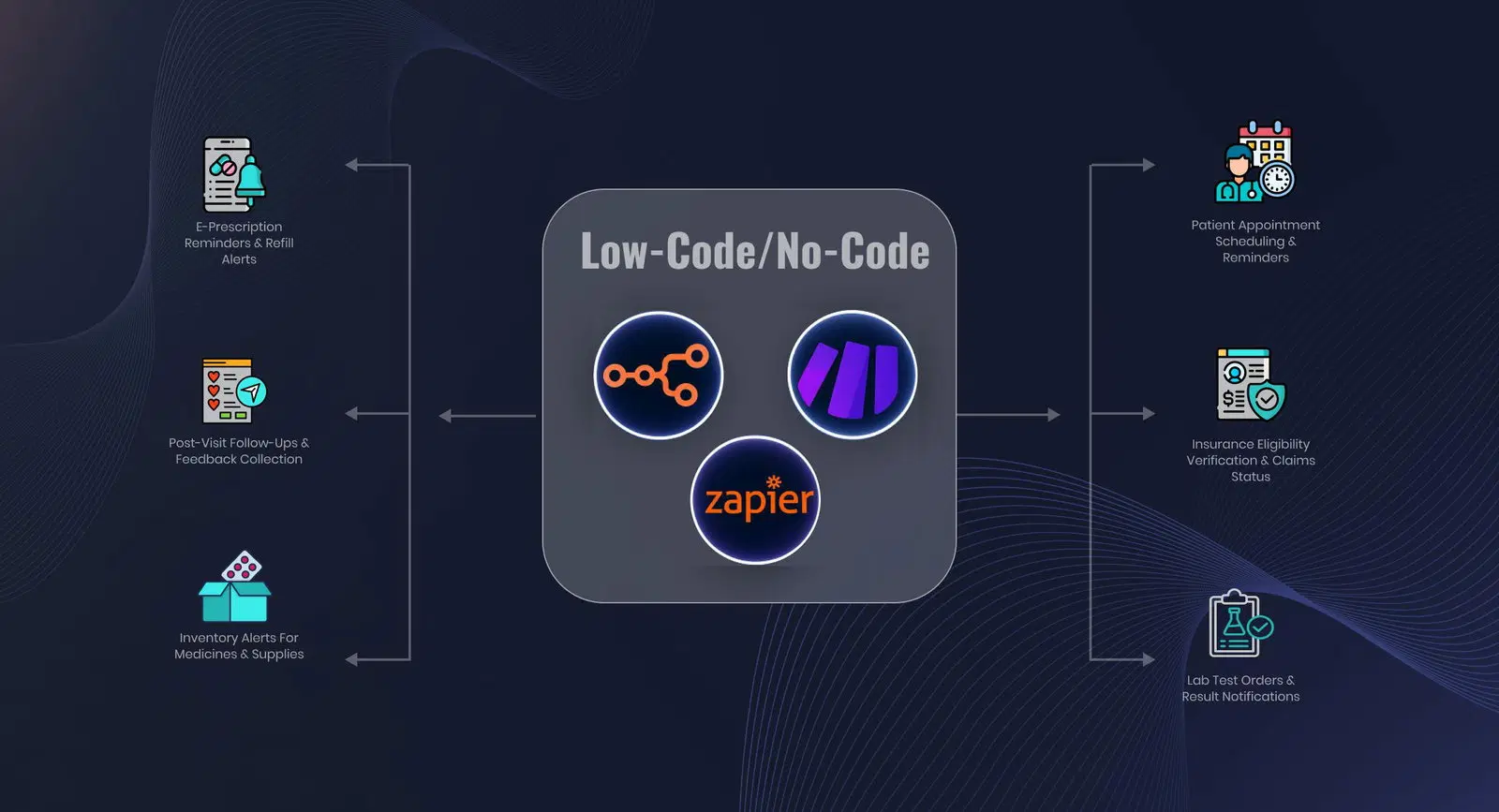
These tools integrate with your existing systems, like PMS and Electronic Health Records (EHRs), to unify forms, scheduling, communication, and billing. In this blog post, we walk you through five everyday dental workflows you can automate today with LCNC tools.
Show
- Automates patient intake, insurance verification, appointment scheduling, treatment follow-ups, billing, and claim tracking across dental practices.
- AI-powered workflows help reduce manual front-desk workload by handling reminders, confirmations, recalls, referrals, and insurance-related tasks.
- Insurance eligibility, benefits verification, treatment coverage calculations, and prior authorization tracking are automated before treatment begins.
- Unscheduled treatment plans and overdue hygiene recalls are automatically identified and followed up to improve patient engagement.
- Every workflow action is logged with audit-ready documentation, supporting compliance and operational visibility.
Best Tools for Dental Workflow Automation and Orchestration
Below is a comparison of widely used automation tools that either serve as system-agnostic layers to coordinate across the stack or embed automation directly into daily operations:
| Tools | Primary Purpose | Key Use Cases | Best For |
|---|---|---|---|
| Dentrix | All-in-one practice management | Scheduling, charting, billing, claims, reminders | Established clinics running a full on-prem or hybrid PMS |
| CareStack | Cloud practice management | Unified scheduling, billing, RCM, multi-location ops | Growing practices and DSOs standardizing on cloud |
| tab32 | Cloud dental suite | Real-time scheduling, treatment workflows, billing | Practices moving off legacy PMS to a modern stack |
| Curve Dental | Cloud-based PMS | Front-office workflows, dashboards, patient ops | Teams prioritizing uptime and remote access |
| Open Dental | Core practice management | Scheduling, charting, billing, integrations | Independent clinics that want a flexible system of record |
| Eaglesoft (Patterson) | Traditional PMS | Scheduling, imaging, billing, recall | Clinics embedded in legacy enterprise dental ecosystems |
| NexHealth | Front-office automation layer | Online booking, intake, reminders, messaging, insurance | Clinics that want automation without replacing their PMS |
| Weave | Communications + payments layer | Calls, texting, reminders, payments | Front desks overloaded with phone and follow-ups |
| Solutionreach | Patient communication automation | Recall, reminders, reactivation campaigns | Practices focused on reducing no-shows and churn |
| Yapi | Intake and check-in automation | Digital forms, contactless check-in, confirmations | Clinics replacing paper and manual front-desk flow |
| Flex Dental | Open Dental automation add-on | Forms, confirmations, no-show reduction | Open Dental users adding lightweight automation |
| Practice by Numbers | Workflow automation + analytics | Scheduling automation, comms, performance dashboards | Data-driven practices optimizing operations at scale |
Top 5 Dental Practices to Automate Using LCNC Tools
1. Patient booking and attendance management
In most clinics, booking happens over the phone. Your front desk checks availability, switches between screens, confirms a slot, and manually enters it into your PMS. Reminders are either done over a call or a text message. This cycle repeats every day.
LCNC tools can transform this process.
You set up a booking form that captures intent and context: provider type, treatment category, and preferred time window. That form feeds a scheduling engine that applies your operational rules—such as provider availability, chair capacity, treatment duration, and blackout periods.
When a slot is selected, the workflow writes the appointment directly into your PMS via a connector. There’s no re-entry or reconciliation.
From there, the appointment becomes the anchor for everything that follows. Confirmation messages are sent, reminders are scheduled at defined intervals, and the record is prepared for follow-up. You decide the timing and channels. The platform handles delivery, retries, and state.
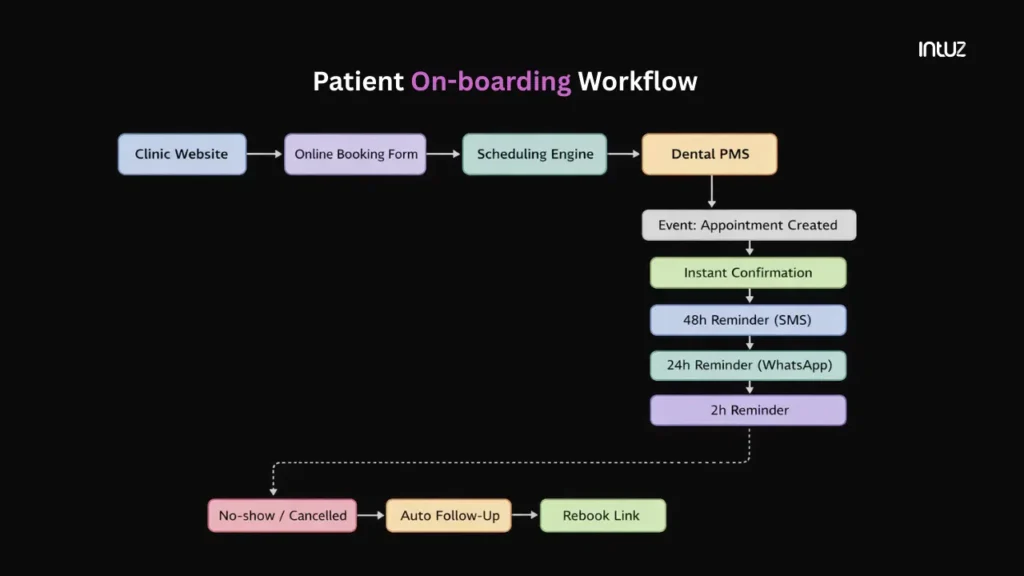
And, for instance, if an appointment is cancelled or marked as a no-show, a rebooking link scoped to the original provider and treatment type is generated and sent.
If the patient reschedules, the new slot is written back into your PMS. If they don’t, the workflow escalates to staff after a defined interval.
Benefit: Automating this workflow helps you in two ways:
Your patients move through a predictable, self-service flow that feels modern and frictionless.You’re able to reclaim hours of staff time each week, freeing up time to provide better patient care and an in-clinic experience.
2. Pre-visit patient onboarding
Patient intake is where inefficiency compounds. For example, a new patient arrives early and completes forms by hand, and staff must then enter or clarify the data in the PMS, making intake indirect.
It’s possible they may not understand the handwriting, prompting them to step away from the desk to reconfirm the patient’s medical history. The small buffer created by arriving early instantly disappears.
What looked like a simple check-in quietly stretches into a reconciliation loop. But automation solves these problems.
When an appointment is created, your system can automatically send a secure intake link that prompts the patient to complete medical history, consent forms, and insurance details on their phone or laptop before they even walk in.
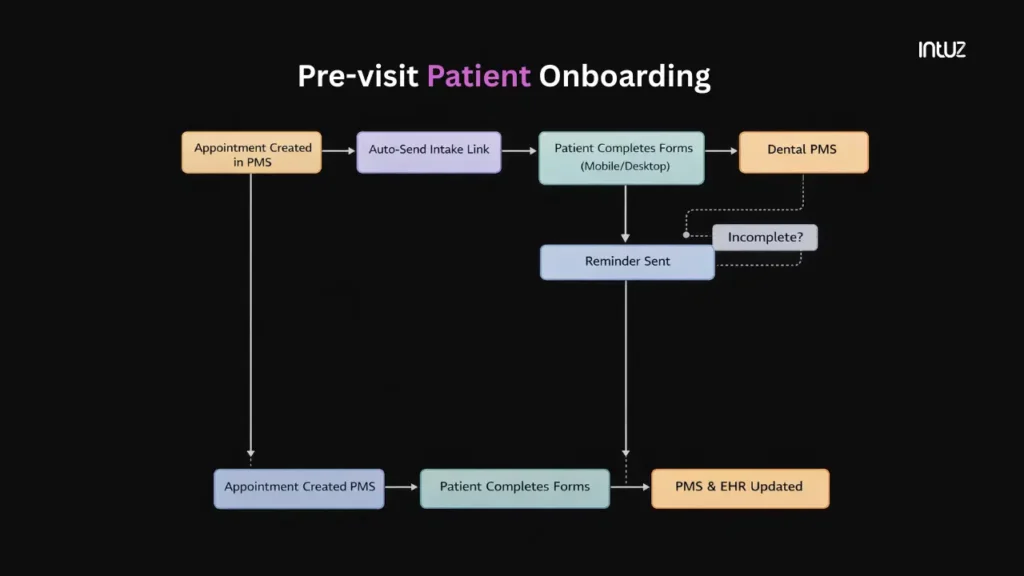
Benefit: The data flowing directly into the right records helps:
Your clinic is to be calmer, more organized, and function like a well-oiled machine.Your patient walks in knowing you have all the details you need from them, and all they need to do is wait for their turn to meet the doctor.
Also Read
Patient Onboarding Workflow Automation3. Insurance verification and claims processing
Insurance is where many clinics lose time without realizing it. For example, a patient arrives for a quick procedure, and your staff discovers their plan has changed, which means reimbursement may or may not happen. The visit moves forward anyway.
Days later, the claim is rejected, forcing staff to investigate and resubmit. This is reactive. Automation makes it proactive.
You can deploy a low-code workflow that sends the patient’s details to an eligibility service as soon as an appointment gets created.
That service returns coverage status, plan type, and basic limits. The workflow writes those results back into the patient record and evaluates them against your rules.
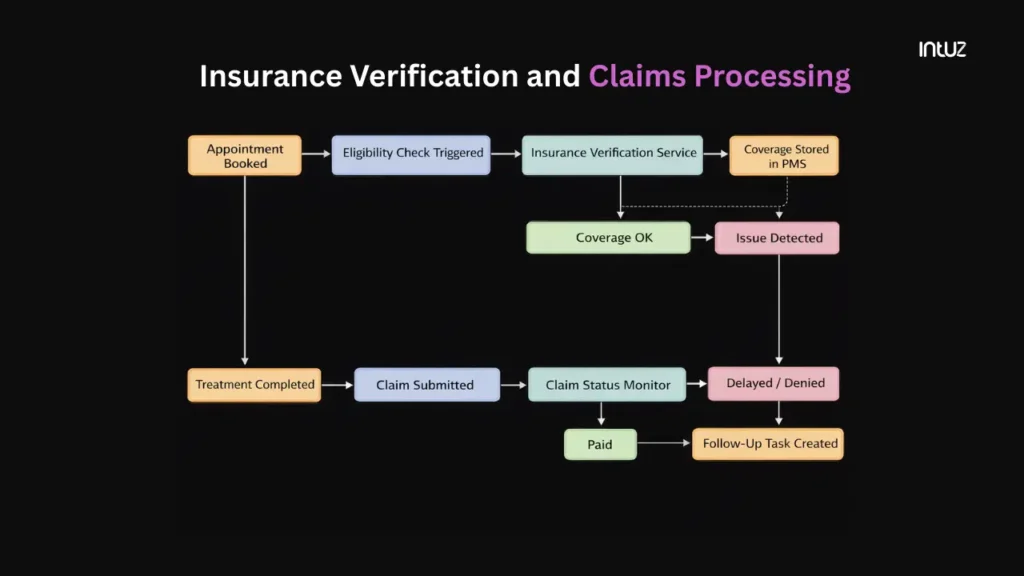
Benefits: Nothing here relies on manual checking—for instance:
By the time a patient arrives for treatment, insurance has already been verified. There are no surprises at the chair, no last-minute calls, and no uncertainty about whether a procedure will be covered.For your team, LCNC tools turn insurance into a managed system. Eligibility is checked automatically. Issues surface early. Claims are tracked without logging into portals or chasing statuses. Time spent back-and-forth with patients and payers drops sharply.
4. Post-treatment billing and payment collection
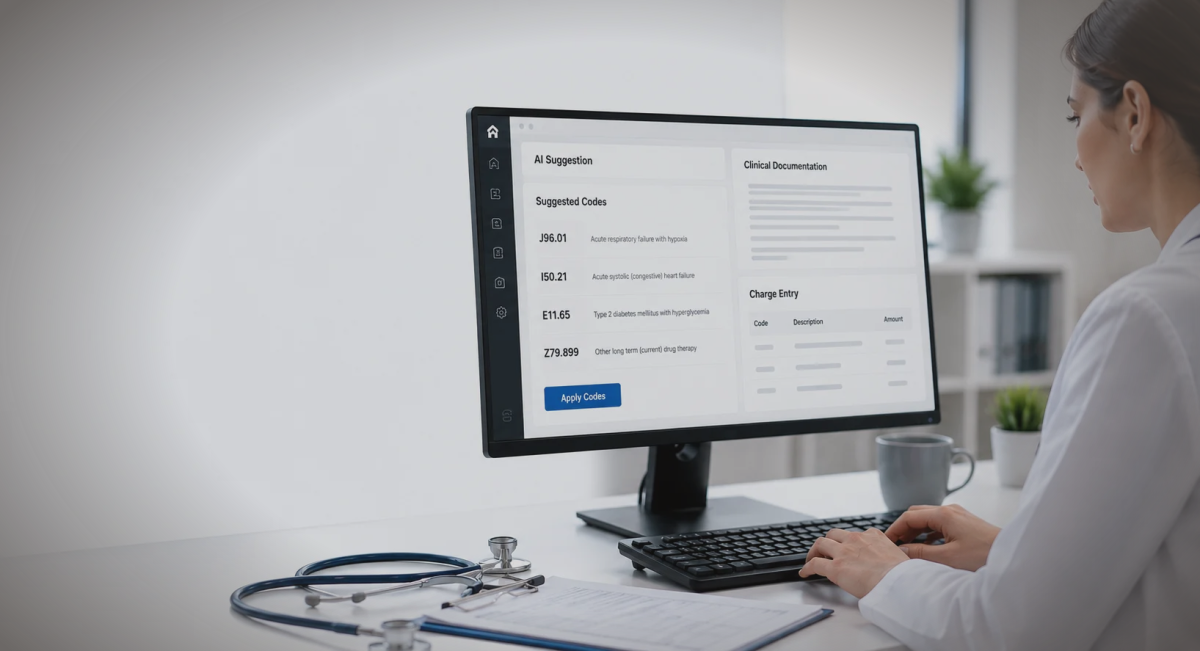
In many clinics, billing begins after the patient leaves. A treatment is completed. Someone later reviews the chart. Codes are checked. An invoice is prepared. A payment link is sent. Follow-ups are handled manually before you see the payment come through.
LCNC tools help make billing a part of a typical healthcare workflow.
When a procedure is marked complete in your PMS, you can retrieve the treatment codes and charges from the record.
An invoice is automatically generated and posted to the patient’s account. Based on your rules, the system can either collect payment immediately or schedule it after insurance adjudication.
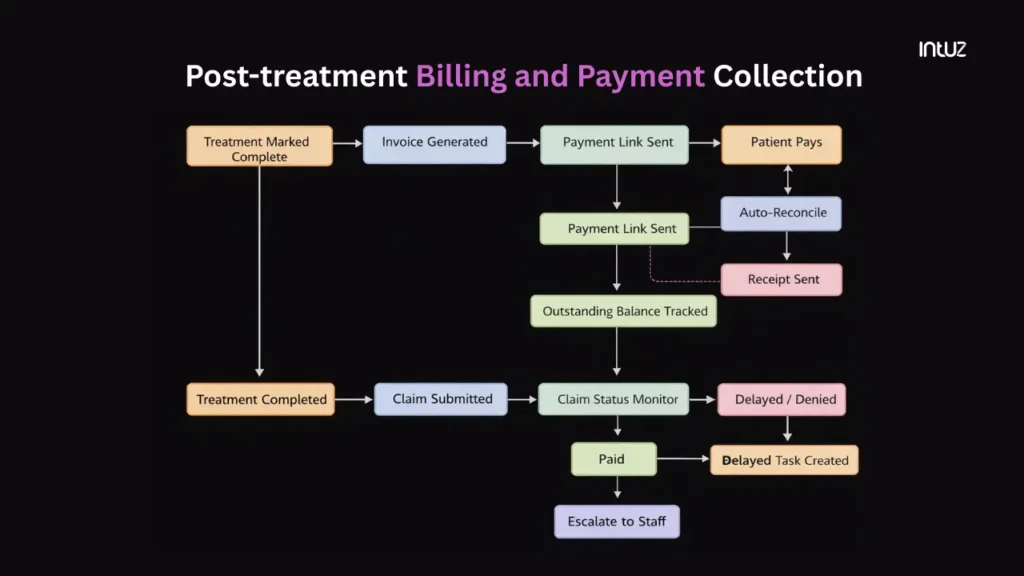
If a balance is due, a payment link is sent to the channel you choose. The workflow tracks whether it’s opened, paid, or ignored. If payment doesn’t arrive within a defined window, a reminder is sent.
If it remains outstanding, a task is created for your staff with the full context attached.
5. Post-visit feedback and review generation
Most clinics collect feedback inconsistently, without a clear system. LCNC tools let you request feedback after every visit. You can implement a workflow that sends a brief post-visit feedback to the patient. Responses can be automatically captured and classified.
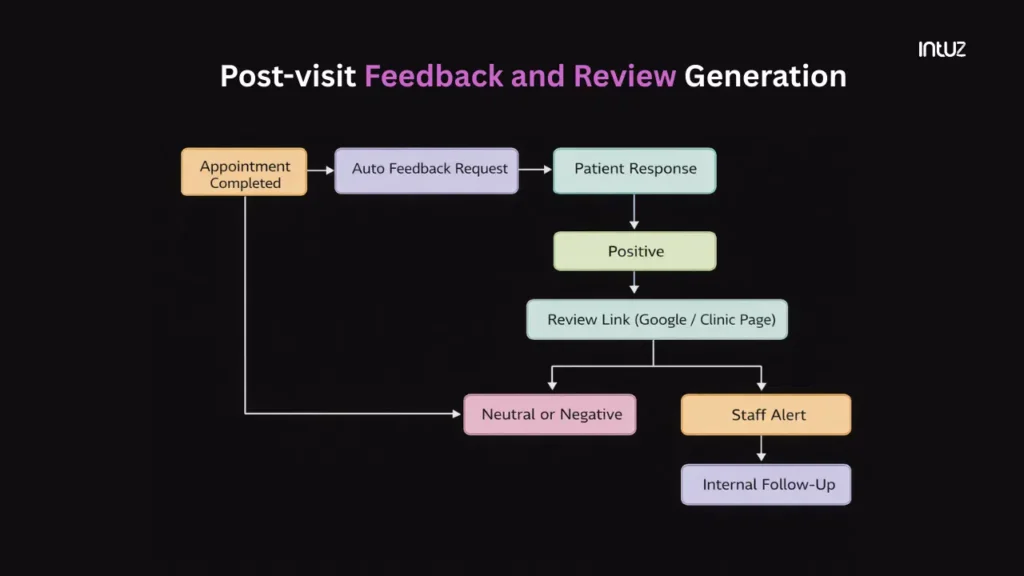
For instance, positive experiences can be routed into a review flow, prompting the patient to leave a public rating. On the other hand, a negative experience can be internalized, creating a task for your staff to follow up on and understand the reason.
How Intuz Helps Dental Clinics Automate Workflows With Low-Code/No-Code Solutions
At this point, the path forward is practical.
You can take the workflows we’ve discussed in this blog post and start building them in-house, experimenting with LCNC tools as your team’s time, comfort, and budget allow. Or you can partner with Intuz to design, implement, and maintain the system end-to-end.
If you choose our Enterprise AI development company, you’re in for a treat. We begin by mapping how your dental clinic functions and use that to define an event-driven operating model: what “scheduled,” “checked in,” “treated,” “billed,” and “closed” mean in your environment.
This gives us a shared language to automate not just individual tasks, but the transitions between them, i.e., when something changes state, what should happen next, and which system should handle it.
From there, we integrate your PMS and surrounding tools using stable connectors built on LCNC platforms, such as Workato and n8n (self-hosted). These let us keep tabs on real events in your systems, route them reliably, and write back to your PMS without building brittle scripts.
We also take data security seriously and ensure your intel is properly stored in approved systems, not scattered across third-party tools. In our HIPAA-aware automation architecture, access is limited to the roles that need it, and every action can be traced.
Once these workflows are stable, we layer intelligence where it helps, using AI to predict which appointments are likely to fail, summarize intake before a patient is seen, route feedback to the right team, or flag unusual billing patterns.
To find out more, schedule a 45-minute consultation with Intuz.
FAQs
What workflows can dental practices automate?
Appointment scheduling, patient reminders, billing/invoicing, inventory tracking, and compliance checklists. Low-code tools like n8n or Landbot connect apps via drag-and-drop, slashing manual work by 70% for SMB dentists, boosting efficiency without devs
Which low-code tools suit dental automation?
Top picks: Dentrix (all in one tool), CareStack (Cloud practice management), Solutionreach (Patient communication automation), Zapier (no-code basics), Bubble (custom apps). HIPAA-compliant options prioritize data security; start with free tiers for SMBs to test ROI fast.
Are no-code tools HIPAA compliant?
Yes, vetted tools like n8n Enterprise, Landbot with add-ons, and Dentally integrate HIPAA via encryption, audit logs, and secure APIs. Always enable BAA contracts; avoid free tiers for PHI to minimize breach risks in US practices
How much time/cost savings from automation?
Expect 20-40% admin time reduction (e.g., 10 hrs/week on scheduling/billing), cutting costs 30% ($5K-20K/year for small practices). ROI in 3 months via tools under $50/mo; scales with patient volume.
How to start low-code dental automation?
1 Audit workflows (scheduling first). 2. Pick tool. 3. Map triggers/actions (e.g., EHR to SMS). 4. Test HIPAA setup. 5. Monitor/scale. Non-tech staff build in hours; iterate via templates.
Work with Intuz
Automate Your Dental Operations
Reduce admin workload with AI-powered dental workflows.
Let's Get Started
Share this article